Tips for Creating Great Paywall Content


Paywall content is any article, video, course, download or community area that visitors can only open after they pay or sign up. Great paywall content is worth more than what readers can find for free: it’s deeper, more specific or more exclusive. To create it, ask your audience what they need, price it fairly, give a free preview and keep publishing on a schedule.
You may have noticed that more and more businesses today are turning to paywalled content, and it’s no wonder! Creating high-quality digital content is time-consuming and expensive. Setting up a paywall helps websites generate revenue and survive in the digital world. The problem with this? There are so many ways to access free content online that it’s not easy to get visitors to pay for your content.
Fortunately, today it’s easier than ever to build a loyal and exclusive online community. In this post, you’ll learn why you should consider creating content and then publishing it behind a paywall. Spoiler: it’s because a paywall can help you create a more loyal community that wants your content so much that they actually pay for it! Let’s take it step by step and cover everything, from paywall types to paywall content tips.
What Is a Paywall?
A paywall is a barrier on a website that blocks some or all content until the visitor pays, usually through a subscription or a one-time purchase. Some paywalls only ask for a free account, which is often called a registration wall. Publishers, creators, course sellers and membership sites all use paywalls to turn their content into recurring revenue.

Types of Paywalls
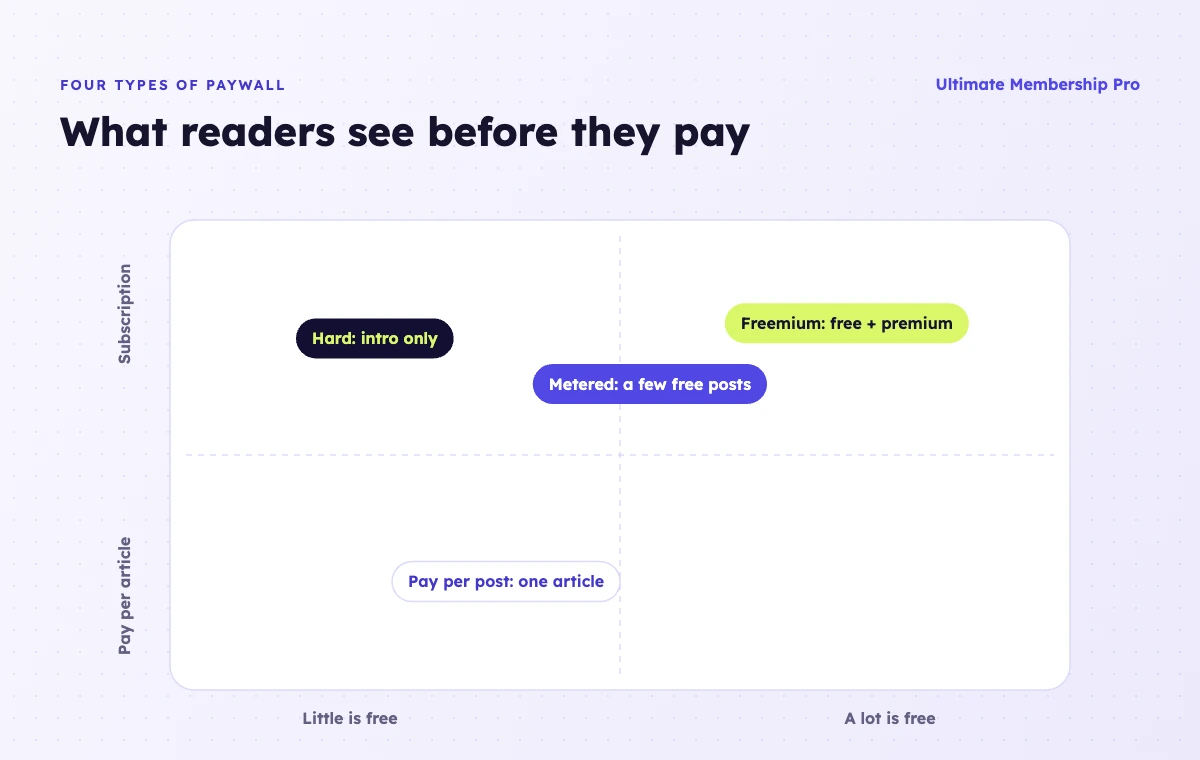
The type of paywall you choose affects how much free content visitors see and how they pay:
- Hard paywall: all premium content is locked, and nothing is visible without paying. It works best when your content is unique and hard to find elsewhere, such as specialist research or a full course.
- Soft (freemium) paywall: some content is free and some is premium, or the start of each article is public and the rest is locked. Visitors get a taste before they decide to pay.
- Metered paywall: readers can view a set number of articles for free before they have to subscribe. News sites use this model to keep casual readers while converting regulars.
- Registration wall: content unlocks with a free account. You don’t earn money directly, but you collect email addresses you can later convert into paying members.
- Pay per post: readers buy access to a single article, guide or video for a one-time price, with no subscription.
First Things First: Why Use Paywalls at All?
In the early days of the Internet many companies provided their content online for free, which led to a decline in print media sales. This increased pressure on their financial models and their reliance on digital advertising (now dominated by giants like Google, Apple, and Facebook). As a result, they have begun experimenting with content payment models in recent years to supplement advertising revenue.
The emergence of subscription models, paywalls and, in some cases, donations, as well as the rise of “gated content” has been unstoppable since companies realized the benefits of a paywall. The New York Times Company, for example, reported more than 13 million subscribers across its print and digital products in August 2026. Proof that people will pay for content they value.
What About Your Business?
As a content creator or business owner, you have probably explored many ways to monetize your content. Perhaps you have already tried selling products, offering services, advertising on your website, or affiliate marketing. While these are all great options, adding a paywall to your website can be much easier, and yes, people will pay for it. On WordPress, a membership plugin such as Ultimate Membership Pro handles the paywall, the payments and the member accounts for you.
The psychology behind this is actually quite simple: If I have to pay for it, it must be good! People tend to trust information they have paid for more, and view free online resources as simplistic at best, illegitimate at worst. If you can establish yourself as a reputable source, which you may already have done, then your valuable content may well help attract and retain paying customers.
The Membership Site: An Effective Way To Offer Paid Content
A membership site is a subscription site with protected content that members can sign up for or pay for. It is usually educational, and new content is expected to be posted regularly. Building a community of subscribers can help create a more sustainable revenue stream, as you can set up recurring subscriptions for your readers instead of constantly spending your hard-earned money on more advertising.
Regardless of your niche, you can use this model to attract readers and ensure that the most engaged pay for continued access. They already know that your site can provide them with helpful, informative content. Now it’s up to them to decide if they want to know more or just read the free content. (Don’t worry: the human mind is curious, and all too often it craves something more.)
What Type of Content Should You Offer?
Not sure what kind of content to offer your members? Not a problem! There are many different types of content that fall under the “content marketing” umbrella, so you have plenty of options to choose from, and choose you should, because these days it’s important for any serious business to share valuable content with an engaged audience.
With content marketing, you can engage your target audience directly, increase awareness of your business or brand, and attract even more customers. Understanding the benefits of different content formats will help you choose the right media for your business and develop a long-term content marketing strategy (which should ideally include a mix of written and visual content).
What Can You Put Under a Paywall?
Once you have started creating content, the next thing you should do is put some of it under a paywall. But which part? Well, the good news is that the format does not matter! Whether it’s an e-book, an online course, an email newsletter, a cheeky behind-the-scenes video, or a valuable webinar, it can easily be put behind the paywall.
As a rule of thumb, anything that ends up behind a paywall has to be worth paying for and have a certain quality that puts it above anything else you offer for free. There is a general perception that sites with content behind a paywall tend to be of higher quality than those without one. This is why a paywall won’t scare your visitors; it’ll show them that what you offer has more value than other free sites!
Creating high-quality, unique content takes time, money, and energy, and a paywall is a great way to get the recognition you deserve for it.
How to Create Great Paywall Content
Now that you know why setting up a paywall for your content can be profitable, let’s discuss the how.
Ask Your Audience
You need to engage with your audience to find out what they love, what they value, what they need to learn, and how much they’re willing to pay for it. If you already have an audience, ask them if there’s anything specific they’d like to learn more about in the future, and take notes on everything they say. That’s what your paid content should be about!
No matter what stage you’re in, remember to read between the lines: People won’t always tell you what they want, because sometimes they don’t even know. To implement an effective paywall strategy, you may need to figure some of this out for yourself, and even learn how to understand your online audience using your web analytics tools.
Price It Right
It’s no surprise that people generally prefer free content. However, they also want to be sure they’re getting a good deal. If your membership offers valuable content at a reasonable price, this may be more useful than spending time searching for free resources. But first, try to learn about common pricing models for other membership sites in order to understand average pricing and avoid overcharging.
Then, consider offering multiple pricing tiers that give visitors more options. The idea behind this is to give customers choices instead of forcing them into an “all-or-nothing” scenario. You could even add a limited free offer into the mix! Your users can start with a free or lower rate and then move to another pricing tier if they like your content. Be sure to always point users to your premium features without being too pushy, but yes, they do need the reminder!
Give Visitors a Free Preview
Nobody pays for something they can’t judge. Show the first few paragraphs of an article, the first lesson of a course or a short clip of a video, then lock the rest. A preview proves the quality of your paywall content, and it also gives search engines and social networks something to show, so new readers can still find you.
Make the locked section clear and friendly: tell readers what they’ll get, what it costs and how to get in. With Ultimate Membership Pro, you can wrap part of a post in a locker and show a custom message or a login form in its place, using the content restriction tools.
Publish Consistently and on a Schedule
Subscribers stay when they know new content is coming. Pick a rhythm you can keep, such as a weekly article, a monthly workshop or a new course module every two weeks, and tell members about it up front.
You can also release existing content gradually instead of all at once. This is called drip content: each member unlocks new lessons a set number of days or weeks after joining, which keeps them engaged and subscribed for longer.
Make Paying Easy
Every extra step between your preview and your content costs you subscribers. Keep the sign-up form short, let people pay with the methods they already use, such as cards through Stripe or PayPal, and send them straight back to the article they wanted to read once they’ve paid.
Create Community Vibes
You can add tremendous value to your paywall content by building a vibrant member community. This can make outsiders feel like they are missing out on the benefits of an exclusive group where paying users can connect with each other in a meaningful way and get value from their peers. You could also set up a referral program to reward loyal members for recommending your services to friends.
If you’re working with WordPress, a membership plugin can help you build that sense of community, for example with member profiles and a member directory where paying members can find each other. And remember, to make your online members feel part of a community, you can always host fun online meetings and group events, and occasionally send them free branded merchandise. With or without a paywall, everyone loves freebies!
Takeaway
Once you’ve built an engaged audience, paywall content can become a steadier source of income than advertising. Putting your best content behind a paywall is worth testing, so why not give it a go? Ultimate Membership Pro lets you lock whole posts or just part of them, sell Memberships billed monthly, yearly or once, and drip content on a schedule. It’s sold as annual plans; you can compare them on the pricing page.
Frequently asked questions
What is paywall content?
Paywall content is any content that visitors can only access after paying or signing up, such as premium articles, videos, courses, downloads or a members-only community. The rest of the site stays free. Paywall content needs to offer more depth, exclusivity or convenience than free alternatives, otherwise visitors will simply look elsewhere.
What are the main types of paywalls?
The main types are hard paywalls, where all premium content is locked, soft or freemium paywalls, where part of the content is free, and metered paywalls, where readers get a set number of free views. Registration walls ask only for a free account, and pay per post sells single pieces of content.
Does a paywall hurt SEO?
It can if search engines cannot see what a page is about. Showing a free preview, such as the first paragraphs of each article, keeps the topic visible and helps pages rank. Google also documents structured data for paywalled content, so publishers can mark which part is locked without being treated as cloaking.
How do I add a paywall to my website?
On WordPress, install a membership or paywall plugin, create your paid plans, connect a payment gateway such as Stripe or PayPal, and choose which content to lock. Decide what visitors without access see, such as a preview with a sign-up button. Hosted platforms like Substack or Patreon include a paywall but give you less control.
What content should I put behind a paywall?
Lock the content that is hardest to find elsewhere: in-depth guides, full courses, templates, research, recordings of live sessions and community access. Keep enough free content to attract new readers and show your quality. A good test is whether a loyal reader would feel the paid content is clearly better than what you give away.
Ready when you are
Turn visitors into paying members with Ultimate Membership Pro
Launch your membership website, protect exclusive content and automate subscription payments, all in one WordPress plugin.
- 14-day money-back guarantee
- Unlimited members
You May Also Like
How to Create a Membership Website (Simple, Low-Cost Setup)
The Best Membership Level Names You Can Use
13 Best WordPress Membership Themes for Your Membership Site