How to Price Your Corporate Membership Site


Corporate membership pricing usually works in one of four ways: a price per seat, fixed bundles for different team sizes, a flat fee for the whole organization, or a base fee plus extra seats. To choose, start from your costs and the value a company gets, compare what competitors charge, and price the corporate plan above your individual plans, with a discount for annual billing.
Corporate membership sites can be a very lucrative business model, but only if you price your memberships correctly. If you charge too little, you will not make enough money to cover your expenses and make a profit. If you charge too much, you will find it difficult to attract new members and keep existing ones.
The key to pricing your corporate membership site is to find the sweet spot between value and price. You want to charge enough to cover your costs and make a profit, but not so much that it becomes a deterrent for potential members.
In this article, you will get an in-depth look at how corporate membership pricing works — and how to choose the right pricing model for your website, regardless of the specific membership website builder you choose.
Who Needs a Corporate Membership Site’s Services?
To better understand where to position your membership site and its corporate services, you will first have to take some time and think of your target audience: who are they and how will they be using your membership site?
In essence, a corporate membership site allows its members to manage their own users. Therefore, for this type of product, some of the most common use cases you will see on membership site examples include:
Homeschooling Co-Ops & Remote Teachers
Parents who are part of a homeschooling cooperative or those who have children in remote schools can use a corporate membership site to manage and monitor the progress of their students.
This type of user is typically looking for an all-in-one solution that will allow them to track the work assigned to each child, grade it, and provide feedback without juggling multiple applications.
By signing up for a corporate membership, these users will also have access to additional features and resources that can help them in their homeschooling journey, such as online courses, planners, and tips from experienced homeschoolers.
Non-Profit Organizations
Many non-profit organizations use corporate membership sites to bring their members together and manage/ market their events and donations. This type of user is typically looking for a way to easily accept and track donations, create communities around their causes, and provide their donors with unique content or training in exchange for their goodwill.
One way corporate accounts can help NPOs is by providing them the option to only add one member who will manage access to your content for their entire team, depending on their needs and employee benefits.
Instructors & Trainers
Instructors and trainers can also use a corporate membership site to manage their students and keep track of their progress. This type of user is usually looking for a way to simplify and streamline their workflow by having all of their student information in one central location.
For instance, if your membership site provides English as a Second Language content, a Business English Language tutor could buy their spot as a member and then share your content with their own students.
Corporate Teams
If you provide corporate training or long-distance team-building services, a corporate membership site can help you manage your clients and keep track of their progress. This type of user is typically looking for a way to provide their employees with the resources they need to be successful, without having to invest in multiple applications or services.
A corporate account will enable a manager to give access to team members who might need to attend your training, courses, or team-building sessions. The corporate membership site feature makes it easy both for you and for them to access the information and events they need.

Pricing Your Corporate Membership Site
Now that you have seen some of the most common types of users who would benefit from a corporate membership site, let’s take a look at how to price your membership.
There are several factors you should consider when setting the price for your corporate membership site:
The Cost of Goods and Services
This includes the costs of acquiring or creating content, hosting, and other associated costs, including that of the tools you need to make sure your membership site is up and running. For corporate plans, also count the extra time you spend on onboarding company admins, invoicing and support for larger groups.
The Value of the Content
You should also consider the perceived value of your content. If you are offering unique, high-value content, you will be able to charge more for your membership than if you are offering generic content that can be found elsewhere.
The Target Market
When considering the price of your membership, you should also think about your target market. If you are targeting large businesses, you will be able to charge more than if you are targeting small businesses or individuals. Likewise, if you are targeting a market likely to pay for luxury (and your product matches their expectations in this respect), you will also be able to charge more.
The Competition
It is also important to consider the prices of similar memberships offered by your competitors. If you are offering a unique service or content, you will be able to charge more than if you are offering a commodity.
Once you have considered all of these factors, you will be in a good position to set a price for your corporate membership site.
Corporate Membership Pricing Models
The factors above tell you how much to charge. The pricing model decides how that amount scales with the size of the company. These are the most common options:
Per-Seat Pricing
The company pays a set amount for every person who gets access. Per-seat pricing is easy to understand and grows with the customer, but it can push companies to share logins to save money, so pair it with clear terms and per-person accounts.
Seat Bundles by Team Size
Instead of charging per person, you sell packages such as a 5-seat, 10-seat and 25-seat plan, each with its own price. Bundles are simple to buy and to manage, and the price per seat can drop as the bundle gets larger, which rewards bigger teams.
Flat Organization Fee
One price covers everyone in the organization, sometimes up to a fair-use limit. Associations, chambers and clubs often use this model for company members. It is the easiest to sell but the hardest to price well, because a small company and a very large one pay the same.
Base Fee Plus Extra Seats
A hybrid model: the corporate plan includes a fixed number of seats, and companies pay more when they need a larger plan. This keeps the entry price predictable while still capturing more revenue from larger teams.
| Model | How it scales | Best for | Watch out for |
|---|---|---|---|
| Per seat | Linearly with each user | Training and course libraries | Shared logins |
| Seat bundles | In steps by team size | Teams of predictable size | Too many bundle options |
| Flat fee | Not at all | Associations and clubs | Large members paying too little |
| Base fee plus seats | Fixed base, then by size | Mixed customer sizes | Explaining the price clearly |
Whatever model you choose, offer a “contact us” option for very large organizations. Big companies often need custom seat counts, invoices or terms that a standard checkout can’t cover.
How to Create Multiple Pricing Tiers for Your Membership Site
Creating multiple pricing tiers is one of the most common ways to price a corporate membership site. This means that you will offer different levels of membership, each with its own price and benefits.
In essence, creating pricing tiers isn’t rocket science. There are, however, some aspects you will need to consider before you split your pricing into multiple plans:
The Perceived Value of the Content
When creating multiple pricing tiers, you need to make sure that there is a perceived value difference between the tiers. If there is no perceived value difference, your customers will not see the need to upgrade and will simply choose the cheapest option.
The Type of Content
When creating multiple pricing tiers, you need to make sure that the content you are offering is appropriate for each tier. For instance, you could give lower-priced tiers access to your core library and reserve live sessions, certificates, reporting or premium courses for the higher-priced and corporate tiers.
The Costs of Delivering the Content
It is also important to consider the costs of delivering the content. For instance, if you offer video content, this includes hosting, streaming and bandwidth, which grow as more people from each company watch your videos.
Likewise, if your pricing tiers include corporate accounts, you will want to take into consideration the money you will have to spend to make corporate account membership possible from a technical point of view.
Keep in mind that, if you want to create multiple pricing tiers for your membership site, the corporate plan should probably be among the highest-paid ones. This helps you create perceived value and it gives you a goal when it comes to maximizing your membership website’s revenue.
How to Set Up Corporate Memberships on WordPress
Your pricing only works if your platform can sell one plan to a whole team. In Ultimate Membership Pro, corporate memberships run on group accounts:
- You set how many seats each Membership includes, so you can create one Membership per team size, each with its own price.
- The person who buys becomes the group owner and pays for everyone.
- The owner invites colleagues by email, with a personal message, and removes people who leave, all from their member portal.
- Invited members get the same access as the owner. If the owner cancels or the Membership expires, the whole group loses access, so access always matches what is paid.
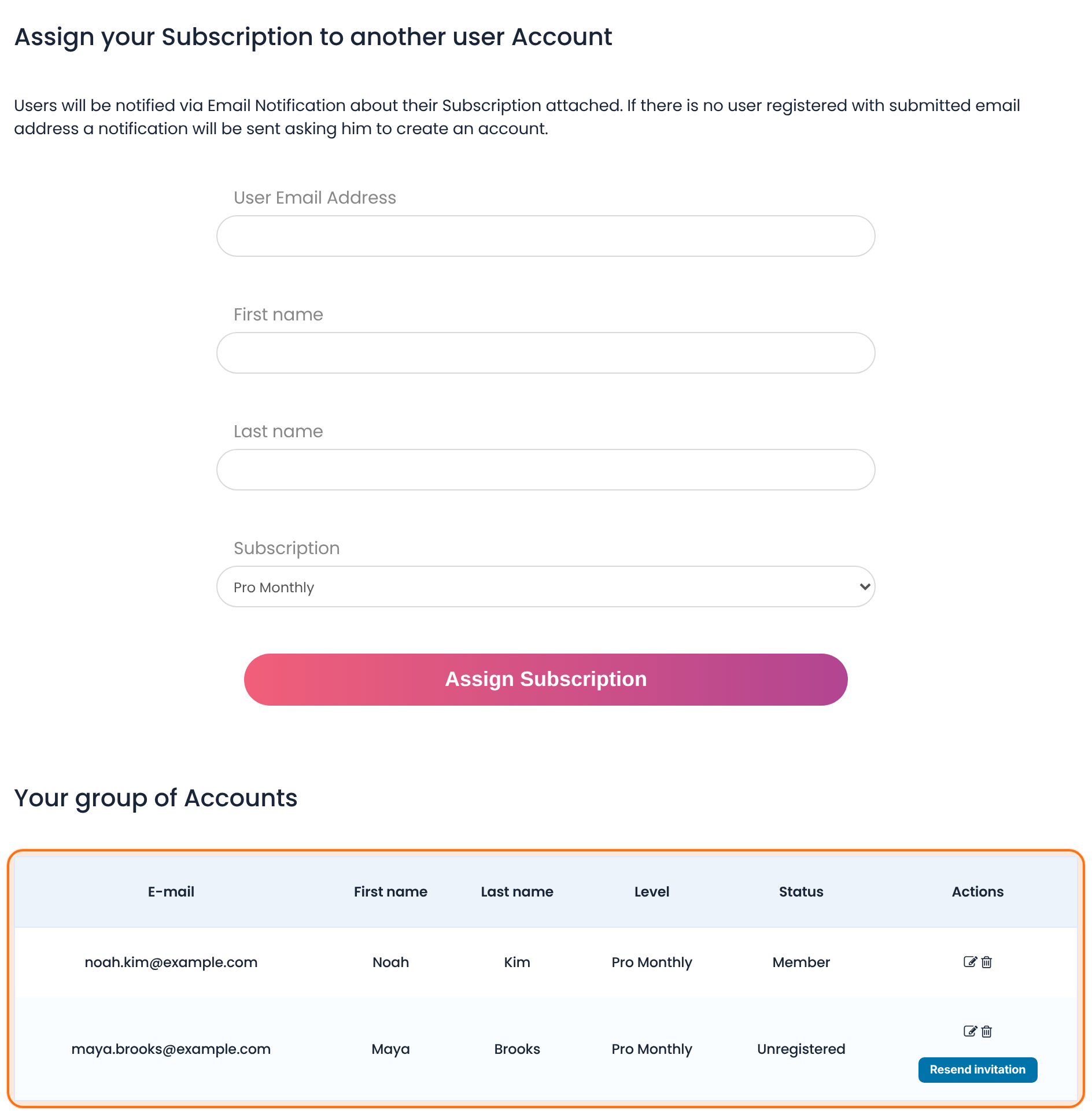
Group accounts come with the Full Package and Agency plans (see plans and pricing). If an organization sends you a list of people instead, every plan lets you import users and their Memberships from a CSV file. You can bill corporate plans as recurring subscriptions through Stripe, PayPal and other gateways.
Other Considerations in Pricing a Corporate Membership Site
Once you have considered the most important factors in setting the price for your corporate membership site (see also this broader membership pricing strategy guide), there are a few other things you should keep in mind:
Discounts
You may want to offer discounts to certain groups of users, such as students, seniors, or NGOs. This helps you create a brand image as a company that cares about social responsibility.
Some examples of such discounts include:
- A percentage off the monthly price for students
- A percentage off the annual price for seniors
- A free month of membership for NGOs
Trial Periods
Another thing to consider is offering a free trial period. This allows potential customers to try out your content and see if it is worth the price.
Pricing Tier Names
When creating multiple pricing tiers, you will need to come up with names for each pricing plan. The names you choose should be reflective of the value of the content. For instance, you might call your plans “Individual”, “Team” and “Enterprise”, so companies immediately see which one is meant for them.
Subscription vs. One-Time Payment
Finally, you need to decide whether you want to charge a one-time payment or a recurring subscription fee. There are pros and cons to both options, so you will need to decide which one is best for your business.
Recurring subscriptions have the advantage of giving you a steadier stream of income, but they may be off-putting to some potential customers. One-time payments, on the other hand, may be more attractive to customers, but they will not give you the same level of income stability.
Discounts for Yearly Plans
When it comes to corporate membership sites, many businesses offer discounts for customers who sign up for yearly plans. This is because it helps them lock in customers for a longer period of time, which gives them a steadier stream of income.
If you do decide to offer discounts for yearly plans, make sure that the discount is significant enough to be worth the customer’s while. A small discount is not likely to convince someone to commit to a yearly plan.
Conclusion
Pricing your corporate community site can be tricky (and so is running a membership site in general), but it is important to get it right. As a membership site creator, you should keep in mind the perceived value of your content, the type of content you are offering, the costs of delivering the content, and other factors such as discounts and trial periods.
With careful consideration, you can come up with a pricing strategy that will help you maximize your membership site’s revenue. So go ahead, research the best membership site platforms and plugins and make sure to pick one that allows you to include a corporate membership option.
Remember, knowing how to build a membership site is one thing. With the membership site builders and WordPress membership site plugins available out there, building a membership site is easier than ever. Running it and making sure your content is consistently engaging, however, is an entirely different affair — one where strategic thinking and staying on top of the latest industry trends can make all the difference in the world.
Frequently Asked Questions
What is corporate membership?
A corporate membership lets a business buy access for a group of people instead of one individual. One account, usually a manager or admin, pays for the plan and adds colleagues, who then get the same access to your content, courses or events. It is a common way for training providers, associations and creators to sell to companies.
How do you price a corporate membership?
Start with your costs per member, then look at the value a company gets and what competitors charge for similar team plans. Choose a model that scales with company size, such as per-seat pricing or seat bundles, and price the corporate plan above your individual plans. Test the price with a few companies before you publish it.
Should corporate memberships be priced per seat?
Per-seat pricing is fair and easy to understand, because companies pay for exactly the people who use your content. Seat bundles, such as 5, 10 or 25 seats, are often simpler to buy and manage. A flat organization fee suits associations, but it can undercharge very large members, so many sites cap it or combine it with seat limits.
How do corporate memberships work on a membership site?
The buyer becomes the group owner and pays for a set number of seats. The owner invites colleagues by email and removes people who leave, and everyone in the group gets the same access. When the owner cancels or the plan expires, the group loses access. In Ultimate Membership Pro, this works through group accounts in the Full Package and Agency plans.
Should you offer discounts on annual corporate plans?
Usually, yes. Companies often budget yearly, and an annual plan gives you a longer commitment and steadier revenue. Make the discount large enough to matter, for example the equivalent of one or two free months, and show the monthly equivalent so buyers can compare plans easily.
Ready when you are
Turn visitors into paying members with Ultimate Membership Pro
Launch your membership website, protect exclusive content and automate subscription payments, all in one WordPress plugin.
- 14-day money-back guarantee
- Unlimited members