How to Make Money with a Membership Plugin on WordPress (5 Steps)
Learn how you can use a WordPress membership plugin to establish yourself as an authority in your industry and generate recurring income.


To make money with a membership plugin, you put your best content behind a paywall and charge members a recurring fee to access it. The plugin handles sign-ups, payments and access, so you can focus on content and community. On WordPress, a plugin such as Ultimate Membership Pro turns your existing site into a paid membership site.
There are many reasons to own a membership site, but success starts with two things: understanding your ideal members and where to find them, and building a strategy that draws them to your site. This guide explains why a membership plugin helps, five steps to earn money with one, and the revenue models you can use.
Why a Membership Plugin Helps You Earn Money
A membership site is one of the most reliable ways to earn money online from your knowledge or content. Here’s why a membership plugin is worth it.
It Generates Steady, Recurring Income
You create a steady flow of recurring revenue by charging members for access. You earn as new members join and as current members renew.
You can also design several membership levels and give each one a different amount of content. In Ultimate Membership Pro, each level is a Membership, and you can bill it monthly or yearly with recurring subscriptions.
It Helps You Build a Bigger Email List
Every small business wants better email marketing, and growing your email list is the first step. Each person who registers, even for a free Membership, is a new subscriber you can reach.
Your list stays active and full of people more likely to respond to your campaigns as long as you keep adding registered users to it.
It Delivers More Value from Content You Already Have
Much of the premium content you restrict access to is evergreen, so it stays valuable to members long after you publish it.
It’s also all gathered in one place for members. You can keep building on that library to give members even more value and keep them paying for access.
How to Make Money with a Membership Plugin: 5 Steps
Many creators and brands are still unsure about the membership model. Yet recurring revenue is easier to plan around than one-off sales, and the right membership pricing strategy makes it predictable. Here’s how to use a membership plugin to make money from the content you create.
1. Publish Fresh Content on a Schedule
Keeping your content fresh is one of the major challenges of running a membership site. Understanding the member journey makes it easier to see what members need first, what works and what they expect next.
With that in mind, build a content plan and release it on a schedule. Drip content unlocks lessons over time, so members always have something new to come back for. Mix formats such as video tutorials, interviews, webinars, worksheets and visual guides to keep members interested.
2. Keep Your Membership Site Easy to Use
Confused members cancel. Use a consistent, logical structure so members always know where to find their content, their account and help.
Clear icons and menus make navigation self-explanatory, and visual consistency helps you organize content and draw attention to key sections. Give members one account page where they manage everything: in Ultimate Membership Pro, the member portal shows their Memberships, orders, invoices and profile in one place.
3. Build a Community Around Your Content
People who share an interest tend to connect on a membership site, but a strong community still takes effort. Turning members into enthusiastic supporters of your brand is crucial to your membership site’s success.
Connecting with members and building relationships can increase your reputation, trust and customer loyalty. A members-only space, such as a membership forum, also creates a sense of exclusivity and belonging. Members can ask questions, share tips and get more out of what you offer.
Remember that people only join and stay if your membership site offers something unique, such as exclusive discounts, practical content they can’t find elsewhere, or direct access to you.
4. Add Affiliate Income
Your membership site can also earn commissions by recommending other products and services as an affiliate. Only promote products that benefit your members and are relevant to your niche, and place affiliate links and banners carefully so they don’t hurt the member experience.
Remember that many countries require you to disclose affiliate links and deals on your website.
It works the other way, too: you can run your own affiliate program and let others sell your Memberships for a commission. Ultimate Membership Pro integrates with Ultimate Affiliate Pro, a separate plugin that tracks referrals on Membership sales.
5. Offer a Free Tier, Trials and Coupons
People are used to trying things before they pay. Many software brands use a freemium funnel and free trials, and the same approach works for membership sites: let people sample your content, then invite them to upgrade.
In Ultimate Membership Pro, you can create a free Membership next to your paid ones, add free or paid trials to a paid Membership, and use a paywall to show part of a post before asking visitors to join. Then optimize the trial so more trial users become paying members.
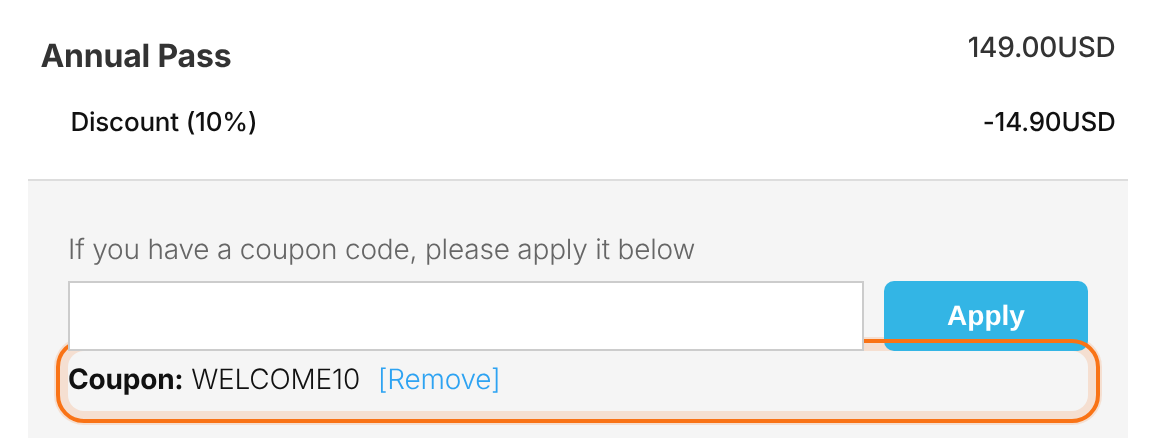
Discount coupons help too. Ultimate Membership Pro lets you create single or bulk coupon codes, limit how many times each can be used, set the dates they’re valid, and choose which Memberships they apply to.
Revenue Models You Can Use with Ultimate Membership Pro
Recurring subscriptions are the classic way to earn money with a membership plugin, but they’re not the only one. With Ultimate Membership Pro you can combine several models:
- Recurring Memberships: monthly or yearly billing, with prorated upgrades and downgrades between Memberships.
- Tiered levels: several Memberships that unlock different content, so members can start small and upgrade.
- Pay what you want: members choose a price between a minimum and maximum you set.
- Gift Memberships: members buy a Membership as a gift for someone else.
- Group memberships: one owner pays for a team and invites the other members (Full Package and Agency plans). Learn more about group memberships.
- Pay per post: sell access to a single post or page for a single payment (Full Package and Agency plans).
Final Thoughts on Earning Money with a Membership Plugin
Not long ago, learning a new skill meant books or local classes. Books are still excellent, but they go out of date quickly and can’t include video lessons or a community. Today you can publish lessons online in minutes and update them whenever you like.
If you’re good at what you do, you can build a membership site that teaches your subject and use a membership plugin to turn it into recurring income. Ultimate Membership Pro is sold as annual plans with unlimited members on every plan, so your plugin cost stays the same as your membership grows.
Frequently asked questions
Can you really make money with a membership plugin?
Yes, if you offer content or access that people value enough to pay for again and again. A membership plugin handles sign-ups, recurring payments and content restriction, so you can charge members monthly or yearly. Income depends on your niche, your pricing and how well you keep members engaged.
What can I sell with a WordPress membership site?
You can sell access to courses, video libraries, downloads, templates, coaching, live sessions, a private community or premium articles. Many sites combine several of these in tiered Memberships, so members can start with a lower tier and upgrade for more content or direct access to you.
How much should I charge for a membership?
Base your price on the value members get, what similar memberships charge and how much content you can deliver each month. Start with one or two tiers, offer a yearly option with a discount, and test your pricing over time. A free trial or free tier can help new visitors decide.
Do I need a free tier to make money with a membership site?
No, but it often helps. A free Membership builds your email list and lets people sample your content before they pay. Trials and partial-content paywalls work the same way. If your audience already trusts you, you can launch with paid Memberships only and use coupons for promotions.
How do I keep members paying every month?
Publish new content on a regular schedule, drip lessons over time, build a community members don’t want to leave, and make their account easy to manage. Reach out when payments fail and ask members why they cancel, so you can fix the most common reasons.
Ready when you are
Turn visitors into paying members with Ultimate Membership Pro
Launch your membership website, protect exclusive content and automate subscription payments, all in one WordPress plugin.
- 14-day money-back guarantee
- Unlimited members
You May Also Like