10 Reasons to Build Your Membership Site on WordPress


Building a membership site on WordPress gives you full ownership of your site, a low running cost, and a large choice of membership plugins, themes and integrations. You pay for hosting, a domain and the plugins you choose, and you can grow from a handful of members to thousands without switching platforms.
If you’re a creator, coach, educator or community builder, here’s why WordPress is a strong home for your membership business, how to get started, and when another platform might suit you better.
Why Build a Membership Site at All?
A membership site turns your expertise into recurring revenue. Instead of chasing one-off sales, you charge members a monthly or yearly fee for ongoing access to courses, videos, downloads, a community or live sessions.
It’s also a good time to start:
- You can learn from the experience of creators who came before you
- You have more content formats and promotion channels to choose from
- The tools to create good content and run a membership site are easier to use than ever
Not sure what to offer yet? Browse these membership site ideas for inspiration.
Top 10 Reasons to Build a Membership Site on WordPress
According to W3Techs, WordPress powers 39.6% of all websites and 58.3% of websites with a known content management system (October 2026). Many have predicted the death of WordPress, but it is still the go-to platform in a lot of niches, membership sites included.
So why build a membership site on WordPress? Here are 10 reasons to consider.
Get your own digital real estate
You can grow an audience on Instagram, X, LinkedIn, YouTube or TikTok, and social media works well when you need to reach a lot of people.
However, you should never build a house on rented land. Social media algorithms can change literally overnight. Plus, you don’t know if any of these channels will be there tomorrow.
Your website and your email list, on the other hand, belong to you. With a self-hosted WordPress site, you own your content and your member data, and you can move to another host whenever you want.
Easy to build
WordPress makes websites easy to build. Yes, you can go into a lot of detail and customize your website (almost any way you want!). But if you just need a place where you can share content, WordPress is one of the easiest and most intuitive options you have. Even if you’ve never worked in WordPress, uploading content and managing a website can be as easy as opening a Google Doc and writing in it.
Cost-effectiveness
Compared to other Content Management Systems and website builders, WordPress is a very cost-effective option. Essentially, you will only have to pay for:
- Hosting, billed monthly or yearly depending on the plan (see these tips on WordPress hosting for membership sites)
- A domain name, renewed every year
- The paid plugins you choose, such as a membership plugin
- A page builder or premium theme (optional)
The WordPress software itself is free. Unlike many hosted platforms, your costs don’t climb steeply as your audience grows, and most WordPress membership plugins don’t take a cut of your sales.

Wide range of membership site plugins
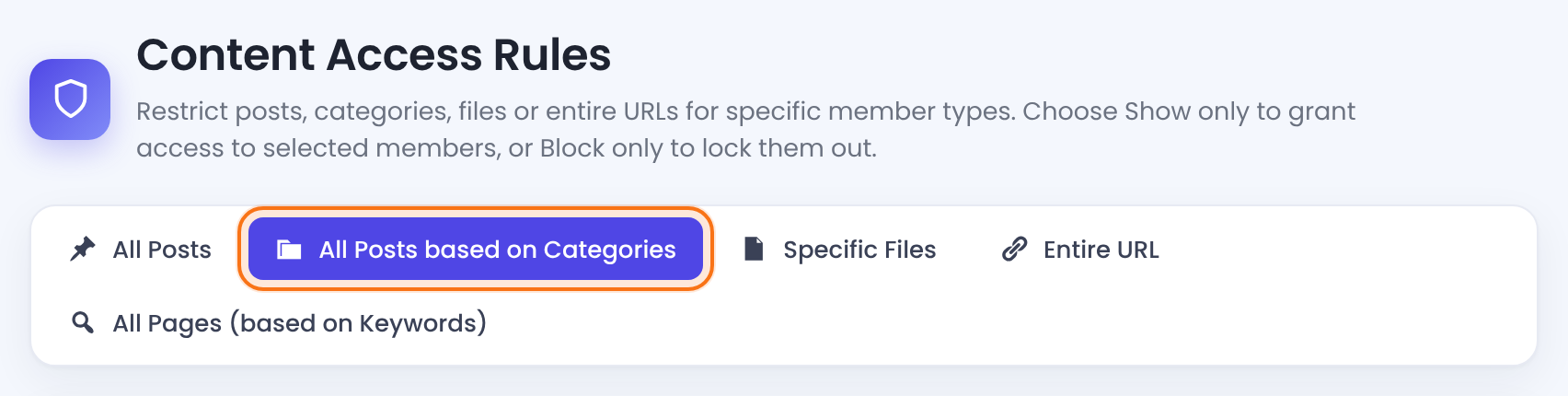
WordPress has a wide choice of membership and content restriction plugins, from free options to full-featured ones. Ultimate Membership Pro, for example, covers the core features most membership sites need:
- Free and paid Memberships with recurring billing, trials and coupons
- Content restriction for pages, posts, categories, files and URLs, plus drip content
- Payment gateways such as Stripe, PayPal, Mollie and Authorize.Net
- Email marketing integrations such as Mailchimp, ActiveCampaign and AWeber
- A front-end member portal where members manage their subscriptions, orders and profile
You install it like any other WordPress plugin and set up your Memberships, locks and payment gateways from its dashboard.
Numerous integrations
WordPress connects with a huge range of tools. From social media to CRM, and from email marketing to project management, you can link your membership site on WordPress with most tools you already use. If there’s no direct integration, you can usually connect the two through a service like Zapier.

Unlimited design options
Many hosted website builders limit your design to their preset templates and options. WordPress is open source, so you can pick from thousands of themes or customize your own as far as you like.
What’s more, with a website builder plugin like Elementor or Divi, you can build a membership site on WordPress that stands out and follows user experience best practices, without having to write a single line of code.
No need for a developer
Speaking of coding, WordPress can be a godsend to non-techy folks. Even if you do decide to have a developer build your membership site on WordPress, there’s little chance you’ll need a developer for website management. WordPress is easy to use and you can update it yourself (add content, change the design, etc.)
That being said, you can also build your membership site on WordPress without the help of a web developer.
Very SEO-friendly
WordPress is one of the most SEO-friendly Content Management Systems out there. The clean designs, the wide range of Search Engine Optimization plugins, and all the customizability make WordPress excellent for managing a membership site if you want to use search engines as your primary traffic source.
High focus on security
WordPress core has a dedicated security team and gets regular security releases. Most WordPress security problems come from outdated plugins and themes or weak passwords, so keep everything updated, use a good host and protect your login page. This matters for membership site owners, because you collect personal data and payments from your members. Ultimate Membership Pro adds login security features that limit failed login attempts and stop members from sharing one account.

A large community to learn from
Got questions on how to do something in WordPress?
There’s a huge community to help you, from the official WordPress support forums to WordPress Stack Exchange, Reddit threads and local meetups. Whatever your level, you’ll usually find someone who has solved your problem before, often for free.
How to Build a Membership Site on WordPress
Once you’ve decided on WordPress, the setup comes down to five steps:
- Get hosting and a domain. Choose a host that handles logged-in traffic well, then install WordPress with your host’s installer.
- Pick a theme. Choose one with clean layouts for your sign-up, login and account pages, or design them with a page builder.
- Install a membership plugin. Create your Memberships, free or paid, and set their prices, billing periods and trials.
- Restrict your content. Decide what stays public and lock the rest by Membership.
- Connect payments and test. Connect a payment gateway, sign up as a test member and check that everything works before you launch.
For a detailed walkthrough, read this guide to building a simple membership site.
When WordPress Might Not Be the Right Fit
WordPress isn’t for everyone. A hosted website builder or an all-in-one creator platform may suit you better if you don’t want to manage hosting, updates and backups, or if you’d rather trade flexibility for a setup where everything is in one place. Compare the options in this guide to choosing a membership site platform.
Conclusion
Building your membership site on WordPress is a smart choice. WordPress is flexible, SEO-friendly and cost-effective, you own your site and member data, and a huge community can help you with any question. With the right plugins in place, you can run a professional membership site that grows with you.
Ready to start? Ultimate Membership Pro is sold as annual plans with unlimited members on every plan.
Frequently asked questions
Is WordPress good for membership sites?
Yes. WordPress is free, open source and flexible, and membership plugins add sign-ups, payments and content restriction. You own your site and member data, can customize every page, and can connect most tools through plugins. The trade-off is that you are responsible for hosting, updates and backups.
Do I need a plugin to make a membership site on WordPress?
Yes. WordPress can make single pages private or password-protected, but it cannot sell memberships, take recurring payments or show content based on a member’s plan. A membership plugin adds those features, along with registration forms, member accounts and payment gateways.
How much does a WordPress membership site cost?
The WordPress software is free. You pay for hosting, a domain name, a membership plugin and any premium theme or page builder you choose, plus payment gateway fees on each transaction. Costs stay fairly flat as you grow, because most membership plugins do not charge per member or take a share of sales.
Can I build a membership site on WordPress without coding?
Yes. You can install WordPress, a theme and a membership plugin without writing code. Memberships, content locks, registration forms and payment gateways are all set up through settings screens, and page builders such as Elementor or Divi let you design pages visually.
Is WordPress.com or self-hosted WordPress better for a membership site?
Self-hosted WordPress from WordPress.org gives you the most freedom, because you can install any membership plugin and payment gateway you want. WordPress.com handles hosting for you, but plugin support depends on your plan. If you want full control over your membership features, choose self-hosted WordPress.
Ready when you are
Turn visitors into paying members with Ultimate Membership Pro
Launch your membership website, protect exclusive content and automate subscription payments, all in one WordPress plugin.
- 14-day money-back guarantee
- Unlimited members
You May Also Like
How to Create Membership Ad Campaigns That Work
Membership Forums: Should You Get One? And If Yes, How?
How to Send a Membership Email and Invite Someone into Your Community
WordPress Restrict Content: 5 Plugins to Consider for Your Membership Site