Recurring Billing Software for Membership Sites: 6 Best Tools for 2026

Recurring billing software charges your customers automatically on a set schedule, so members keep their access without paying by hand every month. For a membership site, the best choice is usually a tool that ties billing to member access, such as a membership plugin with built-in recurring payments, while standalone platforms like Chargebee, Zuora and Recurly suit larger subscription businesses.
Convenience sells. Any service that makes life even a little bit easier gains traction quickly — and that’s exactly what recurring billing does. For many business models (membership sites included), recurring billing is a Holy Grail of sorts. It allows customers to purchase a subscription and have their payments made automatically on a regular basis, making sure they receive the product/service they need, on the dot.
Is the recurring billing model the best option for everyone, though? And if it’s a good option for your membership site, then what is the best recurring billing software? This guide covers both questions.
What Is Recurring Billing?
Recurring billing is a billing system that allows customers to pay for products and services on a regular, predetermined schedule. It is an automated process that helps businesses better manage their cash flow — and makes it easy for customers to get the products and services they want without having to remember to pay for them each month, manually.
Examples of services that work on a recurring billing model include Netflix, Amazon Prime, web hosting services, and subscription boxes.
Who Should Use Recurring Billing?
Recurring billing comes with an attractive proposition, as it can help businesses better predict their revenue (and thus, make better decisions for their growth). However, recurring billing isn’t a perfect fit for every type of business under the Sun.
Businesses that should use recurring billing include:
- Membership sites
- Software companies
- Education providers
- Media websites
…And even among these, recurring billing may not always be the best option. For example, if you run a very niche membership site for seasonal content (e.g., DIY crafts for Christmas), you may not need recurring billing.
Likewise, business models that aren’t (always) a good fit with the recurrent payment system include:
- One-time services
- eCommerce stores
- Wedding-related businesses
- Customized consultancy businesses
- Ad-hoc services (like handymen or plumbing)
Recurring Billing vs Subscriptions
Before going deeper into recurring billing software, it helps to separate subscriptions from recurring billing. While very similar in many ways, the two concepts are not always interchangeable.
Both recurrent billing and subscriptions charge regularly, but they refer to different areas of the “subscription economy” spectrum. One’s all about the actual billing process, whereas the other one is the agreement that happens between customers and businesses.
Recurring billing refers to the process of automatically billing a customer on a regular basis for goods or services that they have previously purchased. The frequency of the billing may be daily, weekly, monthly, or annually. The billing amount may be fixed or variable depending on the customer’s usage of the goods or services. Recurring billing is often used for products or services that are consumed on a regular basis, such as software licenses or gym memberships (and thus, can be considered as subscriptions — hence the confusion.)
However, a subscription refers to the actual agreement between a business and a customer, according to which the customer can access their product/ services for a specified amount of time. The subscription is typically paid for upfront, before receiving access to the products or services. For a closer look at how this works on a membership site, see what a recurring subscription is and when you need one.

How to Choose Recurring Billing Software
If you’re keen on implementing recurring billing in your membership site business, you must look for software that satisfies your needs.
Essentially, you should be looking for recurring billing software that offers:
Flexibility
You want to make sure your recurring billing tool allows you to set up flexible payment plans, with different billing intervals, billing amounts, and cancellation policies. This gives you the freedom to customize your plans according to the type of product or service you’re offering. It also gives your customers the freedom to choose a pricing plan that fits their needs and budget — so it’s a win-win for everyone.
Automation
You need your billing software to automate charges, invoices and receipts. This will help you save time, effort, and resources that would have gone into processing payments manually. Plus, it will help you avoid human error and thus, reduce inaccuracies in your billing process. If you’re starting from scratch, this guide to setting up recurring charges for a membership site covers the basics.
Payment Processing
Your recurring billing software should be capable of processing payments quickly and securely. Additionally, you should also look for a solution that supports multiple payment options (like credit cards, PayPal, etc.), so that your customers can select their preferred method of payment. If you’re deciding between the two most common processors, see this Stripe vs PayPal comparison.
Reporting & Analytics
Finally, it’s important to choose a recurring billing solution that offers reporting and analytics. This way, you’ll be able to keep track of your billing performance, and make decisions with data-driven insights.
Customer Support
No matter how great it is, you may sometimes need technical support with your billing system. This means you need to settle on an option that offers reliable customer support (via phone, email, and/or live chat) in case you run into any issues.
Integrations
Last but not least, you want your billing system to integrate with all the tools you use — particularly with your site and payment processor. This will ensure that everything works harmoniously, and that you can manage your business efficiently.
Top 6 Recurring Billing Software Tools for Membership Sites
Here is a quick look at some of the best recurring billing software options, so you can pick the one that fits your needs and budget best. Prices come from each vendor’s pricing page, as of October 2026.
| Tool | Type | Starting price |
|---|---|---|
| Ultimate Membership Pro | WordPress membership plugin | Sold as annual plans (see the pricing page) |
| Chargebee | Subscription billing platform | Listed on Chargebee’s website |
| Zuora | Enterprise billing platform | On request |
| Wave | Accounting and invoicing app | Recurring billing with Pro, $19/month |
| Zoho Books | Accounting software | Free under $50K yearly revenue |
| Recurly | Subscription billing platform | $249/month + 0.9% of billing volume |
Ultimate Membership Pro
Ultimate Membership Pro is a WordPress membership plugin rather than a standalone billing tool, which makes it a good fit if your recurring revenue comes from a membership site. It combines recurring billing with content restriction, so you manage payments and member access in one place. Its billing features include:
- Recurring Memberships billed every few days, weeks, months or years, or split into a set number of payments
- Free trials or a lower first payment (PayFast, Paystack and Razorpay don’t support trials)
- Upgrades and downgrades with prorated billing
- Flat or percentage coupons with usage limits
- Printable invoices and tax rates by country
- Expiry reminder emails, a grace period to renew, and cancellation from the member’s account page
- Ten payment gateways in every plan, including Stripe, PayPal, Braintree, Mollie and Authorize.Net
Ultimate Membership Pro is sold as annual plans, which you can compare on the pricing page.
Chargebee

Chargebee is a reliable and user-friendly recurring billing software that offers intuitive invoicing, subscription management, payment processing, and more. It supports multiple payment methods (credit cards, digital wallets, bank-based payments, and so on), as well as multiple payment gateways (such as Stripe and PayPal). Additionally, it offers analytics and reporting features to help you track your progress.
Chargebee’s pricing depends on your monthly invoicing volume and is listed on its website.
Zuora

Zuora is frequently cited as the best recurring billing software for Enterprise-grade companies. The reason behind this is that it offers powerful features like multi-currency support, flexible payment plans, and automated invoicing. It also provides detailed analytics and reporting on customer lifetime value and churn rates.
Zuora pricing isn’t publicly available, but one can contact them for more information.
Wave

Wave is a popular invoicing and accounting app for small businesses. Its Starter plan is free, and recurring billing with automatic card payments comes with the Pro plan, at $19 per month billed monthly or $190 per year. That makes it an affordable choice for membership site owners just starting out who mainly need to invoice repeat customers. Wave’s invoicing features include recurring invoices, automatic payments, and automated late payment reminders on Pro.
Zoho Books
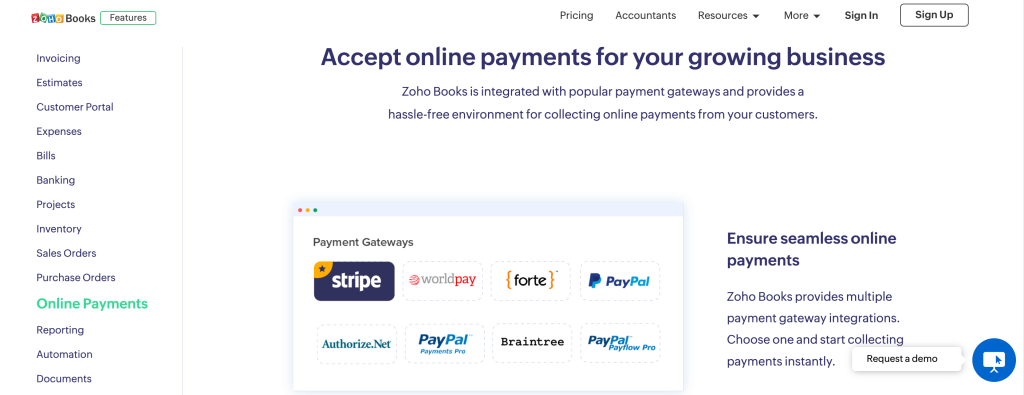
Zoho Books is another good option for anyone looking for an effective, professional recurring billing solution. It offers features like recurring invoices, payment tracking, and reports. Plus, it integrates with some of the most well-known payment processors, it has all the automation features you need, and it allows you to customize your messages too.
In the US, Zoho Books has a free plan that includes recurring invoices for businesses with less than $50K in yearly revenue. Paid plans range from $15 to $240 per month billed annually ($20 to $275 billed monthly).
Recurly

Recurly is a great recurring billing software for those who want to keep an eye on expenses and profits. It offers features like automated billing, fraud protection, analytics and reporting, and streamlined payment processing. Plus, it helps you stay tax-compliant too, by integrating with Avalara and Vertex and allowing you to configure tax regions and address-based tax calculations.
Recurly’s Starter plan costs $249 per month plus 0.9% of billing volume. Higher tiers are priced on request.
Conclusion
Recurring billing is a great option for a wide variety of business models. And if your membership site falls in this category, you should definitely pick billing software that helps you stay on top of your finances, automate at least some of the process, and ensure data security for your business and your customers. Ultimately, the best recurring billing software largely depends on who you are, what you do, what your needs are, and how much you can afford to pay for it — so analyze where you stand and decide based on your specific situation.
If your recurring revenue comes from a WordPress membership site, start with a membership plugin that handles billing and access together, and add a standalone billing platform only if you outgrow it.
Frequently asked questions
What is recurring billing software?
Recurring billing software charges customers automatically on a set schedule, such as monthly or yearly, instead of sending a new invoice by hand each time. It stores the payment method through a payment gateway, sends receipts and reminders, and keeps track of every active subscription, so you can focus on your product instead of chasing payments.
What is the difference between recurring billing and subscription billing?
Subscription billing describes the agreement: a customer pays a set price for ongoing access to a product or service. Recurring billing describes the payment mechanism: charging the customer automatically on a schedule. Most subscriptions use recurring billing, but recurring billing can also cover installment plans or usage-based charges that are not subscriptions.
Do I need separate recurring billing software for a WordPress membership site?
Usually not. A membership plugin with built-in recurring payments can charge members through gateways such as Stripe or PayPal and tie each payment to the member’s access. Standalone tools like Chargebee or Recurly make more sense when you bill customers outside your website or need advanced revenue reporting across several products.
Which payment gateways support recurring billing?
Stripe and PayPal are the most common choices, and both can charge customers automatically on a schedule. Braintree, Mollie and Authorize.Net support recurring payments too. In Ultimate Membership Pro, these gateways handle automatic recurring Membership payments in every plan, while bank transfer payments have to be confirmed by hand.
How much does recurring billing software cost?
It ranges from free to several hundred dollars a month. As of October 2026, Zoho Books is free for US businesses under $50K in yearly revenue, Wave Pro costs $19 a month, and Recurly starts at $249 a month plus 0.9% of billing volume. Your payment gateway charges its own processing fees on top of the software price.
Ready when you are
Turn visitors into paying members with Ultimate Membership Pro
Launch your membership website, protect exclusive content and automate subscription payments, all in one WordPress plugin.
- 14-day money-back guarantee
- Unlimited members
You May Also Like
10 Reasons to Build Your Membership Site on WordPress
Understanding Stripe Payment Gateway (And Why It’s a Great Option for Membership Sites)
Membership Forums: Should You Get One? And If Yes, How?
How to Send a Membership Email and Invite Someone into Your Community
The Easiest Way to Implement Plans for Subscription Payments