Best WooCommerce Membership Plugins (2026): 6 Options Compared
Six WooCommerce membership plugins compared by checkout model, member pricing, members-only store options and recurring billing, with a best-for and a limitation for each.

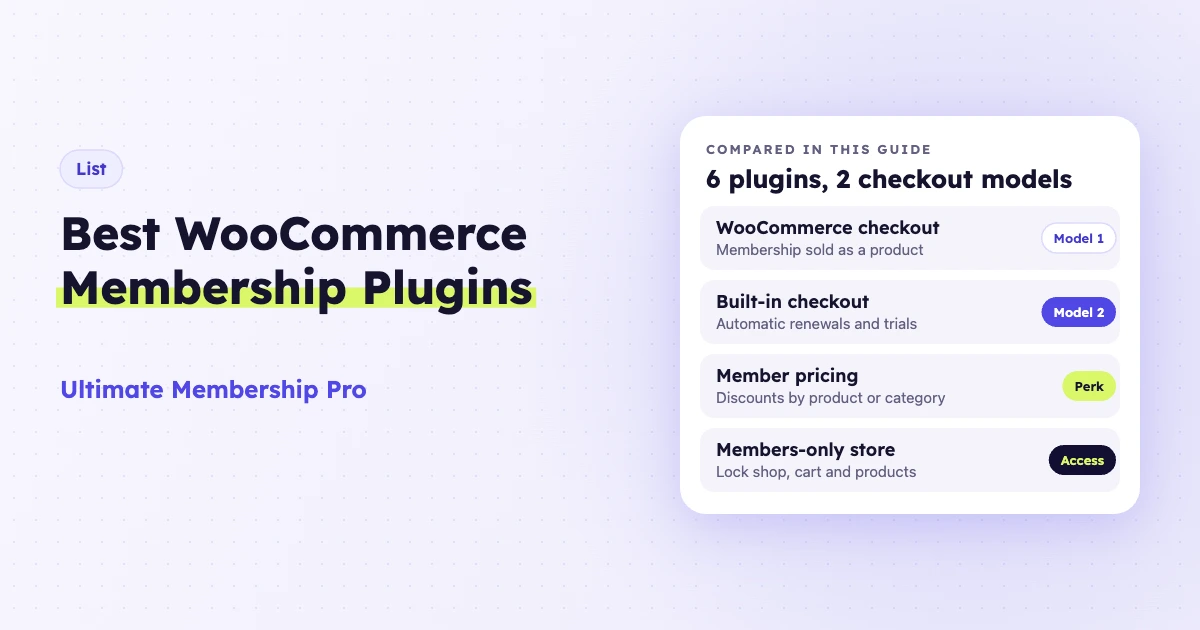
The best WooCommerce membership plugins are Ultimate Membership Pro, WooCommerce Memberships, YITH WooCommerce Membership, Membership for WooCommerce, Paid Memberships Pro and ARMember. They all sell access, give members special prices and lock products or content. The real difference is how members pay: through the WooCommerce checkout as a regular product, or through the plugin’s own checkout with automatic renewals.
Ultimate Membership Pro is made by WPIndeed, the publisher of this blog.
A WooCommerce membership plugin is a WordPress plugin that ties paid or free access levels to your WooCommerce store. Members can get lower prices, see products other shoppers can’t, and open posts, pages or files that stay locked for everyone else. This guide compares six options as of October 2026, with an honest “best for” and a real limitation for each one.
| Plugin | Checkout | Member pricing | Members-only store | Content locking | Recurring billing | Pricing model |
|---|---|---|---|---|---|---|
| Ultimate Membership Pro | WooCommerce or built-in | Yes, by product or category | Yes | Posts, pages, files, menus, part of a post | Yes (built-in checkout) | Annual plans |
| WooCommerce Memberships | WooCommerce | Yes | Yes | Posts and pages | Needs WooCommerce Subscriptions | Annual subscription |
| YITH WooCommerce Membership | WooCommerce | Yes, all products | Yes | Posts, pages, part of a page | Needs YITH Subscription | 1-year license |
| Membership for WooCommerce | WooCommerce | Cart discount | Pro only | Pro only | Separate plugin | Free + annual Pro |
| Paid Memberships Pro | Own or WooCommerce | Per-level price, % off | Extra setup | Yes | Yes (own checkout) | Free core + paid plans |
| ARMember | Own form, WooCommerce add-on | Enterprise plan add-on | Enterprise plan add-on | Yes | Yes (own gateways) | Free Lite + annual or lifetime |
Which WooCommerce membership plugin should you pick?
Pick by how members pay and by what your store already runs. For the most common cases, the short answer is:
- Automatic renewals from one plugin: Ultimate Membership Pro with its built-in checkout. Paid Memberships Pro also renews members through its own checkout.
- An all-WooCommerce stack that already pays for WooCommerce Subscriptions: WooCommerce Memberships.
- A free start: Membership for WooCommerce, or the free Paid Memberships Pro core with its free WooCommerce add-on.
- A store built on other YITH plugins: YITH WooCommerce Membership, plus YITH WooCommerce Subscription if members pay monthly.
- Courses, guides or videos sold next to products: Ultimate Membership Pro, which locks posts, files and parts of a post and releases content on a schedule.
- A site already built on ARMember forms: ARMember with its WooCommerce add-ons, if you have the Enterprise plan.
What does a WooCommerce membership plugin do?
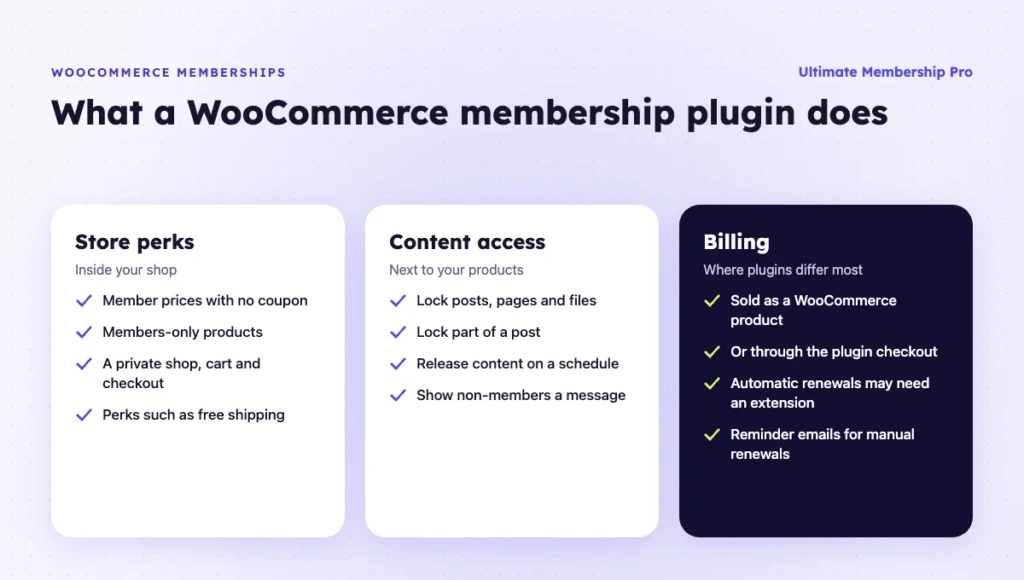
A WooCommerce membership plugin gives a group of customers special rights in your store. The core jobs are the same in every plugin on this list: sell access, change prices for members and hide or lock what non-members should not see.
Most store owners use one for one of these reasons:
- Member pricing. Members get an automatic discount on all products, some categories or single items, with no coupon to type.
- Members-only products. Some products are visible or buyable only for members, like a wholesale range or early releases.
- A private store. The whole shop, cart and checkout are open only to approved members.
- Paid content next to products. You sell a course, guide or video library and also run a regular shop.
- Recurring revenue. Members pay every month or year to keep their perks.
The last point is where plugins differ the most. Some depend on a second subscription plugin to charge members again. Others handle renewals inside their own checkout.
Which checkout model fits your store?
Every WooCommerce membership plugin sells access in one of two ways: as a WooCommerce product, or through the plugin’s own checkout. The choice decides how renewals work and which payment gateways you can use.
Model 1: the membership is a WooCommerce product. You create a product, link it to a membership and sell it like a T-shirt. Access starts when the order is complete.
Any gateway your store already accepts will work. Automatic renewals usually need an extra subscription extension.
Model 2: the membership has its own checkout. The plugin runs its own sign-up and payment flow, with gateways such as Stripe and PayPal. Renewals, trials and coupons are handled there.
WooCommerce still runs your shop. The plugin reads each customer’s membership to apply discounts and rules.
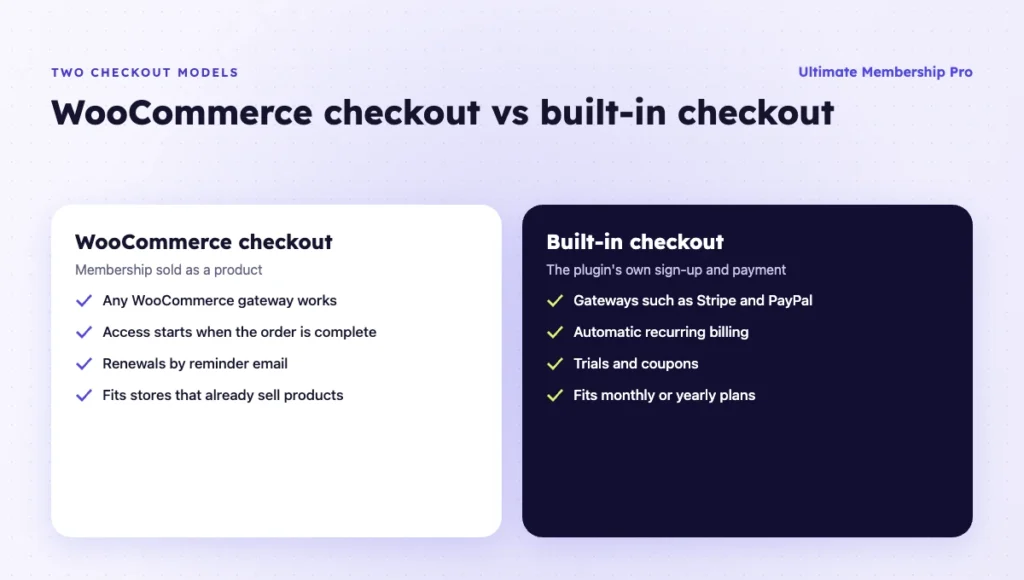
If your members buy once a year and you are happy to send a renewal reminder, the product model is simple and familiar. If you want cards charged automatically every month, pick a plugin that handles recurring billing in its own checkout, or budget for a subscription extension. Stripe’s guide on how subscriptions work explains what happens behind an automatic renewal.
1. Ultimate Membership Pro
Best for: stores that want both checkout models in one plugin, plus content restriction for posts, pages and files.
Ultimate Membership Pro is a WordPress membership plugin made by WPIndeed since 2015 and used by 80,000+ creators, coaches and businesses. Its WooCommerce integration lets you sell Memberships as WooCommerce products or through its own checkout. Both options come with every plan.
Five WooCommerce features matter most:
- Memberships as products. You link a WooCommerce product to a Membership. The Membership is added when the order is completed, and any WooCommerce gateway your store accepts will work.
- Member discounts. Percentage or flat discounts apply to one or more Memberships, on all products, selected categories or specific products. You can limit a discount to set dates.
- Members-only store. Single products, product categories and store pages such as the shop and cart can be locked to chosen Memberships. Non-members see a message or go to a page you pick.
- My Account link. A new menu link in WooCommerce My Account leads to the member’s account page.
- Built-in checkout. Automatic recurring billing with gateways such as Stripe and PayPal, plus trials and coupons. Pro includes 10 payment gateways, and Full Package and Agency include 13.
The same rules that lock products also lock posts, pages, categories, files and menu links, as the content restriction page shows. With drip content, a post or page opens a set number of days, weeks or months after each member joins, or on a date you pick. Members get an email when it opens.
Drip content, unlimited members and 41 add-ons come with every plan.
Limitation: Memberships sold as WooCommerce products don’t renew automatically. Members get reminder emails and buy the next period themselves. For automatic renewals, you use the built-in checkout.
Pricing model: sold as annual plans (Pro, Full Package, Agency) with a 14-day money-back guarantee. See the Ultimate Membership Pro plans.
2. WooCommerce Memberships
Best for: stores that live fully inside WooCommerce and already use, or plan to buy, WooCommerce Subscriptions.
WooCommerce Memberships is developed by SkyVerge and sold on the official WooCommerce marketplace. It is the extension most people find first when they search for memberships in WooCommerce.
Its features cover both your content and your store:
- Restricts posts and pages to members and can drip them on a schedule.
- Hides products from non-members or lets only members buy them.
- Gives member discounts on all products, selected products or categories.
- Extends free shipping rules to members.
- Adds a Member Area where members see their content, products and discounts.
- Imports and exports members by CSV and sends expiry and renewal reminders.
Memberships are separate from products. You can sell them, bundle them with another purchase or assign them by hand.
Limitation: recurring billing, such as a monthly payment, needs WooCommerce Subscriptions. That is a second extension with its own yearly cost. Without it, members buy access for a fixed period.
It is sold as an annual subscription on WooCommerce.com, listed at $199 for one year as of October 2026, with a 30-day money-back guarantee.
3. YITH WooCommerce Membership
Best for: stores already using other YITH plugins that want a members-only area with partial content locking.
YITH WooCommerce Membership turns a WooCommerce product into a membership. You create a membership product with a description and price, then link it to a plan. Admins can also add members by hand or give a plan automatically at registration.
Once a plan exists, the plugin:
- Shows posts, pages and products only to users with a membership.
- Lets you add all products, plus the cart and checkout pages, to a plan for a members-only shop.
- Gives a discount on all products to users of specific plans.
- Releases content gradually over time.
- Offers a “members-only content starts here” block, shortcode and Elementor widget, so non-members see the top of a page and members see the rest.
- Adds an area in My Account with the member’s plan details and history.
Limitation: recurring payments need YITH WooCommerce Subscription, a separate premium plugin. Membership access then follows the subscription status.
YITH sells it as a premium plugin with one year of updates and support and a 30-day money-back guarantee. The product page showed no price when checked in October 2026.
4. Membership for WooCommerce
Best for: small stores that want to start free and add perks like free shipping and cart discounts.
Membership for WooCommerce, by WP Swings, has a free version on WordPress.org and a Pro version. It lets you create membership plans and exclusive products for members.
The free version covers the basics:
- Creates membership plans with limited or unlimited access time.
- Gives a discount on the cart total for members.
- Offers free shipping for members.
- Includes import and export, shortcodes and multisite compatibility.
Pro adds access rules for pages, posts and products, more plan options and custom emails for when a membership starts, expires or is canceled.
Limitation: there is no built-in recurring billing. Renewals come through a separate plugin, Subscriptions for WooCommerce. Content and product restriction need Pro.
Pro is sold as annual plans. As of October 2026, the single-site Pro plan is listed at $99 per year, with a 30-day money-back guarantee.
5. Paid Memberships Pro
Best for: membership sites that keep their own checkout and use WooCommerce mainly for member pricing in the shop.
Paid Memberships Pro is a membership plugin with a free, open-source core. It has its own checkout with recurring payments for Stripe and PayPal and broad content restriction options. Its free WooCommerce add-on connects the two systems.
The add-on itself does three things:
- Sells membership levels through the WooCommerce checkout.
- Sets a custom product price for each membership level.
- Applies a storewide percentage discount for members, with no coupon needed.
Members-only products, a members-only store and free shipping for members are covered by separate guides and extensions. They are not part of the add-on itself.
Limitation: recurring payments through the WooCommerce checkout need WooCommerce Subscriptions, bought separately. Even then, Paid Memberships Pro lists subscription upgrades, downgrades and proration as incompatible. Most of its own checkout add-ons and member emails also stop working once WooCommerce runs the checkout.
The core plugin and the WooCommerce add-on are free. Paid plans, billed monthly or annually, add premium add-ons and support.
6. ARMember
Best for: sites that want a membership plugin with its own forms and gateways and need WooCommerce as one of several tools.
ARMember is a membership plugin with a free Lite version and a premium version. Its WooCommerce Integration add-on can assign a plan when a customer buys a mapped WooCommerce product. It can also show WooCommerce as a payment option on ARMember’s signup form.
Its WooCommerce tools work like this:
- Maps a plan to a WooCommerce product. The plan is assigned when the order is completed, for logged-in buyers.
- Offers plan-based product discounts, fixed or percentage, through the WooCommerce Discount add-on.
- Restricts WooCommerce products by category and tag with the same add-on.
Limitation: recurring plans paid through WooCommerce are treated as semi-automatic, meaning manual, payments. The WooCommerce Discount add-on is included only in the Enterprise plan.
ARMember offers a free Lite plan and annual or lifetime premium plans, with premium add-ons included in the paid tiers.
What about MemberPress?
MemberPress can sell memberships through a WooCommerce store. The integration runs through Zapier, needs the Scale license and requires the paid WooCommerce Zapier extension. It works, but it is a connection between two systems more than a native WooCommerce membership plugin, so it is left out of the main list.
How do you choose the best WooCommerce membership plugin?
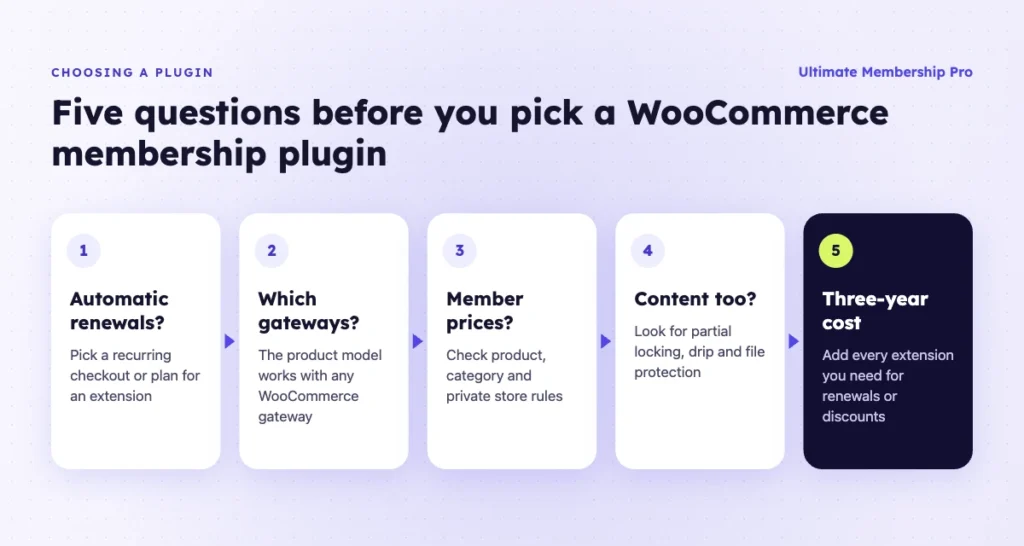
Start with how you want members to pay, then check the perks you need. These questions narrow the list fast:
- Do you need automatic renewals? If yes, pick a plugin with its own recurring checkout, or plan for a subscription extension.
- Which gateways does your store use? The product model works with every WooCommerce gateway. A built-in checkout depends on the plugin’s gateway list.
- Do you need member prices or a private store? Check per-product prices, category discounts and whether the cart and checkout pages can be locked.
- Will you lock content too? If you also sell posts, files or videos, look for partial locking, drip content and file protection.
- How many plugins do you want to run? One plugin that handles memberships, renewals and discounts means fewer updates and fewer conflicts.
- What does the pricing model look like over three years? Add the cost of any extra extension you need for renewals or discounts.
If you’re not sure WooCommerce is the right base at all, compare it with a standalone option in this list of WordPress membership plugins. For recurring products in general, see this guide to WooCommerce subscription plugins. On a tight budget, start with the free WordPress membership plugin options.
How do you sell a membership as a WooCommerce product?
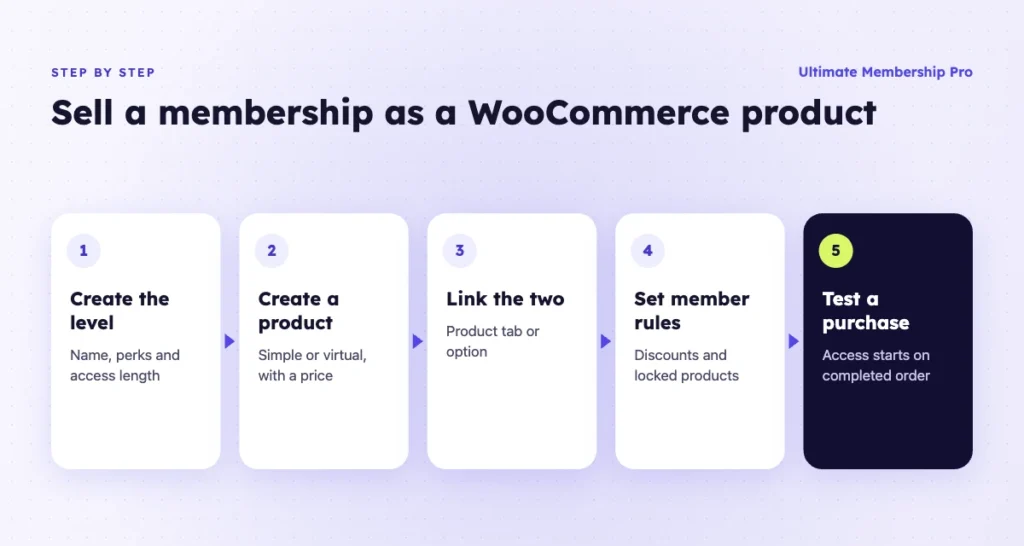
Selling a membership as a product takes a few steps in most plugins. The exact screens differ, but the order is the same.
- Create the membership level. Name it, set what it includes and decide how long access lasts.
- Create a WooCommerce product. Use a simple or virtual product with a clear name, description and price.
- Link the product to the membership. Most plugins add a tab or option on the product screen for this.
- Require an account at checkout. The membership must go to a user account, so guests need to sign in or register.
- Set the rules. Add member discounts, lock products or categories and choose what non-members see.
- Plan renewals. Turn on reminder emails, or connect a subscription option if members should be charged automatically.
- Test a full purchase. Buy the product with a test account and check that access starts when the order is complete.
Ready when you are
Turn visitors into paying members with Ultimate Membership Pro
Launch your membership website, protect exclusive content and automate subscription payments, all in one WordPress plugin.
- 14-day money-back guarantee
- Unlimited members
Frequently asked questions
Does WooCommerce have built-in memberships?
No. WooCommerce sells products and handles checkout, but it has no membership levels, member pricing or content restriction on its own. You add these with a membership plugin. Some plugins sell access as a WooCommerce product, while others add their own checkout and read the member’s level inside the store.
What is the difference between WooCommerce Memberships and WooCommerce Subscriptions?
WooCommerce Memberships controls access: who can see content, buy products or get member prices. WooCommerce Subscriptions controls billing: it charges customers again every week, month or year. You can use Memberships alone for fixed-term access, but automatic monthly payments need Subscriptions or another plugin that handles recurring billing.
Can I make my WooCommerce store members only?
Yes. Most membership plugins can lock the shop page, product categories, single products and even the cart and checkout pages to chosen membership levels. Visitors without access see a message or go to a page you choose, such as a sign-up or pricing page.
Can members get automatic discounts in WooCommerce?
Yes. Membership plugins apply a percentage or flat discount when a logged-in member views a product, with no coupon needed. You can usually target all products, some categories or single items. Some plugins also let you set start and end dates for a member discount.
Do I need WooCommerce to sell memberships on WordPress?
No. Many membership plugins have their own registration and checkout with gateways such as Stripe and PayPal. You need WooCommerce only if you also run a shop, want member prices on products or prefer to sell access as a regular WooCommerce product.
Is there a free WooCommerce membership plugin?
Yes. Membership for WooCommerce has a free version with member cart discounts and free shipping. The Paid Memberships Pro core plugin and its WooCommerce add-on are free, and ARMember has a free Lite version. Free versions usually leave out product restriction, automatic renewals or member pricing, so check those limits before you build your store on one.