Best Ko-fi Alternatives (2026): 8 Options for Shops, Commissions and Memberships
Ko-fi alternatives compared by what you use Ko-fi for: memberships, a shop and digital products, commissions or tips, with fees, Ko-fi Gold math and how to move.

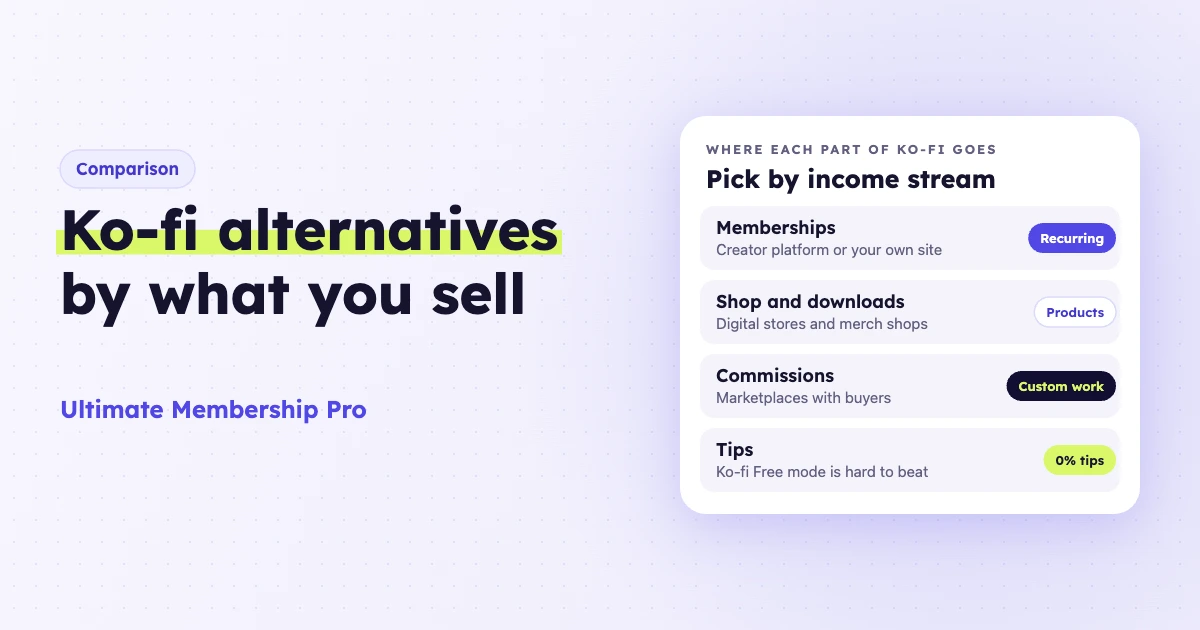
The best Ko-fi alternatives depend on which part of Ko-fi earns your money. Check one setting first: new Ko-fi pages start in Standard mode, which takes 5% even on one-off tips. Free mode keeps one-off tips fee-free and charges the 5% on everything else, and that fee is the usual reason creators leave.
Ultimate Membership Pro is made by WPIndeed, the publisher of this blog.
- Memberships: a WordPress membership site or Patreon.
- Shop and digital products: Gumroad, Payhip or Fourthwall.
- Commissions: VGen or Etsy.
- Tips: Buy Me a Coffee, or Ko-fi itself in Free mode.
A Ko-fi alternative is any platform that takes over one of Ko-fi’s four jobs: tips, memberships, a shop or commissions. Ko-fi bundles all four on one page. Most alternatives do one or two of them better, so many creators end up using two tools.
- Ko-fi Gold ($12/month) removes the platform fee on new sales and pays for itself above $240 a month of that income; members who joined earlier keep the old fee.
- Ko-fi is not the merchant of record, so tax on shop sales is your job. Gumroad and Payhip take more of that work off your plate.
- To own your member list and archive, move memberships to WordPress, where members, content and payment account stay yours.
How much does Ko-fi charge on Free, Standard and Gold?
Ko-fi has no monthly fee on its free plan and takes 5% on memberships, shop items, commissions and monthly tips. One-off tips are free in Free mode. Ko-fi Gold costs $12 a month and drops the platform fee to 0% (as of October 2026).
Ko-fi’s help center says new creators start with “Get all of Ko-fi” switched on, a mode it calls Standard. It adds supporter-only content, scheduled posts and more shop storage, in exchange for the fee on one-off tips.
- Free mode: 0% on one-off tips, 5% on everything else.
- Standard mode: 5% on everything, one-off tips included. You can switch it off in your payment settings.
- Gold, $12/month: 0% platform fee. Memberships that started before you switched keep paying 5%, and if Standard mode is on when you subscribe, you must switch it off separately.
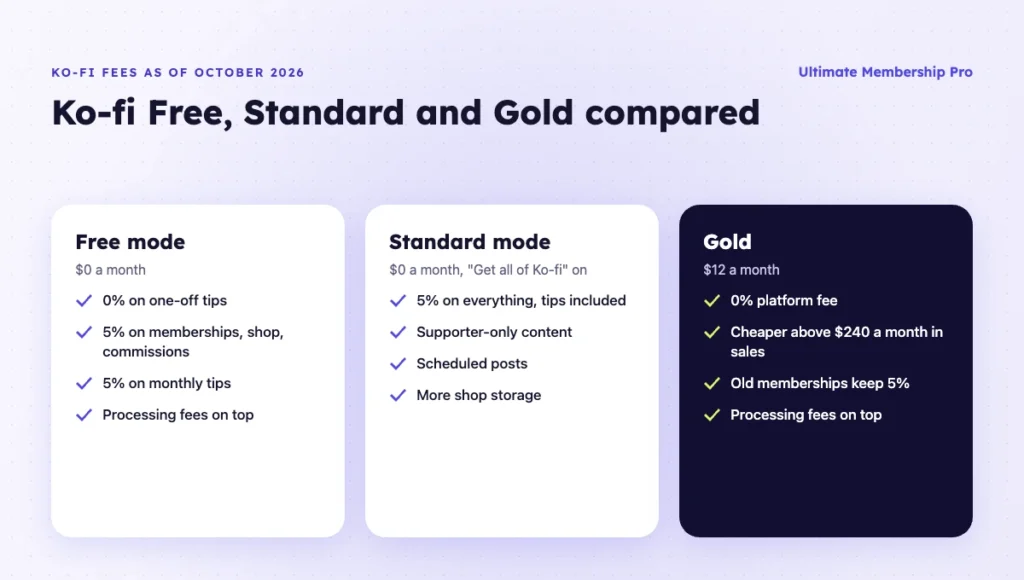
Card processing comes on top on every plan. Payments go straight into your own PayPal or Stripe account, and Ko-fi’s help center puts processor fees at roughly 3% + $0.30. Since 5% of $240 is $12, Gold costs less than the free plan once the sales it covers pass $240 a month.
When do creators outgrow Ko-fi?
Most searches for Ko-fi alternatives start when one income stream outgrows a page built to do a little of everything.
- Tax on shop sales. Ko-fi’s help center says creators must calculate and pay the sales tax or VAT due. Electronic services sold to EU consumers are taxed in the customer’s country, as the EU guide to cross-border VAT explains.
- A shop that needs more. Sellers who want print-on-demand merch, tax handling or a full storefront move to a dedicated store.
- Commissions that need new clients. Ko-fi works for fans who already follow you. Marketplaces bring buyers who search for custom work.
- Memberships on someone else’s page. Creators who want an archive and member list on their own domain look elsewhere.
In Ko-fi’s favor: no monthly fee, free one-off tips in Free mode and instant payouts to your own account. Few alternatives match all three.
Ko-fi alternatives compared by fees and payouts
Ko-fi sits in the first row for reference, followed by eight Ko-fi alternatives. Fees in this article come from each vendor’s own pricing or help pages, checked in October 2026, and exclude card processing.
| Option | Replaces Ko-fi’s | Pricing model | Platform fee | Payouts and tax |
|---|---|---|---|---|
| Ko-fi (baseline) | Tips, memberships, shop, commissions | Free, or Gold at $12/month | 0% on one-off tips (Free mode), 5% on the rest; 0% on Gold | Instant to your PayPal or Stripe; you handle tax |
| Ultimate Membership Pro | Memberships, members-only posts, downloads | Annual plugin plan plus hosting | Your payment processor’s fees | Straight to your Stripe, PayPal or other gateway account |
| Patreon | Memberships | Free to start | 10% for new pages, plus processing and payout fees | Paid out by Patreon, 16+ currencies |
| Gumroad | Shop, digital products | No monthly fee | 10% + $0.50 per direct sale; 30% on Discover | Merchant of record; collects sales tax |
| Payhip | Shop, digital products, memberships | Free, $29 or $99/month | 5%, 2% or 0% by plan | Paid after each sale; remits EU/UK VAT and US/Canadian sales tax on digital sales |
| Fourthwall | Merch, digital products, memberships, tips | Free, or Pro at $15/month | 5% on memberships; digital 5% or 0% on Pro | Monthly deposit to your bank |
| VGen | Art commissions | No monthly fee | 5% plus processing | Stripe-powered payouts or PayPal |
| Etsy | Physical art, custom orders | $0.20 per listing | 6.5% per sale | Etsy Payments |
| Buy Me a Coffee | Tips, memberships, shop | Free | 5% on everything | Bank payouts in 44 countries |
Ko-fi alternatives for memberships and members-only content
For recurring memberships, Patreon gives you reach and an app, and a WordPress membership site gives you ownership. Both bill members automatically and lock content to paying members.
1. Ultimate Membership Pro on WordPress
Ultimate Membership Pro is a WordPress plugin that takes over the memberships part of Ko-fi on a site you own. Members pay through your own gateway account: 10 gateways come with Pro, including Stripe and PayPal, and Full Package raises that to 13.
Each Ko-fi tier becomes a Membership. As the guide for creator memberships shows, a Membership can renew every month or year, stop after a fixed number of payments or charge once, and it can carry a free or paid trial, coupons and gift codes. You can lock a post, a whole category or only the part after a public intro.
Shop files work the same way: you sell access to files by Membership, and the free Download Monitor plugin adds download limits. The plugin doesn’t host files, and selling one page for a single payment uses Pay Per Post (Full Package).
Best for: creators whose income is mostly monthly members and who want members, archive and email list on their own domain.
Limitation: no tip button, commission queue or discovery network, and you run hosting, updates and backups. As on Ko-fi, sales tax stays your responsibility.
The plugin comes as annual plans (Pro, Full Package and Agency); compare them on the Ultimate Membership Pro plans page. Your payment processor still charges its own fees.
2. Patreon
Patreon moves your Ko-fi tiers to a platform built only for memberships. Fans can join a free or paid tier, pay monthly or annually, or send a one-off payment, in 16+ currencies. Pages published after August 4, 2025 pay 10% of income, plus processing, currency conversion and payout fees.
Best for: creators who want fans to find and pay them in an app those fans already use.
Limitation: the 10% is double Ko-fi’s rate, it applies to one-off payments too, and your members live on Patreon’s platform.
Ko-fi alternatives for a shop and digital products
If most of your Ko-fi income comes from the shop, a dedicated store gives you more product tools, and two of them handle tax for you. Gumroad and Payhip suit files; Fourthwall suits merch.
3. Gumroad
Gumroad sells digital products, courses and memberships with no monthly fee. Direct sales cost 10% + $0.50 each, and sales to new customers found through its Discover marketplace cost 30%. It acts as merchant of record and, per its pricing page, handles sales tax worldwide at no extra cost. Its help center says the 10% + $0.50 doesn’t include card processing or PayPal fees.
Best for: digital sellers who want taxes handled and a checkout that takes minutes to set up.
Limitation: the fixed $0.50 hurts small items. On a $3 sticker pack, Gumroad’s platform fee is $0.80, against $0.15 on Ko-fi’s free plan, before processing on either.
4. Payhip
Payhip is an online store for digital downloads, courses, coaching, memberships and physical products, with a store builder. Every plan has the same features: Free Forever takes 5%, Plus costs $29/month with 2%, and Pro costs $99/month with no Payhip fee. It collects and remits EU and UK VAT and US and Canadian sales tax on digital sales.
Best for: creators who sell files to buyers in Europe or North America and don’t want to file VAT or sales tax themselves.
Limitation: Payhip’s pages list no tip page or commissions workflow, and its free plan saves nothing on fees over Ko-fi.
5. Fourthwall
Fourthwall builds a branded shop where vetted partners make and ship your merch. It also sells digital products and memberships with members-only video, and supporters can tip with no added fee beyond processing. Memberships carry a 5% fee and digital products cost 5% on the free plan or nothing on Pro at $15 a month.
Best for: streamers and video creators who want merch, memberships and members-only video in one shop.
Limitation: earnings arrive monthly, not instantly as on Ko-fi, and its pages don’t list commissions.
Ko-fi alternatives for commissions
For commissions, the question is where new clients come from. Ko-fi works when followers already ask for custom work, while a marketplace adds buyers who search for it.
6. VGen
VGen is a commissions hub that connects VTubers, streamers and creators with human artists, with 380,000+ commission services listed. It doesn’t allow generative AI work. It charges artists a 5% service fee plus processing, with payouts through VGen Payments, powered by Stripe, or PayPal.
Best for: digital artists who sell avatars, emotes and illustrations to streamers.
Limitation: no fee saving over Ko-fi, your profile sits next to other artists, and there are no memberships.
7. Etsy
Etsy fits physical art, prints and handmade custom work. Shops can show a Request Custom Order button and answer with a private listing only that buyer can purchase. Etsy charges $0.20 per listing and 6.5% per sale, plus processing, and 12% to 15% on orders from its Offsite Ads.
Best for: makers of physical goods who want buyers already searching a large marketplace.
Limitation: stacked fees run higher than Ko-fi’s, and your shop sits beside competing sellers.
Ko-fi alternatives for tips and donations
For tips, Ko-fi is hard to beat, because one-off tips are free in Free mode. Move only if you need something it lacks, such as bank payouts without a PayPal or Stripe account.
8. Buy Me a Coffee
Buy Me a Coffee is the closest match to Ko-fi: tips, monthly or yearly memberships, members-only posts and a shop that lists art commissions. It charges 5% and no monthly fee, pays creators in 44 countries straight to their bank account, and lets you export your supporter list.
Best for: creators who want yearly memberships and supporter emails on one free page.
Limitation: one-off tips carry the fee here but are free in Ko-fi’s Free mode, and there is no flat-fee plan like Gold.
On WordPress, Ultimate Membership Pro’s Membership Dynamic Price sets a minimum and a maximum, and each member picks an amount in between; its guide says this suits donations. It runs through a Membership checkout, not a one-click tip button.
Also consider: Liberapay for donations
Liberapay handles recurring donations and, per its FAQ, takes no cut: only Stripe or PayPal processing applies. It bans rewards in exchange for donations, so it can’t replace Ko-fi memberships or the shop, and one-off gifts aren’t fully supported yet.
Substack is left out because it replaces only supporter posts: it keeps 10% of paid subscriptions plus Stripe fees, with no shop or tips.
How much would you pay? A worked fee example
Take a creator earning $1,100 a month: $800 from 160 memberships at $5 and $300 from 20 digital sales at $15. On that mix, Ko-fi Gold costs $12 in platform fees, Ko-fi’s free plan $55, Patreon $110 and Gumroad $200. Fees are as each vendor listed them in October 2026, without card processing.
| Platform (example: $1,100 a month) | Plan cost | Platform fee | Total per month |
|---|---|---|---|
| Ko-fi, Free mode | $0 | $55 (5%) | $55 |
| Ko-fi Gold | $12 | $0 | $12 |
| Buy Me a Coffee | $0 | $55 (5%) | $55 |
| Fourthwall, Free or Pro | $0 or $15 | $55 or $40 | $55 |
| Payhip Plus | $29 | $22 (2%) | $51 |
| Payhip Pro | $99 | $0 | $99 |
| Patreon | $0 | $110 (10%) | $110 |
| Gumroad | $0 | $200 (10% + $0.50 x 180) | $200 |
If Ko-fi does everything you need, Gold may be cheaper than leaving. The $12 assumes members joined after you upgraded: if all 160 joined before, their $800 keeps paying 5% and Gold’s total is $52. Gumroad’s fixed $0.50 per sale makes it the priciest choice for small, frequent payments.
On your own WordPress site, the costs are hosting, a domain and the annual plugin plan, and they don’t grow with revenue. Payment processor fees still apply.
Which Ko-fi alternative should you choose?
Choose by the job that brings in most of your money, then check whether the rest can stay on Ko-fi. Many creators keep Ko-fi for tips and move one income stream.
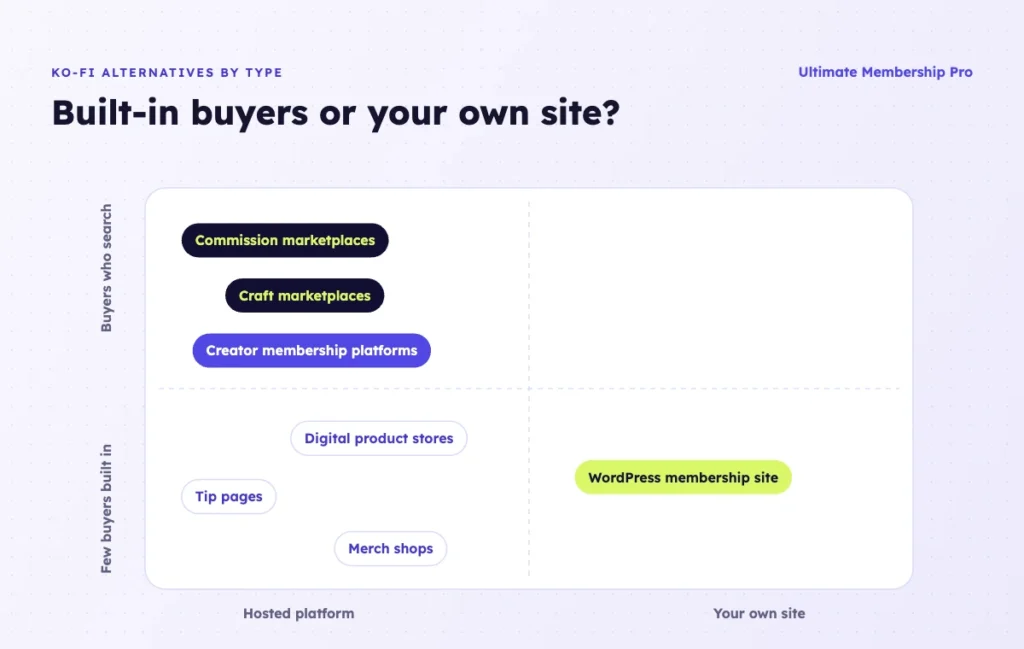
- Mostly one-off tips: stay on Ko-fi in Free mode with “Get all of Ko-fi” switched off. Pick Buy Me a Coffee if you need bank payouts.
- Digital products sold abroad: Gumroad or Payhip, because tax handling matters more than a point of fees across borders.
- Commissions: VGen for digital art, Etsy for physical pieces. Keep Ko-fi commissions for regulars.
- Merch: Fourthwall handles production and shipping. Etsy suits merch you make yourself.
Best Ko-fi alternative for memberships
Patreon if reach and an app matter most. A WordPress membership site if you want members, content and payments on your own domain, with fixed costs instead of a cut of every payment.
Should you stay on Ko-fi?
Ko-fi remains the cheaper choice if most of your money arrives as one-off tips, if fee-bearing sales stay under $240 a month, or if you’d rather not maintain a website. Above $240, try Gold before you move, counting only income it covers.
Can you replace Ko-fi with your own WordPress site?
Yes, for memberships, members-only posts and downloads. Commissions and tips need extra tools or can stay where they are. This table maps each Ko-fi feature to WordPress with Ultimate Membership Pro.
| Ko-fi feature | On WordPress with Ultimate Membership Pro |
|---|---|
| Memberships and tiers | Memberships billed monthly, yearly or in installments, with trials, coupons and prorated upgrades |
| Supporter-only posts | Lock posts, categories or part of a post; drip posts after someone joins |
| Digital shop items | Lock download pages and files by Membership; Pay Per Post sells a single page (Full Package) |
| Physical shop items | WooCommerce, with member discounts and products locked to chosen Memberships |
| Tips | No tip button; Membership Dynamic Price lets members choose an amount |
| Commissions and Discord roles | Not built in or listed among the plugin’s integrations |
Billing runs on recurring subscriptions that charge members automatically every period through the built-in gateways. Members renew, cancel or upgrade from their account page, and with Stripe Connect they can change their card there, while you can pause or resume their subscription from your dashboard.

For physical items, the WooCommerce integration gives members discounts and can lock products to chosen Memberships. Memberships sold as WooCommerce products don’t renew automatically, so recurring billing should use the plugin’s own checkout.
How do you move from Ko-fi without losing supporters?
Move one income stream at a time: map where each part goes, save your data, rebuild your offers, then tell supporters with a clear date. Tippers only need a new link; monthly members need the most care.
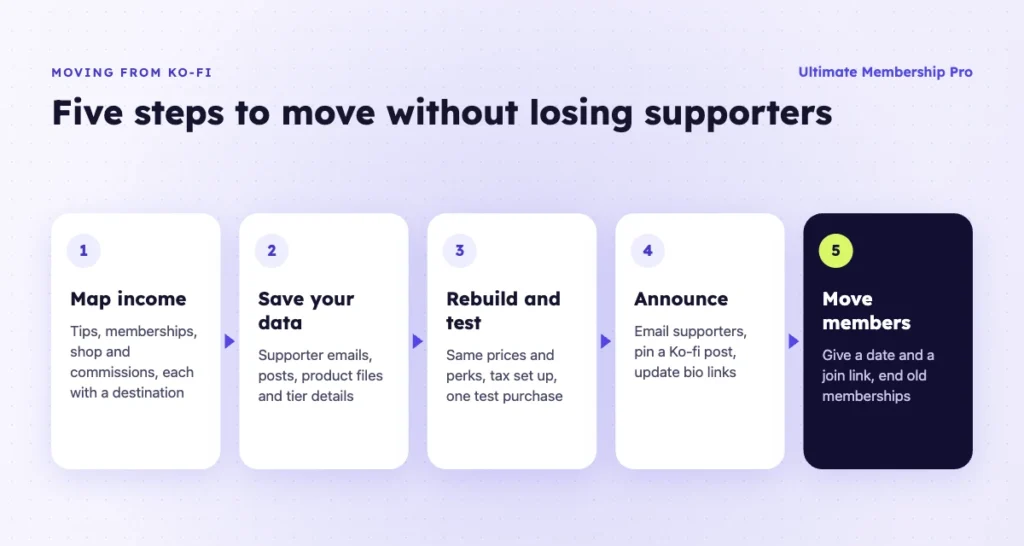
- Map each income stream. List tips, memberships, shop items and commissions with their revenue, and pick a home for each.
- Save your data. Keep supporter emails, posts, product files and tier details. Payment records also sit in your PayPal or Stripe account.
- Rebuild and test. Recreate tiers with the same price and perks, upload products, set up tax handling, then buy once as a test customer.
- Announce the move. Email supporters who agreed to hear from you, pin a post on your Ko-fi page and update your bio links.
- Move monthly members. Give them a date and a join link, and end their Ko-fi memberships so nobody pays twice.
What happens to monthly members?
Monthly members don’t move by themselves, because their memberships were set up through Ko-fi. Ask Ko-fi’s support how to close memberships cleanly, and time the change for the end of a billing period.
Moving to WordPress? The Ultimate Membership Pro support team helps you migrate from Ko-fi with its own tools. Before you set a date, ask them how your active recurring subscriptions will be handled for your payment gateway. The plugin’s CSV import adds members with their Membership and dates, but not gateway subscriptions, so agree on a renewal plan first.
Ready when you are
Turn visitors into paying members with Ultimate Membership Pro
Launch your membership website, protect exclusive content and automate subscription payments, all in one WordPress plugin.
- 14-day money-back guarantee
- Unlimited members
Frequently asked questions
What are the best Ko-fi alternatives?
The best Ko-fi alternatives depend on which part of Ko-fi you replace. Patreon or a WordPress membership site suit memberships, Gumroad or Payhip suit digital products, Fourthwall suits merch, and VGen or Etsy suit commissions. Buy Me a Coffee is the closest all-in-one page, and Liberapay suits recurring donations.
Does Ko-fi take a fee on tips?
As of October 2026, Ko-fi takes 0% on one-off tips in Free mode and 5% on monthly tips. If Standard mode (Get all of Ko-fi) is on, one-off tips also pay 5%. Ko-fi Gold, at $12 a month, removes the platform fee; if Standard mode is on when you subscribe, switch it off separately. PayPal or Stripe processing fees apply in every case.
Is Ko-fi Gold worth it?
Yes, once the income it covers passes $240 a month, because 5% of $240 equals Gold’s $12 price; above that, Gold costs less than most Ko-fi alternatives. Memberships that started before you upgrade keep paying 5%, so count only new memberships, shop sales, commissions and monthly tips.
What are some sites like Ko-fi for commissions?
VGen is a commissions hub for digital art, avatars, emotes and stream assets, with a 5% service fee. Etsy suits physical custom work through custom order requests and private listings. Buy Me a Coffee’s shop also lists art commissions.
Does Ko-fi collect VAT on digital sales?
No. Ko-fi’s help center says it is not the merchant of record, so creators must calculate and remit sales tax or VAT themselves. Gumroad acts as merchant of record, and Payhip remits EU and UK VAT and US and Canadian sales tax on digital sales.
Can I run Ko-fi style memberships on my own website?
Yes. On WordPress, Ultimate Membership Pro sells monthly or yearly Memberships, locks members-only posts and files, and takes payments into your own Stripe or PayPal account. The Ultimate Membership Pro support team helps you migrate from Ko-fi with its own tools. You look after hosting and updates, and there is no tip button or commission queue built in.