Best Whop Alternatives (2026): 9 Options for Communities, Courses and Digital Products
Compare 9 Whop alternatives for paid Discord access, courses, communities and digital products: fees, pricing models and a WordPress option you own.

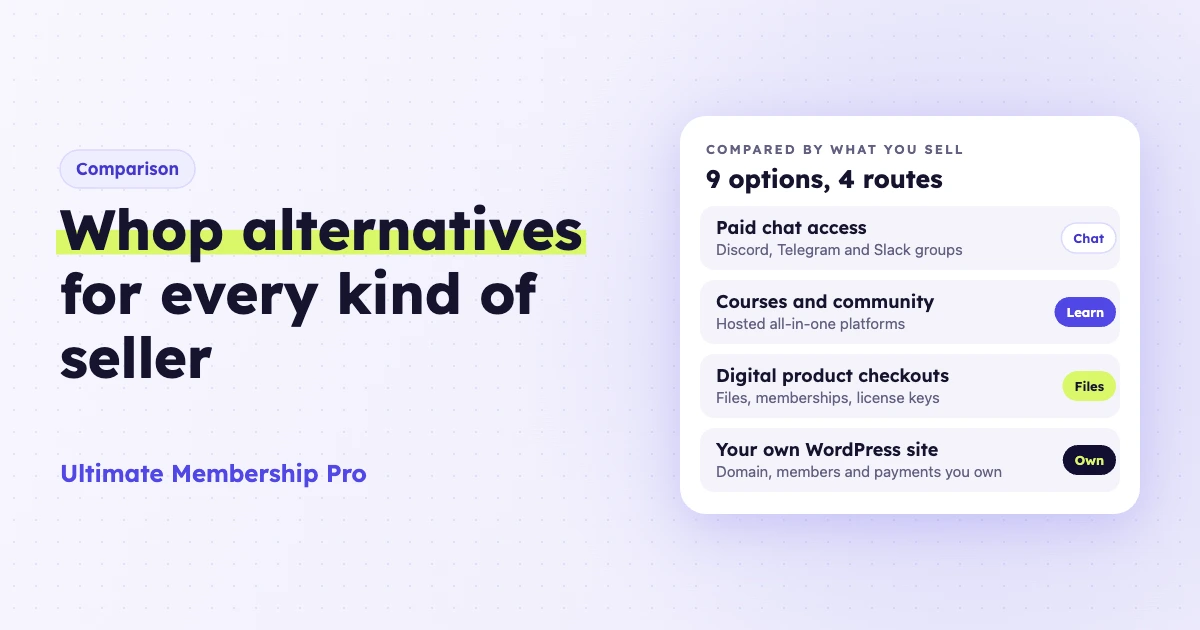
The best Whop alternatives depend on what you sell. LaunchPass and Patreon handle paid Discord access, Skool, Circle and Podia host courses and communities, and Gumroad, Lemon Squeezy and Payhip sell digital products. A WordPress site with a membership plugin suits sellers who want their own brand, domain and member list. Whop’s own processing fee is low, so control is usually a bigger reason to leave than price.
Ultimate Membership Pro is made by WPIndeed, the publisher of this blog.
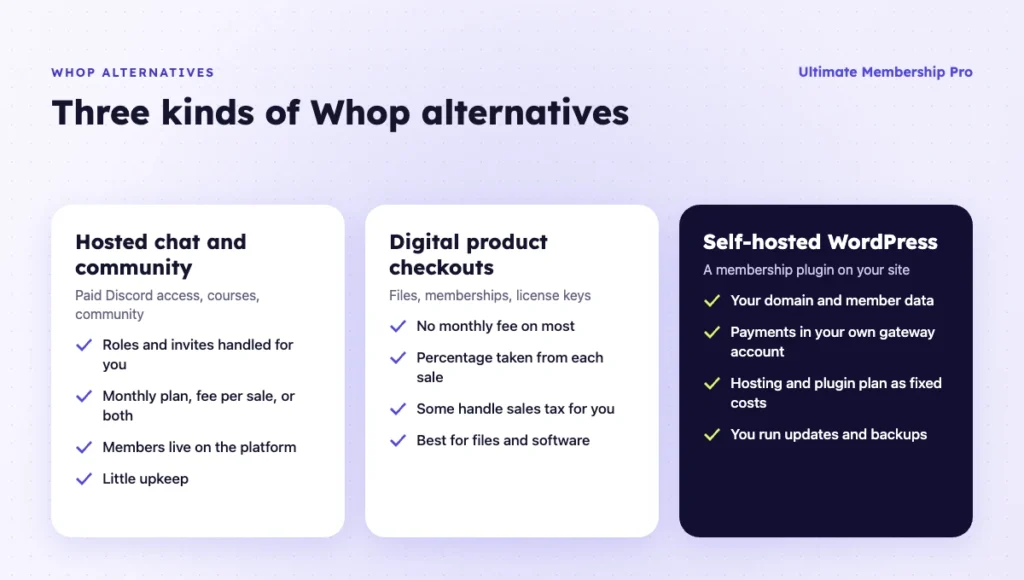
Whop alternatives are platforms that let you sell paid community access, courses, digital products or software outside Whop’s marketplace. They fall into four groups: paid chat access tools, course and community platforms, digital product checkouts, and self-hosted membership sites that run on your own domain.
- Whop has no monthly fee and includes card processing in its per-sale fee, so few options beat it on price alone.
- For a paid Discord or Telegram group, LaunchPass is the closest swap. TradingView indicator sellers have a reason to stay: Whop’s TradingView app automates indicator access, while the alternatives checked here leave it manual.
- Once Stripe Billing’s 0.7% on subscriptions is counted, a WordPress site pays about $84 in fees on $2,000 of monthly sales, against $66 on Whop, plus hosting and a plugin plan.
What is Whop, and why do sellers look for Whop alternatives?
Whop is a platform and marketplace for selling paid communities, courses, coaching and software access, with payments, payouts and affiliates built in. Sellers look for Whop alternatives when they want their own brand, checkout and customer list, fewer stacked fees, or less reliance on one marketplace and its affiliate network.
Whop’s docs list apps sellers add to a product, such as Chat, Courses, Forums, Events and Files. Buyers link Discord to their Whop account to claim server access. By default, any affiliate in Whop’s global network can promote your product for a 30% commission, which you can change.
As of October 2026, Whop’s fee page lists 2.7% + $0.30 per domestic card payment, processing included, and no monthly fee. It lists no separate platform fee, including for sales that grant access through its Discord, Telegram or TradingView apps. International cards, currency conversion, payouts and the optional Billing and tax tools cost extra. Some third-party reviews still quote a 3% platform fee, so check the fees shown in your Whop dashboard before you compare sites like Whop.
Whop alternatives at a glance
This table compares the nine Whop alternatives in this guide, with Whop itself in the first row as the baseline. Prices and fees were checked on each vendor’s own site as of October 2026. Unless a row says otherwise, card processing applies on top.
| Option | What you sell | Pricing model | Fee per sale | Best for |
|---|---|---|---|---|
| Whop (baseline) | Communities, courses, Discord access, software | Pay as you go, no monthly fee | 2.7% + $0.30 per domestic card payment, processing included | Marketplace reach and fast setup |
| Ultimate Membership Pro | Memberships, locked content, files | Annual plugin plan plus your own hosting | Your payment processor’s fees | A membership business on your own WordPress site |
| LaunchPass | Paid Discord, Telegram or Slack access | Free for free members; Premium $29/month | 3.5% on Premium, plus Stripe 2.9% + 30¢ | Paid chat communities |
| Patreon | Memberships with posts, video and Discord roles | Free to start | 10% plus processing, payout and conversion fees | Creators who already publish content |
| Skool | Community, courses, live calls | Hobby $9/month or Pro $99/month | 10% + 30¢ on Hobby, 2.9% + 30¢ on Pro, processing included | One simple community with courses |
| Circle | Community spaces, courses | From $89/month billed yearly | 2% on Professional, lower on higher plans | A branded community with spaces |
| Podia | Courses, downloads, community | From $42/month billed yearly | 5% on Mover, none on Shaker and up | Course creators who want email built in |
| Gumroad | Digital products and memberships | No monthly fee | 10% + $0.50 direct, plus card processing; 30% via Discover | Testing a product with no upfront cost |
| Lemon Squeezy | Software, license keys, subscriptions | No monthly fee | 5% + 50¢, sales tax handled | Software sellers who want license keys; check its 2026 status first |
| Payhip | Downloads, courses, coaching, memberships | Free, $29/month or $99/month | 5%, 2% or none by plan, plus processing | A low-cost store for digital products |
What are the best Whop alternatives?
The best Whop alternatives are built for what you sell. The nine below start with the self-hosted option, then chat access, community and checkout tools.
1. Ultimate Membership Pro on WordPress
Ultimate Membership Pro is a WordPress membership plugin by WPIndeed, used since 2015 by more than 80,000 creators, coaches and businesses. It is the only option here that you host yourself: the domain, member database and payment account stay yours.
You sell access as Memberships, and content restriction by Membership covers pages, posts, categories, files and parts of a post. Subscription billing covers recurring and one-time charges, with trials, coupons, installments and prorated upgrades. Pro includes 10 payment gateways, and Full Package adds three more.
For a private community on WordPress, the plugin handles invitation codes, manual approval, a members-only directory and posting limits per Membership, and it adds the member account to BuddyPress profiles. For files, the Specific Files rule protects direct links to PDF, ZIP, MP3 and MP4 files by Membership on Apache servers.
Best for: sellers who want their community, content and checkout on their own domain, with unlimited members on every plan.
Limitation: Ultimate Membership Pro has no Discord or Telegram integration and no forum, chat or activity feed. It locks only what lives on your WordPress site. You also run hosting, updates and backups, and there is no marketplace to bring buyers.
Ultimate Membership Pro is sold as annual plans (Pro, Full Package and Agency), listed on the pricing page, with a 14-day money-back guarantee. Payment processor fees still apply.
2. LaunchPass
LaunchPass sells paid access to private Discord, Telegram and Slack communities. It sends invites automatically and, on Premium, removes members or their Discord role when they cancel or a charge fails. Payments run through Stripe.
The free Basic plan covers free members. Charging for access needs Premium at $29/month plus a 3.5% transaction fee, and Stripe’s 2.9% + 30 cents applies to every payment. Premium adds recurring billing, trials, coupons, tiered access and affiliate tracking.
Best for: a Whop alternative for Discord communities, or for Telegram and Slack groups, when the chat is the product.
Limitation: it only sells chat access. Courses, downloads and a full website need other tools, and the percentage fee grows with revenue.
3. Patreon
Patreon is a creator membership platform for posts, video, audio and community. Its Discord integration links each tier to a Discord role: when a member connects Discord, the Patreon bot assigns the role, and it removes the role if the member cancels or a payment is declined.
Patreon’s pricing page lists a 10% platform fee on income, plus payment processing, currency conversion and payout fees, and applicable taxes.
Best for: creators who publish regular content and want a paid Discord as a perk of a tier.
Limitation: the 10% fee is high next to Whop’s processing fee, and Patreon removes roles but leaves the member in your server, so you remove them yourself if needed.
4. Skool
Skool is a hosted community platform with courses, videos and live calls, plus a discovery page where people browse communities. Plans include unlimited members and courses, a custom URL and affiliates.
Hobby costs $9/month with 10% + 30¢ per transaction, and Pro costs $99/month with 2.9% + 30¢ (3.9% + 30¢ on payments above $900). Skool’s help center presents these fees as covering card processing.
Best for: one focused community where members learn from courses and talk in the same place.
Limitation: every community uses the same Skool layout, and its pricing lists no store for downloads or software license keys.
5. Circle
Circle is a hosted community platform with community spaces and courses, a custom domain on every plan and unlimited members.
Professional costs $89/month with a 2% transaction fee, Business $199/month with 1%, and Scale $419/month with 1%, all billed yearly. Custom branded iOS and Android apps come with the custom-priced Circle Plus plan.
Best for: a branded community with several spaces and courses.
Limitation: it costs more than most options here before you sell anything.
6. Podia
Podia is an all-in-one platform for courses, downloads, community spaces and email marketing. Mover costs $42/month billed yearly with a 5% transaction fee; Shaker ($84/month) and Earthquaker ($150/month) have no Podia transaction fee. Stripe or PayPal processing still applies.
Best for: a Whop alternative for courses when you also want email marketing and a simple site in one tool.
Limitation: email limits are small on every plan (100 subscribers on Mover, 1,000 on Earthquaker), and its pricing page lists no Discord or Telegram access feature.
7. Gumroad
Gumroad is a checkout and storefront for digital products, including memberships. It charges no monthly fee. Gumroad’s help center lists direct sales at 10% + $0.50 per transaction plus card processing (2.9% + $0.30) or PayPal fees, while Discover marketplace sales cost a flat 30% that includes processing. Gumroad acts as merchant of record and handles sales tax.
Best for: testing a product idea with no upfront cost.
Limitation: with processing added, direct sales cost about 13% plus 80 cents each, the highest rate on this list.
8. Lemon Squeezy
Lemon Squeezy is a merchant of record for software and digital products. It sells downloads and subscriptions, issues license keys after each sale and handles global sales tax. Ecommerce costs 5% + 50¢ per transaction with no monthly charge, and some payments may carry additional fees.
Best for: sellers who used Whop for software access and need license keys.
Limitation: in a January 28, 2026 update, Lemon Squeezy’s CEO pointed users toward Stripe Managed Payments and acknowledged slower support and less frequent product updates. Before you build on it, confirm you can still open a new store, and expect a possible later move to Stripe.
9. Payhip
Payhip is a store for digital downloads, courses, coaching and memberships. Every plan has the same features: Free Forever charges a 5% transaction fee, Plus costs $29/month with 2%, and Pro costs $99/month with no transaction fee. PayPal and Stripe charge their standard rates on top.
Best for: a low-cost store for files and simple memberships.
Limitation: its pricing page lists no Discord or community features, and the free plan’s 5% fee adds up as sales grow.
How do Whop alternatives compare on fees?
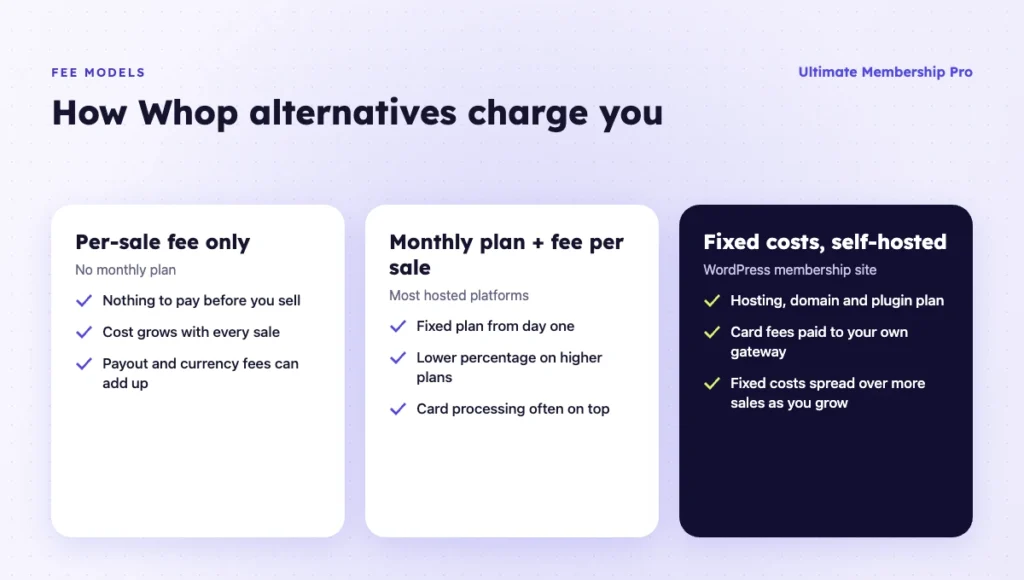
On fees alone, Whop is hard to beat, since card processing is already inside its per-sale fee. Most Whop alternatives cost more per sale or add a monthly plan, so the case for switching is control, brand and tools.
The table is a worked example, not a quote. It assumes $50 average sales, domestic cards and two monthly revenue levels (40 and 200 sales). It uses the fees listed in the first table, Stripe’s 2.9% + 30¢ where processing is separate, and leaves out payouts, taxes and currency conversion.
| Option (example plan) | $2,000 a month | $10,000 a month | What the number includes |
|---|---|---|---|
| Whop | $66 | $330 | 2.7% + $0.30 per payment |
| Self-hosted WordPress with Stripe | $84 + fixed costs | $420 + fixed costs | Stripe 2.9% + 30¢ + 0.7% Billing on subscriptions; hosting and plugin plan extra |
| Payhip Plus | $139 | $579 | $29 plan + 2% + Stripe |
| Skool Pro | $169 | $449 | $99 plan + 2.9% + 30¢, processing included |
| LaunchPass Premium | $169 | $729 | $29 plan + 3.5% + Stripe |
| Gumroad (direct sales) | $290 | $1,450 | 10% + $0.50 + card processing 2.9% + $0.30 |
The WordPress row adds the 0.7% Billing fee on recurring volume from Stripe’s pricing page. Add the same 0.7% to the LaunchPass and Payhip rows if their renewals run through Stripe Billing on your account.
Which Whop alternative should you choose?
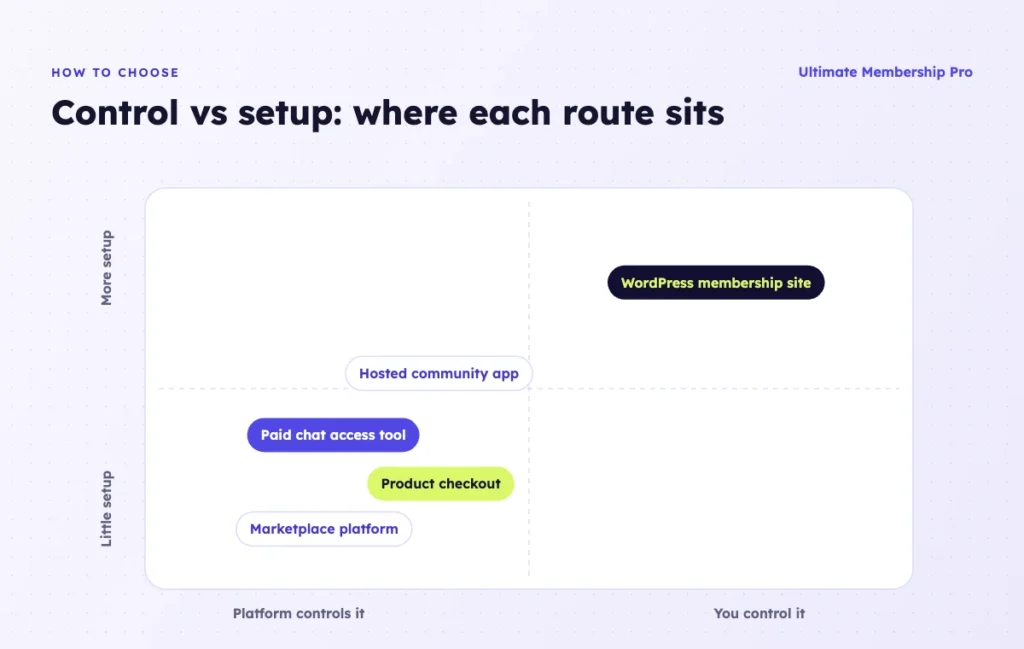
Group the options by what you sell, shortlist two or three, and compare them at your real revenue.
Whop alternative for Discord communities
If the Discord server is the product, LaunchPass is the closest swap: it handles invites, roles and removals for Discord, Telegram and Slack. Patreon fits when the server is a perk of a creator membership with posts and video. Ultimate Membership Pro does not manage Discord roles, so it is the wrong tool for a chat-only business.
Discord also sells access natively through Server Subscriptions, monthly tiers bought inside Discord by servers that qualify. As of October 2026, Discord’s FAQ says they can’t be bought on Android and Apple takes an extra 30% on iOS.
Trading alerts, sports picks and Telegram-first groups
Many Whop sellers run paid groups for trading education or market alerts, sports picks and reselling leads, usually delivered in Discord or Telegram. Here the access tool matters most: LaunchPass covers Discord, Telegram and Slack, and Patreon covers Discord roles.
TradingView works differently. Its vendor rules say a script author grants invite-only access per username, which needs a Premium or Ultimate TradingView account. Whop’s docs describe a TradingView app that connects your account, loads your indicators and grants and removes member access for you. It runs on your TradingView login cookie, since TradingView has no public API, and Whop notifies you when it can’t act, for example after a member changes their username.
The alternatives checked here leave this step manual. LaunchPass’s site lists no TradingView integration, and on WordPress a registration text field collects each buyer’s TradingView username while you add and remove access yourself. If you sell indicators to many buyers, that automation is a fair reason to stay on Whop.
Whatever the category, read the platform’s and the payment processor’s terms for your type of content before you move.
Best Whop alternative for courses
For a course plus a community, Skool keeps everything in one simple space, Circle gives you more structure and branding, and Podia adds email marketing. On WordPress, Ultimate Membership Pro sells course access as a Membership, and Ultimate Learning Pro, a separate WPIndeed course plugin, links a course to a Membership so members get it with their plan.
Digital products and software
Gumroad and Payhip suit files, templates and ebooks. Lemon Squeezy suits software with license keys and global tax handling. If members pay a monthly fee for a growing library, selling digital downloads by Membership on WordPress is another route that protects the file links.
What about Stan Store, Kajabi or Teachable?
These three come up in searches for Whop alternatives but are built mainly around courses, digital products and coaching rather than paid community access. Stan Store is a link-in-bio store that advertises 0% transaction fees. As of October 2026, Kajabi starts at $143/month billed yearly, and Teachable at $29/month billed yearly with a 7.5% fee on Starter.
When Whop is still the better fit
Stay on Whop if its marketplace and affiliate network bring you a large share of buyers, if you sell to customers who already use Whop accounts, or if you sell TradingView indicators and rely on its TradingView app to add and remove access. Its processing fee is lower than most percentage-based options, so a move for price alone rarely pays off.
Whop vs a WordPress membership site
A WordPress membership site sits at the opposite end from Whop: self-hosted and brand-led, where Whop is hosted and marketplace-led. This table sets them side by side.
| Factor | Whop | WordPress membership site |
|---|---|---|
| Fees | Per-sale card fee with processing included; extras for international cards and payouts | Your gateway’s fees (Stripe: 2.9% + 30¢, plus 0.7% on subscriptions), hosting and a plugin plan |
| Checkout and brand | Store page on whop.com; buyers use a Whop account | Checkout and member area on your own domain |
| Customer list | Exportable users and memberships | Member database on your own site |
| Setup and upkeep | Hosted, with nothing to install or update | Hosting, a theme and a plugin, plus updates and backups |
| Community | Chat, forums and Discord access as apps | A separate forum or community plugin whose pages you lock by Membership; no Discord or Telegram integration |
| TradingView indicators | TradingView app grants and removes access | Collect usernames at sign-up and manage access in TradingView by hand |
| Payments | Whop processes payments and pays you out | Payments go straight into your Stripe, PayPal or other gateway account |
| Discovery | Marketplace and global affiliates | Search, social channels, email and your own affiliate program |
How do you move from Whop to another platform?
Whatever you move to, go in stages: export your data, rebuild your offers, then move members and payments with a clear plan, so nobody loses access or pays twice.
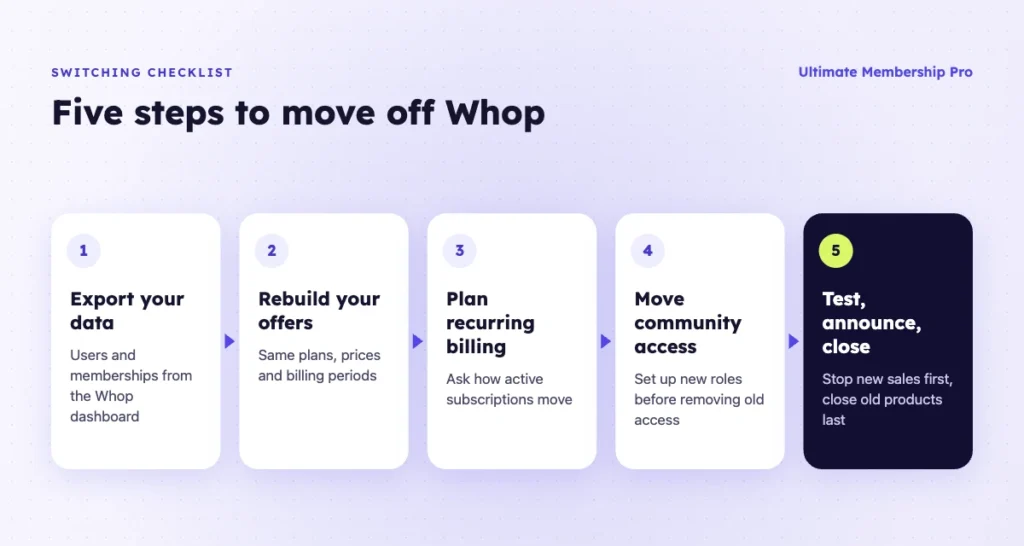
- Export your data. In the Whop dashboard, filter and export your users and memberships. It includes names, emails, status, plans and dates.
- Rebuild your offers. Recreate each product and plan with matching prices and billing periods, and move videos, files and pages.
- Plan the recurring billing move. Before you announce anything, ask the new platform how it handles active subscriptions.
- Move community access. If you sell Discord access, set up the new bot or integration with its own roles, and remove Whop’s access only after members have moved.
- Announce, test and close. Buy a test membership, check access and receipts, then email members a date and link. Stop new sales on Whop first and close old products last.
If you move to WordPress, the Ultimate Membership Pro support team helps you migrate from Whop with its own tools; ask them how your active recurring subscriptions will be handled for your payment gateway. You can also import members from a CSV file with a Membership and start and expiry dates. Imported Memberships don’t create orders or gateway subscriptions, so recurring payments don’t start from the import alone.
Ready when you are
Turn visitors into paying members with Ultimate Membership Pro
Launch your membership website, protect exclusive content and automate subscription payments, all in one WordPress plugin.
- 14-day money-back guarantee
- Unlimited members
Frequently asked questions
What is the best alternative to Whop?
It depends on what you sell. LaunchPass is the closest match for paid Discord, Telegram or Slack access. Skool, Circle and Podia suit courses with a community, and Gumroad, Payhip and Lemon Squeezy suit digital products. A WordPress membership site suits sellers who want their own domain and member list.
What are some sites like Whop for paid Discord access?
LaunchPass sells paid access to Discord, Telegram and Slack communities and, on Premium, removes roles when members cancel. Patreon links each membership tier to a Discord role and removes it when a payment is declined or a member cancels. On Whop itself, buyers link Discord to claim server access, and its TradingView app handles indicator access.
How much does Whop charge sellers?
As of October 2026, Whop’s fee page lists 2.7% + $0.30 per successful domestic card transaction, with no setup or monthly fees and no separate platform fee. International cards add 1.5%, currency conversion 1%, and a next-day ACH payout costs $2.50. Optional billing and tax tools cost extra.
Are there cheaper Whop alternatives?
On fees per sale, few Whop alternatives are cheaper. A self-hosted WordPress site with Stripe pays similar card fees plus Stripe Billing’s 0.7% on subscriptions, and fixed costs for hosting and a plugin plan. Most hosted alternatives add a monthly plan, a percentage per sale, or both, so compare them at your actual revenue.
Can I run a Whop-style community on WordPress?
Yes, with some assembly. A membership plugin such as Ultimate Membership Pro handles sign-up, payments and access, and a separate forum or community plugin handles discussion, with its pages locked by Membership. Ultimate Membership Pro has no Discord or Telegram integration and no built-in chat.
Can I move my Whop members to another platform?
Yes. Whop lets you export users and memberships with names, emails and plan details. If you move to WordPress, the Ultimate Membership Pro support team helps you migrate with its own tools; ask them how your active recurring subscriptions will be handled for your payment gateway. Keep the Whop product open until members have moved.