Digital Membership Card: Benefits and How to Create One


A digital membership card benefits your membership site by giving members proof of membership they can open on any device, with no printing or shipping. It also cuts admin work, lets you share perks and renewal reminders, and can be scanned by QR code or barcode at the door. Cards fit best for gyms, clubs and sites with partner offers.
New membership sites launch every day, so it pays to give members something that sets yours apart. A digital membership card is one simple way to do that: it shows people they belong, and it gives you a practical tool for perks, check-ins and renewals. This guide covers what electronic membership cards are, their benefits, when they make sense, and how to create one, including in WordPress.
What is a digital membership card?

A digital membership card is the electronic version of a plastic membership card. Like a physical card, it identifies the member and gives them access to perks, benefits and discounts. Instead of sitting in a wallet, it lives as a file, a page in the member’s account, or a pass in a mobile wallet app on their phone or computer.
You will also see them called electronic membership cards, virtual membership cards or mobile membership cards. They come in a few formats:
- A printable card or PDF that members print or save from your website
- A card page inside the member’s account on your membership site
- A pass in Apple Wallet or Google Wallet, usually created with a dedicated card service
- A card inside a membership card app that your organization or a provider runs
Many digital cards carry a QR code or barcode that staff can scan at the door or at a partner store, but a card can also show the member’s details as plain text. With the right membership card template, you can match the card to your brand or to a partner organization.
Large brands such as Starbucks and Sephora run their loyalty programs through digital cards, but cards are not limited to retail. Gyms, clubs, associations and online communities use them too, and offline businesses benefit as much as online ones.
Why do you need a digital membership card?
A digital membership card lets you take the member experience a step further without much effort, and creating one is easier than most site owners expect.
The most important considerations are design and delivery. If members find the card useful and easy to open, it becomes one more reason to stay, which helps you keep member retention high.
Benefits of digital membership cards

Here is how digital membership cards can help your members and your business.
More convenience for your members
Digital membership cards cut the admin work of running a community. Every member gets the card in their member profile and can open it from any device, so there is nothing to mail out and nothing to lose. For members, a digital card means their privileges are always with them, on the phone they already carry.
Immediate updates and changes
With digital membership cards, you can change a card’s details almost instantly. When perks change, a membership is renewed or a member moves to a different tier, the card updates without reprinting. This matters most when you have a lot of members, because everyone stays up to date with no extra effort from you.
Higher security levels

Have you ever had your wallet stolen? A plastic card can be lost or used by someone else, while a digital card sits behind the phone’s lock screen and the member’s login.
If a member cancels or loses their phone, you can revoke or block the card online instead of waiting for a plastic card to expire. For events or sensitive content, you can add extra checks, such as two-factor authentication on the member’s account or a photo ID at the door.
Eco-friendliness
Producing and shipping a card for every member takes time and money, and the process repeats for every lost or damaged card. Whatever the card is made of, the environment pays for it.
A fully digital membership reduces that waste, and so does sending promotions online instead of printing them.
Time and money savings
With digital membership management, you help your budget as well as the environment. You cut the costs of printing, shipping and administration, and you spend less time handling card requests.
More possibilities for branding and design
Digital cards are easy to customize with the logos, colors and fonts that match your brand identity. They also allow more personalization than printed cards, such as the member’s name, membership type and the date they joined. A well-designed card reinforces your brand every time a member opens it, so start with a clear membership logo.
Full use of smartphone technology
Most members already know how to use a mobile membership card, because they keep boarding passes, tickets and loyalty cards on their phones. Instead of emailing every benefit and promotion, you can show them on the card, where members spot and use them sooner. Members can follow their perks without calls or long emails.
If you want members to keep the card next to their tickets, choose a card service that creates Apple Wallet and Google Wallet passes.
Easier membership management
Moving to digital cards means managing them online: issuing cards, revoking them and keeping member information current. That makes the process more efficient, not more complicated. You can let members know they have earned new perks, remind them about expiring memberships, and block cards for users who no longer have access. A good member portal does most of this work for you.
Location does not matter either. Wherever members are, they can update their information and use their member card.
Stronger online presence
Keeping your online presence in line with your physical one reinforces your branding. Members notice when you keep up with the times, and many prefer a card on their phone to another piece of plastic. New members appreciate the extra effort too, especially if you already run an established business.
Partner perks and affiliate marketing
Digital membership cards are the key to valuable partnerships. You can link the card to special offers and discounts from partner merchants, so members get perks they can only access with their card. That gives members a reason to stay active, gives partners a way to reach your audience, and brings more income your way.
Cards also pair well with loyalty programs, rewards and the digital products you sell. Track which partner offers members redeem, so you know which partnerships are worth keeping.
Usage tracking
When your card system records scans or check-ins, the card becomes a useful source of data about your members. If a member is active, you can send incentives based on past activity. If they have gone quiet, you can reach out before they lapse. Follow how the cards are used, and you will know what to do next.
Higher renewal rates
A digital card shows the expiration date clearly, and your membership system can remind members before it runs out. Members can then renew in a click or two instead of filling in a paper form. In Ultimate Membership Pro, for example, members get an email before access expires and can renew an expired Membership in one click from their account page.
The same member experience as physical cards, or better

Digital membership cards live on smartphones, and that is their biggest advantage. They do most of what a magnetic-stripe card does, faster and at a lower cost.
Many businesses offer pre-negotiated discounts to members, and the member only needs to show the card or let staff scan its QR code or barcode. Easy perks like these keep members satisfied and encourage them to use their membership more often.
Does every membership business need digital membership cards?
It depends on your line of business and on how you expect members to use the card. Digital cards earn their place when members have something to do with them: show the card at a venue, check in at an event, or unlock discounts and partner offers.
Say you run an online business and sell courses you created. If the card would only record who has taken your courses, it adds little value, because your course platform already tracks completion. On the other hand, if you run a larger membership site where people access courses from partners, several stores or member discounts, a digital card helps them keep track of codes and offers in one place.
Digital cards are especially useful for offline organizations such as gyms, clubs, associations and exclusive venues, where staff need a quick way to check who is a member. Whatever your model, do not add a card just for the sake of it. Weigh whether it gives members real value before you offer one.
How to create a digital membership card
You have four main ways to create digital membership cards, depending on your platform, your budget and how advanced the card needs to be.
Use a WordPress membership card plugin
If your membership site runs on WordPress, the simplest option is a membership plugin that creates the cards for you. Ultimate Membership Pro includes WordPress membership cards that your members can print, filled in from each member’s account, so you never design cards one by one.
Each card shows the member’s name, their Membership and its expiry date, the date they became a member, and their member ID. You can start from one of three designs, choose the card size, add your logo, rename the labels on the card, and give cards only to the Memberships you pick. Members find the card in a Membership Cards tab on their account page, and you can also show it anywhere on your site with a shortcode. From there, members print it or save it as a PDF from their browser, on any device.
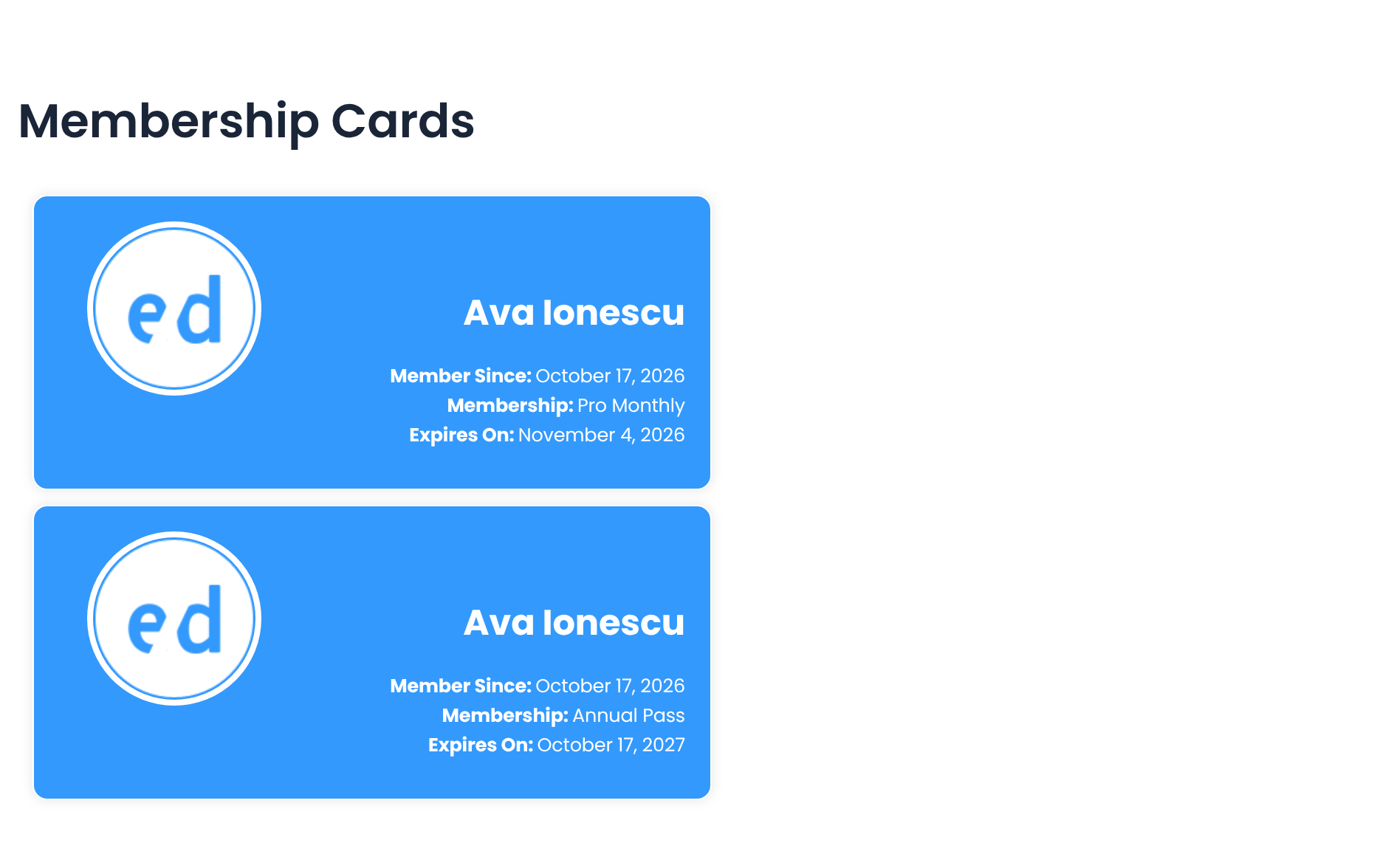
Keep in mind what these cards are not: they show the member’s details as text, without a QR code or barcode, and they are not Apple Wallet or Google Wallet passes. If you need scannable cards or wallet passes, pair your site with a dedicated card service. The Membership Card add-on is included in every plan, and the membership card documentation walks you through the setup.
Use a membership card app or wallet pass service
Companies that specialize in digital cards can create passes that members add to Apple Wallet and Google Wallet, or run a dedicated membership card app. When you compare providers, check that they let you use your own template and support the wallet apps your members use. Look for useful extras, such as member ID numbers, expiration dates, QR codes and branding options. Pricing varies by provider, so compare a few before you decide.
If you would rather offer an app of your own, read this guide on how to build a membership app.
Design the card yourself or hire a designer
For simpler designs, you will not need to spend much. Online tools such as Canva, Adobe Express or even Microsoft Word let you create a branded card and upload it to your membership platform. A graphic designer costs more, but gives you a more polished, professional result. Either way, a static design does not fill in member names or IDs on its own, so you need a plugin or a developer if you want each card personalized.
Get developer help
If the membership card needs to be more sophisticated, for example with live check-ins, custom integrations or its own app, hire someone experienced in app development. You get all the bells and whistles and an even better member experience, at a higher cost.
What to include on a digital membership card
Whichever method you choose, make sure the card includes the information staff and partners need:
- The name and logo of your organization, association or community
- The card holder’s name, member ID and, if needed, contact details
- The membership type or tier
- The expiration date
- A QR code or barcode, if staff or partners need to scan the card
A few tips help members actually use the card:
- Check that your card tool or wallet app supports the format you want
- Keep the layout simple, so the card is easy to read on a small phone screen
- Give members clear instructions on how to open and use the card
- Make sure there are real benefits to holding the card, such as access to higher-tier paywall content or discounts on your site and partner sites
Conclusion
Moving away from physical membership cards may feel strange at first, but it is a step most organizations will take sooner or later. A digital membership card saves you printing and admin work, keeps perks and renewal dates in front of members, and gives them proof of membership on the phone they already carry. If your members have real uses for a card, it is worth offering one. For more ways to grow your community, browse these membership site ideas.
Frequently asked questions
Are digital membership cards better than physical cards?
For most online memberships, digital cards are the more practical choice. They cost nothing to print or ship, update instantly when perks change and are always on the member’s phone. Physical cards still suit members who want something to hold, so some organizations offer both formats.
How do members use a digital membership card?
Members open the card on their phone or computer, from a digital wallet, a membership card app or their account page. They show it at a venue or partner store, where staff check the details or scan a QR code or barcode. Online, the card can carry discount codes or links to member-only offers.
What information should a digital membership card include?
A good card shows your organization’s name and logo, the member’s name, the membership type, an ID number and an expiration date. Add a QR code or barcode if staff need to scan it at the door. Keep the layout simple so the card is easy to read on a small phone screen.
Can members add a digital membership card to Apple Wallet or Google Wallet?
Many digital card services let members save their card as an Apple Wallet or Google Wallet pass, so it opens like a boarding pass. Check that your provider supports the wallet apps your members use before you launch. Printable cards, like the ones Ultimate Membership Pro creates, are not wallet passes, but members can save them as a PDF on their phone.
How do you create a membership card in WordPress?
Use a WordPress membership plugin that creates a card for each member automatically. Ultimate Membership Pro fills each card from the member’s account with their name, Membership, expiry date and member ID. You choose one of three designs, add your logo and pick which Memberships get a card, and members print it or save it as a PDF from their account page.
Ready when you are
Turn visitors into paying members with Ultimate Membership Pro
Launch your membership website, protect exclusive content and automate subscription payments, all in one WordPress plugin.
- 14-day money-back guarantee
- Unlimited members
If you enjoyed reading this article about digital membership cards, you should read these as well: