Do You Really Need a Member Directory? Your A to Z Guide to Directories


A member directory is a searchable online list of the people in an organization, with a profile for each member: name, photo, role, expertise and contact details. You need one if your members benefit from finding and contacting each other, as in associations, alumni groups, chambers of commerce and professional networks. On WordPress, you can build one with a membership plugin.
The term “member directory” might sound like one of those old-school things you don’t hear about much anymore. If you imagine tall cabinets filled with paper cards and folders, then you might think a member directory isn’t necessary for the digital age.
But while the physical concept of a membership directory may no longer exist (in most cases at least), the need for a centralized record of members is still very much alive.
What does an online member directory look like these days? Why would you build one? And how do you do it?
This guide answers all these questions (and more). Read on to get the skinny on building a successful member directory.
What Is a Member Directory?
So, what exactly is a member directory? A member directory is an online list of members in an organization that provides basic information about each individual. This information can include name, contact information, email addresses, titles, expertise, interests, and more. Member directories can be used for networking purposes and provide potential members with an easy way to learn about the organization and its people.
Furthermore, member directories are sometimes a way to provide the public with information. For example, the Better Business Bureau uses a directory to provide customers with information about local businesses so they can make informed decisions.
Why Should You Build a Member Directory?
Building a member directory can be beneficial in many ways. It can help you:
Be More Transparent
A member directory can be a great way to provide potential members with more information about your organization. It also shows new or potential customers that you are open and honest about who is part of your group.
Build a Community
A member directory is often the heart of a membership site. It’s a great way to foster relationships between members and build stronger community ties. This can help you grow your online presence (and eventually monetize it with paywall content, merchandise, and so on.)
Network and Connect with Other Businesses
This is, in fact, one of the core purposes of a member directory. It can help you find new business contacts and connections, which can be extremely beneficial in the long run.
Showcase Your Expertise
Want to gain more authority in your field? Joining a member directory can help you do just that. It can give you the opportunity to showcase your work, skills, and knowledge and get recognition from industry leaders.
Want to level up and be perceived as one of the ultimate authorities in your niche? Build your own member directory and attract the best talent in your field.
Help Members Grow Their Businesses
…And grow yours in the process too. Member directories are a great meeting point for demand and supply. They help members promote their products, services, and expertise, and create new opportunities for collaboration.
Types of Membership Directories (and Examples)
Not all member directories are created the same.
OK, that might be a bit of an overstatement. Most member directories are quite similar in terms of structure. In essence, they all provide basic information about members and their roles in the organization, as well as contact details.
However, depending on the specific purpose of a member directory, it might show slightly different characteristics. Some of the most common types of member directories include:
Professional Associations
These are often used by industry organizations or associations to show the expertise of their members. Union and trade associations are sometimes included in the same “professional member directory” category. Bar associations and medical societies, for example, commonly keep directories of their member lawyers or doctors, often with a members-only section for contact details. If you run an association, see how membership sites for associations and clubs handle dues, renewals and directories in one place.
Business Directories
These feature information about businesses in a certain sector or geographic area. They are very useful for customers looking for local services. Some examples here include Yelp, TripAdvisor, and the Better Business Bureau.
Alumni Directories
These are often used by colleges and universities to keep track of all their alumni. These member directories normally include information about the students’ degrees and studies as well as their contact details. A good example is the (very aptly named) Harvard Alumni Directory, where you can look up the people who graduated from Harvard.
Chambers of Commerce
These are used by business organizations to list their members and the businesses in their area. Most local chambers of commerce publish an online member directory, so residents and other businesses can find local companies by category and contact them directly.
It is worth noting that these are some of the most common types of member directories, but not all of them. Essentially, member directories can take as many shapes as industries and niches there are.
How to Build a WordPress Member Directory
The easiest way to build a member directory is through a WordPress website. Essentially, you will need:
- A domain name
- Hosting
- A WordPress site (the most basic ones can be built without coding)
- A membership site plugin (such as Ultimate Membership Pro, which includes a WordPress member directory)
Additionally, you might want to add pricing levels to your member directory. For example, everyone could see a basic listing, while only paying members see full profiles and contact details.
Setting Up a Membership Directory with Ultimate Membership Pro
With Ultimate Membership Pro, the directory is built from the profile data members already give you when they sign up. A typical setup looks like this:
- Decide which profile fields you need. Add custom fields to your registration form, such as company, job title, location or specialty. Field types include text, dates, dropdowns, checkboxes and file uploads, and each field can appear on the sign-up form, on the profile, or only to admins.
- Build the members list. Choose which fields each member card shows, pick a ready-made template and color scheme, and display members as a grid or a slider, with pagination for large lists.
- Add search and filters. Let visitors search the directory and filter it by your own custom fields, for example by city or industry.
- Place the directory on a page. The directory is added with a shortcode, and each member card links to that member’s public profile.
- Decide who can see it. Keep the directory public, or restrict the page to chosen Memberships so other visitors are redirected or see a message you write.
Once you have all the pieces, you can start adding members to your directory and fine-tuning the design. Members can update their own details from their account page, so the directory stays current without you editing every profile by hand. Public profiles can show a photo, the member’s website and other fields you choose, so visitors get a more vibrant idea of who you are as an organization.

What Information to Include in a Member Directory
Every type of member directory has a different information structure. For example, a professional association directory might include a member’s qualifications, while an alumni directory might include details about the courses they took.
A Chamber of Commerce member directory usually includes just contact information (and often from just one or two representatives of each business). But at the same time, a business directory opened to the public (such as the Better Business Bureau) might include other types of data, such as credibility scores or reviews, both from members and customers.
Whatever type of member directory you want to build, though, there are some elements you should include in any type of member directory:
- Name
- Picture
- Contact information
- Professional qualifications, accreditations, specializations or courses taken
- Links to their website and social media profiles
Member Directory Privacy: Best Practices
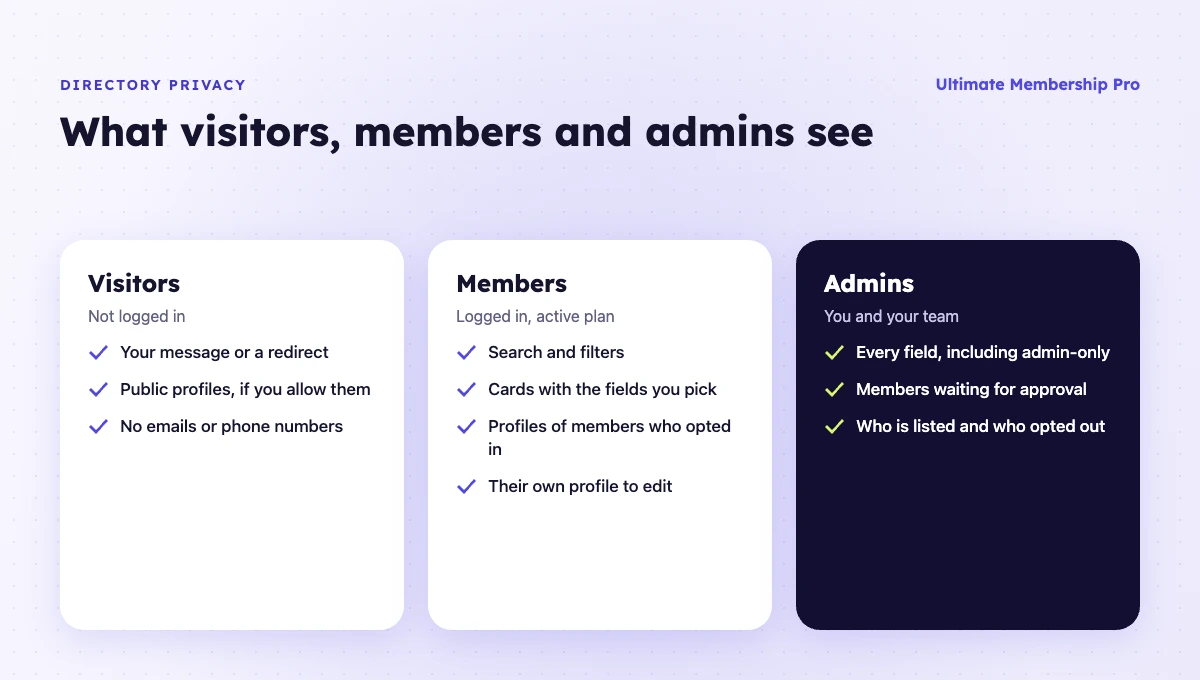
A member directory publishes personal data, so privacy needs to be part of the plan from day one. Members join to be found by the right people, not by spammers and scrapers. A few practices keep everyone comfortable:
- Ask for consent. Tell members at sign-up that their profile will appear in the directory and what will be shown. If you have members in the EU or UK, data protection rules such as the GDPR apply to personal data you publish.
- Show only what’s needed. A name, photo and specialty are often enough for a public listing. Keep phone numbers and email addresses for logged-in members, or leave them out and let members add a website instead.
- Control visibility per field. Some fields belong on the public profile, others only in the admin area. Decide this for each field before you launch, not after members complain.
- Consider a members-only directory. Restricting the directory page to members protects contact details and gives people one more reason to join.
- Let members edit their own profiles. People change jobs, cities and email addresses. Self-service editing keeps the directory accurate and gives members control over their data.
- Approve new members before they appear. If anyone can register, hold new accounts for approval so fake profiles never reach the directory.
Top 5 Ways to Promote Your WordPress Member Directory
Say you’ve already set up your member directory. And while the website might look great (and function just as well), there’s one small problem: a member directory isn’t much without…members.
Here are some tips to help you promote your member directory and attract more people to it:
Build a Social Media Strategy
“Don’t build a house on rented land” is sound advice, and it’s especially true with social media. You should always strive to own the conversation, as this allows you to control both the message and the context. And social media isn’t particularly friendly with allowing content creators to actually control…anything.
Basically, if your entire business strategy ends at social media, you need to connect the dots and bring people back to your site, as opposed to relying on social media to build and support your community. Make sure your social media strategy will always circle back to channels you can own: your site and email.
Create and Share Free Content
Have you ever noticed that the most popular content creators on the web tend to give away a lot of their content for free? That’s because it works. People love (and appreciate) getting something for free.
Think of ways to give away free content and resources to help your members and attract new ones. For example, you could produce content guides and tutorials that are relevant to your members, or you could offer discounts and promotions for those who join your directory.
Once you have a solid audience for your free content, you can start to engage members with exclusive content (and draw them towards your membership site.)
Become Part of Other Communities
To attract more people to your member directory or membership site, you should first make sure you’re part of other communities. Of course, you don’t want to spam other places with your links, but it’s important to become an active member of other communities related to your area of expertise. That way, you can share your knowledge, gain people’s trust, and slowly attract them toward your own personal brand (and thus, towards your website too.)
Incentivize People to Spread the Word
People love rewards and incentives, so it makes sense to create a referral program with your member directory. That way you can encourage people to spread the word about your directory. You could offer discounts, free content, or exclusive access to certain areas of your website for each successful referral.
Use Social Proof Wisely
People are social animals. They like places where other people hang out.
Think of how when you travel, you’re more tempted to stop and eat somewhere if there’s already a line of people waiting for it. It’s even better when you hear someone else raving about the place.
The same applies to any member directory or membership site. You can use member testimonials or success stories to show people what other members have achieved through your directory, and encourage them to join in. Sure, no one likes a humblebrag, but using social proof smartly can help you grow your audience.
Member Directories: Conclusion
In short, member directories aren’t dead. They’re alive and well, but have taken more advanced forms. They’re a great way to build, grow, and monetize your community, and building a WordPress member directory is one of the easiest ways to tap into this opportunity. Of course, your work won’t end when the site’s published (promoting your directory is crucial), but all in all, WordPress and a good community plugin can give you a solid base from which you can launch your success.
Frequently asked questions
What is a membership directory?
A membership directory is a list of the members of an organization, usually published online and searchable. Each entry shows basic profile details such as name, photo, role, company, expertise and contact information. Associations, alumni groups, chambers of commerce and clubs use membership directories so members can find and contact each other.
Is a member directory the same as a membership directory?
Yes. Member directory and membership directory are used interchangeably. Both describe a list of an organization’s members with their profile details. Some organizations call it a member roster or members list. What matters is the same in every case: who is listed, which details are shown, and who is allowed to see them.
Should a member directory be public or private?
It depends on its purpose. A public directory works when members want to be found by customers, as in a chamber of commerce. A members-only directory suits networking groups and associations, because contact details stay protected and access becomes a benefit of joining. Many sites combine both: a public listing and private contact details.
What should a member directory include?
Most directories include each member’s name, photo, contact information, professional details such as qualifications or specialties, and links to a website or social profiles. Add search and filters for the fields people actually look for, such as location or industry, and only publish personal details members have agreed to share.
How do I create a member directory in WordPress?
Install a membership plugin with a directory feature, add the profile fields you need to your registration form, then build the members list and place it on a page. In Ultimate Membership Pro, you choose the fields each member card shows, add search and filters, and can restrict the directory page to chosen Memberships.
Ready when you are
Turn visitors into paying members with Ultimate Membership Pro
Launch your membership website, protect exclusive content and automate subscription payments, all in one WordPress plugin.
- 14-day money-back guarantee
- Unlimited members
You May Also Like
Community Membership Sites Are Thriving. Here’s How to Build Yours
Build a Membership App to Maximize Your Content’s Potential & Earn More with Your Community