Best WordPress Membership Plugins Compared (2026)


The best WordPress membership plugins are Ultimate Membership Pro, MemberPress, Paid Memberships Pro, MemberMouse, WishList Member and Restrict Content Pro (now Kadence Memberships Pro), with ARMember, SureMembers, WooCommerce Memberships, Ultimate Member and Simple Membership as strong options for specific needs. All of them lock content and manage members inside WordPress; they differ in pricing model, free versions, payment gateways and how they handle recurring billing and drip content.
Choosing well matters, because switching later is a migration: members, active subscriptions and payment details all have to move. This guide compares 11 membership plugins on who each one is for, its key features, its pricing model and starting price, and one honest limitation. Ultimate Membership Pro is listed first because it is the plugin this site makes, and its description sticks to features you can check on its own pages.
Membership plugins compared at a glance
The table below shows how the 11 best WordPress membership plugins handle the features most membership sites need. Prices are the lowest paid plan shown on each vendor’s official pricing page as of October 2026.
| Plugin | Best for | Free version | Recurring payments | Content dripping | Starting price |
|---|---|---|---|---|---|
| Ultimate Membership Pro | One plugin for payments, access and members | No (free 24-hour demo) | Yes, built in | Yes | Sold as annual plans |
| MemberPress | Creators selling content and courses | No | Yes | Yes | $199.50/year |
| Paid Memberships Pro | Starting free and extending with add-ons | Yes | Yes | Yes (Series add-on) | $49/month or $499/year |
| MemberMouse | Marketers who rely on upsells and automation | No | Yes | Yes | $149.50/year |
| WishList Member | Sites that sell through an external cart | No | Through payment integrations | Yes | $149.50/year |
| Restrict Content Pro (now Kadence Memberships Pro) | Simple sites built with Kadence | Yes (Kadence Memberships) | Yes | Yes (Pro) | See vendor site |
| ARMember | Profiles, directories and social login on a budget | Yes (Lite) | Yes | Yes | $89/year |
| SureMembers | Access control for SureCart or WooCommerce sites | No | Through SureCart or WooCommerce | Yes | $69/year |
| WooCommerce Memberships | Stores selling products and memberships | No | With WooCommerce Subscriptions | Yes | $199/year |
| Ultimate Member | Communities, profiles and directories | Yes | Through the Stripe integration | Not listed | $276/year |
| Simple Membership | Basic paid access at no cost | Yes | Yes (PayPal, Stripe) | Not listed | Free (paid add-ons) |
Prices change often, so confirm them on the vendor’s site before you buy. Not listed means the vendor’s own feature pages don’t mention that feature.
How to choose a WordPress membership plugin
Before you compare brand names, write down what your membership has to do on day one and a year from now. These criteria separate the plugins in this list.
Content restriction
Check what the plugin can lock: whole pages and posts, custom post types, categories, files, URLs, part of a post or menu items. Then check what a visitor without access sees, such as a teaser, a login form or an upgrade message. Partial restriction lets you show a preview and keep the rest for members, which usually converts better than a blank wall.
Payments and recurring billing
Confirm that the plugin charges recurring payments automatically on the gateway you want, and that the gateway works in your country and currency. Some plugins process payments themselves; others hand checkout to WooCommerce, SureCart or an external cart. If you plan to use trials, coupons, prorated upgrades, taxes or invoices, check that they are included rather than sold as extras.
Content dripping
Drip content releases lessons or posts on a schedule, for example a set number of days after someone joins or on a fixed date. It suits courses, challenges and coaching programs, and it gives members a reason to stay subscribed. In some plugins dripping is built in; in others it is a paid add-on or not offered at all.
Member self-service
Members should be able to sign up, log in, update their card, change plans and cancel without emailing you. A good account page cuts support requests and helps recover failed payments. Look at the registration forms too: custom fields, email verification and social login all affect how many visitors finish signing up.
Integrations
List the tools the plugin has to work with: your email marketing service, page builder, LMS, WooCommerce store or Zapier. A native integration is usually more reliable than a workaround, and it keeps member data in sync when someone joins, upgrades or cancels.
Pricing model and total cost
Membership plugins are sold in very different ways: a free core with paid add-ons, annual plans, monthly plans, lifetime licenses or bundles with other products. Compare the plan you would actually need, not the cheapest one, and check site limits, transaction fees and which features sit in higher tiers. If you want to start at no cost, see this guide to free WordPress membership plugins.
Support, updates and migration
Check how often the plugin is updated, what support comes with your plan and whether you can import and export members with their subscription dates. These details matter most on the day something breaks or you outgrow the tool.
The 11 best WordPress membership plugins reviewed
Each review covers who the plugin suits, its key features, its pricing model and starting price, and one limitation to weigh before you buy. Features and prices come from each vendor’s own website.
1. Ultimate Membership Pro

Ultimate Membership Pro is a WordPress membership plugin built around Memberships: each Membership sets a price, a billing cycle and the content it unlocks, and you can create as many as you need. It covers the whole membership side of a site in one plugin, from sign-up forms and recurring billing to content restriction, drip content and member accounts, and every plan includes unlimited members and Memberships.
- Best for: creators, course sellers, associations and businesses that want payments, access and member management in one plugin, including sites that need gateways beyond Stripe and PayPal.
- Key features: recurring subscriptions with free or paid trials, coupons, prorated upgrades, taxes and invoices; content restriction for pages, posts, custom post types, categories, files, URLs and parts of a post; drip content by days after sign-up or on a fixed date, with email notifications; a member account page, a member directory, membership cards and badges.
- Payments: Stripe, PayPal, Braintree, Mollie, Authorize.Net, 2Checkout, PagSeguro and bank transfer on every plan, with PayFast, Paystack and Razorpay added in the Full Package. The payment gateways page shows which ones bill members automatically.
- Integrations: WooCommerce, Elementor, Divi, Mailchimp, ActiveCampaign, ConvertKit, MailPoet, Zapier, BuddyPress and WPML (ConvertKit and MailPoet with the Full Package), plus the others listed on the features page.
- Pricing model: sold as annual plans: Pro for one site, Full Package for three and Agency for ten, each with a 14-day money-back guarantee. Pro Add-ons such as My Group Accounts, Pay per Post and Two-Factor Authentication come with Full Package and Agency. Current prices are on the pricing page.
- Limitation: there is no free version (only a free 24-hour demo site), and advanced options such as group accounts and pay per post require the Full Package or Agency plan.
2. MemberPress

MemberPress is one of the best-known paid membership plugins for WordPress. It combines access rules, subscriptions, coupons and pricing pages in one plugin, adds a course builder through MemberPress Courses, and is straightforward to set up, which is why many first-time membership site owners start with it.
- Best for: creators who sell content and courses and want one established, all-in-one tool.
- Key features: access rules by membership or purchase, drip content with timed releases and access expiration, automated subscription billing, coupons with expiry dates and usage limits, MemberPress Courses, and Corporate Accounts for selling bulk memberships to teams.
- Pricing model: annual plans (Launch, Growth and Scale), starting at $199.50/year for Launch.
- Limitation: the Launch plan adds a 4.9% transaction fee on each successful payment (Growth and Scale don’t), and there is no free version.
Comparing the two directly? Read Ultimate Membership Pro vs MemberPress, or see why site owners switch on the MemberPress alternative page.
3. Paid Memberships Pro

Paid Memberships Pro (PMPro) is an open-source membership platform. The core plugin is free to self-host, and the paid plans add a license key for premium add-ons and support. The free plugin is no longer listed on WordPress.org, so you download it from the vendor’s site.
- Best for: developers and site owners who want to start free and extend the plugin with add-ons or custom code.
- Key features: membership levels, recurring payments with an order recorded for each successful charge, Stripe, PayPal and offline payments, selling levels through WooCommerce, and scheduled releases through the Series for Drip Feed Content add-on.
- Pricing model: free core; the Standard plan costs $49/month or $499/year for one site.
- Limitation: much of the functionality lives in separate add-ons you install and configure one by one, and the paid plans cost more than most plugins in this list.
If you are moving off PMPro, the Paid Memberships Pro alternative page compares it with Ultimate Membership Pro.
4. MemberMouse

MemberMouse is a membership platform for WordPress built with marketers in mind. Besides memberships and content protection, it sells products with one-click upsells and automates follow-up with push notifications, which is why it is often compared with MemberPress.
- Best for: info-product businesses that depend on upsells, automation and revenue reporting.
- Key features: time-release (drip) content, recurring subscriptions, one-click upsells, push notifications and several billing integrations.
- Pricing model: annual plans (Basic, Plus and Pro), starting at $149.50/year for Basic.
- Limitation: there is no free version, and the marketing-focused feature set is more than a simple content membership needs.
For a closer look, read MemberPress vs MemberMouse or the roundup of MemberMouse alternatives.
5. WishList Member

WishList Member is a long-established WordPress membership plugin whose strength is its range of integrations. It connects to payment providers such as Stripe, PayPal, 2Checkout, Authorize.Net, ClickBank, Recurly, SamCart, ThriveCart and WooCommerce, and to email tools such as Mailchimp, ActiveCampaign, ConvertKit, AWeber and MailerLite.
- Best for: marketers who already sell through a cart such as ThriveCart or SamCart and want WordPress to handle member access.
- Key features: content drip and posts scheduled for an exact date, monthly subscriptions through its payment integrations, and integrations with LMS plugins including LearnDash, Tutor LMS, LifterLMS, Sensei LMS and WP Courseware.
- Pricing model: annual plans (Basic, Plus and Pro), starting at $149.50/year for one site.
- Limitation: billing runs through third-party carts and gateways, so how recurring payments behave depends on the integration you choose, and there is no free version.
6. Restrict Content Pro (now Kadence Memberships Pro)

Restrict Content Pro is now Kadence Memberships Pro, part of the Kadence product family. Its free edition, Kadence Memberships (formerly Restrict Content), is on WordPress.org and already covers membership levels, auto-renewals, upgrades and downgrades, member emails, printable invoices and Stripe payments.
- Best for: simple, clean membership sites, especially if you already build with Kadence.
- Key features: membership levels, auto-created registration, account and profile pages, auto-renewals, CSV export, WooCommerce product restriction and shortcodes for restricted content; the Pro edition adds add-ons such as drip content.
- Pricing model: free edition on WordPress.org; Kadence Memberships Pro is sold by Liquid Web; check current pricing on the vendor’s site.
- Limitation: drip content and other advanced features need the paid Pro edition.
Switching from it? See the Restrict Content Pro alternative page, or read how it stacks up in Restrict Content Pro vs MemberPress.
7. ARMember
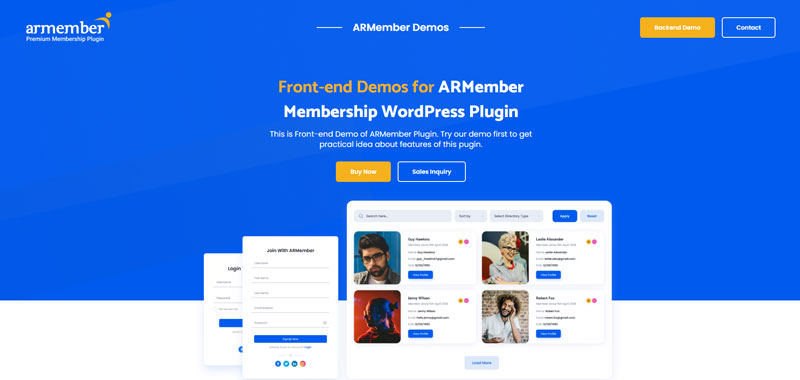
ARMember is an all-in-one membership plugin with a free Lite version and paid licenses sold yearly or for life. It packs recurring billing, drip rules, member profiles and directories into one plugin.
- Best for: budget-conscious sites that want member profiles, directories and social login alongside their memberships.
- Key features: unlimited membership levels with recurring billing, drip rules by date or subscription length, restriction by page, URL or shortcode, member profiles and directories, digital membership cards, social login and coupons; named gateways include Stripe, PayPal, Razorpay, Authorize.Net, Braintree, Paystack and 2Checkout.
- Pricing model: free Lite version; yearly plans start at $89/year for one site, and lifetime licenses are also offered.
- Limitation: the Lite version is no longer on WordPress.org (its listing was closed in February 2025), so you get it and its updates from the vendor’s site, and the long feature list takes time to configure.
8. SureMembers
SureMembers focuses on access control. It locks content and manages memberships, and it works with SureCart or WooCommerce for selling access, so checkout and billing stay in the store tool you already use.
- Best for: sites that already sell with SureCart or WooCommerce and need a lightweight access layer.
- Key features: locking pages, posts, categories or individual blocks, drip content, restricted downloads such as videos and PDFs, redirects to login, pricing or checkout pages, menu visibility rules, partial content and automations through OttoKit.
- Pricing model: annual plans starting at $69/year for one site, plus a lifetime plan.
- Limitation: it doesn’t process payments itself, so one-time payments, subscriptions and payment plans depend on SureCart or WooCommerce, and there is no free version.
9. WooCommerce Memberships
WooCommerce Memberships is the official WooCommerce extension for selling memberships in an online store. You can sell a membership as a product, include it with another purchase or assign it manually, and tie member perks to your catalog.
- Best for: stores that want member-only products, discounts and free shipping alongside gated content.
- Key features: restricting who can view or buy products, member discounts and free shipping, a Member Area, content dripping, CSV import and export, and expiration and renewal reminder emails; group access needs the separate Teams extension.
- Pricing model: $199/year from the WooCommerce Marketplace.
- Limitation: it requires WooCommerce, and automatic recurring billing needs WooCommerce Subscriptions as well.
Prefer to keep memberships in a dedicated plugin while still using your store? Ultimate Membership Pro can sell Memberships as WooCommerce products and give members product discounts; WooCommerce renewals use reminder emails, and automatic billing runs through its built-in checkout.
10. Ultimate Member
Ultimate Member is a free plugin for user profiles, registration and online communities, with more than 200,000 active installations on WordPress.org. Its core handles front-end profiles, registration and login forms, member directories and content restriction.
- Best for: community and directory sites where profiles matter more than payments.
- Key features: front-end profiles, a drag-and-drop form builder, custom fields and user roles, member directories, content restriction, conditional menus, and integrations with ForumWP and JobBoardWP.
- Pricing model: free core; paid plans start at $276/year, and the Stripe integration for paid memberships is listed in the Pro plan.
- Limitation: payments aren’t part of the core plugin, and content dripping isn’t listed among its features.
If you need paid Memberships on top of profiles, compare the two on the Ultimate Member alternative page.
11. Simple Membership

Simple Membership is a free plugin that does what its name says: free and paid membership levels, content protection and member management, without many extras. It is one of the most widely used free options, with more than 40,000 active installations on WordPress.org.
- Best for: small sites on a tight budget that need basic paid access.
- Key features: free and paid membership levels, email activation for free sign-ups, bulk protection of posts and pages, PayPal, Stripe and Braintree payments, recurring billing with PayPal and Stripe, and a free Social Login add-on.
- Pricing model: free; premium add-ons are sold separately on the vendor’s site.
- Limitation: Braintree handles one-time payments only, and content dripping isn’t listed among its features.
If you mainly sell courses: LMS plugins with membership features
Learning management systems (LMS) focus on lessons, quizzes and student progress, while membership plugins focus on payments, access and member management. If courses are your main product, an LMS may fit better, or you can pair one with a membership plugin. Three popular options are below; for a fuller list, see the best WordPress LMS plugins.
Thrive Apprentice

Thrive Apprentice is the course builder in Thrive Suite. It isn’t sold separately on Thrive’s pricing page: Thrive Suite costs $299/year or $149/quarter and includes all eight Thrive Themes plugins. That is good value if you also want the page builder and the other tools, but a lot to pay if you only need membership features.
LearnDash

LearnDash is one of the best-known LMS plugins for WordPress, built around course creation, quizzes and other learning features rather than membership management. It is now sold by Liquid Web in a package that also includes Kadence, The Events Calendar and Give, starting at $350 for one site, and you can try it free for 48 hours.
Tutor LMS
Tutor LMS has a free core plugin, and paid plans start at $199/year for one site, with lifetime licenses also available. Its feature list includes course subscriptions and site-wide memberships, so it can cover courses and simple memberships in one tool.
Plugins that complete a membership site
A membership plugin handles access and payments, but most membership sites also run a page builder such as Elementor or Oxygen, a security plugin such as Wordfence, an SEO plugin such as Yoast or Rank Math, a performance tool such as NitroPack, analytics such as Jetpack Stats and a lead-capture tool such as OptinMonster. They are useful companions rather than membership plugins, which is why they aren’t ranked here.
Check that your membership plugin works with the builder you choose: Ultimate Membership Pro, for example, integrates with Elementor, and the Full Package can lock individual Elementor widgets. Hosting matters too, because pages for logged-in members usually can’t be served from a page cache; see this guide to WordPress hosting for membership sites.
Which one should you pick?
Start from what you sell and how you want to charge for it. These are the best fits by use case:
- One plugin for payments, access and members: Ultimate Membership Pro. It handles recurring billing on many gateways, content restriction and drip content, and gives every member a Member Portal to manage subscriptions and orders.
- Content and course creators who want an established all-in-one tool: MemberPress, ideally on a plan without transaction fees.
- Starting on a zero budget: Paid Memberships Pro, Simple Membership or the free Kadence Memberships, accepting that key features may need paid add-ons later.
- An existing WooCommerce or SureCart store: WooCommerce Memberships or SureMembers.
- Marketing funnels with upsells or an external cart: MemberMouse or WishList Member.
- Communities and member directories: Ultimate Member or ARMember.
- Courses first, memberships second: LearnDash, Tutor LMS or Thrive Apprentice, or a membership plugin that supports online course memberships.
Conclusion
There is no single best WordPress membership plugin for every site, but there is a best fit for yours. Shortlist two or three of the best WordPress membership plugins from the comparison table, then check the details that cause problems later: whether recurring billing works on your gateway, what the plan you actually need costs, whether there are transaction fees, and how members manage their own subscriptions.
If you want payments, content restriction, drip content and member management in one plugin with unlimited members, Ultimate Membership Pro is worth testing first: you can try it on a free 24-hour demo site before you choose an annual plan.
Frequently asked questions
What is the best WordPress membership plugin?
It depends on what you sell. Ultimate Membership Pro suits sites that want payments, content restriction, drip content and member management in one plugin with many gateways. MemberPress is a popular all-in-one for creators, Paid Memberships Pro and Simple Membership have free cores, and WooCommerce Memberships fits online stores. Compare free versions, gateways and pricing models before you choose.
What is a membership plugin?
A membership plugin turns a WordPress site into a membership site. It adds registration and login, lets you lock pages, posts, files or parts of a post so only members can see them, and takes one-time or recurring payments. Most also handle member accounts, notification emails and drip content that unlocks on a schedule.
Is there a free WordPress membership plugin?
Yes. Paid Memberships Pro, Simple Membership, Ultimate Member, ARMember Lite and Kadence Memberships, formerly Restrict Content, all have free versions. Free cores usually cover basic restriction and payments, while drip content, extra gateways and integrations are often paid add-ons. Check those limits before you build a paid membership business on a free plugin.
Can I sell memberships with WooCommerce?
Yes. WooCommerce Memberships turns store products into memberships, and SureMembers can use WooCommerce for checkout. Automatic recurring billing with WooCommerce Memberships needs WooCommerce Subscriptions as well. Ultimate Membership Pro can also link WooCommerce products to Memberships; WooCommerce renewals rely on reminder emails, so automatic billing runs through its built-in checkout.
Do WordPress membership plugins charge transaction fees?
Most don’t, but check before you buy. The MemberPress Launch plan adds a 4.9% fee on each successful payment, while its Growth and Scale plans don’t. Your payment processor, such as Stripe or PayPal, also charges its own processing fees whatever plugin you use, so include both costs when you set your membership prices.
Can I switch membership plugins later?
Yes, but plan the move. Members, active subscriptions and payment details have to move to the new plugin, and recurring payments usually need to be reconnected at the gateway. Export members to CSV, test on a staging site and pick a plugin that can import users with their membership dates. Choosing carefully now saves you a migration later.
Ready when you are
Turn visitors into paying members with Ultimate Membership Pro
Launch your membership website, protect exclusive content and automate subscription payments, all in one WordPress plugin.
- 14-day money-back guarantee
- Unlimited members