Failed Payment Recovery for Membership Sites: A 5-Step Plan
Failed payment recovery for membership sites: why renewals fail, how retries and dunning emails work, grace periods, metrics and a WordPress setup.

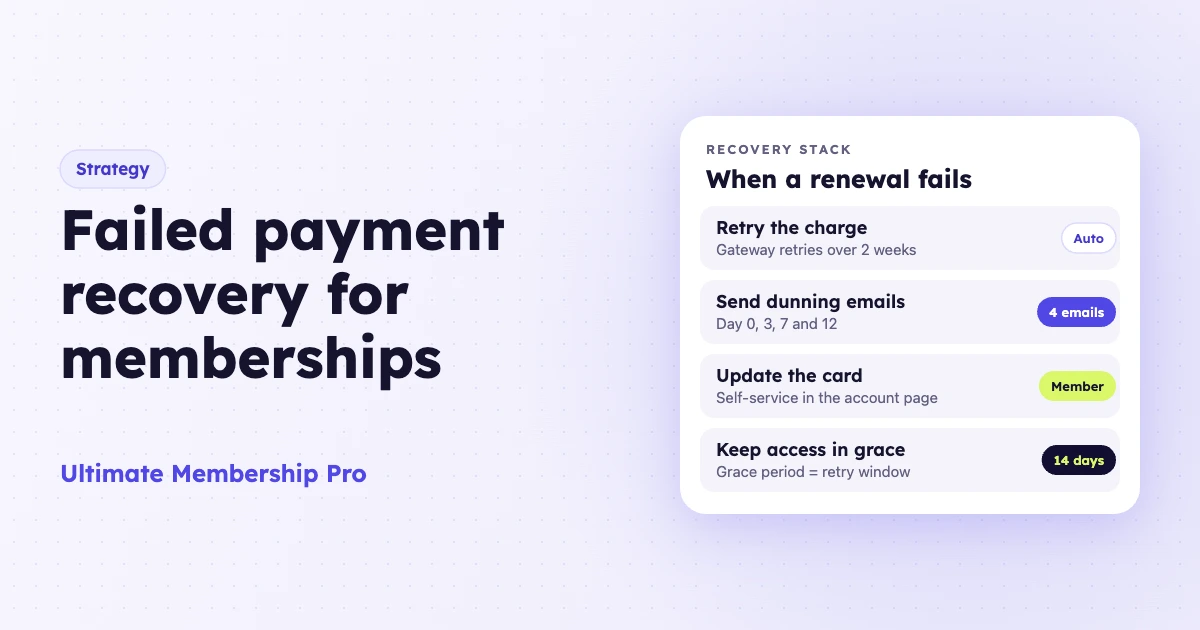
Failed payment recovery is how you collect a recurring membership payment after the first charge fails, so the member keeps paying and keeps access. It combines automatic retries, a short dunning email sequence, an easy way to update a card and a grace period that lasts as long as the retries. This guide covers why payments fail, the timing to use, the numbers to track and a WordPress setup.
A failed payment happens when the member’s bank declines a renewal charge or the charge is blocked before it reaches the bank. If nobody recovers it, the member leaves without choosing to. That loss is called involuntary churn. Dunning management is the part of recovery that talks to the member: the emails and notices that ask them to fix the payment.
Key takeaways
- A failed payment is a billing problem. Treat the member as someone who still wants to stay.
- Let your payment gateway retry the charge, and keep access open while it does.
- Send three or four short dunning emails, each with one link to the page where members update their card.
- Track your recovery rate and involuntary churn rate every month, so you know which step to fix first.
Why do membership payments fail?
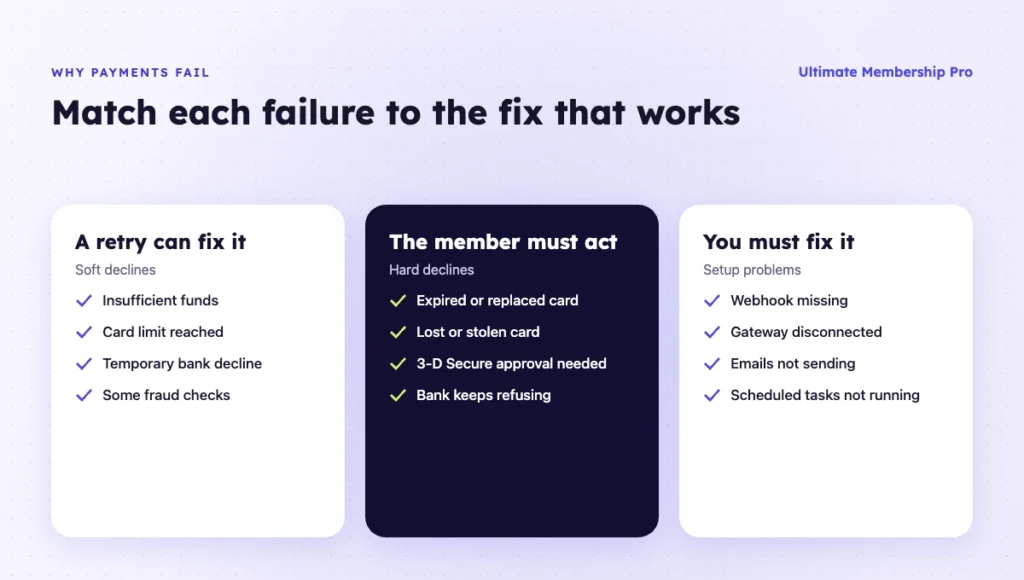
Membership payments fail for three groups of reasons: the bank declines the charge, the card on file no longer works, or something in your own setup blocks or loses the payment. Each group needs a different fix, so look at the decline reason before you act.
| Reason | What happens | Can a retry fix it? | What fixes it |
|---|---|---|---|
| Insufficient funds or card limit reached | The bank declines the renewal | Often, once money is back on the card | Automatic retries over several days |
| Expired card | The charge fails on the billing date | Only if the bank sends new card details | Automatic card updates or a new card from the member |
| Lost, stolen or replaced card | The bank refuses the old card number | No | Automatic card updates where the bank takes part, otherwise a new card from the member |
| Generic decline or fraud check | The bank flags the recurring charge as unusual | Sometimes | Retries, then the member calls the bank |
| Authentication required (3-D Secure) | The bank wants the member to approve the payment | No | An email with a link to confirm the payment |
| A problem in your setup | The gateway charges, but your site never hears about it | No | Fix the webhook or gateway settings |
A soft decline, such as low funds, can pass a few days later. A hard decline, such as a stolen card, fails every time. Stripe’s documentation lists the hard decline codes it cannot retry, including lost_card, stolen_card and authentication_required. For those, Stripe keeps the retry schedule but only charges again after the member adds a new payment method.
What are the five layers of failed payment recovery?
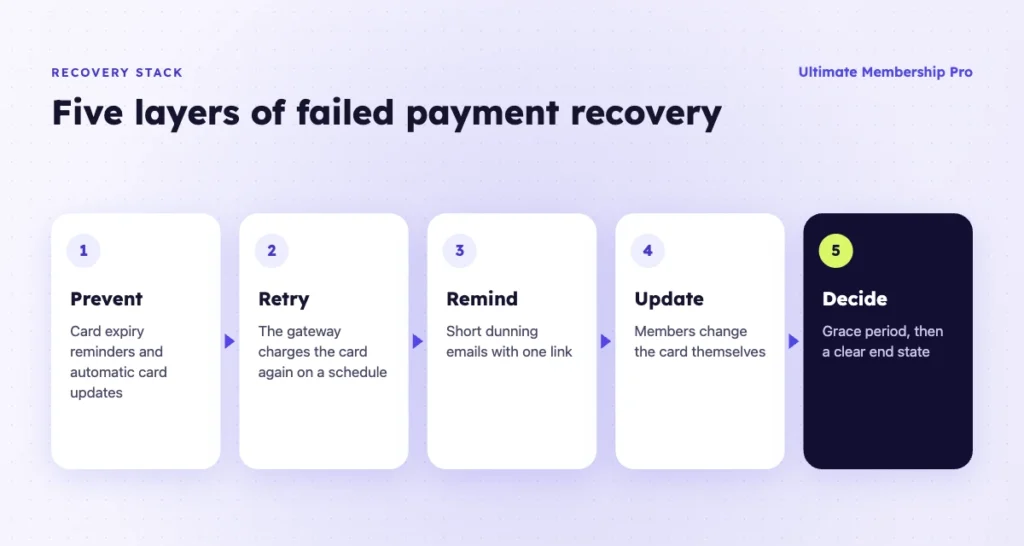
Failed payment recovery works in five layers, from the cheapest to the last resort. Each one catches payments that the layer before it missed.
- Prevention. Card expiry reminders and automatic card updates stop many failures early.
- Automatic retries. The gateway charges the card again on a schedule.
- Dunning emails. A short sequence tells the member what happened and what to do.
- Self-service card update. A page where the member enters a new card without a support ticket.
- An end-state rule. When recovery stops, what happens to access and how the member comes back.
How do automatic payment retries work?
After the first failure, your payment gateway charges the card again on a schedule. Retries recover temporary declines, such as low funds, without any action from you or the member.
For Stripe failed payments, Smart Retries picks the retry times using signals about when a payment is most likely to go through. You choose the number of tries and a window of 1 week, 2 weeks, 3 weeks, 1 month or 2 months. As of October 2026, Stripe recommends 8 tries within 2 weeks as the default. You can switch Smart Retries off and set a custom schedule of up to three retries instead.
Stripe does not retry at all in a few cases: when no payment method is on file, after a hard decline, for India-issued cards and when a Stripe Connect account has been disconnected. If your site takes payments through a Connect with Stripe button, keep that connection in place.
When the last retry fails, Stripe follows your settings. It can cancel the subscription, mark it unpaid, leave it past due or pause it if the subscription is eligible. For most membership sites, canceling keeps billing and access in step, so nobody is charged weeks later for a Membership that already ended.
On a monthly plan, keep the retry window shorter than the billing period. With a 2-month window on a monthly Membership, the next renewal comes due while the last one is still being retried, so the member can end up with two unpaid invoices at once.
Card networks also help. When a bank replaces a card, including one reported lost or stolen, Stripe attempts to update the saved card on its own. Stripe says this is widely supported for US-issued cards and varies in other countries. Bank debits such as SEPA, ACH and Bacs are different: Stripe doesn’t retry them unless you turn on local payment method retries, and then only for insufficient funds.
PayPal runs its own retries, with rules that depend on how the subscription was created. The WordPress setup below covers what happens on PayPal.
What should a dunning management sequence look like?
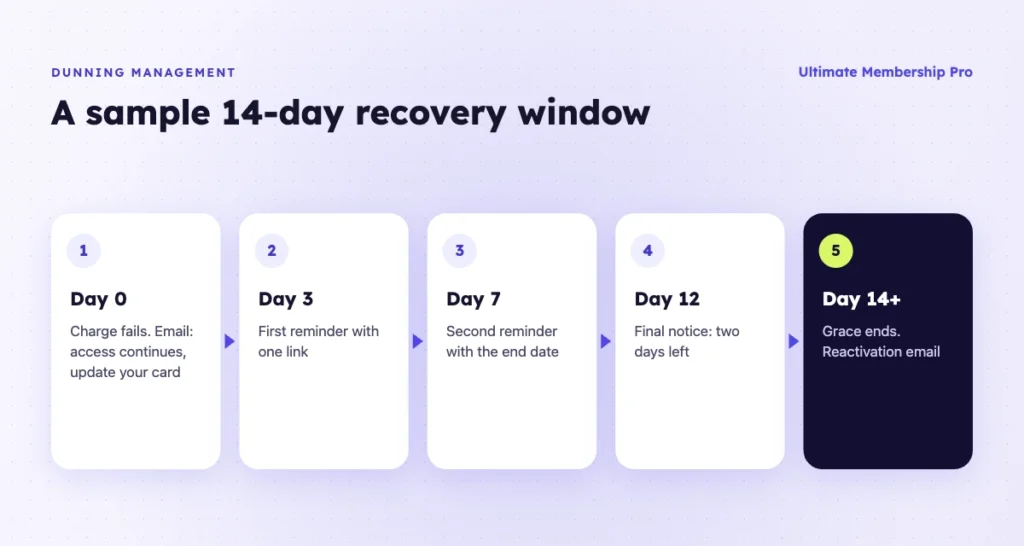
Good dunning management sends one email right after the first failure, one or two follow-ups while retries run and a final notice before access ends. Every email names the Membership, says what happens next and links to the page where the member updates their card.
Here is a sample schedule for a 14-day retry window. Shift the days to fit yours.
| When | Main message | Tone | |
|---|---|---|---|
| Day 0 | Payment didn’t go through | Your access continues. Update your card here. | Calm and helpful |
| Day 3 | First reminder | The payment is still open. One link to fix it. | Short |
| Day 7 | Second reminder | Access ends on [date]. If the card is fine, call your bank. | Direct |
| Day 12 | Final notice | Two days left. Here is what you keep by updating today. | Clear, no guilt |
| After access ends | Reactivation | Your account and progress are saved. Rejoin here. | Warm |
Here is what the Day 0 email could say. It is an example to adapt, not a template from any tool:
Subject: Your [Membership name] payment didn’t go through
Hi [first name], your renewal for [Membership name] didn’t go through, but your access continues until [date]. Update your card here: [card update link].
If your card details are correct, your bank may have blocked the charge, and a quick call to them can clear it. Questions? Reply to this email.
Four rules make each email work harder:
- Start with access. “Your access continues until [date]” reads calmer than “Payment failed” and tells the member what matters to them.
- One link only. Send members straight to the card update page, never to your home page.
- Use a reply-to address a person reads. Members often reply with “my bank says it’s fine.” Answer them.
- Stop the moment the payment succeeds. A reminder after the member has paid feels careless.
Stripe can send part of this sequence for you. With Stripe’s failed payment emails turned on, it emails the customer after each failed payment with a link to update the payment method. It can also send a link to confirm a payment that needs 3-D Secure, and keep reminding the member until they confirm.
With 8 retries in two weeks, that can mean several emails. Decide which system sends which message, so members never get two emails about one failure on the same day.
Should you keep access during a grace period or lock members out?
Keep access open for at least as long as your gateway retries the charge. With Stripe’s recommended 8 tries in 2 weeks, that means a 14-day grace period, and this is the setting to match whenever you change the retry window. A member locked out on day one, for a payment that would have gone through on day four, gets a worse experience and a reason to leave.
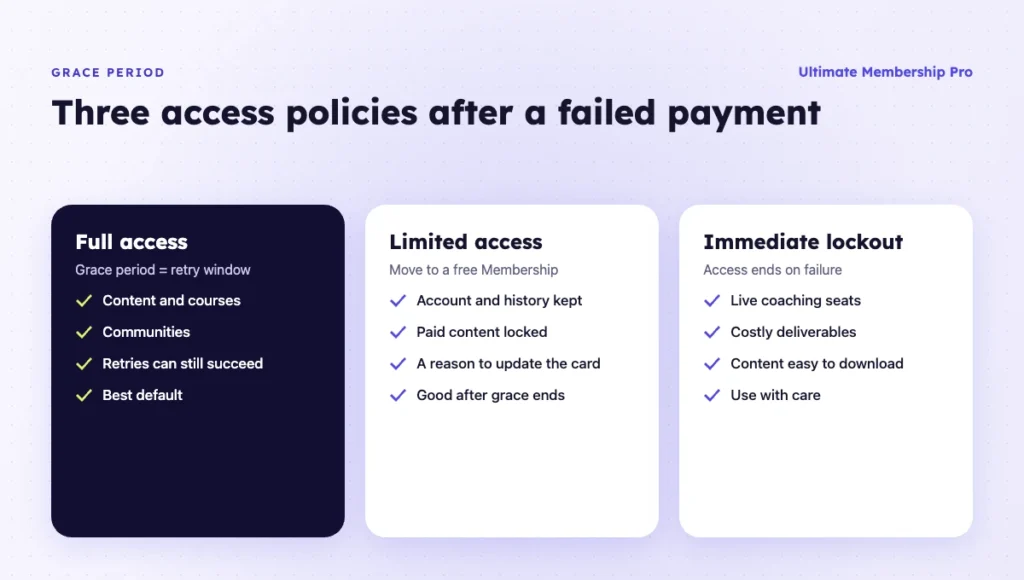
You have three options once a renewal fails:
- Full access during a grace period. Best for most content, community and course memberships.
- Limited access. Move the member to a free Membership when the paid one ends. They keep their account and see what they are missing, which gives them a reason to update the card.
- Immediate lockout. Fits only when each period has a real cost to you, such as live coaching seats, or when members could download everything in a few days.
How do you prevent failed payments before the charge?
Prevention is the cheapest part of failed payment recovery: a few reminders and settings you turn on once.
- Remind members before a card expires. A note a month ahead, with a link to change the card, catches an expired card before the renewal date.
- Warn before large renewals. A reminder a week before an annual charge gives members time to check the card and move money. Stripe can send upcoming renewal emails, and Ultimate Membership Pro has a “Before Subscription Payment due” email whose timing you set (1 day by default).
- Support 3-D Secure. Under Europe’s Strong Customer Authentication rules, a bank can ask a member to approve a renewal while they are away from your site. Stripe’s confirmation email covers that case.
- Offer a second payment method. A member whose card keeps failing may pay at once with PayPal or another option.
Failed payments cause only one kind of churn. For members who decide to leave, these ways to increase member retention cover the other side.
How do you measure recovery and involuntary churn?
Two numbers measure it: the recovery rate and the involuntary churn rate. A third, time to recover, shows how fast recovery works.
- Recovery rate = recovered failed payments ÷ all failed payments in the period. Count by number of payments or by amount, and keep the same method every month.
- Involuntary churn rate = members lost to unrecovered payments ÷ paying members at the start of the period.
- Time to recover = average days from the first failure to the successful payment.
Worked example (made-up numbers): a site has 400 members on a $25 monthly Membership. In one month, 24 renewals fail. Retries recover 10, and the emails and card updates recover 6 more. That is a recovery rate of 16 ÷ 24, or about 67%. The 8 members not recovered give an involuntary churn rate of 8 ÷ 400, or 2% for the month. If each of them would have stayed another year, that is about $2,400 of revenue lost to card problems.
Compare each month with your own past months. Stripe’s recovery analytics show failure and recovery rates for subscription payments.
How do you set up failed payment recovery in WordPress?
On a WordPress membership site, the work is split. Your membership plugin handles access, the grace period, card changes and reminder emails. Your payment gateway handles retries and failed-payment emails. Set up both, then test them together.
What Ultimate Membership Pro does when a renewal fails
Ultimate Membership Pro charges members automatically every period with its built-in gateways, as its subscription and billing features describe. Here is what happens after a failed charge, per its guide to renewals, cancellations and expiry:
- With Stripe, the plugin does not act on a failed renewal. The end date is not extended, so the Membership expires on schedule, plus any grace period. Stripe’s own retry settings decide whether the charge is tried again.
- When a later retry succeeds, the end date moves forward one cycle. If the Membership had already expired, the “Activation Subscription – Renewed” email tells the member their access is back.
- With PayPal, a failed or suspended recurring payment removes the Membership from the account, so the grace period never starts.
- There is no separate “payment failed” email in the plugin. Use Stripe’s failed payment emails for that message.
PayPal members need their own path. Since their Membership is removed at the first reported failure, recovery happens after access ends. Send them a short win-back email from your email tool with a direct link to that Membership’s checkout, and offer card payment through Stripe there, so the new subscription gets retries and a grace period.
In the plugin, the grace period has a site-wide setting, Default Grace Period for all Memberships, which is 0 days by default and goes up to 364. Each Membership can override it in its Grace Period after Expire field. The value is copied to a member’s Membership when it is assigned, so a change only affects new sign-ups. During the grace period the member keeps access, while the status already shows Expired and a Renew button appears.
With Stripe Connect, members can fix the card themselves. In the Subscriptions tab of the member account page, a Change Card button sits next to each recurring Membership. Stripe may ask for 3-D Secure confirmation when they save it. Members with an upcoming card expiry can also get a reminder the month before, again with Stripe Connect.
| Recovery step | Handled by | Where you set it |
|---|---|---|
| Retries after a failed charge | Stripe | Stripe Dashboard, revenue recovery settings |
| Failed payment and 3-D Secure emails | Stripe | Stripe Dashboard, customer email settings |
| Card expiry reminder | Ultimate Membership Pro (Stripe Connect) or Stripe | Email notifications, or Stripe’s expiring card email |
| Self-service card change | Ultimate Membership Pro (Stripe Connect) | Member Portal, Subscriptions tab |
| Grace period and access | Ultimate Membership Pro | Default grace period, or per Membership |
| Grace period, expiry and win-back emails | Ultimate Membership Pro | Email notifications |
| PayPal failed or suspended payment | PayPal retries; Ultimate Membership Pro removes the Membership | Win-back email from your email tool, with a checkout link |
Step-by-step setup with Stripe
- Connect Stripe with Stripe Connect. Click “Connect with Stripe”, with no API keys to copy, and add the webhook for Live and Test mode. The webhook only works on a live website. The Stripe integration page has the details.
- Turn on retries in Stripe. Pick Smart Retries with a 2-week window, and choose what happens after the last retry.
- Turn on Stripe’s customer emails. Enable failed payment emails and the 3-D Secure confirmation link. The Stripe-hosted page lets members pay the open invoice right away, while the Change Card button on your site updates the card for future charges.
- Set the grace period. Enter 14 days to match the 2-week retry window, before members sign up.
- Write your emails. In the email notifications, edit “Customer enter in Grace Period”, the three expiry alerts (5, 3 and 1 days before the end date by default) and “After Subscription Expired”. Use the plugin’s “Upcoming Card Expiry Reminder” or Stripe’s expiring card email, never both.
- Choose the end state. Keep the End of Term Action on Do Nothing, the default, so the expired Membership stays on the account and the member can renew. Or remove it and assign a free Membership, so the member keeps an account with limited access.
- Test the whole flow. Check that WP-Cron runs and that your site sends email. In a Stripe sandbox, customer emails only go to addresses on your verified email domain or to team members, so test with one of those.
Orders that stay Pending, such as unconfirmed bank transfers, need a different reminder. The Payment Reminder add-on emails those members a set number of days after the order, as many times as you choose. It is included in Full Package and Agency. Its page does not mention failed card renewals, so keep Stripe’s emails for those.
Ultimate Membership Pro is sold as annual plans (Pro, Full Package, Agency), with 45+ email notifications and unlimited members on every plan.
What mistakes slow down payment recovery?
Most failed payment recovery problems come from small gaps between the gateway and the membership site:
- Sending members to a new checkout while retries still run. If a member pays again through Renew, check that the old subscription in Stripe is canceled, so they are not billed twice.
- Treating every decline the same. Retries cannot fix a stolen card or a payment waiting for 3-D Secure. Those members need an email from day one.
What is the best failed payment recovery setup?
For most membership sites on Stripe, the setup above is the right start, plus a warm reactivation email for members whose access ends. Run it for a full billing cycle before you change anything. Then fix the weakest step first: low recovery from retries points to hard declines and card updates, while low recovery from emails points to timing, wording or the update link.
Ready when you are
Turn visitors into paying members with Ultimate Membership Pro
Launch your membership website, protect exclusive content and automate subscription payments, all in one WordPress plugin.
- 14-day money-back guarantee
- Unlimited members
Frequently asked questions
What is failed payment recovery?
Failed payment recovery is the process of collecting a recurring payment after the first charge fails. It usually combines automatic retries by the payment gateway, dunning emails that ask the member to update their card, a self-service card update page and a grace period that keeps access open while recovery runs.
What is the difference between dunning and failed payment recovery?
Dunning is the communication part: the emails and notices that tell a member a payment failed and ask them to fix it. Failed payment recovery is the whole process, which also includes automatic retries, card updates from the card networks, the grace period and the rule for when recovery stops.
How long should a grace period be after a failed payment?
Make the grace period at least as long as your gateway’s retry window. With Stripe’s recommended setting of 8 tries within 2 weeks, a 14-day grace period keeps access open while every retry still has a chance. Lock access sooner only if each billing period has a real cost to you.
Does Stripe retry failed subscription payments automatically?
Yes, once retries are turned on in your Stripe settings. Smart Retries picks the best times to try again within a window you choose, or you can set a custom schedule of up to three retries. Stripe does not retry hard declines, such as a stolen card, until the customer adds a new payment method.
What is a good failed payment recovery rate?
There is no single benchmark, because tools count recovery in different ways, by number of payments or by amount. Track your own rate every month with the same method. Then change one step at a time, such as email timing or grace period length, and compare the next full billing cycle.