
In Ultimate Membership Pro, every Membership a member holds has an end date. A membership renewal payment moves that date forward; a cancellation stops future payments; when the date passes without a renewal, access ends after an optional Grace Period.
This guide explains each part of that life cycle and the settings that control it, so you can predict what members experience.
Before you start
- You know the Access Types (LifeTime, Limited Time, Date Range, Recurring Subscription). See Create your first Membership.
- WP-Cron runs on your site. Expiry actions and the reminder emails are scheduled checks; without cron they don’t run.
The life cycle at a glance
Renewal
- When
- A recurring payment is confirmed
- Effect
- End date moves forward one cycle
- Applies to
- Recurring Subscription
Cancellation
- When
- The member clicks Cancel
- Effect
- No more payments; access usually stays until the end date
- Applies to
- Recurring Subscription
Expiry
- When
- The end date passes
- Effect
- Access stops after the Grace Period
- Applies to
- All except LifeTime
End of Term Action
- When
- About a day after expiry, or after the Grace Period
- Effect
- Optionally removes or replaces the Membership
- Applies to
- All except LifeTime
Renewals
For a Recurring Subscription, the payment gateway charges the member every cycle. When the gateway confirms the payment, the plugin extends the end date by one cycle, counted from the current end date, so a payment that arrives early doesn’t cut the member’s time.
Limited Time and Date Range Memberships are paid once and don’t renew by themselves. When one expires, the member can buy it again with the Renew button in the Member Portal (see below).
Cancellations
Members cancel a recurring Membership with the Cancel button in the Subscriptions section of the Member Portal. The plugin asks the payment gateway to stop future charges. In the plugin’s own words, the subscription stays active until it expires without renewing.
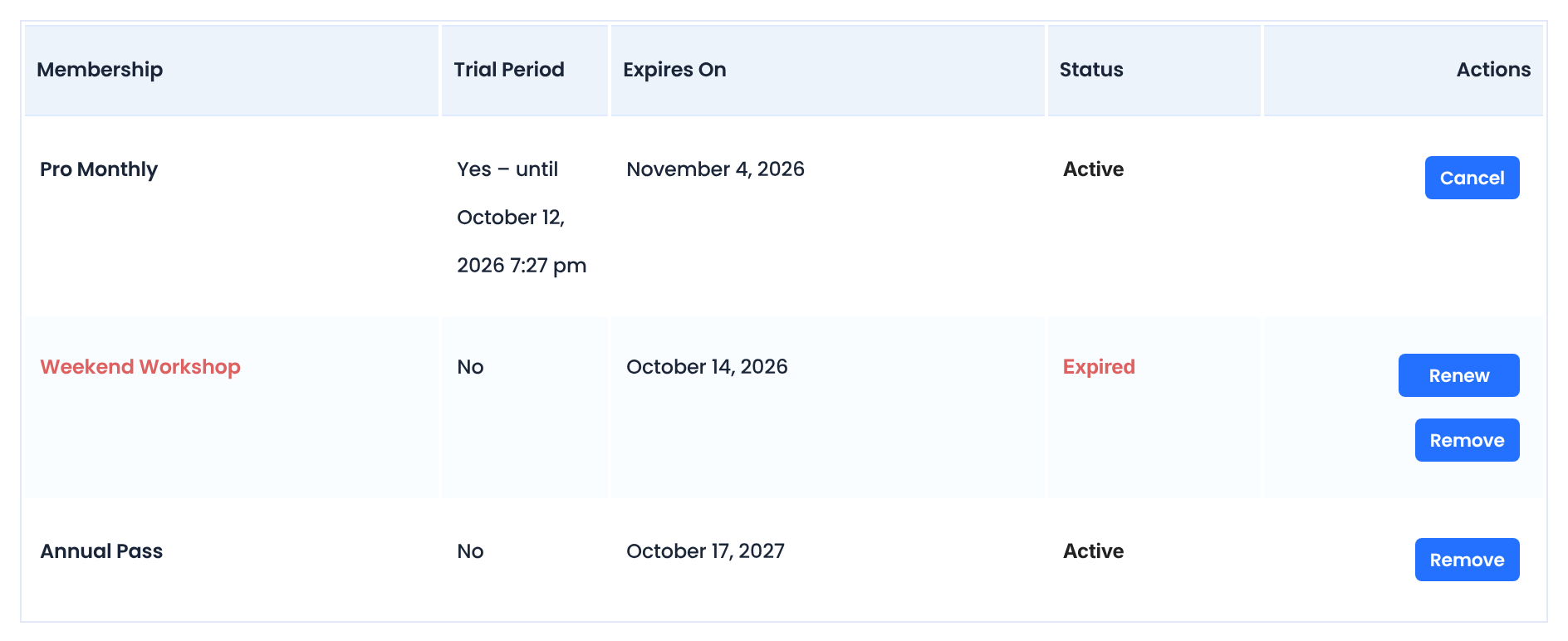
Shown for active recurring Memberships. Not shown while the Membership is on Hold or Paused, or when it was paid with Braintree.
Shown once a Membership has expired. It opens the checkout page for that Membership.
Deletes the Membership from the member’s account right away, after a browser confirmation. One-time Memberships always have it; for active recurring Memberships it appears only after the member cancels.
Shown for a paid Membership that is still on Hold, after a delay, so the member can complete an unfinished payment.
With most gateways the Membership’s status becomes Cancelled. With PayPal it shows Cancellation pending and the member is sent to PayPal to stop the automatic payment there; it becomes Cancelled once PayPal confirms.
Choose what happens after a cancellation
Each recurring Membership has a Cancel Subscription Action in its Expiration & Lifecycle card (Ultimate Membership Pro›Memberships, edit the Membership):
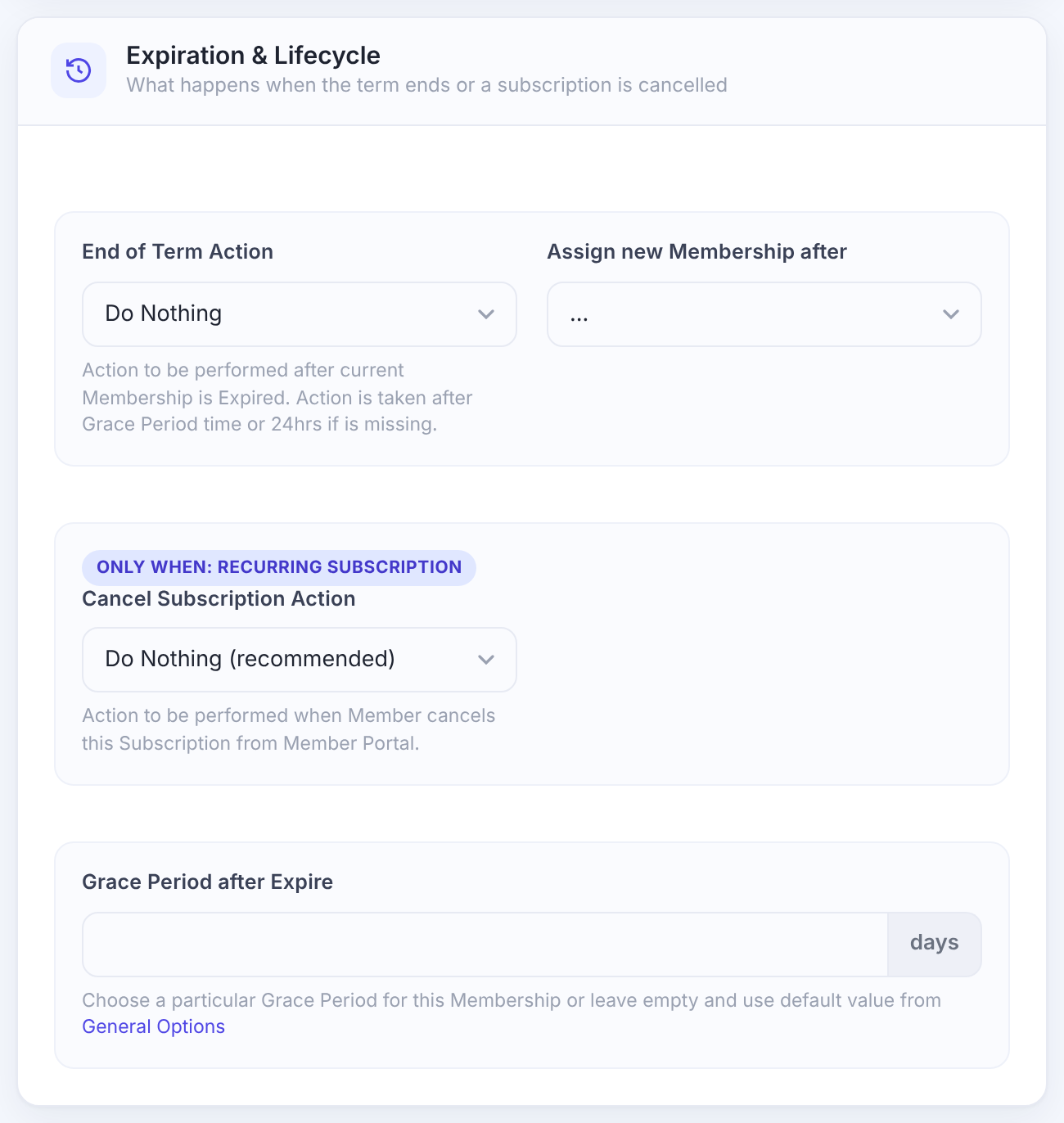
What happens when the member cancels from the Member Portal.
- Do Nothing (recommended): the member keeps access until the paid period ends.
- Remove this Subscription from Member: the Membership is taken off the account at once.
- Replace this Subscription: it’s replaced right away with the Membership chosen in Assign new Membership after Cancel, for example a free plan.
Default: Do Nothing (recommended)
Ask before members cancel
- Without extra settings, Cancel acts as soon as it’s clicked. The Reason for Cancellation module adds a confirmation window that also asks why they’re leaving.
Failed payments
There’s no separate “payment failed” email. What happens depends on the gateway:
When PayPal reports a failed or suspended recurring payment, the Membership is removed from the member’s account.
A failed renewal isn’t acted on. The end date simply isn’t extended, so the Membership expires on its date, plus any Grace Period. Stripe’s own retry settings decide whether the charge is tried again.
A refund reported by the gateway removes the Membership from the member’s account.
Expiry and the Grace Period
A Membership expires when its end date passes without a renewal. The Grace Period gives extra days of access after that, for example while a late payment goes through.
Set a default Grace Period
- Go to Ultimate Membership Pro›Settings›Public Workflow and find Grace Subscription Period.
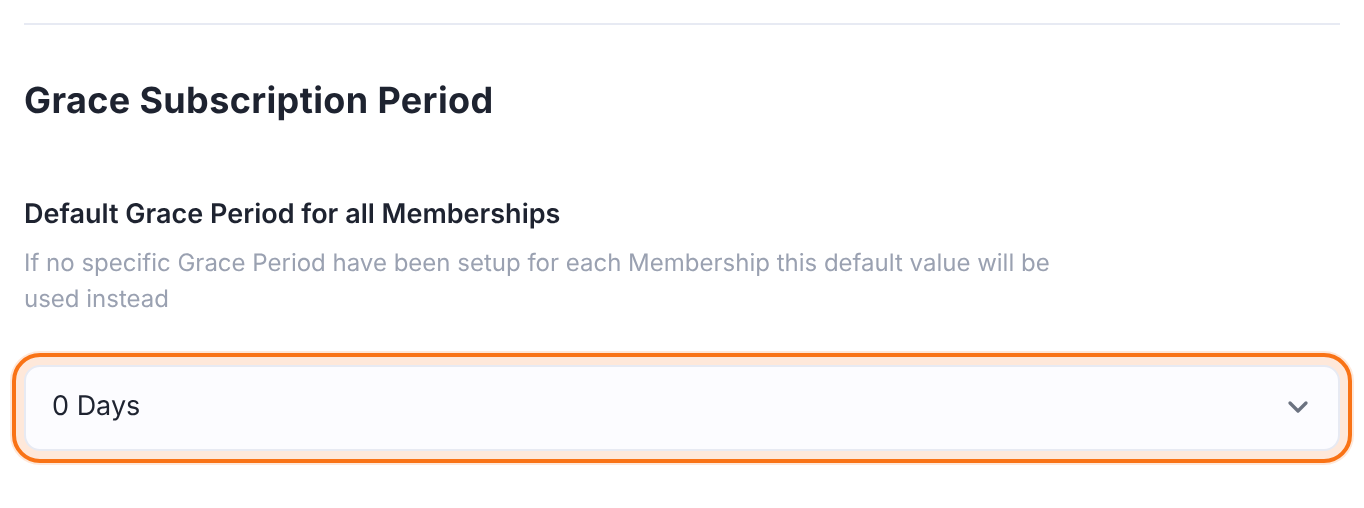
Used for every Membership that has no Grace Period of its own. From 0 to 364 days.
Default: 0 Days
Set per Membership in its Expiration & Lifecycle card, in days. It overrides the default.
Default: Empty (use the default)
Good to know about the Grace Period
- The Grace Period is copied to a member’s Membership when it’s assigned. Changing it later affects new sign-ups, not members who already hold the Membership.
- During the Grace Period the member keeps access, but the status already shows Expired and the Renew button appears.
Decide what happens after expiry
Runs once a day. The plugin’s hint: the action is taken after the Grace Period, or 24 hours after expiry if there’s none.
- Do Nothing: the expired Membership stays on the account, so the member can renew it.
- Remove this Membership from Member: it’s taken off the account.
Default: Do Nothing
Gives the member another Membership at that point, for example Free Community so they keep basic access.
Default: None
Reminder emails
Turn these on under Ultimate Membership Pro›Email Notifications. Each has a member version and most have an admin version.
Sent once a day to members whose Membership expires in the set number of days.
A reminder before the next recurring payment.
Checked every 12 hours.
Sent once a day after the end date.
Sent when an expired Membership becomes active again after a payment.
Sent when a member cancels.
Set how many days before expiry the three alerts go out under Ultimate Membership Pro›Settings›Notifications Settings:
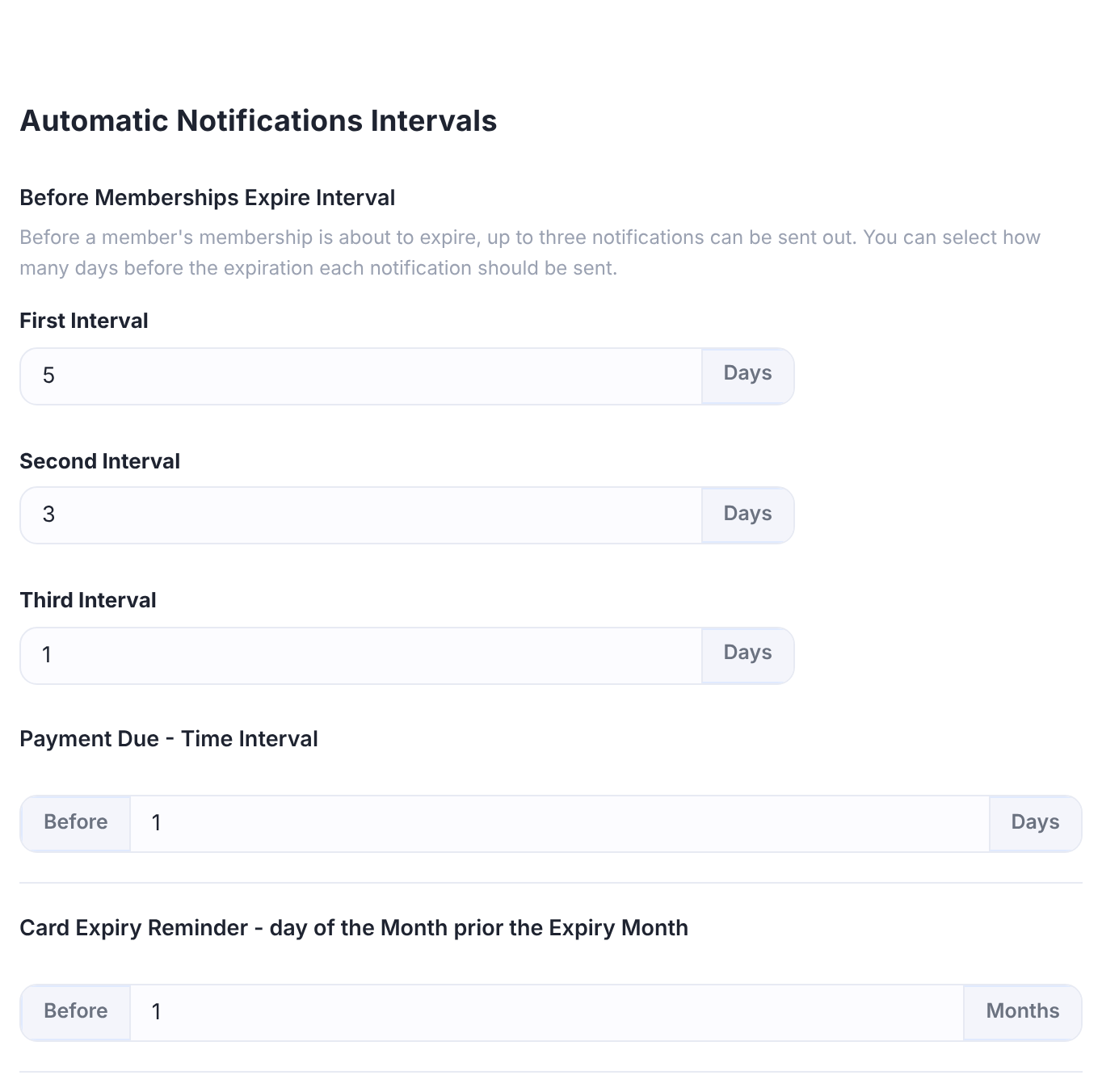
Days before the end date for each of the three alerts.
Default: 5, 3 and 1 days
Days before a recurring payment for the payment due reminder.
Default: 1 day
Choose which buttons members get
Go to Ultimate Membership Pro›Showcases›Subscriptions Table and open Subscriptions Table Actions.
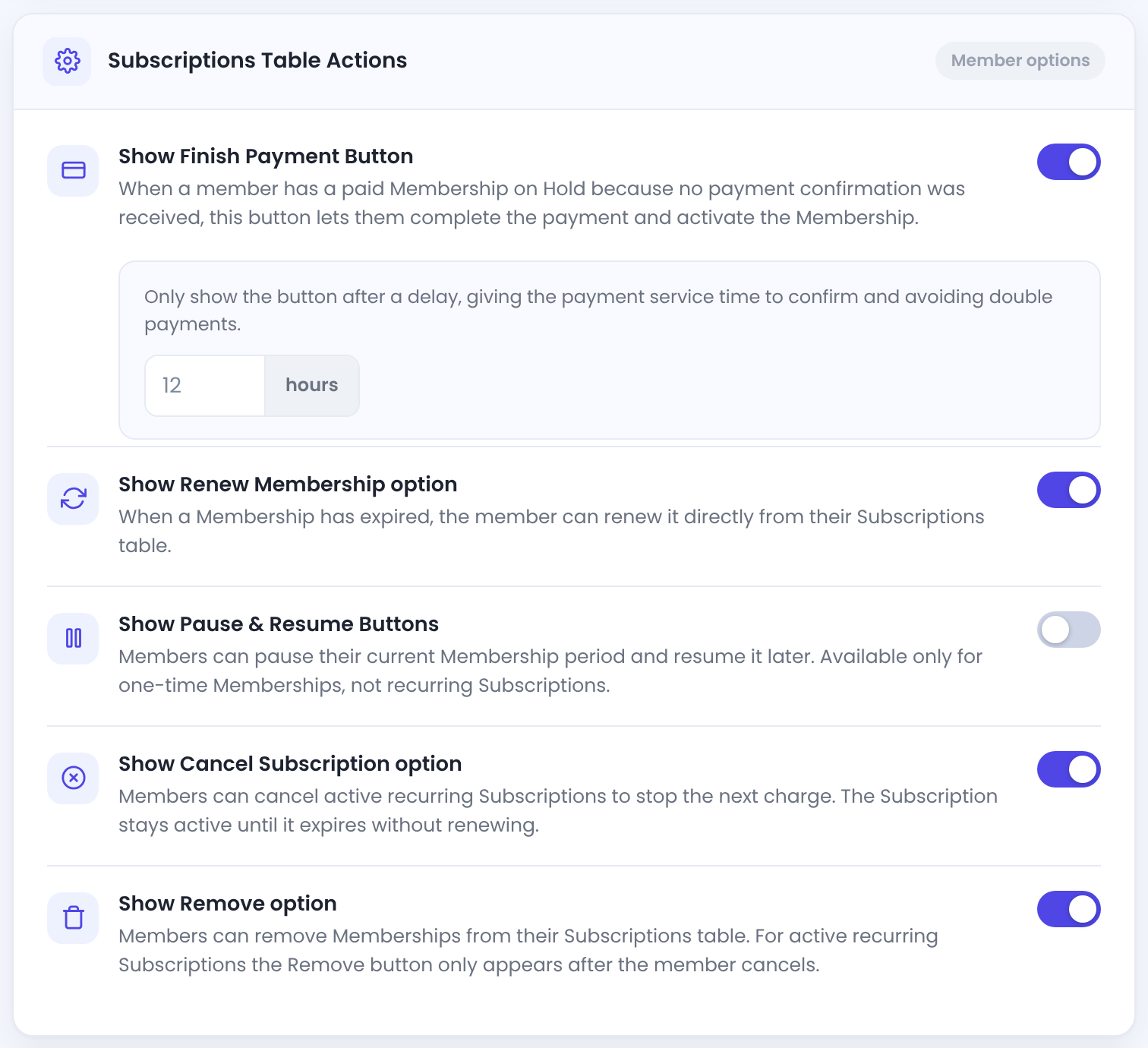
The delay (0 to 24 hours) gives the gateway time to confirm a payment and avoids double payments.
Default: On, after 12 hours
The Renew button on expired Memberships.
Default: On
Lets members pause a one-time Membership and resume it later.
Default: Off
The Cancel button on active recurring Memberships.
Default: On
The Remove button.
Default: On
Example: a monthly plan that falls back to free
- Cancel Subscription Action
- Do Nothing (recommended)
- Grace Period after Expire
- 3 days
- End of Term Action
- Remove this Membership from Member
- Assign new Membership after
- Free Community
- Expiry alerts
- 5, 3 and 1 days before
Troubleshooting
A member cancelled but still has access. Is that a bug?
No. With Cancel Subscription Action set to Do Nothing (recommended), a cancelled Membership keeps access until the end of the period the member already paid for. Choose Remove this Subscription from Member to end access at once.
A member cancelled the payment before paying. What happens?
The Membership stays on Hold and gives no access until a payment is confirmed. The member can complete it later with Finish Payment, or you can activate it from Manage Plans. See Membership statuses explained.
The expiry emails aren’t sent
Check that the notifications are active, that WP-Cron runs on your site, and that emails leave your server. See Set up email notifications.
The Cancel button doesn’t appear for a member
It appears only for active recurring Memberships, not while the Membership is on Hold or Paused, and not for Braintree payments. Also check Show Cancel Subscription option in the Subscriptions Table showcase.
The End of Term Action didn’t run right after expiry
It runs once a day, after the Grace Period or 24 hours after the end date, so allow up to a day more.


