
In Ultimate Membership Pro, a membership trial is a special first payment on a recurring Membership: free, or at a lower price, for a set time. When it ends, the member pays the regular price every cycle. Trials lower the barrier to sign up and let people try your content first.
This guide sets up a 7-day free trial, then shows the second kind: a lower intro price for the first few billing cycles.
Before you start
- The Membership exists and its Access Type is Recurring Subscription. Trials don’t exist for LifeTime, Limited Time or Date Range Memberships. See Create your first Membership.
- A payment gateway that supports your kind of trial is enabled. See Connect a payment gateway and the limits below.
Open the Membership’s billing settings
- Go to Ultimate Membership Pro›Memberships and edit the Membership.
- In the Membership Billing card, set Payment Type to Payment and enter the Membership Price.
The Trial/Initial Payment Settings box appears under the price. The plugin’s own hint sums it up: fill it in only if you want a trial; otherwise leave the fields empty.
Set up a free trial
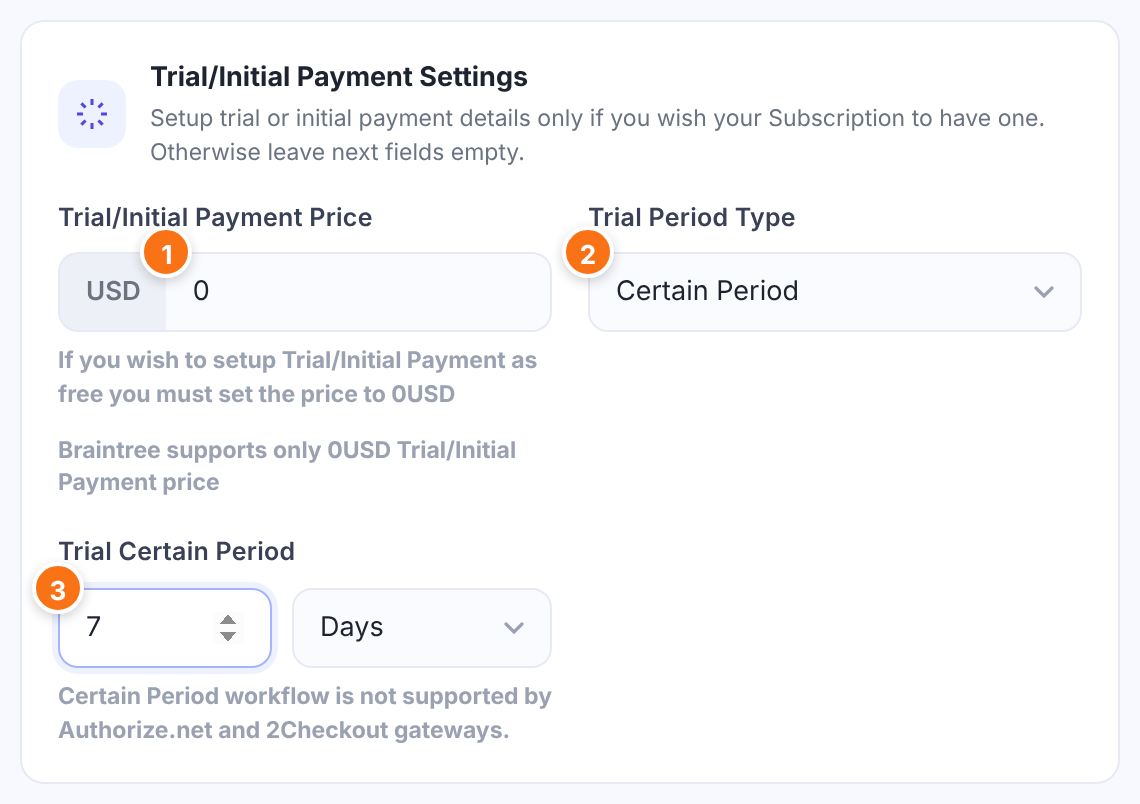
What the member pays at the start. Enter 0 for a free trial, or an amount for a paid trial. The currency is the one set under Payment Settings.
Default: Empty (no trial)
How long the trial price applies:
- Certain Period: a fixed length of time.
- Couple cycles subscription payments: a number of normal billing cycles. See the next step.
Default: Certain Period
A number from 1 to 31 and a unit: Days, Weeks, Months or Years. Example: 7 Days.
Click Save Changes. New sign-ups now start with the trial; members who already hold the Membership aren’t affected.
Or charge an intro price for the first cycles
Instead of a time-based trial, you can discount the first few payments. With a monthly Membership, $9 for 3 cycles means the member pays $9 for each of the first three months, then the regular price.
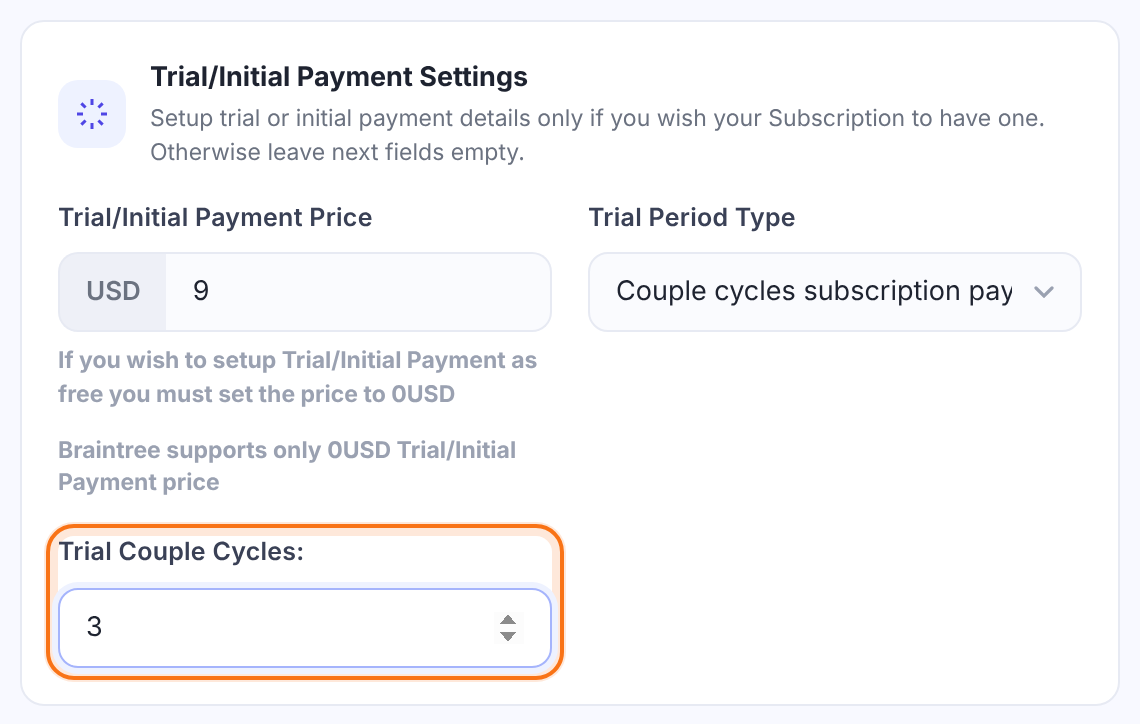
How many billing cycles are charged at the trial price. The cycle length is the Membership’s Subscription Cycle.
Default: 1
Check what members see at checkout
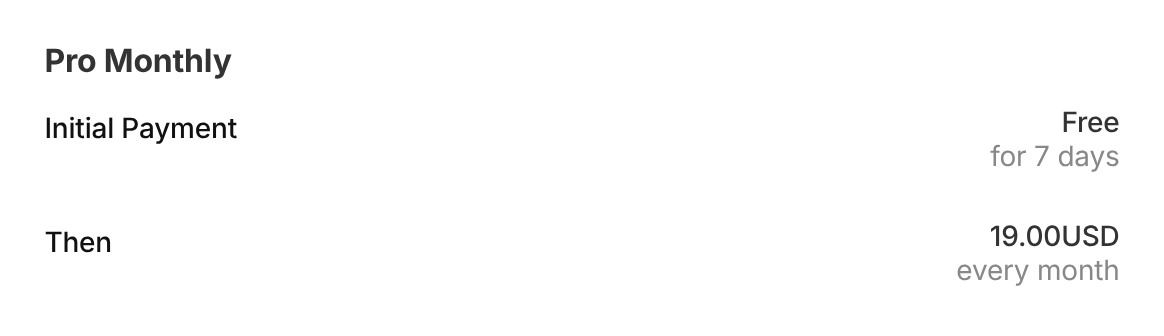
The checkout page shows the trial as the initial payment, followed by the regular price:
After sign-up, the member’s Subscriptions table in the Member Portal has a Trial Period column that shows whether the subscription started with a trial. You can hide the column in the Subscriptions Table showcase; see Customize the Subscriptions and Payments tables.
Payment gateway limits for trials
- Authorize.net and 2Checkout don’t support the Certain Period type; use Couple cycles subscription payments.
- 2Checkout allows at most 1 trial cycle.
- Braintree supports only free (0) trials, and the trial period must also be set in your Braintree Plan details.
Tell members when the trial ends
- Turn on the Customer Trial Subscription has expired email under Ultimate Membership Pro›Email Notifications. It’s checked every 12 hours. See Set up email notifications.
Example: 7 days free, then monthly
- Access Type
- Recurring Subscription, 1 Months
- Payment Type
- Payment
- Membership Price
- $19
- Trial/Initial Payment Price
- $0 (free)
- Trial Period Type
- Certain Period
- Trial Certain Period
- 7 Days
- Checkout shows
- Initial Payment: Free for 7 days. Then: 19.00USD every month
Troubleshooting
Why don’t I see the trial fields on my Membership?
The Trial/Initial Payment Settings box only appears when the Access Type is Recurring Subscription and the Payment Type is Payment.
How do I offer a free trial in Ultimate Membership Pro?
Edit the recurring Membership, set Trial/Initial Payment Price to 0, choose Certain Period and enter the trial length, for example 7 Days, then save.
Can I charge a lower price for the first months instead of a free trial?
Yes. Enter the lower amount as Trial/Initial Payment Price, choose Couple cycles subscription payments and set Trial Couple Cycles to the number of discounted cycles.
Why does Braintree reject my trial?
Braintree supports only free trials, and the trial must also be configured in the matching Plan in your Braintree account.


