
Ultimate Membership Pro coupon codes are discount codes that members type on the checkout page to lower the price of a Membership. A coupon takes a percentage or a fixed amount off, can be limited to some Memberships, a date range and a number of uses, and on a recurring Membership it can lower only the first payment or every payment.
This guide creates one coupon by hand and a batch of codes at once, shows where members enter them, and explains how coupons work with recurring Memberships and each payment gateway.
Before you start
- Your license is active. Without it the Coupons screen shows “Coupons is a licensed feature”. See Find and activate your license key.
- You have a paid Membership, for example Annual Pass at $149 or Pro Monthly at $19/month. See Create your first Membership.
- A Checkout Page is set up: members enter coupons there, not on the registration form. See Configure the checkout page.
The Coupons screen
Go to Ultimate Membership Pro›Coupons. The Manage Coupons screen shows four counters (Total Coupons, Active Now, Percentage Coupons, Total Redemptions), a search box and the list of coupons.
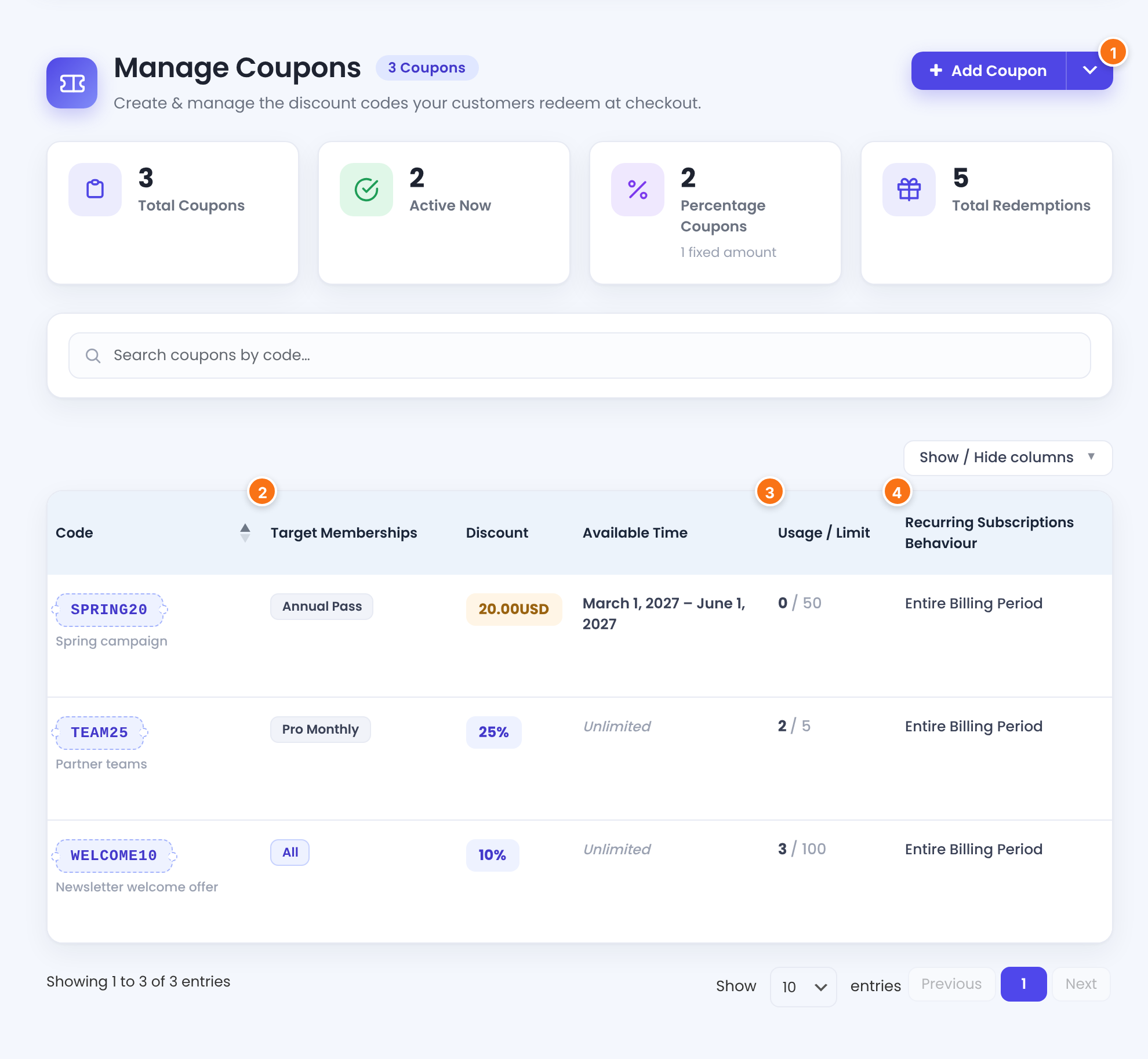
Opens the form for one coupon. The arrow next to it offers Single Coupon (one code by hand) and Bulk Coupons (a batch of random codes).
The Memberships the coupon works for, or All.
How many times the code has been used, out of its Usage Limit (∞ when there’s no limit).
Just for Initial Payment or Entire Billing Period. See the section on recurring Memberships below.
Hover over a code to see Edit and Delete. To delete several, tick them, choose Remove in Bulk Actions and click Apply.
Create a coupon
- Click Add Coupon. The Add Single Coupon screen opens.
- Fill in the four cards below, then click Save Coupon at the bottom.
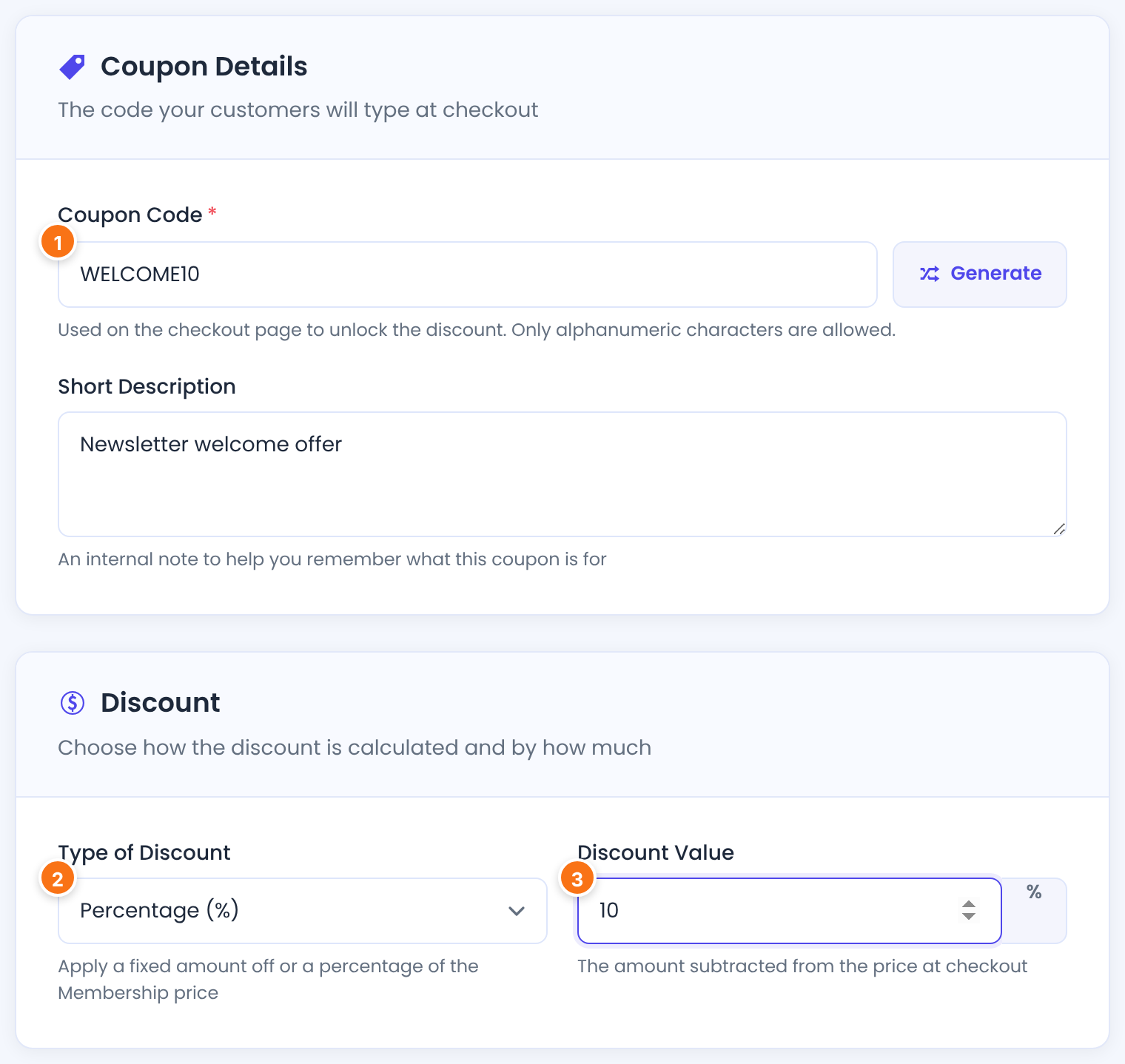
What members type at checkout, for example WELCOME10. Generate fills in a random 10-character code. Use letters, numbers and underscores, without spaces. Members can type the code in lower or upper case.
A note for you, shown under the code in the list. Members never see it.
How the discount is calculated.
- Percentage (%): a percentage of the Membership price.
- Fixed Amount: an amount in your site currency.
Default: Percentage (%)
How much is taken off. A discount larger than the price makes the price $0, never negative.
Default: 10
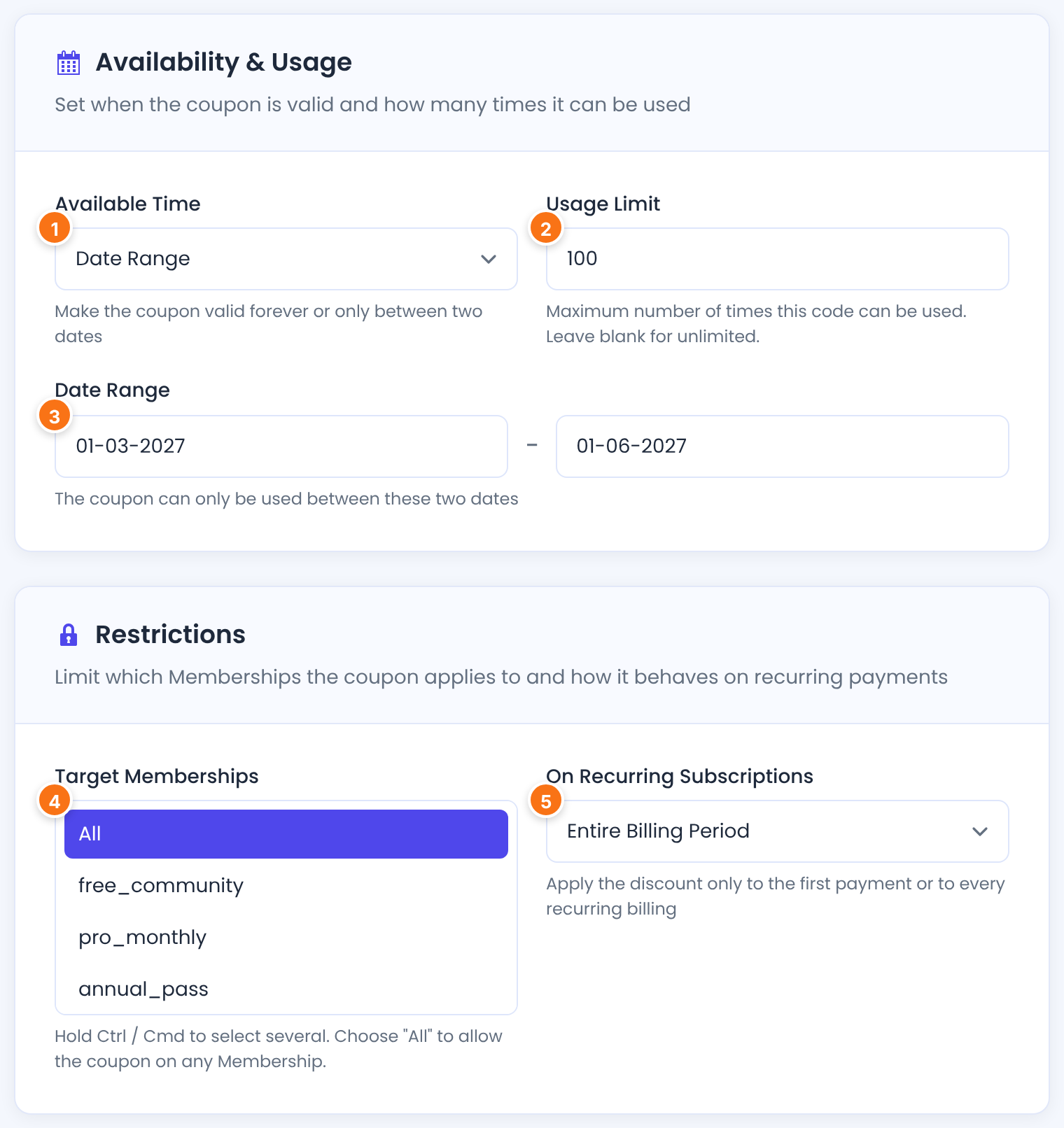
When the coupon can be used.
- Unlimited: the coupon never expires.
- Date Range: the coupon works only between two dates.
Default: Unlimited
How many times the code can be used in total, by all members together. The field is filled in with 10 on a new coupon: change it, or clear it for no limit.
Default: 10
The start and end date (day-month-year). The coupon is valid until the end date begins: for a campaign that runs through May 31, enter 01-06 as the end date. If you leave one of the two dates empty, the coupon has no time limit.
The Memberships the coupon works for. The list shows each Membership’s slug, for example pro_monthly. Hold Ctrl (Cmd on a Mac) to select several. Choose All, or select nothing, to allow the coupon on every Membership.
Default: None selected, which means All
Only matters for Memberships with recurring billing. One-time Memberships have a single payment, which is always discounted.
- Entire Billing Period: every payment of a recurring Membership is discounted.
- Just for Initial Payment: only the first payment is discounted; renewals are charged the full price.
Default: Entire Billing Period
Click Save Coupon. The coupon appears in the list. Each coupon needs its own Coupon Code and a Discount Value above 0.
Generate many codes at once
For a campaign with a unique code per person (one code per newsletter subscriber, for example), click the arrow next to Add Coupon and choose Bulk Coupons.
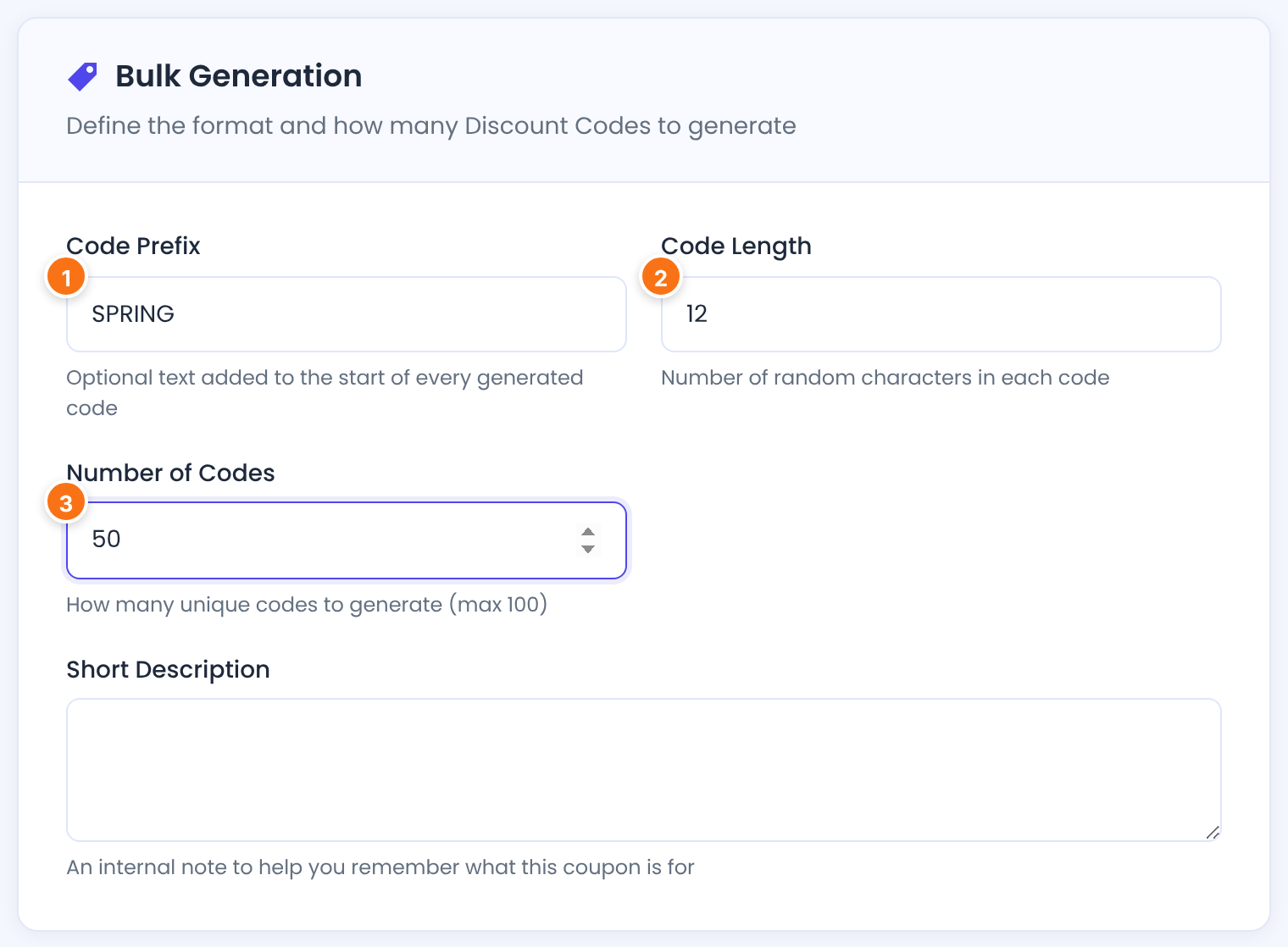
Text at the start of every code, for example SPRING. Optional.
The length of each code. The prefix counts toward it: with the prefix SPRING and a length of 12, each code is SPRING plus 6 random characters.
Default: 10
How many codes to create, up to 100 at a time.
Default: 2
The Discount, Availability & Usage and Restrictions cards below work as for a single coupon, and every generated code gets the same settings. The Usage Limit applies to each code separately: set it to 1 for single-use codes. Click Generate Coupons.
Check the coupon box on the checkout page
Members enter coupons on the checkout page. The box is on by default. To check it, go to Ultimate Membership Pro›Showcases›Checkout Page:

Shows the coupon field on the checkout page. Turn it off if you don’t use coupons.
Default: On
In the Coupon Section of the same screen you can change the texts of the box: “If you have a coupon code, please apply it below”, the Apply button and the Coupon label.
What members see
On the checkout page, the member types the code and clicks Apply. The price updates right away: a Discount line shows the percentage or amount, and the code appears under the box with a [Remove] link.
![Checkout page for Annual Pass at 149.00USD with Discount (10%) -14.90USD and Coupon: WELCOME10 [Remove]](https://ultimatemembershippro.com/wp-content/uploads/2026/10/ump-coupons-06-checkout-applied.png)
If the code can’t be used, the member sees an error instead:
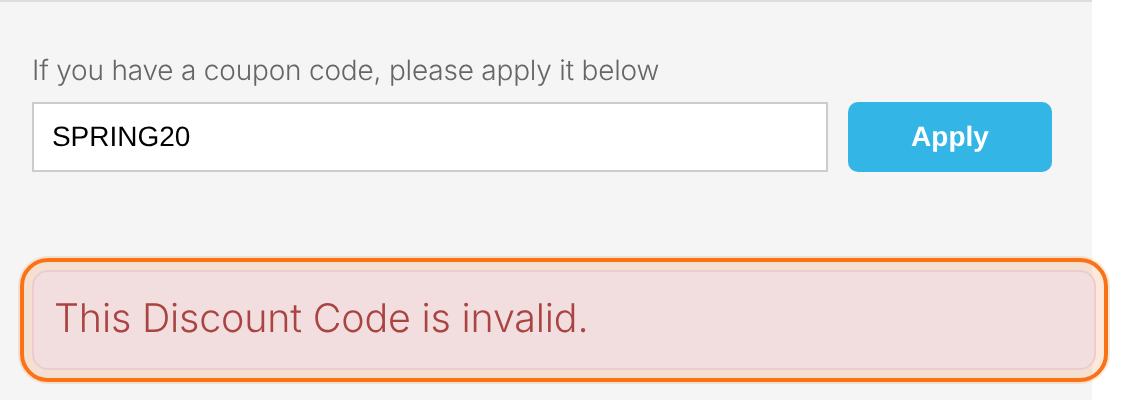
The coupon box only shows for paid Memberships. When a coupon brings a one-time price to $0, the button reads Free Access and the Membership is activated without a payment. Taxes, if you charge them, are calculated on the discounted price.
Coupons on recurring Memberships
Entire Billing Period
- $19/month plan, 25% coupon
- $14.25 every month
- Best for
- Partner or group discounts that last
Just for Initial Payment
- $19/month plan, 50% coupon
- $9.50 the first month, then $19/month
- Best for
- Welcome offers
With Just for Initial Payment, the discounted first payment covers one billing cycle and the full price starts with the next one. If the Membership already has a trial, the coupon discounts the trial payment instead. On a Membership with a free trial, the first payment is already $0, so use Entire Billing Period.
Which gateways accept coupons on recurring Memberships
Each payment gateway supports different kinds of discounts on recurring payments. When a gateway doesn’t support the coupon’s setting, the member sees “This Discount Code is invalid.”
Both settings, with any discount. Stripe charges at least $0.50 for a discounted payment.
Entire Billing Period with any discount. Just for Initial Payment only with a 100% discount (a free first period).
Entire Billing Period only.
Coupons on one-time Memberships only.
Limits
- A use is counted when the member places the order.
- A member can enter one coupon per checkout.
Share a link with the coupon filled in
Add &coupon_used=WELCOME10 to the checkout link of a Membership, for example yoursite.com/checkout-page/?lid=3&coupon_used=WELCOME10 (3 is the Membership ID), and the code is already applied when the member opens the page.
Example: a welcome offer
- Coupon Code
- WELCOME10
- Type of Discount
- Percentage (%)
- Discount Value
- 10
- Available Time
- Unlimited
- Usage Limit
- 100
- Target Memberships
- All
- On Recurring Subscriptions
- Entire Billing Period
- Result
- Annual Pass $134.10 instead of $149; Pro Monthly $17.10/month after its free trial
Troubleshooting
Why does the checkout say “This Discount Code is invalid.”?
Ultimate Membership Pro shows this one message for every reason a coupon can’t be used: the code doesn’t exist (check for typos), its Usage Limit is reached, today is outside its Date Range, the Membership isn’t in its Target Memberships, or the payment gateway doesn’t support the coupon’s setting on a recurring Membership. Check the coupon under Coupons and the gateway list above.
Why don’t I see a coupon field at checkout?
Check that Discount Coupon box is on under Showcases › Checkout Page. The box never shows for a free Membership, since there’s nothing to discount.
Where is the coupon field on the registration form?
Coupons are entered on the checkout page now, in the Discount Coupon box. The checkout also appears inside the registration form, above the Register button.
Do coupons work with Stripe on recurring Memberships?
Yes. Stripe and Stripe Checkout accept both Entire Billing Period and Just for Initial Payment coupons with any discount, including a partial discount on the first payment only. Discounted payments below $0.50 are charged as $0.50.
Which setting should I use on a Membership with a free trial?
Entire Billing Period. A Just for Initial Payment coupon discounts the first payment, and on Pro Monthly, with its 7-day free trial, that payment is already free.
How are coupon uses counted?
A use is counted each time an order with the coupon is placed. The Usage / Limit column shows the current count. Edit the coupon and raise its Usage Limit if needed.
What does a coupon need before I save it?
A Coupon Code that no other coupon uses and a Discount Value above 0.
Where can I see who used a coupon?
Payment History has a Coupon column with the code used on each order. See Manage payments and orders.


