
Your Ultimate Membership Pro license key activates the plugin on your site. Until it’s active, the plugin runs in Trial mode with some limits. With an active license you get unlimited Memberships, automatic updates and support.
This guide shows where to find the key and how to activate it in WordPress.
Before you start
- Ultimate Membership Pro is installed and active. See Install Ultimate Membership Pro.
- You can log in to your account on ultimatemembershippro.com.
Copy your license key
- Log in to your account on ultimatemembershippro.com.
- Open the Licenses tab of your account dashboard. Each license shows its key, the product, its status and how many sites use it.
- Copy the key for Ultimate Membership Pro.
Have a legacy license?
Connect it once from the Legacy license tab on the ultimatemembershippro.com login page. It then moves into your account and shows on the Licenses tab.
Open the Licensing screen
In WordPress, go to Ultimate Membership Pro›Licensing. While the plugin is in Trial mode, the Activate license button in the banner at the top of every plugin screen takes you there too.
Enter your details
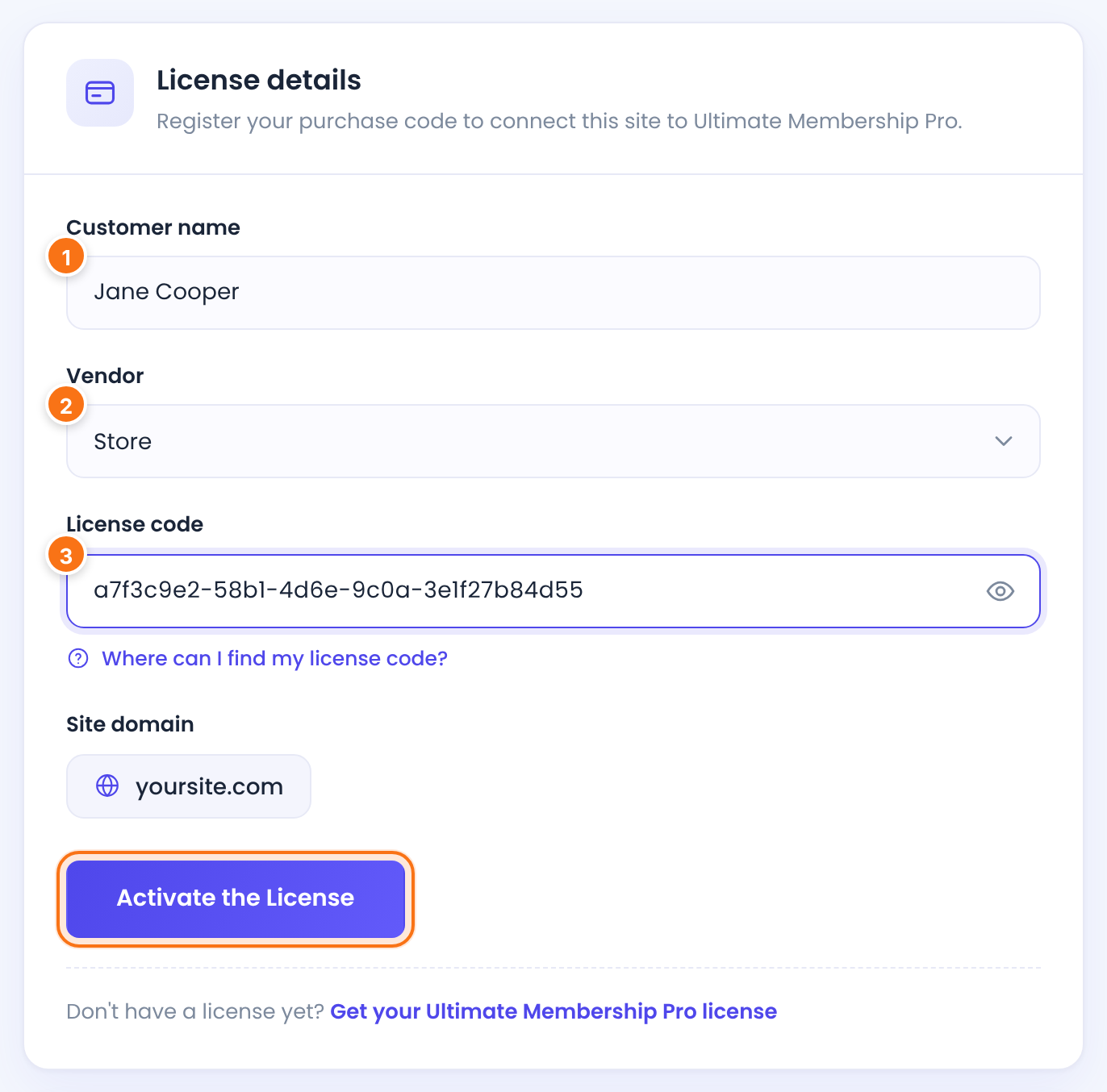
Your name.
Leave it on Store.
Default: Store
Paste the key you copied. The eye icon shows or hides it. Copy it directly from your account so no spaces get added.
The domain this license will be activated for. You can’t edit it here.
Activate
Click Register the License. On a site where a license was activated before, the button reads Activate the License.
Your browser briefly goes to the license server and comes back to the Licensing screen. When it worked, you see Your plugin has been successfully activated the License. and the status at the top changes from Not activated to License active.
What Trial mode limits
Until the license is active:
You can create up to 3 Memberships.
The Coupons screen is locked.
Only the first 10 payments are listed.
You can’t add new custom fields.
The login, registration and password reset forms show a notice that the plugin is a Trial Version.
Automatic updates are off. See Update the plugin.
Moving to a new site?
Free the license on the old site first. See Move your license to another site.
Example
- Customer name
- Jane Cooper
- Vendor
- Store
- License code
- Pasted from the Licenses tab
- Site domain
- yoursite.com
- Result
- License active
Troubleshooting
“Submitted Purchase Code is invalid.”
The key wasn’t recognized. Copy it again from the Licenses tab and check there are no spaces before or after it.
“Submitted Purchase Code does not match with Current product.”
The key belongs to another product, for example Ultimate Affiliate Pro. Use the Ultimate Membership Pro key.
“The API Server may be down for a moment. Please try again later”
The license server didn’t answer. Wait a few minutes and try again.
“cURL is disabled on your server. Please enable it so the activation request can be sent.”
Ask your host to enable the cURL PHP extension. The button stays disabled until then.
Still not working?
See Plugin or license won’t activate for every error and fix.


