
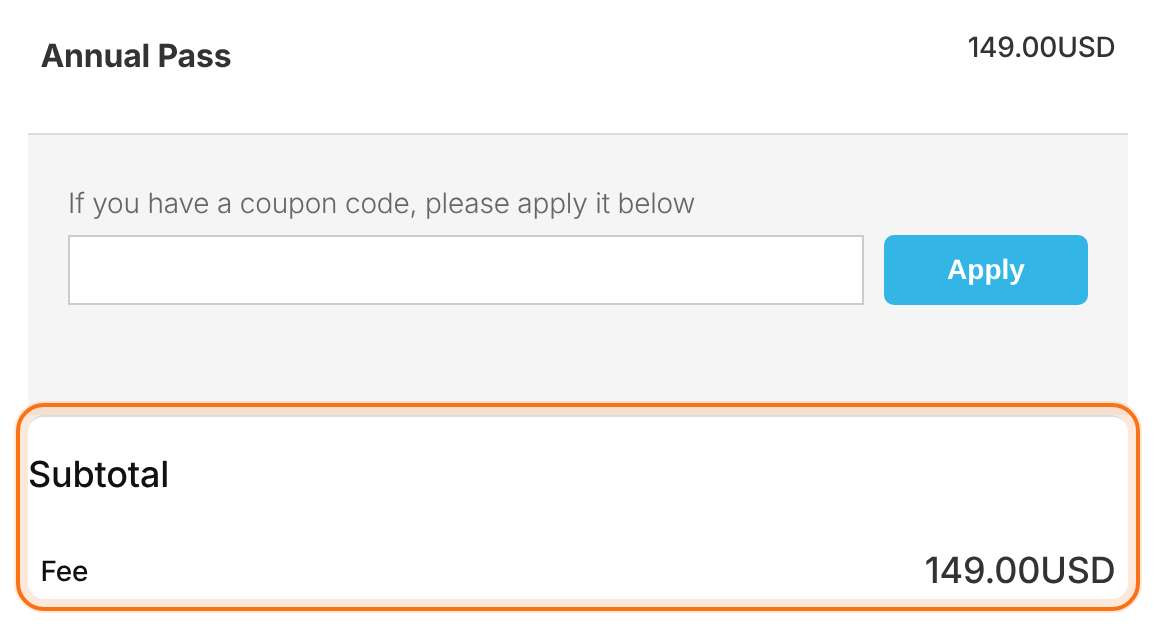
The Ultimate Membership Pro currency is one site-wide setting: every Membership price, checkout, order and invoice uses it, and it’s the currency sent to your payment gateway. By default prices show the currency code after the number (149.00USD); a few settings turn that into the format your members expect, such as $149.00.
This guide sets the currency, its symbol and position, the price separators and decimals, adds a custom currency, and explains which gateways accept which currencies.
Before you start
- Pick the currency before you start selling. Prices aren’t converted when you change it later, and orders keep the currency they were paid in.
- Check that the payment gateways you use accept that currency (see Which gateways accept which currency below).
Choose the currency
- Go to Ultimate Membership Pro›Settings›Payment Settings.
- In Default System Currency, pick your currency, for example U.S. Dollar ($).
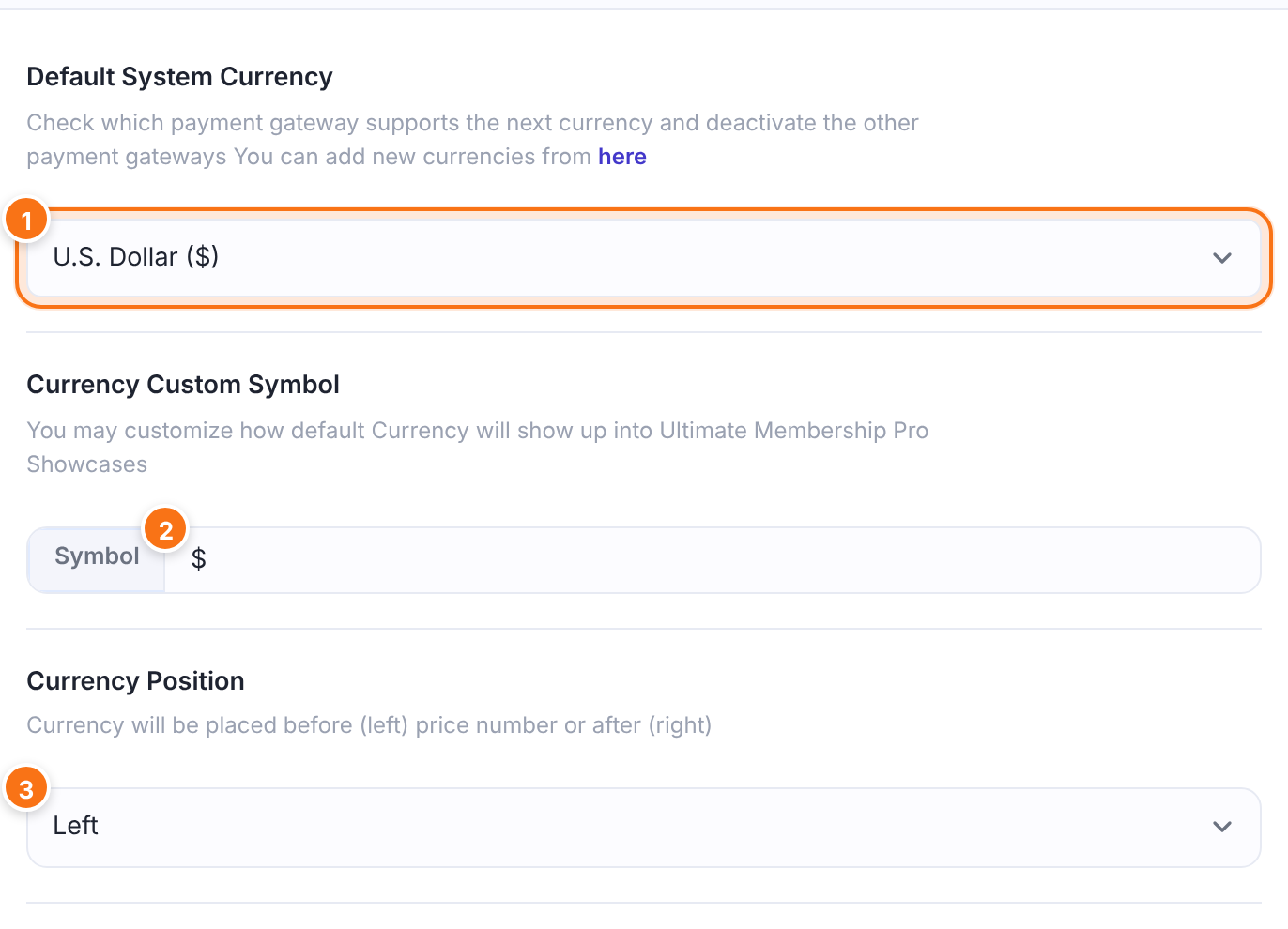
The one currency of your site. Membership prices are plain numbers in this currency, new orders are created in it, and it’s the currency code sent to the gateway. The list has 29 currencies plus any custom currency you add, marked “(Custom Currency)”.
Default: U.S. Dollar ($)
What prices show instead of the currency code, for example $, € or £. It’s used everywhere prices are formatted: checkout, Payment History, invoices, the Member Portal and the {currency} tag of email notifications. When it’s empty, prices show the code, for example 149.00USD. To show a symbol, fill in this field.
Default: Empty
Where the symbol or code goes. There’s no space between them either way.
- Left: before the number,
$149.00. - Right: after the number,
149.00$.
Default: Right
Click Save Changes in the bar at the bottom of the screen.
The Setup Wizard asks for the same currency and position the first time you set up the plugin, so you may only need to add the symbol here.
Set separators and decimals
Below the currency, the Price Separators group controls how numbers look. The defaults suit US dollars.
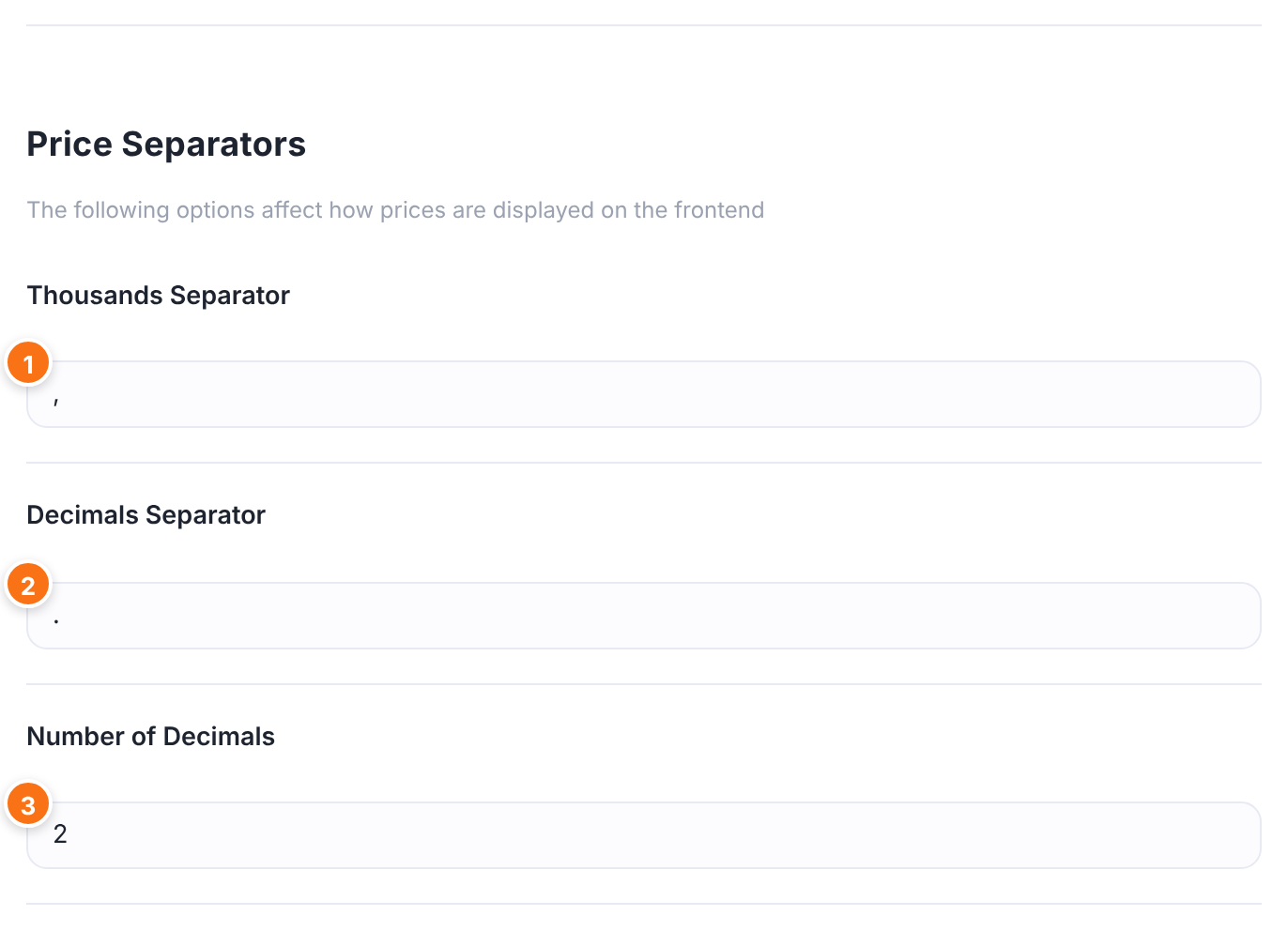
Groups thousands, for example 1,234.50. Type . or a space for European formats.
Default: ,
Separates cents. Type , for 1.234,50.
Default: .
How many decimals prices show. Enter 0 for currencies without cents, such as JPY. It also sets how coupon discounts, taxes and prorated amounts are rounded, so keep 2 for currencies with cents.
Default: 2
Type one character in each separator and a whole number in Number of Decimals.
What members see
The checkout shows the price in the format you set. With the default settings, the Annual Pass shows the code after the number:
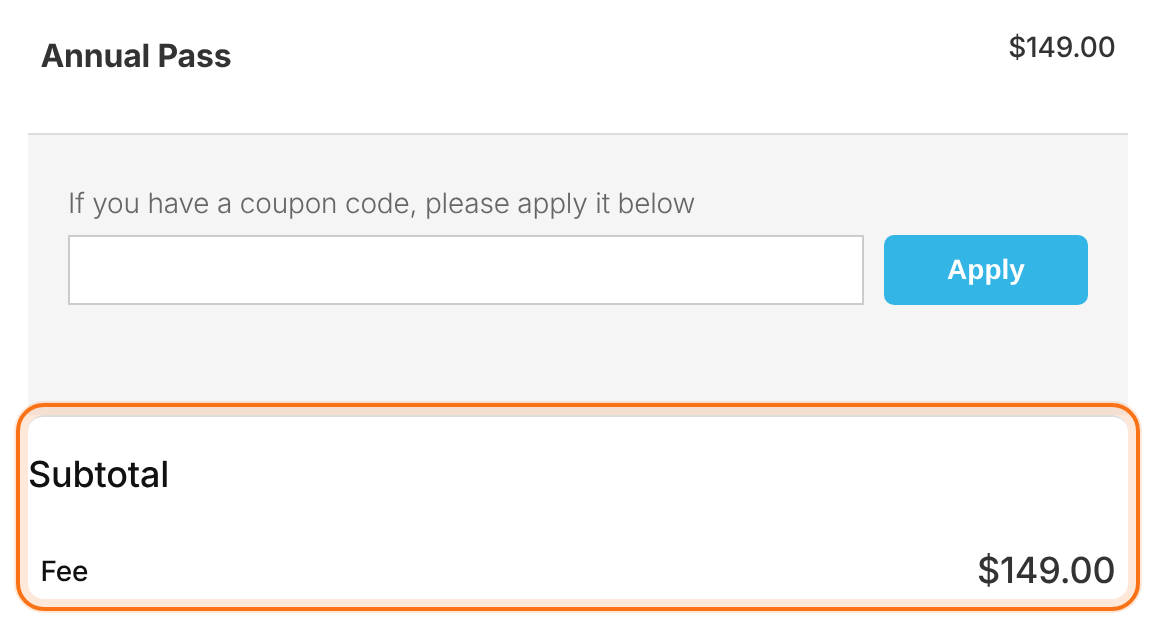
With Currency Custom Symbol set to $ and Currency Position set to Left, the same checkout shows $149.00:
Text you typed yourself doesn’t change
- The Price Details text of a Membership (shown on the pricing page) and any price you wrote in a page or email are plain text. Update them by hand after you change the currency.
- In email notifications,
{amount}already includes the symbol or code. Don’t add{currency}next to it, or the currency appears twice.
Add a custom currency
If your currency isn’t in the list, or you sell for something that isn’t money (credits, points), add it as a custom currency.
- Go to Ultimate Membership Pro›Modules and open Custom Currencies (in Payments & Billing). The module is always active.
- Fill in Code: and Name: and click Save Changes.
- Go back to Settings›Payment Settings and pick it in Default System Currency, where it appears with “(Custom Currency)”.
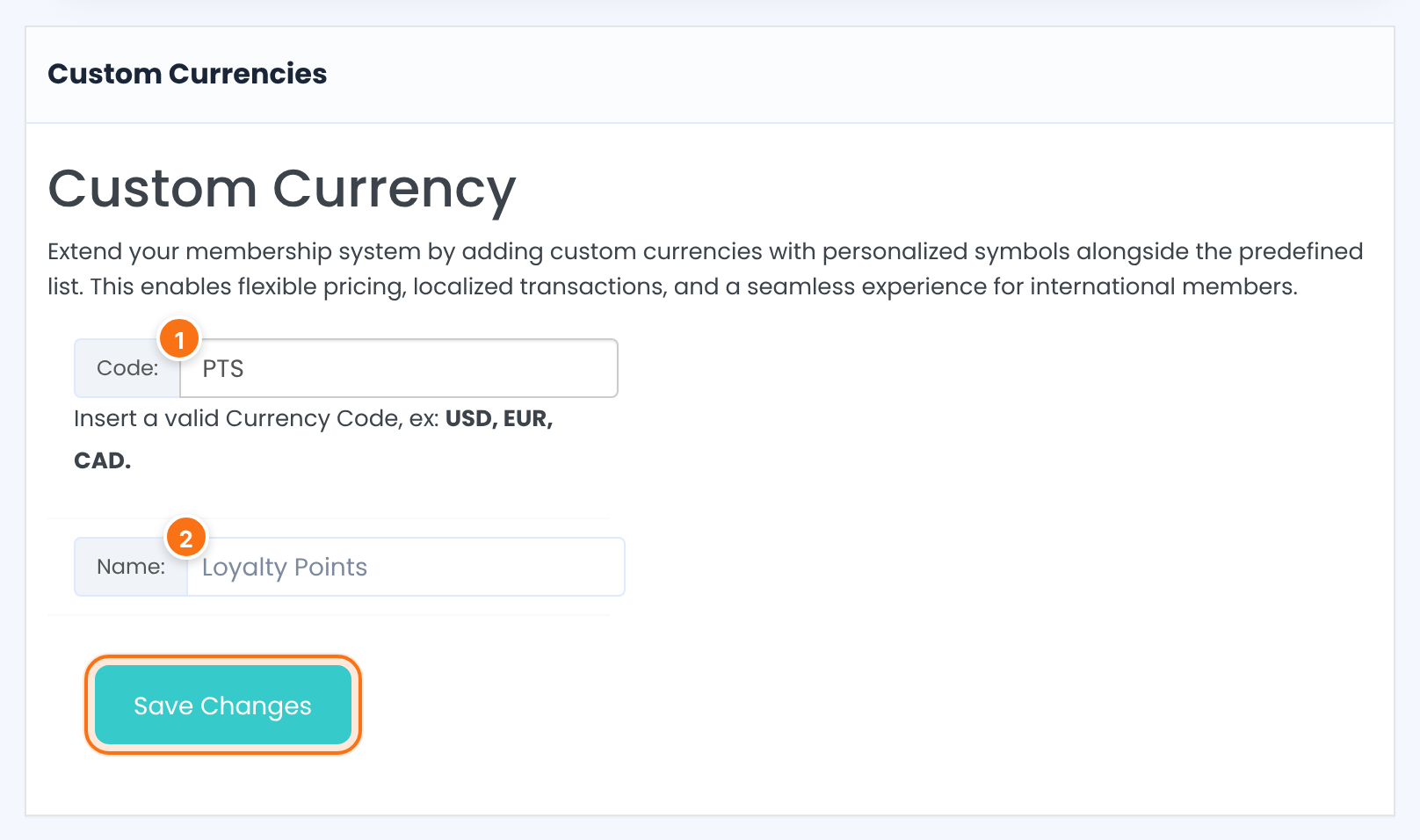
The code that’s stored, sent to the gateway and printed after prices (unless you set a Currency Custom Symbol). For a real currency, type its ISO code in capital letters, for example INR.
The label shown in the currency lists. Set the symbol in Currency Custom Symbol.
Saved currencies appear in a table below the form with Code, Name and a Delete icon. Delete removes a currency at once, without asking. Both fields are required, and each code can be added once.
Gateways only charge real currencies
- A made-up currency such as
PTSonly works for free Memberships, for bank transfers or for payments you record by hand. Card and PayPal gateways reject codes they don’t know. - Before you delete a custom currency, pick another Default System Currency if your site is using it.
Which gateways accept which currency
Ultimate Membership Pro sends your currency code to the gateway as it is and doesn’t convert amounts. Enable only the gateways that accept your currency.
Brazilian Real (BRL) only. See Set up PagSeguro.
South African rand (ZAR) only. See Set up PayFast.
Charges in your Paystack account’s currency (NGN, GHS or ZAR), so use the same one on your site. See Set up Paystack.
Your Razorpay account must accept your site currency; the settings screen links to Razorpay’s list. See Set up Razorpay.
EUR and a list of other currencies. See Set up Mollie.
Most currencies. The smallest charge is $0.50 in currencies with cents; currencies without cents (JPY, KRW and others) are sent as whole amounts. See Set up Stripe.
Whatever your account with the provider accepts. Check it in their dashboard.
Any currency, including custom ones, because you confirm each payment yourself. See Accept bank transfers.
Different gateways for different Memberships
If one gateway doesn’t accept your currency, you can still keep it for some Memberships only. See Allow only some payment methods for a Membership.
Changing the currency later
Stay the same numbers. A $19 Membership becomes 19 EUR; edit each price if it should change.
Keep the currency they were created in. In Payment History, the Total revenue box then shows the currency used by most completed orders, with the note “completed payments in USD”.
Members already subscribed through Stripe, PayPal and similar gateways keep paying in the old currency; the subscription lives at the gateway. Only new subscriptions use the new currency.
Example: US dollars with a symbol
- Default System Currency
- U.S. Dollar ($)
- Currency Custom Symbol
- $
- Currency Position
- Left
- Thousands Separator
- ,
- Decimals Separator
- .
- Number of Decimals
- 2
- Result at checkout
- Annual Pass $149.00, Pro Monthly $19.00
Troubleshooting
Can Ultimate Membership Pro sell in two currencies at the same time?
No. The plugin has one currency for the whole site, set in Default System Currency. A Membership has one price with no currency of its own, and there’s no currency switcher or conversion by country. To sell in two currencies, run a separate site for each currency.
Why do my prices show 149.00USD instead of $149.00?
Without a Currency Custom Symbol, prices show the currency code. Go to Settings › Payment Settings, type $ in Currency Custom Symbol, set Currency Position to Left and save.
I changed the currency. Why do my old orders still show the old one?
Each order keeps the currency it was paid in. Only new orders use the new currency. Membership prices aren’t converted either; edit them if the amount should change.
How do I add a currency that’s not in the list, like INR?
Go to Modules › Custom Currencies, enter INR in Code: and Indian Rupee in Name:, and save. Then pick it in Settings › Payment Settings › Default System Currency. Make sure your gateway accepts INR.
Can I use points or credits instead of money?
Yes, add them as a custom currency, for example code PTS and name Loyalty Points. Card and PayPal gateways can’t charge them, so use them with free Memberships, bank transfers or payments you add by hand.
The payment fails with “Currency is not set.” What does it mean?
The payment was started without a currency, so Ultimate Membership Pro stopped it before contacting the gateway. Open Settings › Payment Settings, check that Default System Currency shows your currency and click Save Changes.
Why is my Stripe payment rejected for a low price?
Stripe doesn’t charge less than $0.50 in currencies with cents. The price field of a Membership reminds you, for example “Stripe payment gateways requires at least 0.50USD subscription price”. Raise the price or use another gateway.


