
Ultimate Membership Pro can take payments through PagSeguro, the Brazilian payment service. It’s meant for members in Brazil paying in Brazilian reais (BRL): members are sent to PagSeguro to pay, and PagSeguro notifies your site when the payment is confirmed.
This guide sets your prices in BRL, connects PagSeguro with your account e-mail and token, adds the notification URL and runs a Sandbox test. The example is a Brazilian edition of the Coaching Club site.
Before you start
- You have a PagSeguro seller account. For testing, access to PagSeguro’s Sandbox.
- Your site currency is Brazilian Real, and your Memberships are priced in BRL (Step 1).
- You have a paid Membership, for example Pro Monthly at 99 BRL a month. See Create your first Membership.
- Your site is reachable from the internet, so PagSeguro can send notifications to it.
What PagSeguro supports
Payments
- One-time
- Yes: LifeTime, Limited Time and Date Range Memberships
- Recurring
- Yes, as a PagSeguro recurring payment
- Checkout
- Redirect to PagSeguro’s payment page
Billing rules
- Currency
- BRL only
- Intervals
- Weekly, monthly, every 2, 3 or 6 months, yearly
- Trials
- Yes, as a number of days, free or paid
Price your Memberships in BRL
PagSeguro only accepts payments in Brazilian reais (BRL), so set your site currency to BRL and enter every Membership Price in reais.
- Go to Ultimate Membership Pro›Settings›Payment Settings.
- Set Default System Currency to Brazilian Real (only for Brazilian members) and save.
- Check the Membership Price (and any Trial/Initial Payment Price) of every paid Membership, and enter it in reais.
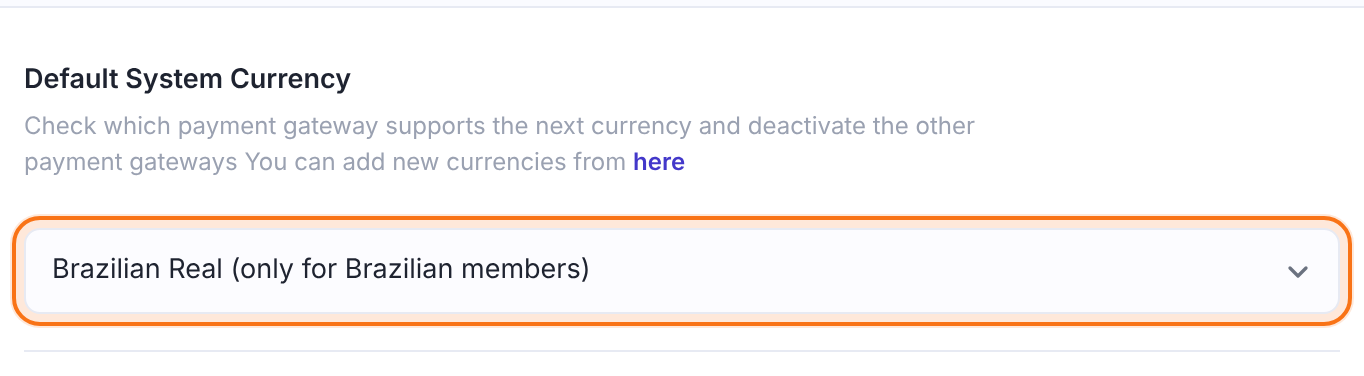
Amounts must be between 1.00 and 2000.00 BRL
- Each payment sent to PagSeguro must be at least 1.00 and at most 2000.00 BRL.
- Keep every Membership Price, and every paid trial price, inside this range.
Open the PagSeguro settings
- Go to Ultimate Membership Pro›Payment Gateways.
- Find PagSeguro and click Complete setup (Manage once it’s active).

The settings page is called Pagseguro Gateway. Its badge shows Inactive, Sandbox or Live.
Turn on the gateway
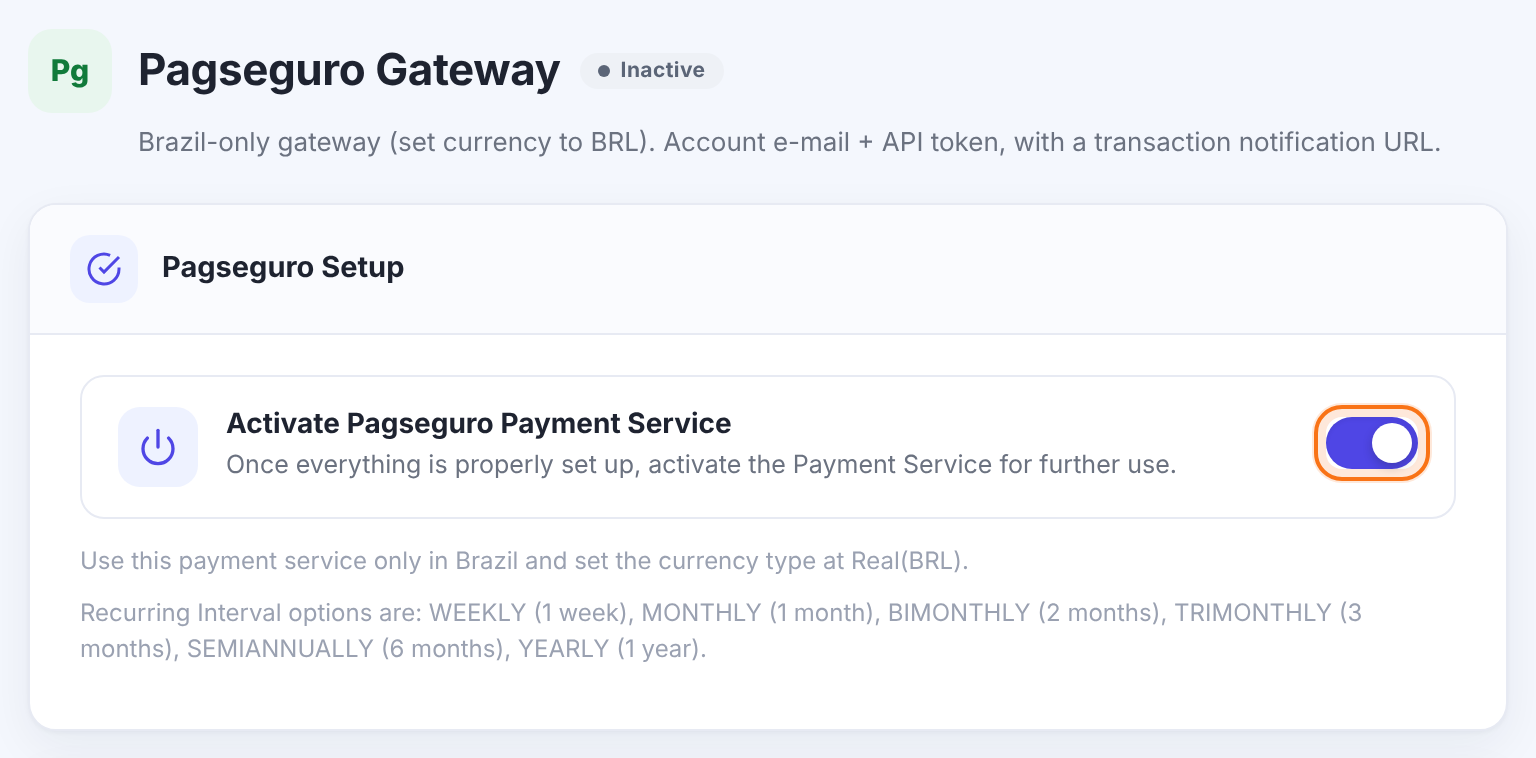
Makes PagSeguro available at checkout. It’s offered to members only when this is on and both Pagseguro Account E-mail and Token are filled in.
Default: Off
The notes under the switch repeat the two rules of this gateway: use it only in Brazil with the currency set to Real (BRL), and recurring payments use one of the intervals WEEKLY, MONTHLY, BIMONTHLY (2 months), TRIMONTHLY (3 months), SEMIANNUALLY (6 months) or YEARLY.
Add your account e-mail and token
In PagSeguro, go to Online Sale › Integrations, open Use of API’s and click Generate token.
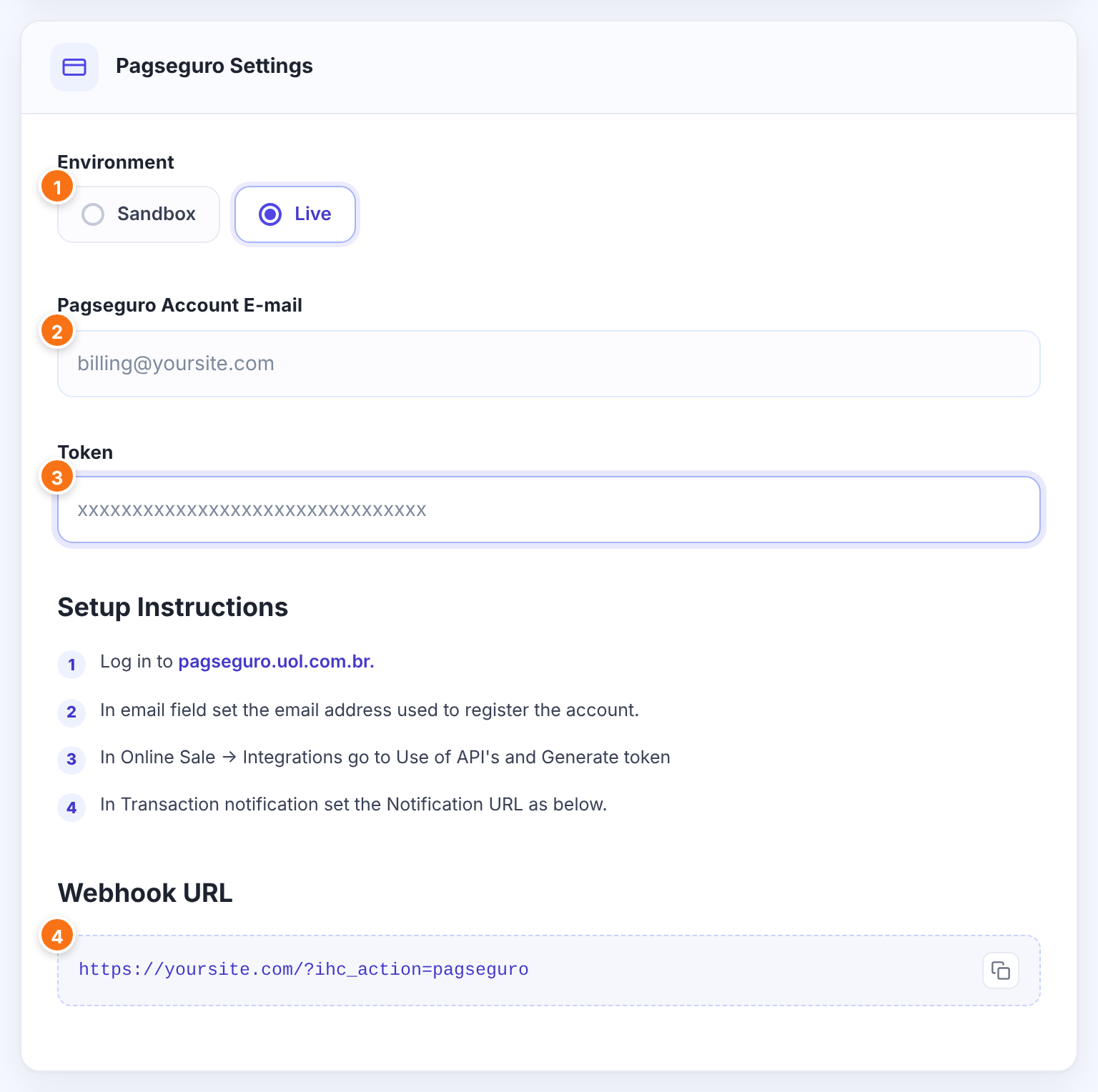
Sandbox sends payments to PagSeguro’s Sandbox; Live takes real payments. The instructions under the fields change with the choice.
- Sandbox
- Live
Default: Live
The e-mail address you registered your PagSeguro account with.
The token you generated in PagSeguro. Keep it secret. Your site also uses it to look up each notification from PagSeguro.
Where to generate the token and set the notification URL, shown on the screen for reference.
The notification address to set in PagSeguro (next step). Use the copy button next to it.
Set the notification URL in PagSeguro

https://yoursite.com/?ihc_action=pagseguro- In PagSeguro, open Transaction notification.
- Set the Notification URL to the Webhook URL and save.
Ultimate Membership Pro also sends this address with every payment. When PagSeguro reports a transaction, your site handles it like this:
The order becomes Completed and the Membership is activated. Each later charge of a recurring plan adds a new order and extends the Membership.
The Membership is taken off the member’s account.
The Membership’s status becomes Cancelled.
Nothing changes yet; the order stays Pending.
Set how PagSeguro appears at checkout
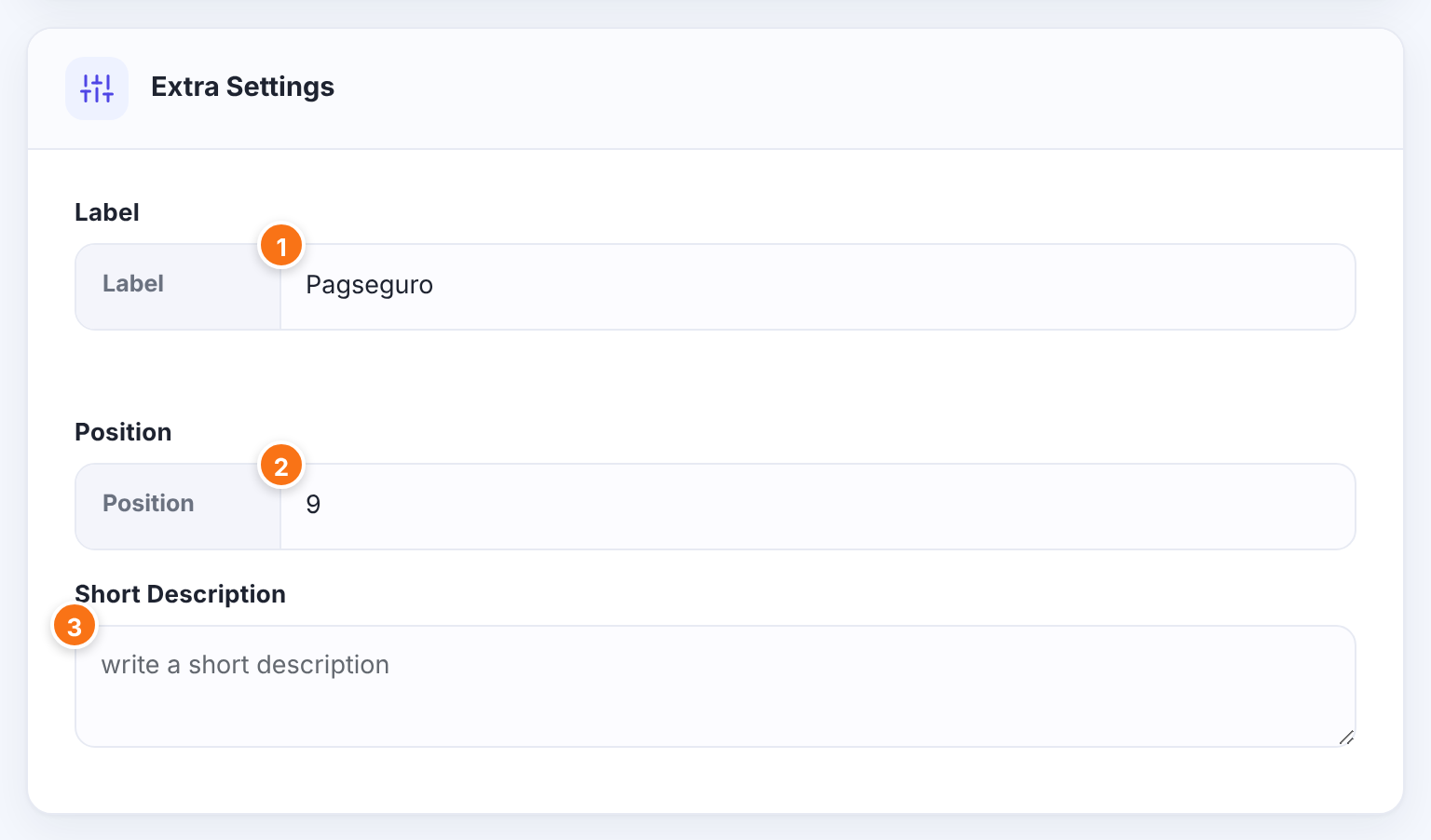
The name of this payment method at checkout. You can change it, for example to PagSeguro.
Default: Pagseguro
The order of this gateway among the payment methods at checkout. Lower numbers come first.
Default: 9
Optional text about the gateway, saved with its settings.
Click Save Changes.
Test a payment
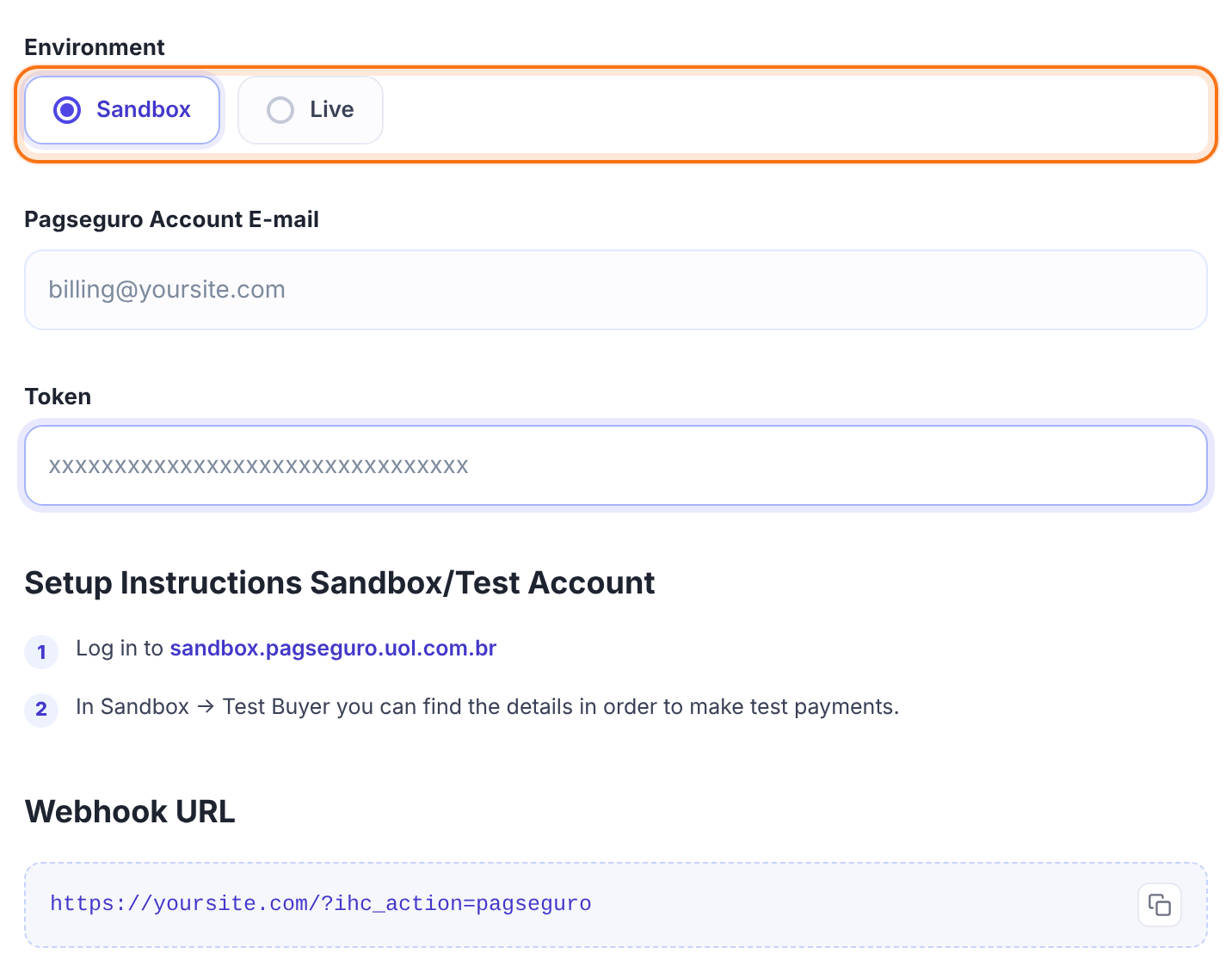
- Set Environment to Sandbox, enter the e-mail and token for PagSeguro’s Sandbox, and save.
- Log in to sandbox.pagseguro.uol.com.br and open Sandbox › Test Buyer to get the test buyer’s details.
- Buy Pro Monthly on your site in a private window and choose PagSeguro. Pay on PagSeguro’s page as the test buyer.
- In Ultimate Membership Pro›Payment History, the order becomes Completed once PagSeguro reports the payment.
When it works, switch Environment to Live, enter your live e-mail and token, and save.
Limits to know
- BRL only, with each payment between 1.00 and 2000.00 BRL (see Step 1).
- Recurring Memberships are billed at one of PagSeguro’s intervals: weekly, monthly, every 2, 3 or 6 months, or yearly. Use one of these intervals for your Subscription Cycle.
- Limited plans need at least 2 payments.
- Refunds are made in your PagSeguro account.
Offer PagSeguro to Brazilian members only
If you also sell outside Brazil in another currency, PagSeguro isn’t the right gateway for those members, because it takes payments in BRL only. Keep a separate site or plan priced in BRL for Brazilian members.
Example: Coaching Club Brasil on PagSeguro
- Default System Currency
- Brazilian Real (only for Brazilian members)
- Membership
- Pro Monthly, Recurring Subscription, 1 Months, 99 BRL
- Environment
- Sandbox while testing, then Live
- Pagseguro Account E-mail
- billing@yoursite.com
- Token
- From Online Sale › Integrations › Use of API’s
- Notification URL
- https://yoursite.com/?ihc_action=pagseguro
- Label
- PagSeguro
Troubleshooting
Why don’t members reach PagSeguro’s payment page after choosing PagSeguro?
PagSeguro refused the request. Check that the Pagseguro Account E-mail and Token belong to the account that matches the Environment (Sandbox or Live).
Which amounts can I charge with PagSeguro?
PagSeguro payments are in BRL, between 1.00 and 2000.00 BRL. Price the Membership in BRL within that range.
Why does the order stay Pending after the member paid?
PagSeguro hasn’t reported the payment as paid yet, or couldn’t reach your site. Check the Notification URL in PagSeguro and that your site is publicly reachable.
Which recurring intervals can I use with PagSeguro?
Weekly, monthly, every 2 months, every 3 months, every 6 months and yearly. Set the Membership’s Subscription Cycle to one of these.


