
In Ultimate Membership Pro, members see two tables in the Member Portal: their Memberships (the Subscriptions table) and their payments (the Payments table). You decide which columns each table shows and which buttons members get, such as renewing or canceling a Membership themselves.
This guide sets up both tables and explains each member action.
Before you start
- The Member Portal is set up. See Set up the Member Portal.
Choose the Subscriptions table columns
- Go to Ultimate Membership Pro›Showcases›Subscriptions Table.
![Subscriptions Table Showcase: shortcode [ihc-account-page-subscriptions-table] with a Copy button, and the column switches Membership (always on), Plan Details, Amount, Payment Service, Trial Period, Grace Period, Starts On, Expires On and Status above a live preview row](https://ultimatemembershippro.com/wp-content/uploads/2026/10/ump-member-tables-12-subs-columns.png)
The Membership column is always shown. Plan Details, Amount, Payment Service, Trial Period, Grace Period, Starts On, Expires On and Status are on by default; switch off the ones your members don’t need.
Choose what members can do
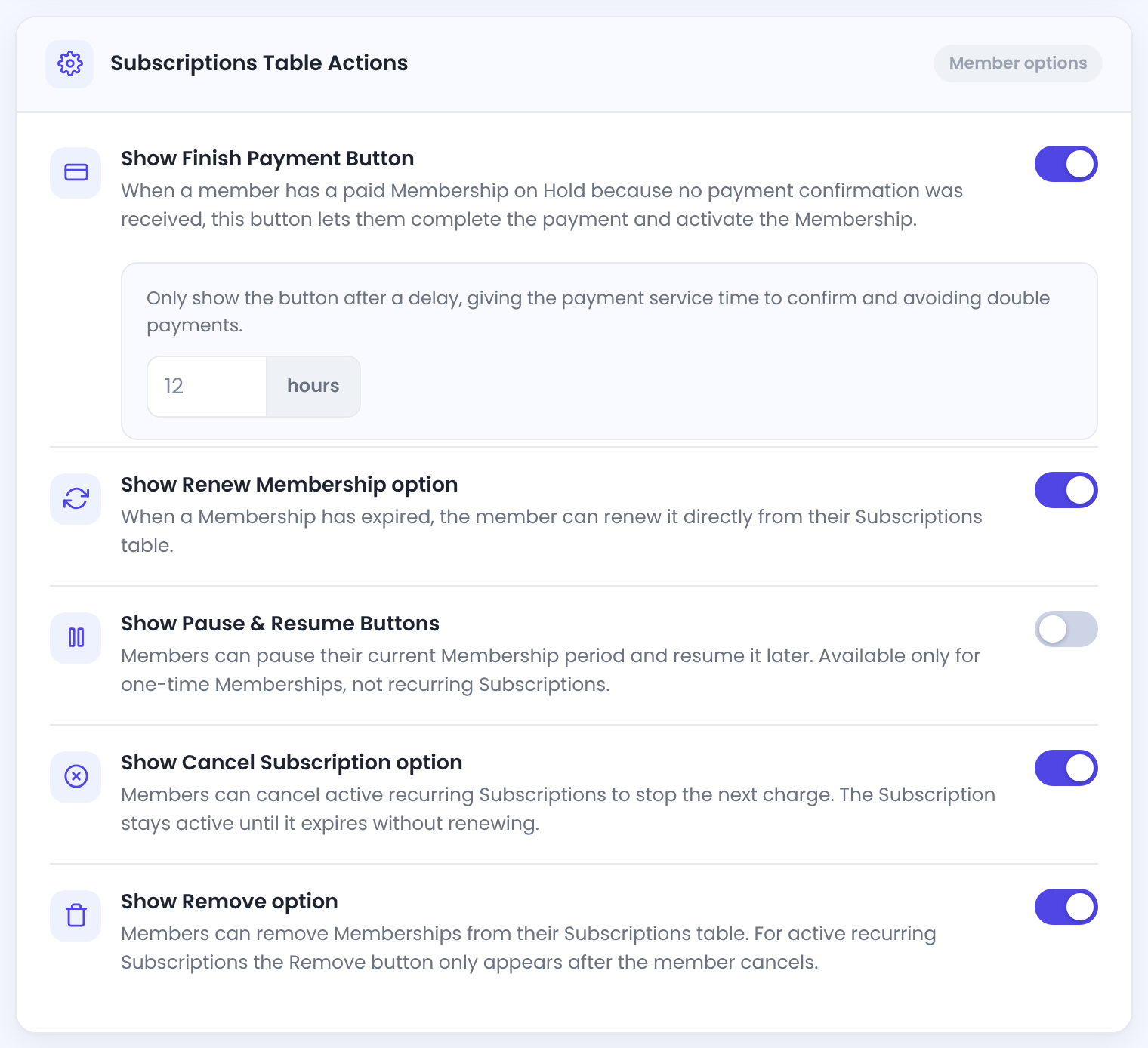
For a paid Membership on Hold because the payment wasn’t confirmed: the member can pay again and activate it. The delay gives the payment service time to confirm first, so nobody pays twice.
Default: On, after 12 hours
When a Membership has expired, the member can renew it from the table.
Default: On
Members can pause an active Membership and resume it later. Works for one-time Memberships; for recurring subscriptions only when paid with Stripe (Stripe Connect).
Default: Off
Members can cancel an active recurring subscription. No further charges are taken; the Membership stays active until it expires.
Default: On
Members can delete a Membership from their table. For an active recurring subscription, Remove only appears after they cancel.
Default: On
- Click Save Changes.
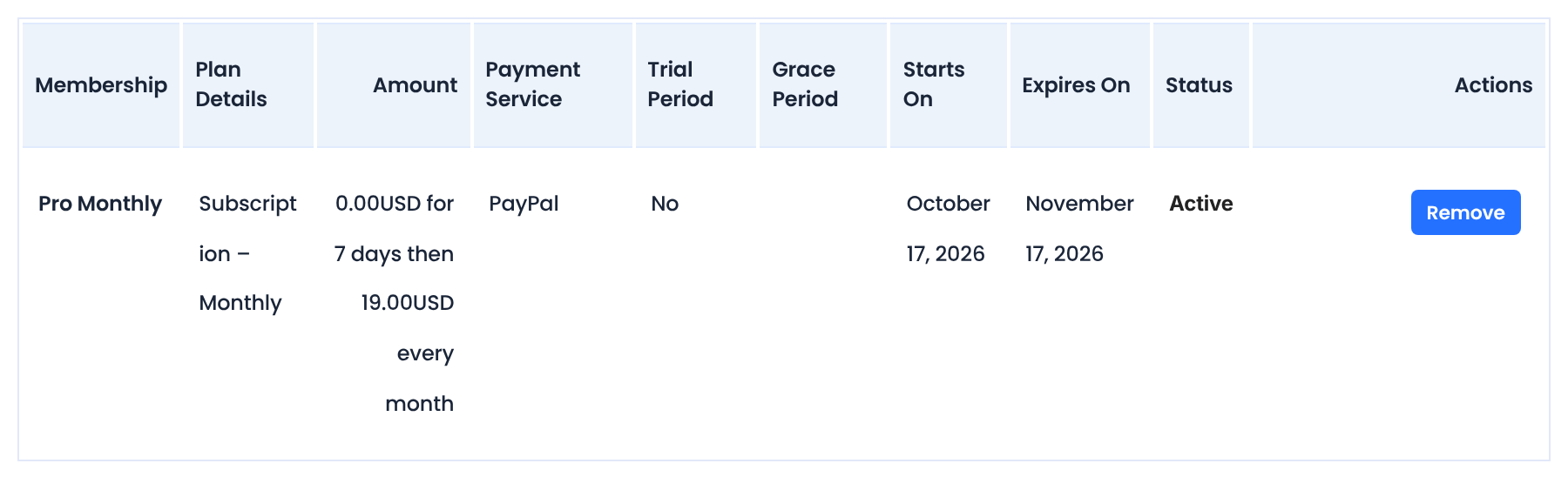
Members see the table in the Subscriptions tab of the Member Portal:
Choose the Payments table columns
- Go to Ultimate Membership Pro›Showcases›Payments Table.
![Payments Table Showcase: shortcode [ihc-account-page-orders-table] and column switches Code (always on), Memberships, Total Amount, Payment Method, Date, Coupon, Transaction and Status above a live preview row](https://ultimatemembershippro.com/wp-content/uploads/2026/10/ump-member-tables-14-payments-columns.png)
The order code. Always shown.
Switch off what members don’t need.
Default: On
Only listed when taxes are turned on.
A Download link for each invoice. Only listed when the Invoice module is on; see Send invoices.
- Click Save Changes.
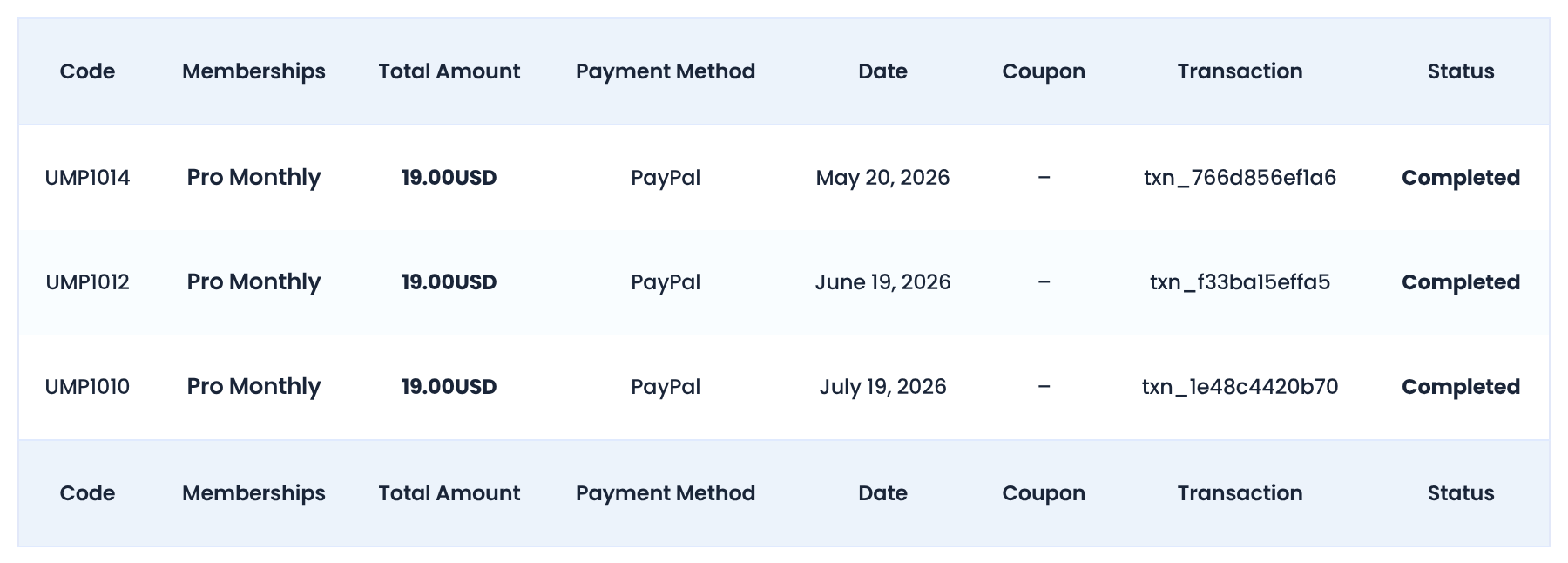
Show the tables on any page
[ihc-account-page-subscriptions-table]
[ihc-account-page-orders-table]
Both show the logged-in member’s own data. Visitors who aren’t logged in see nothing.
Good to know
- Canceling stops renewals, not access: the member keeps the Membership until it expires. Read How renewals, cancellations and expiry work.
- Pause & Resume isn’t offered for recurring subscriptions paid through other gateways, even when switched on.
- The tables in the portal follow the Show Subscription Table and Show Orders Table switches of each tab.
Example: members manage their own plan
- Subscriptions columns
- Membership, Amount, Payment Service, Starts On, Expires On, Status
- Actions
- Finish Payment after 12 hours, Renew, Cancel
- Off
- Pause & Resume, Remove
- Payments columns
- Code, Memberships, Total Amount, Date, Status
Troubleshooting
Why doesn’t the Cancel button show in the Subscriptions table?
Cancel is only offered for active recurring subscriptions. One-time and LifeTime Memberships have no future charges to cancel.
Why doesn’t the Finish Payment button show?
Finish Payment appears for a Membership on Hold, and only after the delay you set has passed since the member’s last order for that Membership.
Why is a member’s Payments table empty?
The member has no orders yet. Memberships assigned by an administrator don’t create orders.


