How to Create a Membership Website for Free


You can create a membership website for free by pairing a free WordPress install with free hosting, a free subdomain, a free theme and a free membership plugin. The catch is that free tools come with limits, such as unstable hosting, long subdomain addresses and capped features. A common path is to start free to test the idea, then move to paid hosting and a full membership plugin once members start paying.
More and more creators, coaches and communities earn recurring income from members, and you don’t need a big budget to join them. With WordPress and a few free tools, you can build a free membership site, test your idea with real members, and start paying for tools only when the site starts paying you.
You don’t need to write code, either. Most of the setup happens in settings screens, so you can build a simple site without hiring a developer.
This guide covers what you need, what each piece costs, where free tools fall short, and the steps to create a membership website for free.
What Is a Membership Site?
A membership site is a website where people sign up, often for a paid subscription, to get access to exclusive content. This content could be anything from e-courses, tutorials, videos, or webinars to private forums, blogs, and even live events.
When you create a membership website, you essentially create a recurring income source. You can have your members pay a monthly or annual fee to access exclusive content on your website. Popular membership site ideas include:
- Educational membership sites
- Fitness membership sites
- Cooking class membership sites
- Business coaching membership sites
- Book club membership sites
Advantages of Building a Membership Site
Membership sites are quite advantageous for anyone looking to tap into the Creator Economy. Here are a few benefits of building a membership site:
Recurring Revenue Stream
Unlike many other business models, your membership site can generate consistent revenue month after month. You don’t need to create new products or services to continue making money constantly, and you don’t need to chase fast (and unsustainable) customer acquisition.
Easy to Set Up
You don’t need programming skills to set up a membership site. You can get started with very little money and build your first version with free tools, as the steps below show.
Fueling Your Passion Project
Are you good at something but never thought you could build revenue from it? A membership site allows you to do just that. You can monetize your skills and knowledge by creating exclusive content for your members. This could be anything from online courses to teaching others how to cook or work out from the comfort of their homes.
Can You Generate Revenue with a Membership Site?
The short answer is: yes.
It won’t happen overnight, but you can make money from your membership website. As long as you provide valuable content and keep new members joining, a membership site can grow from a side income into a full business. Your prices matter as much as your content, so read up on membership pricing strategy before you set them.
What You Need to Start a Membership Site
To start a membership site, you need four things.
WordPress and a Theme
The WordPress.org software is free and open source. You install it on your hosting account (most hosts offer a one-click installer), then pick a theme that fits the type of membership site you want to create. For ideas, browse these WordPress membership themes.
Domain Name
A domain name is your site’s address, such as yoursite.com. You can buy one from a registrar like Namecheap, and some hosts include a domain for the first year with an annual plan. For tips on picking a name and an extension, see how to choose a membership site domain name.

Hosting
Hosting stores your website’s files and serves them to visitors. Shared hosting from companies such as HostGator or GoDaddy is the cheapest paid option. Managed WordPress hosting costs more, but it takes care of speed, security and backups for you. Compare your options in this guide to WordPress hosting for membership sites.

WordPress Membership Plugin
A WordPress membership plugin helps you to manage your members, content access, and payment methods. This plugin is essential for turning a simple blog into a website where people can log into their account and see content according to the rules you establish. For instance, free members might only be able to see one piece of content a month, or only some types of articles, whereas premium members might have access to all of the content.
Free plugins cover the basics, while paid plugins add features such as recurring billing, drip content and more payment gateways. To see how the main options compare, read this roundup of the best WordPress membership plugins.
How Much Does a Membership Website Cost?
Building a membership website doesn’t have to break the bank. As a general rule, you will have to pay for:
- Hosting: the main fixed cost, billed monthly or yearly. Budget shared hosting is the cheapest paid option.
- Domain name: a yearly fee that depends on the extension you choose (.com, .org, .co and so on).
Additionally, you may also want to pay for:
- A premium theme, if no free theme fits your design.
- A page builder such as Elementor Pro or Divi. Both are paid products, and current prices are listed on each vendor’s site.
- A professional membership plugin and its add-ons. Ultimate Membership Pro, for example, is sold as annual plans with add-ons included.
- An email marketing tool such as Mailchimp or Kit (formerly ConvertKit). Most have a free plan, and paid plans grow with your list size and the features you need.
Payment gateways such as Stripe and PayPal usually charge a fee on each transaction instead of a monthly fee, so that cost only starts once members pay you.
The Limits of a Free Membership Site
You can run a free membership site, but free tools come with limits you should know before you launch:
- Hosting: free hosting is usually slower and less stable, which leads to downtime and, once people pay, to cancellations.
- Themes: free WordPress themes do the job, but they offer fewer layout and design options than premium themes.
- Domains: truly free domains are now hard to find. Freenom, which gave away .tk, .ml, .ga, .cf and .gq domains, stopped new registrations in 2023. Your realistic free options are a subdomain from your host or a domain included for the first year with a paid hosting plan.
- Membership plugins: free versions often lack features such as recurring billing or drip content, or they keep them for a paid upgrade.
- Email marketing: free plans limit automation and cap how many contacts you can have on your list.

If you still want to create a membership website for free, here are resources you can use:
- Free hosting: InfinityFree, ByetHost
- Free domains: the free subdomain your host gives you, or a domain included with some annual hosting plans, such as Hostinger’s
- Free themes: the WordPress.org theme directory
- Free membership plugins: Simple Membership, s2Member, or see more in this list of free WordPress membership plugins
- Free email marketing tools: many offer a free plan, including Mailchimp and Kit
Free vs. Paid: When to Upgrade Each Piece
| Piece | Free option | Main limit | When to pay |
|---|---|---|---|
| Hosting | Free hosts such as InfinityFree | Slower, less stable, fewer resources | Before you open sign-ups |
| Domain | Subdomain from your host | Long address that looks less trustworthy | Before you start promoting the site |
| Theme | WordPress.org theme directory | Fewer design and layout options | When your design outgrows it |
| Membership plugin | Free plugins such as Simple Membership | Fewer features; extras often sit in paid upgrades | When you need recurring billing, drip content or more gateways |
| Email marketing | Free plans from Mailchimp or Kit | Contact caps and limited automation | When your list nears the cap |
How to Create a Membership Website for Free, Step by Step
Once you have your tools, the setup follows the same six steps whether you use free or paid tools.
Step 1: Install WordPress
Sign up for hosting (free is fine for testing, but move to paid hosting before launch) and use your host’s installer to set up WordPress. Connect your domain, or use the free subdomain your host gives you while you build.
Step 2: Choose a Free Theme
Pick a lightweight theme with a clear header menu and a full-width page template, so your sign-up, login and account pages look clean. You can install free themes from Appearance, then Themes, in your WordPress dashboard.
Step 3: Install a Membership Plugin and Create Your Memberships
Install a free plugin to test your idea, or a paid one if you plan to charge members from day one. In Ultimate Membership Pro, each access level is called a Membership. You can create a free Membership for sign-ups next to paid ones with recurring subscriptions, free or paid trials, and coupons.
Step 4: Restrict Your Member Content
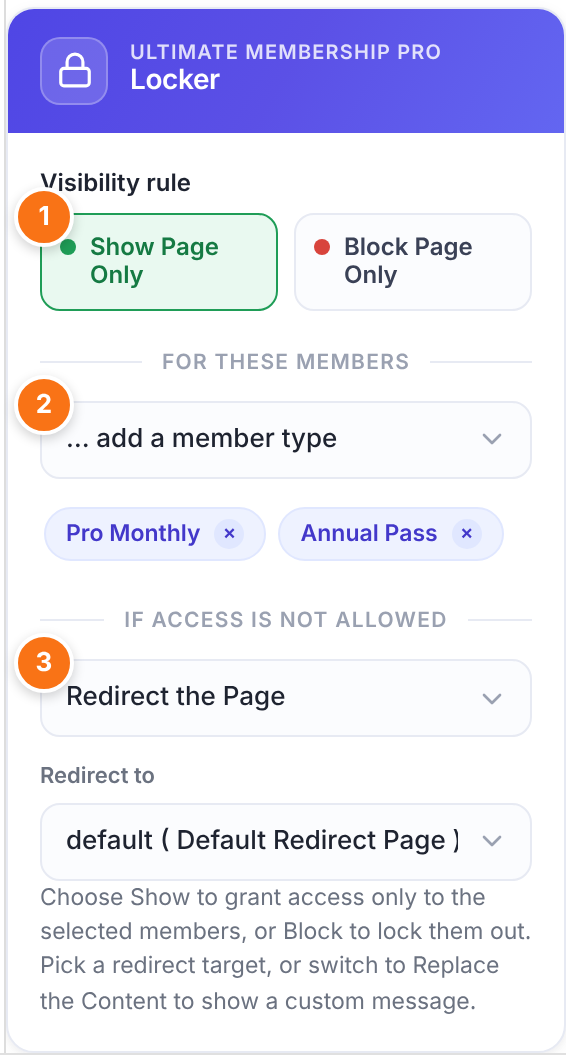
Decide what stays public and what is for members only. A public homepage and a few free posts help visitors see what they get before they join. With Ultimate Membership Pro, you can restrict content from a page’s edit screen, or lock a whole post type, category, file or URL with one rule.
Step 5: Set Up Sign-Up, Login and Payments
Create your register, login and account pages and add them to your menu. For paid Memberships, connect a payment gateway. Ultimate Membership Pro works with Stripe, PayPal and other payment gateways, so members can pay by card or PayPal at checkout.
Step 6: Test and Launch
Log out, or open a private browser window, and sign up as a new member. Check that locked pages stay locked, welcome emails arrive and payments go through. Then announce your site to your audience and invite your first members.
Conclusion
Creating a membership website is not as complicated or expensive as it may seem. You can start with WordPress, free hosting, a host subdomain, a free theme and a free membership plugin, and use that setup to test your idea with your first members.
Once people start paying, move to reliable hosting and your own domain, and choose a membership plugin that can grow with you. Ultimate Membership Pro is sold as annual plans, with unlimited members on every plan.
Frequently asked questions
Can you build a membership site without paying anything?
Yes, you can launch a basic membership site with free hosting, a free subdomain, a free WordPress theme and a free membership plugin. Free tools usually limit storage, features, member counts or email contacts. They work for testing an idea, but you will likely need paid tools once you start charging members.
What is the cheapest way to start a membership website?
The cheapest setup is a self-hosted WordPress site on budget shared hosting, a low-cost domain, a free theme and a membership plugin. Skip paid page builders at first and use a free email tool until your list grows. Add paid tools only when a free option starts to hold your site back.
Is free hosting good enough for a membership site?
Free hosting is fine for building and testing, but it is risky for a live membership site. Free hosts tend to be slow and unstable, and they often limit storage and bandwidth. Since members pay for reliable access, downtime hurts trust quickly. Move to paid hosting before you open sign-ups.
Do you need technical skills to create a membership website?
No, you can build a membership site on WordPress without writing code. A membership plugin handles sign-ups, payments and content access through settings screens, and a theme or page builder handles the design. Plan for a few hours to learn the basics and test your sign-up flow before launch.
Can a free membership plugin handle paid subscriptions?
Some free membership plugins accept payments, but many cap members, limit gateways or push you toward a paid upgrade. If you plan to sell recurring subscriptions, check those limits first. Ultimate Membership Pro is sold as annual plans with unlimited members on every plan, recurring subscriptions, free Memberships, trial periods, and Stripe and PayPal payments.
Ready when you are
Turn visitors into paying members with Ultimate Membership Pro
Launch your membership website, protect exclusive content and automate subscription payments, all in one WordPress plugin.
- 14-day money-back guarantee
- Unlimited members
You May Also Like
What Is a Recurring Subscription and Should You Get One for Your Membership Site?
The Ultimate Guide to Understanding Membership Types, from A to Z
How to Choose a Membership Site Platform for Your Online Community
How to Create Paid Member Subscriptions on WordPress
How to Create a Membership Dashboard: Use Cases and Best Practices