Best Teachable Alternatives for 2026: 9 Options for Course Creators
Compare the best Teachable alternatives by price, transaction fees and features, from Thinkific, Kajabi and LearnWorlds to WordPress LMS plugins and a membership site you own.

The best Teachable alternatives are Thinkific for unlimited courses on one plan, Kajabi for funnels and email in the same bill, Podia and Payhip for a simple creator store, LearnWorlds for interactive training, and a WordPress site with LearnDash, Tutor LMS or Ultimate Membership Pro if you want to own the platform. Teachable starts at $29/month billed yearly with a 7.5% transaction fee as of October 2026, so most creators who switch want lower fees, fewer product caps or more control over their school.
Ultimate Membership Pro is made by WPIndeed, the publisher of this blog.
A Teachable alternative is any course platform, creator store, marketplace or WordPress plugin you can use to sell online courses outside Teachable. Hosted platforms run the software for you, WordPress plugins run on a site you host, and a marketplace like Udemy sells your course to its own audience.
- Teachable takes 7.5% of each sale on Starter and 0% from Builder when you use Teachable Payments. U.S. schools that connect their own Stripe account through the Custom Payment Gateway pay a 2% integration fee per transaction (as of October 2026).
- Thinkific with Thinkific Payments, Podia Shaker, LearnWorlds Pro Trainer and Payhip Pro take no platform fee on sales. Udemy pays instructors 37% of organic sales.
- LearnDash, Tutor LMS and Ultimate Membership Pro with Ultimate Learning Pro run on your own WordPress site. You pay for plugins and hosting, and payments go through your own gateway account.
- If you move to WordPress, the Ultimate Membership Pro support team helps you migrate from Teachable with its own tools. Before you set a date, ask them how your active recurring subscriptions will be handled for your payment gateway.
Why do course creators look for Teachable alternatives?
Course creators usually compare Teachable alternatives when the Starter fee or the product cap starts to bite, or when they want community, certificates or their own site without moving up a tier.
- The Starter fee. As of October 2026, Starter costs $39/month, or $29/month billed yearly, and keeps 7.5% of every sale. At $2,000 in monthly sales, that fee alone is $150.
- Product caps. You can publish 5 products on Starter, 10 on Builder ($69/month billed yearly) and 50 on Growth ($139/month billed yearly). Each course, coaching offer or digital download counts as one; memberships and bundles don’t.
- Features on higher tiers. Community starts on Builder. Course certificates, removing Teachable branding and imported students are highlighted on Growth.
- Payment and design control. Teachable Payments handles sales tax and VAT for you. With your own Stripe account on the Custom Payment Gateway, Teachable no longer handles tax, U.S. schools pay the 2% integration fee, and PayPal can’t take subscription payments. Your pages stay inside Teachable’s site builder.
In Teachable’s favor, Builder and above charge 0% with Teachable Payments, every plan includes iOS and Android student apps, and you never deal with hosting. The current numbers are on Teachable’s pricing page and its fees article.
Teachable alternatives at a glance
This table compares nine Teachable alternatives against Teachable itself. Prices and fees come from each vendor’s own site as of October 2026, and card processing applies on top of every option.
| Option | Pricing model | Platform fee on sales | Best for |
|---|---|---|---|
| Teachable (baseline) | From $29/month billed yearly | 7.5% on Starter; 0% from Builder with Teachable Payments | Hosted courses with student apps |
| Ultimate Membership Pro + Ultimate Learning Pro | Annual plugin plans plus your own hosting | Sold as annual plans; your processor’s fees apply | Courses and Memberships on a site you own |
| Thinkific | From $82/month billed yearly | None with Thinkific Payments; extra gateway fee with Stripe or PayPal | Unlimited courses on every plan |
| Kajabi | From $143/month billed yearly | No revenue share; 2% on Basic with a third-party processor | Courses plus funnels and email marketing |
| Podia | From $42/month billed yearly | 5% on Mover; none from Shaker | A simple store for courses, downloads and community |
| LearnWorlds | From $24/month billed yearly | $5 per paid enrollment on Starter; none from Pro Trainer | Interactive video and SCORM training |
| Payhip | Free plan; paid from $29/month | 5% Free, 2% Plus, none on Pro | The lowest cost to start |
| LearnDash | $350 for one site, bundled with Give, The Events Calendar and Kadence | No platform fee listed; processor fees apply | A full-featured WordPress LMS |
| Tutor LMS | Free core; Pro from $199/year for one site | No cut of course revenue | A budget WordPress course site |
| Udemy | Revenue share on each sale | You get 37% of organic sales and 97% through your coupon or referral link | Reaching students already on a marketplace |
What are the best Teachable alternatives?
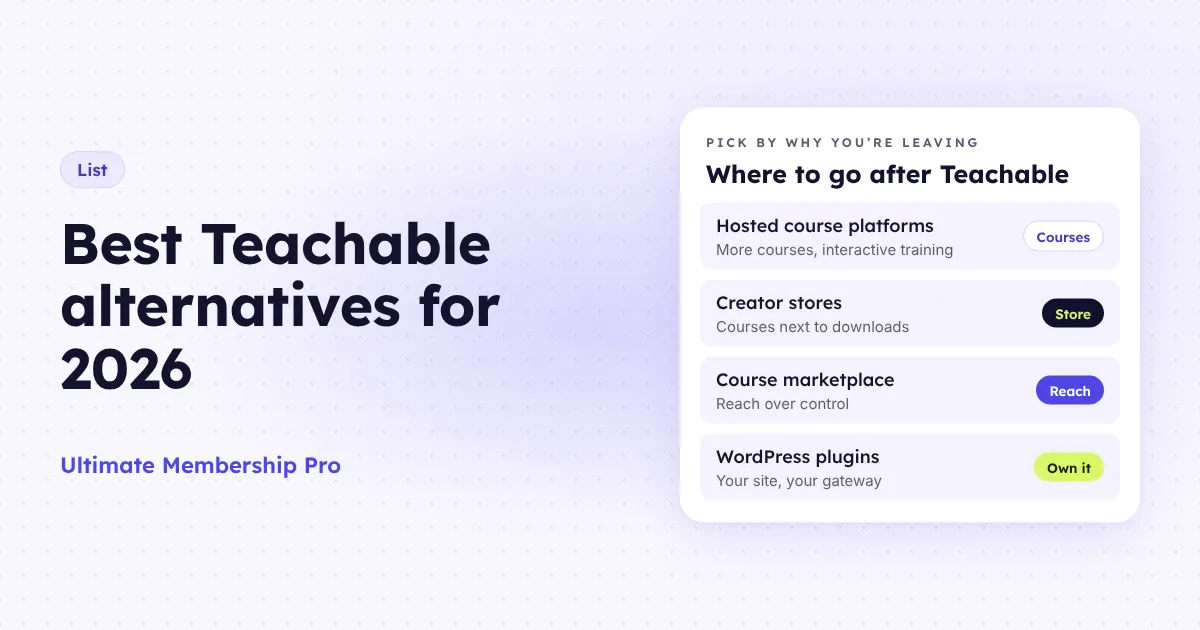
The best Teachable alternatives depend on why you’re leaving, and the closest sites like Teachable are the hosted course platforms Thinkific and LearnWorlds.
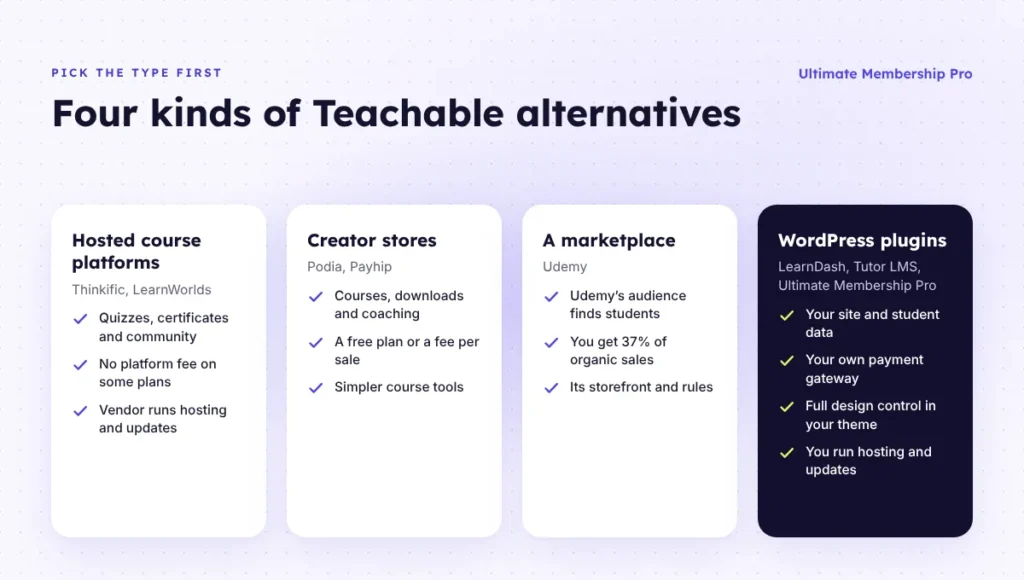
These sites like Teachable fall into four groups: hosted course platforms, creator stores, a marketplace and WordPress plugins you run yourself.
1. Ultimate Membership Pro and Ultimate Learning Pro on WordPress
Ultimate Membership Pro is a WordPress membership plugin that sells access to your content as Memberships. On your own domain, it runs sign-up, checkout, renewals and the student account page, with unlimited members on every plan.
The course itself comes from Ultimate Learning Pro, a separate WPIndeed plugin sold on its own. Its site lists quiz timers, completion certificates, reward points, badges, scheduled lessons and multiple instructors per course. In the course membership setup, you link each course to a Membership, so the course and its curriculum unlock together when a student pays.
Without a second plugin, lessons can be WordPress pages that drip content opens days, weeks or months after a student joins, or on a date. Cheat Off logs out an earlier session when someone else uses the same login.
Best for: Teachable users who want no product caps, no platform share of sales and full design control through their own WordPress theme.
Limitation: it is a self-hosted setup, not a hosted platform. There is no student app, forum or email campaign tool built in, quizzes and certificates need Ultimate Learning Pro, and you look after hosting, updates and backups.
Ultimate Membership Pro is sold as annual plans (Pro, Full Package and Agency), listed on the pricing page. Payment processor fees still apply.
2. Thinkific
Thinkific is the hosted platform most people weigh in a Teachable vs Thinkific decision. Every plan includes unlimited courses, downloads and coaching products, plus quizzes, certificates, memberships, affiliate tracking and a custom domain.
Start costs $109/month, or $82/month billed yearly, with 1 community. Grow costs $164/month billed yearly with 3 communities, bulk email and no Thinkific branding. Thinkific Payments adds no platform fee; connecting Stripe or PayPal directly adds a gateway fee that varies by plan. A branded mobile app costs $199/month extra.
Best for: creators who hit Teachable’s product cap and want many courses on one plan.
Limitation: the entry plan costs more than Teachable Builder, and white-labeling starts on Grow.
3. Kajabi
Kajabi is a hosted business platform for courses, coaching and community with unlimited marketing emails, funnels and landing pages on every plan. Basic costs $179/month, or $143/month billed yearly, with 5 products, 2,500 contacts and 1 community. Growth costs $199/month billed yearly with 50 products and 25,000 contacts.
Kajabi takes no revenue share, but third-party processors other than PayPal and Kajabi Payments add 2% on Basic, 1% on Growth or 0.5% on Pro. The branded app comes with Pro at $399/month billed yearly.
Best for: creators who would otherwise pay for Teachable plus a separate email and funnel tool.
Limitation: in a Teachable vs Kajabi comparison, Kajabi costs far more at entry level, and Basic has the same 5-product cap as Teachable Starter.
4. Podia
Podia is a creator store for courses, downloads, coaching and community, with a website, blog, landing pages and a custom domain. Mover costs $42/month billed yearly with a 5% transaction fee, 50 products and 25 community spaces. Shaker costs $84/month billed yearly with no Podia fee, 150 products, affiliate marketing and upsells.
Best for: solo creators who want a lighter dashboard and community spaces without paying for a higher tier.
Limitation: the included email list is small (100 subscribers on Mover, 500 on Shaker), and the pricing page lists no student app.
5. LearnWorlds
LearnWorlds is a hosted course platform aimed at interactive and professional training, with a built-in community on every plan. Starter costs $24/month billed yearly with a $5 fee per paid enrollment and no certificates. Pro Trainer costs $79/month billed yearly with no LearnWorlds fee, certificates, basic AI interactive video and 20 SCORM packages.
Best for: trainers and teams who need SCORM, interactive video or a branded academy.
Limitation: the flat $5 per enrollment on Starter hurts low-priced courses, and the branded app is a paid add-on from Pro Trainer.
6. Payhip
Payhip sells online courses, memberships, coaching and digital downloads from one store, with email marketing included. All plans share the same features and unlimited products; only the fee changes. Free Forever takes 5% of each sale, Plus costs $29/month with 2%, and Pro costs $99/month with no transaction fee.
Best for: creators with a small catalog who want to start without a monthly bill.
Limitation: the Free and Plus plans take a share of every sale, and the pricing page lists no community features.
7. LearnDash
LearnDash is a WordPress LMS plugin from Liquid Web. Its site lists quizzes with 8 question types, assignments, certificates, drip schedules, recurring subscriptions, one-time payments, course bundles and built-in memberships through MemberDash. As of October 2026, a one-site plan is listed at $350, bundled with Give, The Events Calendar and Kadence.
Best for: creators who want a mature LMS on their own WordPress site.
Limitation: you run hosting and setup yourself, and the plan bundles plugins you may not need.
8. Tutor LMS
Tutor LMS is a WordPress course plugin with a free core. Its feature list includes a certificate builder, advanced quizzes, content drip, course subscriptions, memberships and native eCommerce with coupons and guest checkout. Pro costs $199/year for one site with all Pro add-ons, and the pricing page says Tutor LMS takes no percentage of your course revenue.
Best for: WordPress users who want to test a course site on the free version before paying.
Limitation: like any plugin, it leaves hosting, updates and security to you, and Pro features need a paid plan.
For a side-by-side look at more course plugins, see this guide to the best WordPress LMS plugins.
9. Udemy
Udemy is a course marketplace, not a school you run. Its instructor help center says you receive 97% of the net amount when a student buys through your coupon or referral link, and 37% on organic sales that Udemy brings in. Earnings from Udemy Business and subscription plans are covered in a separate article.
Best for: new instructors who need students more than control, or as a discovery channel next to your own school.
Limitation: you sell inside Udemy’s storefront and rules, and most of each organic sale stays with Udemy.
How do Teachable alternatives compare on features?
The differences between these Teachable alternatives show up in community, apps and certificates, based on each vendor’s pricing and feature pages as of October 2026. Udemy is left out because it is a marketplace.
| Option | Community | Mobile app | Certificates | Where your school runs |
|---|---|---|---|---|
| Teachable | Builder and up | iOS and Android student apps | Highlighted on Growth | Teachable’s hosted site builder |
| Ultimate Membership Pro + Ultimate Learning Pro | Members directory; add a forum plugin locked by Membership | No native app | With Ultimate Learning Pro | Your WordPress site and theme |
| Thinkific | 1 on Start, 3 on Grow, 10 on Expand | Branded app add-on | Every plan | Hosted, on your custom domain |
| Kajabi | 1 on Basic and Growth, 3 on Pro | Kajabi app; branded app on Pro | Built in | Hosted; 1 website, 3 on Pro |
| Podia | 25 spaces on Mover, 100 on Shaker | Not listed | Yes (course feature) | Hosted, with custom domain |
| LearnWorlds | Built in on every plan | Branded app add-on from Pro Trainer | From Pro Trainer | Hosted |
| Payhip | Not listed | Not listed | Yes | Hosted store |
| LearnDash | Not listed | Not listed | Yes | Your WordPress site |
| Tutor LMS | Not listed | Not listed | Yes, with a builder | Your WordPress site |
Which Teachable alternative costs less as you grow?
On percentage plans the fee grows with every sale, so a flat plan with no sales fee wins as revenue grows. Payhip Plus is the cheapest option here at $1,000 a month, while Teachable Builder and Thinkific Start stay flat at any volume. The table is a worked example using yearly-billed prices where offered (Payhip lists monthly prices only) and fees as of October 2026, without card processing, which you pay on every option.
| Monthly platform cost (example) | $1,000 in sales | $3,000 in sales | $10,000 in sales |
|---|---|---|---|
| Teachable Starter ($29 + 7.5%) | $104 | $254 | $779 |
| Teachable Builder ($69, Teachable Payments) | $69 | $69 | $69 |
| Thinkific Start ($82, Thinkific Payments) | $82 | $82 | $82 |
| Podia Mover ($42 + 5%) | $92 | $192 | $542 |
| LearnWorlds Starter ($24 + $5 per sale of a $100 course) | $74 | $174 | $524 |
| Payhip Plus ($29 + 2%) | $49 | $89 | $229 |
| Udemy organic sales (63% stays with Udemy) | $630 | $1,890 | $6,300 |
| Your own WordPress site | Fixed: hosting + annual plugin plans | Fixed: hosting + annual plugin plans | Fixed: hosting + annual plugin plans |
Teachable Builder costs less than Starter above about $530 in monthly sales, Podia Shaker ($84) beats Mover above $840, and LearnWorlds Pro Trainer ($79) beats Starter once you sell more than 11 paid enrollments a month. The Udemy row assumes no taxes or app store fees, which Udemy deducts before your share.
On WordPress, the yearly total is hosting, a domain, a theme, the plugin plans and an email tool, plus card fees. It stays the same at $1,000 or $10,000 a month, so set it against a full year of your Teachable bill and fees.
Teachable vs your own WordPress site: what changes?
Moving to WordPress swaps a managed school for one you run: you give up the student apps, tax handling and hosted upkeep, and gain your own theme and database, a choice of gateways and no product or member caps.
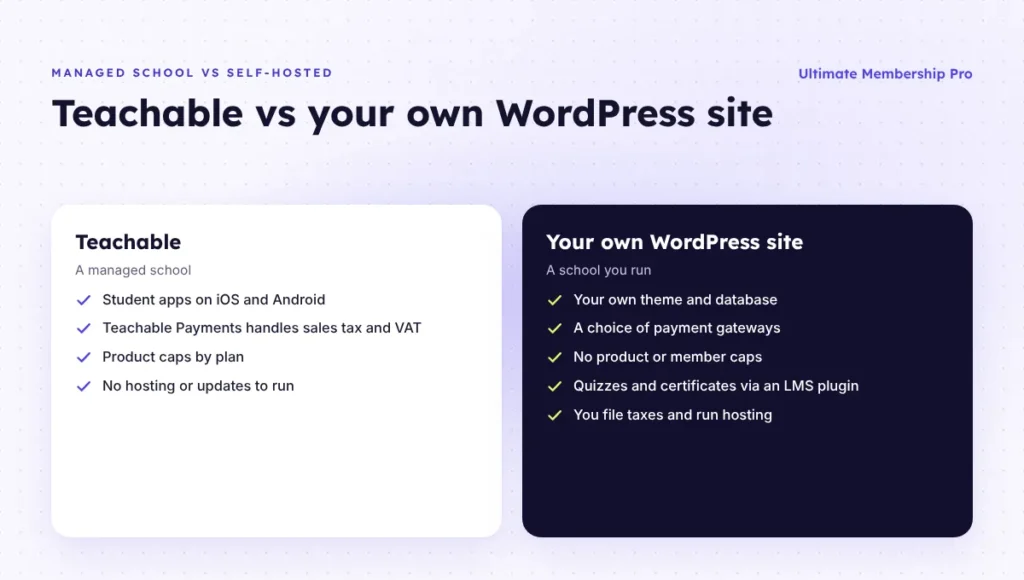
- Taxes. Teachable Payments calculates, collects and remits U.S. sales tax and EU and UK VAT. Ultimate Membership Pro adds tax by country or state to checkout and printable invoices, but filing and paying it is up to you.
- Student app. There is no native app. Students open lessons and their account page in a mobile browser.
- Course tools. On its own, Ultimate Membership Pro doesn’t add quizzes, certificates or progress tracking. Ultimate Learning Pro or another LMS plugin covers those.
- Community. There is no built-in forum, chat or feed. The private community setup pairs a members directory with bbPress forums locked by Membership.
- Upkeep. Hosting, updates, backups and security are your job, or your host’s.
In return, design is fully yours: Ultimate Membership Pro works with Elementor, Gutenberg and WPBakery, and its forms sit inside your theme’s layout. Pro includes 10 payment gateways, and Full Package and Agency add PayFast, Paystack and Razorpay. Recurring subscriptions bill monthly, yearly, in installments or once for permanent access, with free or paid trials and coupons.
Students handle their own billing in the Member Portal: they renew, cancel and print invoices there, and pause and resume with Stripe Connect.
Which Teachable alternative should you choose?
Start from the reason you’re leaving, then trial two or three Teachable alternatives that fix it.
You want lower transaction fees
Teachable Builder already drops the fee to 0% with Teachable Payments. Thinkific, LearnWorlds Pro Trainer, Podia Shaker and Payhip Pro take no platform fee, and Thinkific and Payhip also lift the product cap.
You want design control and your own site
Choose WordPress. LearnDash and Tutor LMS are full course plugins. Ultimate Membership Pro is the membership layer: it sells access, runs subscriptions and uses content restriction to lock pages, posts, categories or files, with Ultimate Learning Pro adding the course structure.
You want memberships and community around the course
Podia and LearnWorlds include community on their entry plans, and Thinkific and Kajabi include at least one. On WordPress, you pair a membership plugin with a forum or community plugin.
You need more students, not more control
Udemy brings an existing audience. You can keep a flagship course on your own school and use Udemy for discovery; sales that come through your own coupon or referral link earn the 97% share.
When Teachable is still the better fit
Stay if you sell 10 products or fewer, value the student apps and tax handling, and don’t want to run a website. Moving to Builder fixes the fee for less effort than a migration.
How do you move from Teachable without losing students?
Export your students, rebuild the courses and decide how paying subscribers move before you announce anything. Keep your Teachable school live until every active subscription has a next step.
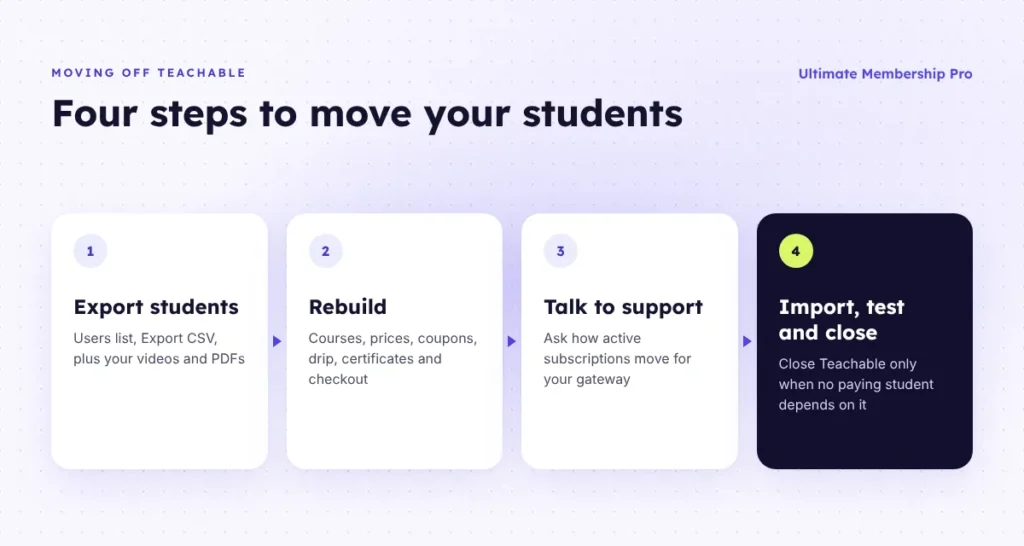
- Export students. In Teachable’s Users list, apply any filters and click Export CSV. The file is emailed to the school owner with names, emails, sign-up dates, enrolled course counts and marketing opt-out status. The link expires, so download it right away, along with your original videos and PDFs.
- Rebuild. Recreate courses, prices, coupons, drip schedules, certificates, checkout pages and emails.
- Talk to support. If you move to WordPress, the Ultimate Membership Pro support team helps you migrate from Teachable with its own tools. Before you set a date, ask them how your active recurring subscriptions will be handled for your payment gateway.
- Import, test and close. Add students with the access they’ve paid for, email them the new login link, and test a purchase, a lesson and a cancellation. Close Teachable only when no paying student depends on it.
What happens to paying subscribers?
It depends on how you take payments today. With Teachable Payments, payments run through Teachable’s own payment system, so ask its support what subscription and payment data can leave with you before you set a switch date.
With the Custom Payment Gateway, payments run through your own Stripe Standard account under your own Stripe agreement. PayPal can’t take subscription payments on that gateway, so recurring students on it pay through Stripe.
The standard CSV member import covers accounts and access: each row takes a Membership with start and expiry dates. On its own, the import doesn’t create orders or gateway subscriptions, which is why the support conversation in step 3 comes first for recurring billing: the answer depends on where those subscriptions run today.
Ready when you are
Turn visitors into paying members with Ultimate Membership Pro
Launch your membership website, protect exclusive content and automate subscription payments, all in one WordPress plugin.
- 14-day money-back guarantee
- Unlimited members
Frequently asked questions
What is the best alternative to Teachable?
It depends on why you want to leave. Thinkific suits creators who need unlimited courses, Kajabi suits those who want funnels and email in the same bill, and Podia or Payhip suit a simple store. If you want to own the site and the payment account, a WordPress site with Ultimate Membership Pro and Ultimate Learning Pro, LearnDash or Tutor LMS fits best.
How much does Teachable take from each sale?
As of October 2026, Teachable keeps 7.5% of each sale on Starter, which costs $29/month billed yearly. Builder, Growth and Custom charge 0% when you use Teachable Payments, while card processing still applies, at 2.9% + 30 cents for U.S. cards. U.S. schools using their own Stripe account through the Custom Payment Gateway pay a 2% integration fee per transaction.
Teachable vs Thinkific: which is better?
Teachable is cheaper to start, at $29/month billed yearly on Starter as of October 2026, but caps published products by plan. Thinkific starts at $82/month billed yearly and includes unlimited courses, certificates and a community on every plan. Pick Teachable for a small catalog on a budget, and Thinkific once you need many courses without a product cap.
Can I use WordPress instead of Teachable?
Yes. A WordPress site with a course plugin replaces Teachable on a domain you control. LearnDash and Tutor LMS are full course plugins. Ultimate Membership Pro sells course access as Memberships with recurring billing and drip content, and Ultimate Learning Pro adds quizzes and certificates. You handle hosting, updates and tax filing, which Teachable manages for you.
Can I move my students from Teachable to another platform?
Yes. Export your students from Teachable’s Users list as a CSV file and keep your original course files. Plan active subscriptions with care, because the answer depends on whether you use Teachable Payments or your own Stripe account. If you move to WordPress, the Ultimate Membership Pro support team helps you migrate with its own tools; ask them how your active recurring subscriptions will be handled for your payment gateway.