
In Ultimate Membership Pro, every notification email shows a sender name and address in the member’s inbox. By default that’s your site title and the WordPress admin email. Setting your own makes emails look like they come from your business and makes replies reach the right inbox.
This guide sets the sender, the addresses that receive admin notifications, and the timing of the reminder emails, which live on the same screen.
Before you start
- An address on your own domain, for example team@yoursite.com. Mail sent from a free address (Gmail, Outlook) through your site often lands in spam.
- Notifications are set up. See Set up email notifications.
Open Notifications Settings
- Go to Ultimate Membership Pro›Settings›Notifications Settings.
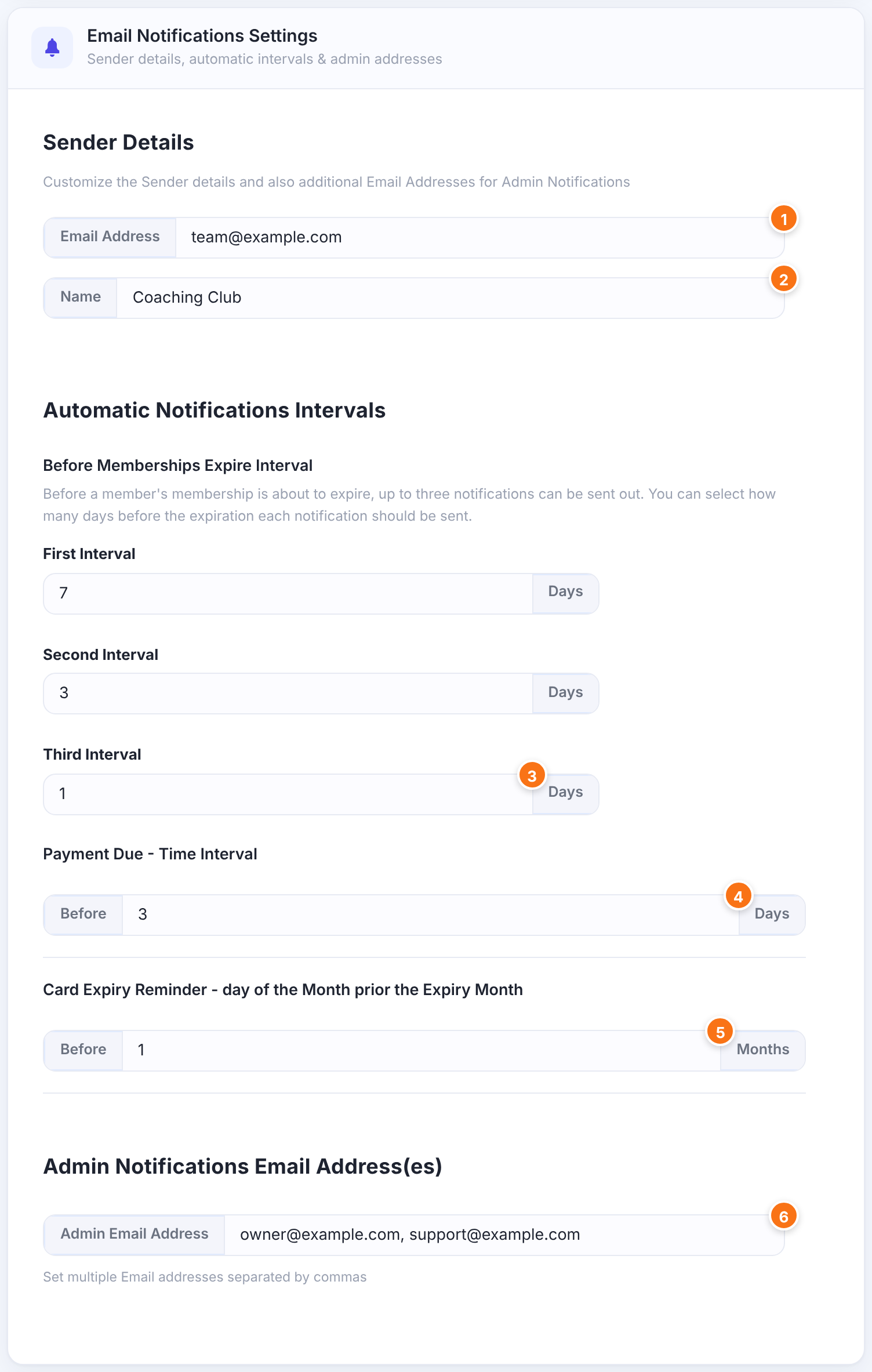
Set the sender
The From address of every notification and test email.
Default: empty (the WordPress admin email is used)
The From name members see in their inbox.
Default: empty (the site title is used)
Set the reminder intervals
Days before expiry for First Alert, Second Alert and Third Alert Before Subscription Expire. Each one is sent only if that notification exists.
Default: First 5, Second 3, Third 1 Days
Days before a renewal charge for Before Subscription Payment due.
Default: 1 Day
A day of the month, from 1 to 28. On that day the plugin emails members whose saved Stripe Connect card expires next month (Upcoming Card Expiry Reminder). The box says Months, but the number is the day.
Default: 1
Set the admin addresses
Where Administrator notifications go. Separate several addresses with commas; invalid addresses are skipped.
Default: empty (the WordPress admin email is used)
Click Save Changes. Send a test from Ultimate Membership Pro›Email Notifications to check the new sender: the test popup shows it on the From line.
Limits and gotchas
When the sender doesn’t change
- Many SMTP plugins and some hosts force their own From address and ignore this setting. If your emails still show another sender, check the From settings of your SMTP plugin.
- The Weekly Summary Email doesn’t use these sender settings; it goes out with the WordPress default sender.
- To improve delivery, use an address on the same domain as your site and set up SPF and DKIM for that domain with your email provider.
Clean up the logs
Below the settings, Notification Logs deletes logged emails older than One Day, One Week or One Month. It only affects the log list, not the emails already sent.
Example: Coaching Club
- Email Address
- team@example.com
- Name
- Coaching Club
- Before Memberships Expire Interval
- 7, 3 and 1 Days
- Payment Due – Time Interval
- 3 Days
- Card Expiry Reminder
- 1 (the 1st of the month)
- Admin Email Address
- owner@example.com, support@example.com
Troubleshooting
Why do emails still come from wordpress@yoursite.com?
Either the settings weren’t saved, or an SMTP plugin or your host replaces the From address. Check the From settings of your SMTP plugin.
Why does the admin get no email after I added more addresses?
Check that the addresses are separated by commas and are valid. An invalid address is skipped. If the field is empty, admin emails go to the WordPress admin email.
When is the first expiry reminder sent?
A daily check sends it about that many days before the Membership expires: 5 days with the default First Interval. WP-Cron must run on your site.
Do reminders go out if I only set the intervals?
No. The intervals only time the emails; each reminder needs its own notification in Email Notifications. See Set up email notifications.


