
In Ultimate Membership Pro, the Download Monitor Integration module limits how much each member can download from files you serve with the Download Monitor plugin. You set a limit per Membership, and one for registered users who have no active Membership.
This guide switches the module on, chooses what is counted and sets the limits for three Coaching Club Memberships.
Before you start
- The Download Monitor plugin is installed and active, and your files are added as downloads in it.
- You have your Memberships. See Create your first Membership.
- Your license is active. See Find and activate your license key.
Switch on the module and set the limits
- Go to Ultimate Membership Pro›Modules and open Download Monitor Integration, in the Integrations group.
- Switch on Activate/Hold Download Monitor Integration.
- Choose the Limit Type, enter the Memberships limits and click Save Changes.
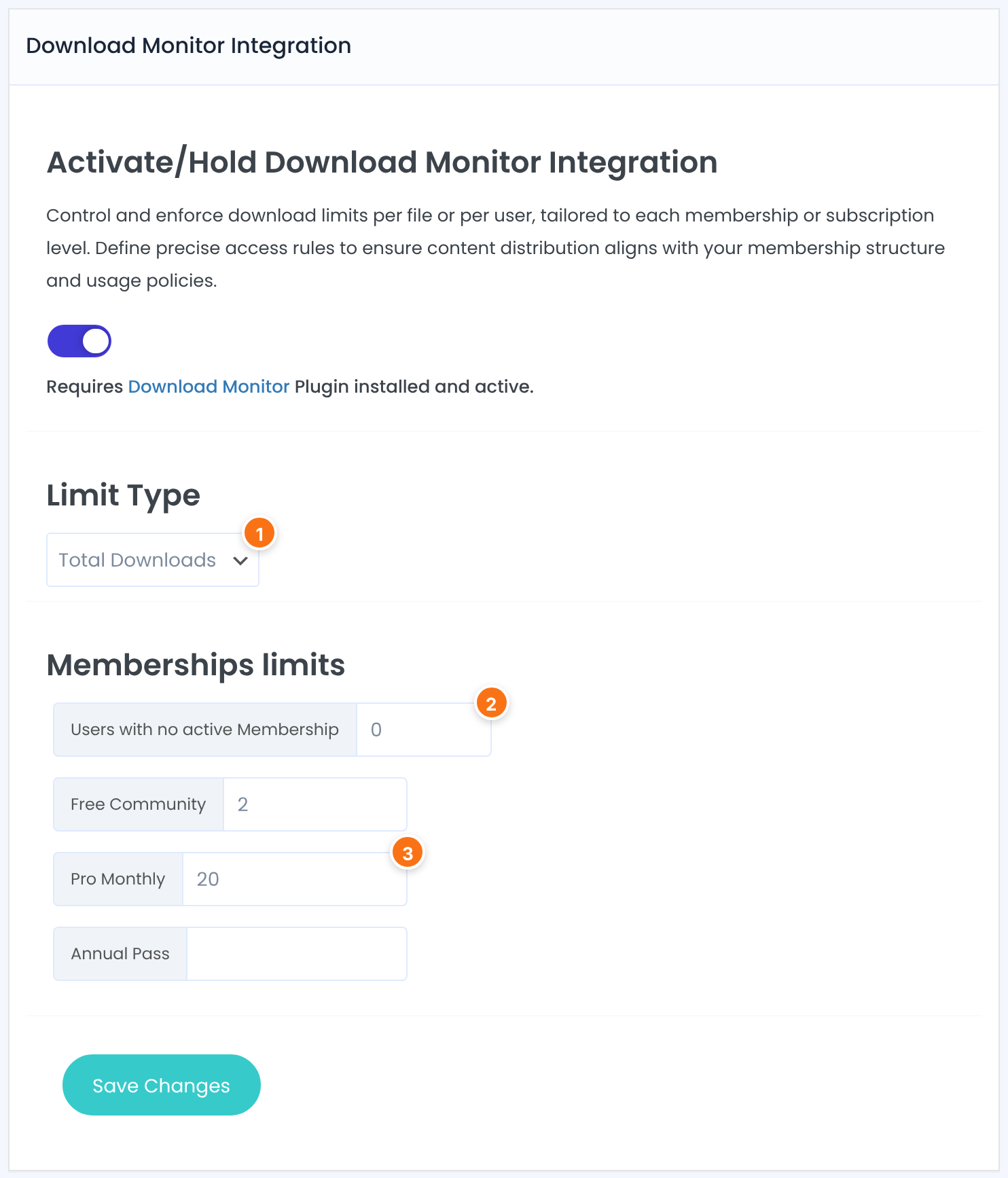
What the limits count.
- Downloaded Files: each different file counts once, however often it’s downloaded.
- Total Downloads: every download counts, including the same file twice.
Default: Downloaded Files
Limit for logged-in users who have no active Membership. Enter 0 to block their downloads; leave it empty for no limit.
Limit for members with that Membership. Leave it empty for no limit.
How the limit is counted
Downloads are counted from Download Monitor’s download log for the member, since the first download. The count doesn’t reset each month.
Each time a Membership becomes active for a member, including renewals, its limit is added to that member’s allowance. A member who renewed Pro Monthly once can download 40 times in total with a limit of 20.
A member with more than one active Membership can download while any of them still has room.
Administrators, and visitors who aren’t logged in. Download Monitor’s own access settings still apply to them.
Keep Download Monitor’s log on
The count comes from Download Monitor’s download log. If Download Monitor doesn’t log downloads, nothing is counted and the limits never trigger.
When a member reaches the limit, Download Monitor refuses the download and shows its no-access message. Expired Memberships don’t give any downloads.
Example: download limits for the Coaching Club
- Limit Type
- Total Downloads
- Users with no active Membership
- 0 (no downloads)
- Free Community
- 2
- Pro Monthly
- 20 (40 after one renewal)
- Annual Pass
- Empty (no limit)
Troubleshooting
Why can members download more than the limit?
Check that the module is switched on and saved, that Download Monitor’s download log is on, and that the field for their Membership isn’t empty. Remember that renewals add to the allowance.
Why can’t a member download anything?
Their limit may be 0, they may have reached it, or their Membership may have expired. Check the member’s Membership status and Download Monitor’s download log for them.
I’m testing as administrator and nothing is limited. Is it broken?
No. Administrators are never limited. Test with a member account.
Do the limits apply to files that aren’t in Download Monitor?
No. They apply only to Download Monitor downloads. To protect other files, see Restrict content with Access Rules.


