
In Ultimate Membership Pro, Google reCAPTCHA asks every visitor to prove they’re human before the registration or login form is sent. Bots fill in these forms by the thousands, and the check stops fake accounts and password-guessing scripts at the door.
This guide adds the “I’m not a robot” checkbox to the Coaching Club registration form and login form. You set the keys once and then switch the check on for each form.
Before you start
- A Google account, to create the reCAPTCHA keys for your domain.
- Your registration and login pages are set up. See Set up the registration form and Set up the login form.
- Your server can make outgoing requests to Google (cURL). The plugin checks each answer with Google before it accepts the form.
Get your reCAPTCHA keys
- Open the Google reCAPTCHA admin console and create a new site.
- Choose reCAPTCHA v2 with the “I’m not a robot” Checkbox.
- Add your site’s main domain, for example
yoursite.com. - Accept the terms and submit. Google shows a site key and a secret key. Keep the page open.
Use reCAPTCHA v2 for the registration form
The ReCaptcha Integration setting also offers reCAPTCHA v3, an invisible check with no checkbox. For the registration form, use reCAPTCHA v2: it’s the version we recommend for Ultimate Membership Pro forms.
Add the keys to Ultimate Membership Pro
- Go to Ultimate Membership Pro›Settings›reCaptcha Setup.
- Choose the version and paste both keys.
- Click Save Changes.
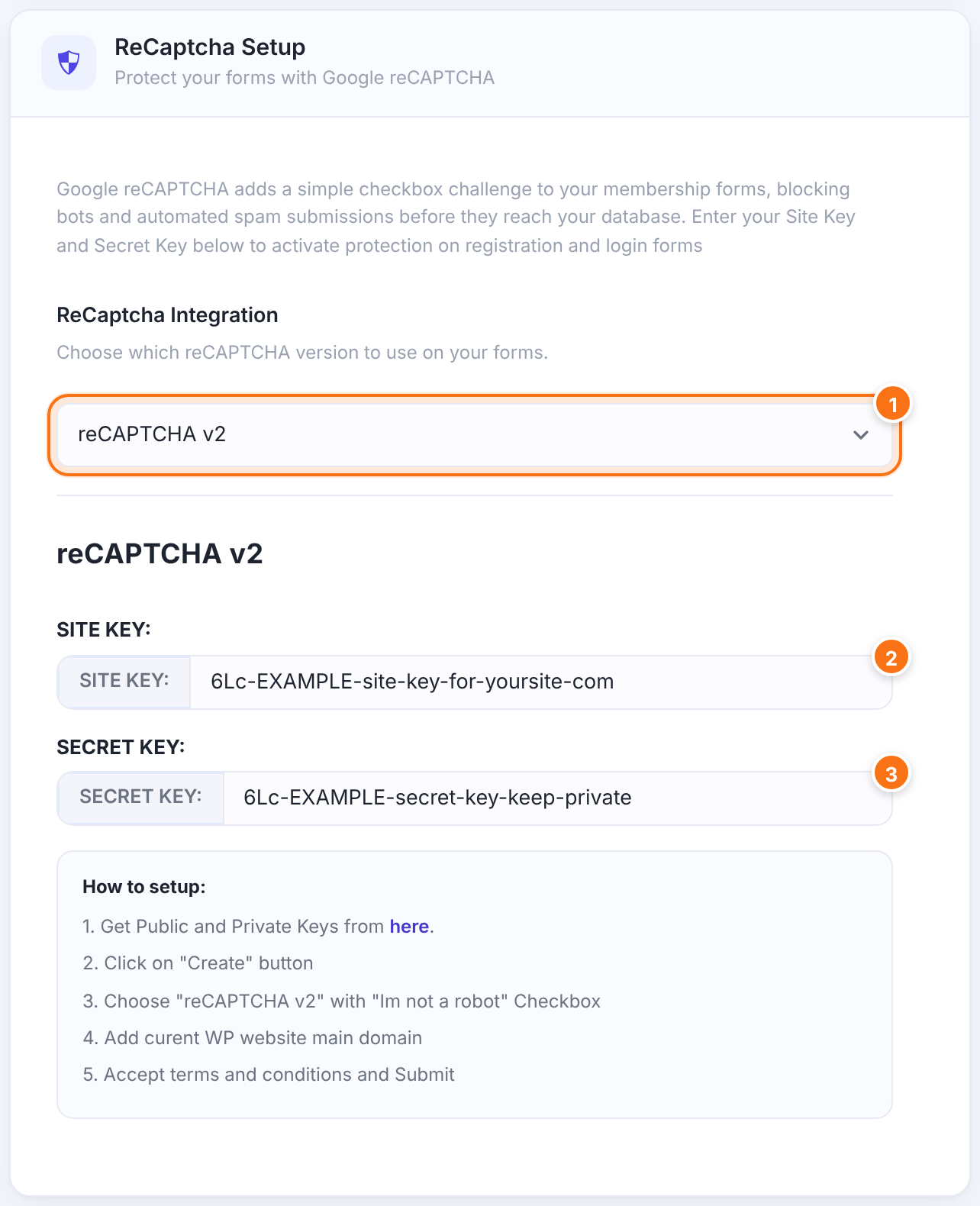
reCAPTCHA v2 or reCAPTCHA v3. The key fields below change with your choice.
Default: reCAPTCHA v2
The site key from Google. Without it, the reCAPTCHA doesn’t show on any form.
The secret key from Google. The plugin uses it to check each answer, so keep it private.
Keys belong to one version
- Each version keeps its own pair of keys. v2 keys don’t work as v3 keys, and the other way round.
- If you switch the version, create keys of that type in Google and paste them into the new fields.
Show the reCAPTCHA on the registration form
- Go to Ultimate Membership Pro›Registration Form and open the Custom Fields tab.
- Find the field named Capcha (that’s how the plugin spells it).
- Switch on On Registration. Switch on On Modal too if you use the registration popup.
- Click Save Changes.

Adds the reCAPTCHA to the registration form ([ihc-register]).
Default: Off
Shown as When Selected: wherever the field is on, new members must pass it. You can’t make it optional.
The Capcha field is built in, so you can’t delete it. If no site key is saved, the field is left out of the form.
Turn it on for the login form
- Go to Ultimate Membership Pro›Login Form.
- In Additional Options, switch on Display ReCaptcha Verification box.
- Click Save Changes.
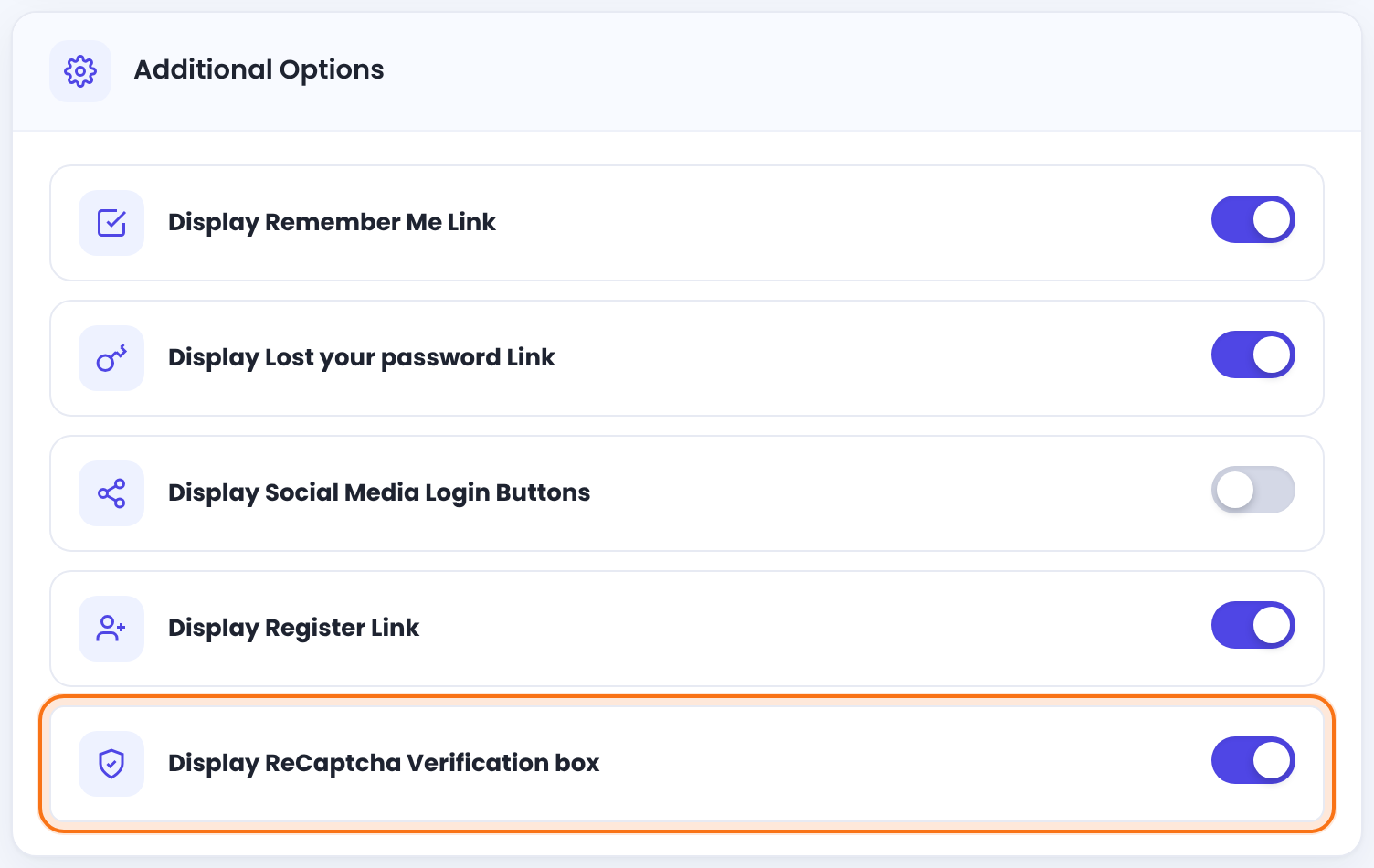
Logged-in visitors never see the reCAPTCHA. The lost password form doesn’t use it.
Test both forms
Open the registration page and the login page in a private browser window. You should see the “I’m not a robot” checkbox above the button. Submit once without ticking it: the form is not sent.
Example: Coaching Club
- ReCaptcha Integration
- reCAPTCHA v2
- SITE KEY: / SECRET KEY:
- v2 Checkbox keys for yoursite.com
- Capcha field
- On Registration and On Modal
- Display ReCaptcha Verification box
- On
Troubleshooting
Why does the form say “Error with Captcha”, or come back without creating the account?
The form shows “Error with Captcha”, or comes back without creating the account, when Google didn’t accept the answer. Check that the secret key is saved and matches the site key, and that both are for the version you selected. Edit the text in Registration Form›Custom Messages (Required ReCaptcha) or Login Form›Custom Messages (ReCaptcha Error Message).
Why does “Please fill out all mandatory fields” show under the reCAPTCHA?
The message “Please fill out all mandatory fields” shows under the reCAPTCHA when the visitor didn’t tick the checkbox. Tick it, then send the form again.
Why doesn’t the reCAPTCHA show on my form?
The reCAPTCHA shows only when the site key is saved for the selected version, the Capcha field or the login option is on, and you test logged out. Caching or script-delay plugins can also hold back Google’s script; exclude it from them.
How do I change the reCAPTCHA language?
The reCAPTCHA language has no setting to edit. The checkbox follows your site language in Settings›General›Site Language, so a Romanian site shows it in Romanian. Only the language part of the locale is used, so Brazilian Portuguese (pt_BR) shows Portuguese. Never edit the plugin’s files; changes are lost on the next update. A developer can set a fixed language by copying the register-captcha.php and login-captcha.php templates into the theme. See Override templates in your theme.
Why does Google say the domain isn’t supported?
Google reports an unsupported domain when your site’s domain isn’t in the key settings. Add the exact domain of your site to the key settings in the Google reCAPTCHA console, including a staging domain if you test there.


