
Login Redirects+ is an Ultimate Membership Pro module to redirect members after login: each Membership goes to its own page. Without it, every member lands on the same page; with it, Pro members go to their members area and Annual Pass members to their hub.
This guide sets one page per Membership for the Coaching Club site and sets priorities for members who hold more than one Membership.
Before you start
- The Login Redirects+ module is activated in Ultimate Membership Pro›Modules (under Members & Registration). This module needs an active license; see Find and activate your license key.
- Your Memberships exist. See Create your first Membership.
- The pages members should land on are published. To send members to another website, add it first as a redirect link: Add your own redirect links.
Which page a member lands on
When a member logs in through the plugin’s login form, the first rule that applies wins:
- The member logged in from a Locker on a restricted page: they stay on that page.
- Login Redirects+ is on: the page set for the member’s active Membership with the highest priority.
- Otherwise: the After Login page in Settings›Pages Setup›Redirects Setup.
- If After Login is Do Not Redirect: the member stays on the login page and sees the welcome message.
Set a page for each Membership
- Go to Ultimate Membership Pro›Modules and click Login Redirects+.
- Check that Activate/Hold Login Redirects+ is on.
- Under Custom Redirections:, pick a page for each Membership.
- Click Save Changes.
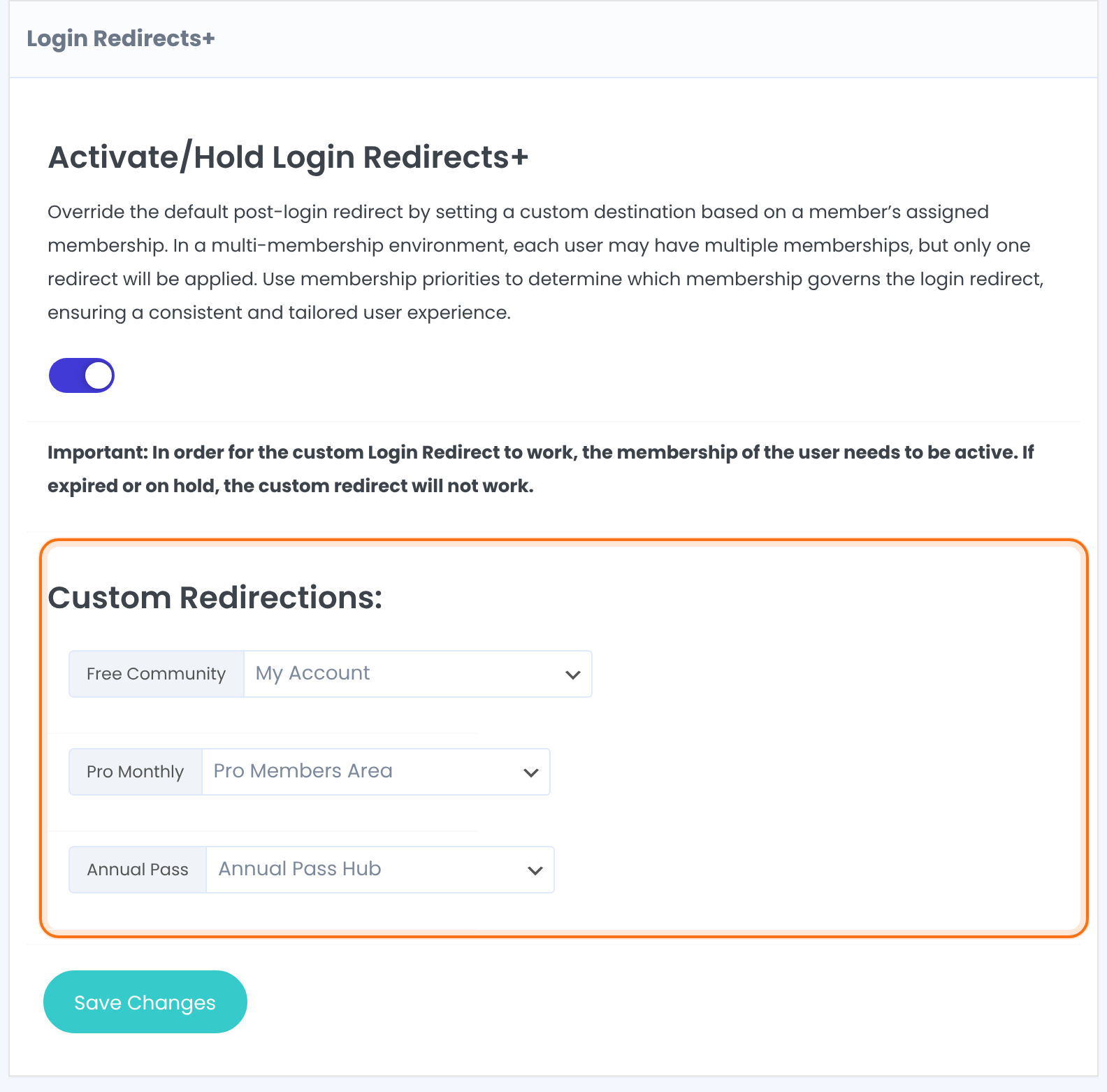
Turns the module’s rules on or off. When it’s off, everyone goes to the After Login page.
Default: Off
One row per Membership. The list has your pages and your redirect links, shown as Custom Link: <name>. Each row starts on your current After Login page; it’s stored when you save.
Pick a page for every Membership
- Don’t leave a Membership on …. Members of that Membership aren’t redirected at all: they stay on the login page.
- Saving stores the page shown in every row. If you later change After Login, the rows keep the page they had.
Set the priorities
A member can hold several Memberships, but only one redirect happens. In Memberships Priorities:, give each Membership a number. 1 is the highest priority: the plugin checks Memberships from 1 upward and uses the first one the member holds.
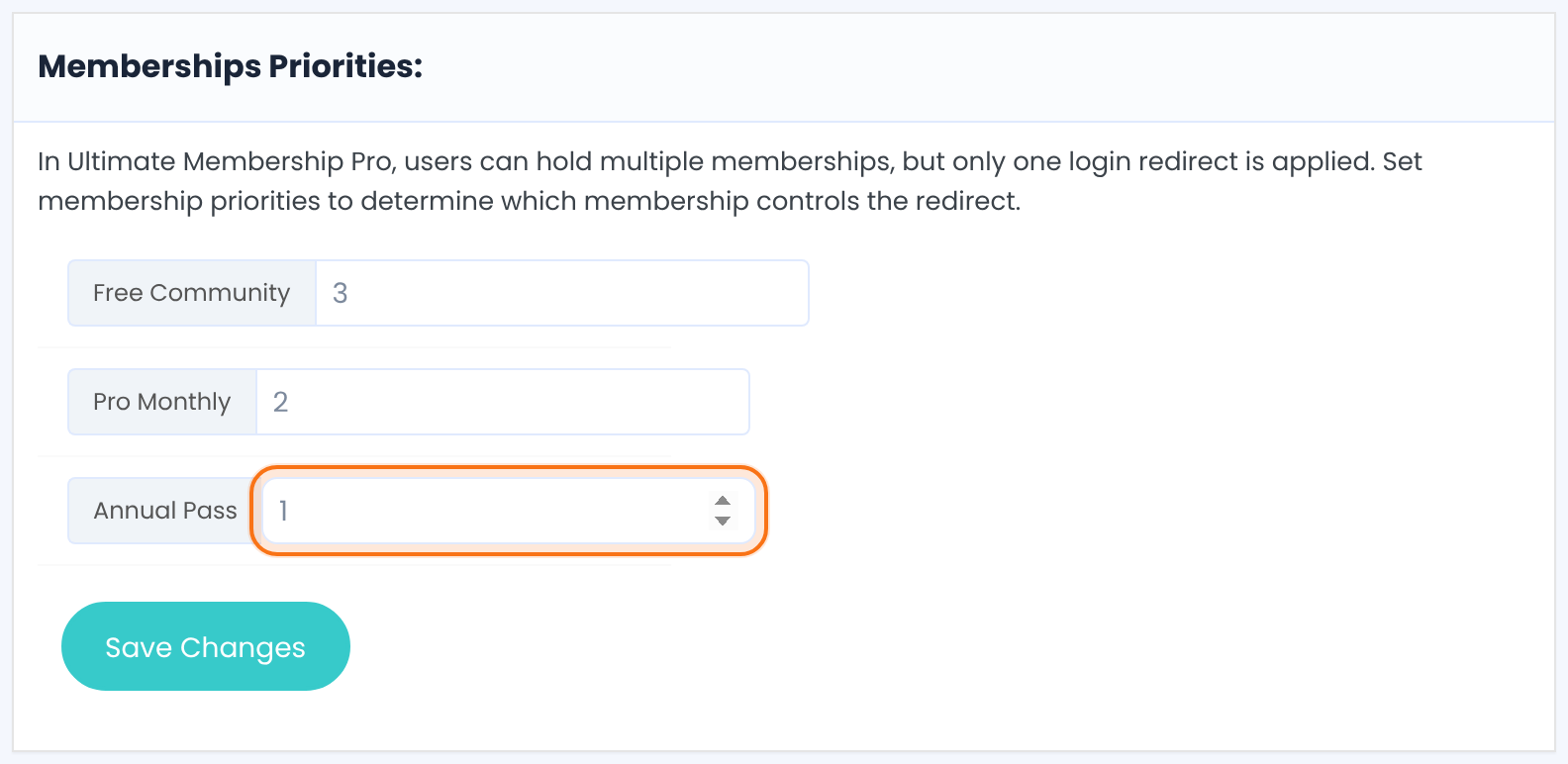
Click Save Changes. Both boxes are saved together.
Only active Memberships count
A Membership that has expired, hasn’t started yet, or is still waiting for payment is skipped. The member then goes to the page of their next active Membership, or to the After Login page if they have none.
Example: Coaching Club
- Activate/Hold Login Redirects+
- On
- Free Community
- My Account (priority 3)
- Pro Monthly
- Pro Members Area (priority 2)
- Annual Pass
- Annual Pass Hub (priority 1)
- A member with Pro Monthly and Annual Pass
- Lands on Annual Pass Hub
- A member whose Pro Monthly expired
- Lands on the After Login page
Troubleshooting
Why do members still land on the After Login page?
Members still land on the After Login page when Activate/Hold Login Redirects+ is off or not saved, or when the member’s Membership isn’t active in Members. Expired and unpaid Memberships are skipped.
Why does a member stay on the login page and see “Welcome to our Website!”?
A member stays on the login page when the Membership that decided the redirect is set to …, or when After Login is Do Not Redirect. Pick a page for that Membership.
Why is a member sent to the wrong Membership’s page after login?
Login Redirects+ uses the member’s Membership with the lowest number in Memberships Priorities. Check those numbers: the lowest number wins.
Why do members who log in on a restricted page stay there?
Members who log in from a Locker on a restricted page stay there by design: logging in from a Locker brings members back to the content they wanted.
Does a redirect_to link work with the login form?
A redirect_to link doesn’t work: the Ultimate Membership Pro login form doesn’t read redirect_to. Use the Login Redirects+ rules or the After Login page.
Can I send members to another website after login?
You can send members to another website after login. Add the address as a redirect link, then pick Custom Link: <name> in the Membership’s row.


