Skip to content
  • Features
    • Subscriptions & payments
    • Content restriction & drip
    • Member directory & profiles
    • Paywall
    • Group memberships
    • All features
  • Solutions
    • Online courses
    • Video membership
    • Creators
    • Associations and clubs
    • Podcast membership
    • Team memberships
    • Paid newsletter
    • Coaching
    • Digital downloads
    • Private community
    • Payment gateways
    • All integrations
  • Add-ons
    • 41 Add-ons
    • 46 Pro Add-ons
    • Compare plans
  • Pricing
  • Resources
    • Documentation
    • Developer hooks
    • Video tutorials
    • Changelog
    • Blog
    • Go to my account
    • Legacy vs Pro
Free trialBuy now
Log in to your account
Ultimate Membership Pro
  • Features
    • Core features
      • Subscriptions & payments
      • Content restriction & drip
      • Member directory & profiles
      • Member portal
      • Registration & login
    • Sell more
      • Paywall
      • Group memberships
      • WooCommerce memberships
      • Invoices & taxes
      • Membership cards
    • Secure & scale
      • Login security
      • Multisite subscriptions
      • All features
    • Performance and security

      Built to be fast and safe

      Tested with 100,000+ members and 1M+ payments, with Safe Mode and a Reports section built in.

      • Updates and support all year
      • Unlimited members on every plan
      See all features
  • Solutions
    • Use cases
      • Online courses
      • Video membership
      • Creators
      • Associations and clubs
      • Podcast membership
      • Team memberships
      • Paid newsletter
      • Coaching
      • Digital downloads
      • Private community
      • All use cases
    • Payments and store
      • Stripe
      • Payment gateways
      • WooCommerce
      • Ultimate Affiliate Pro
    • Builders and marketing
      • Elementor
      • Divi
      • Email marketing
      • All integrations
    • Not sure it fits your site?

      Try the live demo and click through the admin and the member side before you buy.

      Try the live demoSearch the documentation
  • Add-ons
    • 41 Add-onsEvery plan
    • 46 Pro Add-onsFull Package
    • Compare plans
  • Pricing
  • Resources
    • Learn
      • Documentation
      • Developer hooks
      • Video tutorials
      • Changelog
      • Blog
    • Guides
      • Content restriction, explained
      • Membership site ideas that make money
      • Membership website examples
      • Do you need a member directory?
    • For customers
      • Go to my account
      • Legacy vs Pro
      • Migrate your Envato License to your Store account
    • Customer support

      Stuck on a setting or something isn’t working? Open a ticket and our team will help you.

      Open a support ticketSearch the documentation
Login
Free trial
Buy now
Ultimate Membership Pro
Buy now

Payments

26
  • Set your currency
  • Create coupon codes
  • Let members choose a payment method
  • Accept bank transfers
  • Send invoices
  • Set up 2Checkout
  • PayPal doesn’t show the credit card option
  • Paid, but the Membership is still on hold
  • Move from Stripe Checkout to Stripe Connect
  • Set up Stripe
  • Charge taxes
  • Sell Memberships with WooCommerce
  • Set up Stripe Checkout
  • Set up PayPal Standard
  • Set up PayPal Express Checkout
  • Set up Mollie
  • Set up Braintree
  • Set up Authorize.net
  • Set up PagSeguro
  • Set up Razorpay
  • Set up Paystack
  • Set up PayFast
  • Configure the checkout page
  • Customize the thank you page
  • Manage payments and orders
  • Change a paying member’s plan, price or dates

Troubleshooting

12
  • Plugin or license won’t activate
  • Dates and times look wrong
  • Server errors and blocked plugin files (500, 403)
  • Known compatibility issues
  • Emails are not sent
  • PayPal doesn’t show the credit card option
  • Paid, but the Membership is still on hold
  • Login and registration problems
  • Restricted content is visible to everyone
  • Find plugin conflicts with Safe Mode
  • Fix redirect loops and pages that bounce
  • Move your membership site to a new domain or host

Getting Started

14
  • Find and activate your license key
  • Update the plugin
  • Plugin or license won’t activate
  • Move your license to another site
  • Requirements
  • Set up the membership pages
  • Create your first Membership
  • Restrict your first page
  • Connect a payment gateway
  • Customize what members see (Showcases)
  • How Ultimate Membership Pro works
  • Install Ultimate Membership Pro
  • Run the setup wizard
  • Move your membership site to a new domain or host

Content Restriction

12
  • Release content over time (Drip Content)
  • Notify members when drip content unlocks
  • Control access to the WordPress dashboard
  • Restrict content with Access Rules
  • Show menu items only to some members
  • Hide part of a page (Inside Locker)
  • List the posts a member can access
  • Restricted content is visible to everyone
  • Limit post views, posts and comments per Membership
  • Let search engines index restricted pages
  • Fix redirect loops and pages that bounce
  • Show teasers of restricted content

Members & Member Portal

14
  • Add custom tabs to the Member Portal
  • Manage your members
  • Import members from a CSV file
  • Give each member a private page
  • Track member activity
  • Show public member profiles
  • Add a member and assign a Membership
  • Set up the Member Portal
  • Customize the profile form
  • Customize the Subscriptions and Payments tables
  • Export and import plugin settings
  • Read your membership reports
  • List members on your site (Members Directory)
  • Usernames, emails and member IDs

Registration & Login

23
  • Prevent account sharing
  • Use the built-in special fields
  • Style the WordPress login page
  • How password reset works
  • Verify members’ email addresses
  • Add custom fields to the registration form
  • Add a logout link to your menu
  • Change plugin texts and messages
  • Add Google reCAPTCHA
  • Let members log in with social accounts
  • Invite-only registration
  • Redirect members after login
  • Stop spam registrations
  • Add your own redirect links
  • Login and registration problems
  • Registration with email only (Register Lite)
  • Redirect members after registration
  • Block brute-force login attempts
  • Set up the registration form
  • Set up the login form
  • Login and registration popups
  • Log in with a one-time link
  • Usernames, emails and member IDs

Developers

7
  • Use the API Gate
  • Translate the plugin
  • Override templates in your theme
  • Style forms and pages with CSS
  • Translate with WPML
  • Hooks and filters reference
  • Shortcodes reference

Emails & Notifications

6
  • Change the sender name and email
  • Collect newsletter subscribers (Opt-In)
  • Set up email notifications
  • Emails are not sent
  • Send push notifications with Pushover
  • Get a weekly summary email

Integrations

11
  • Show the Member Portal in BuddyPress profiles
  • Limit downloads with Download Monitor
  • Reward purchases with myCred points
  • Show the Member Portal in WooCommerce My Account
  • Sell Memberships with WooCommerce
  • Member discounts on WooCommerce products
  • Use the Elementor widgets
  • Use the block editor (Gutenberg) blocks
  • Connect Zapier
  • Connect InfusionSoft (Keap)
  • Track events in Kissmetrics

Memberships

15
  • Build your pricing page
  • Offer a free or paid trial
  • Let members choose their price
  • Membership statuses explained
  • Allow only some payment methods for a Membership
  • Give members a printable Membership card
  • Sell Memberships as gifts
  • Show Membership badges
  • Control who can buy a Membership
  • Sell sites in a WordPress MultiSite network
  • Start a Membership after a delay
  • How renewals, cancellations and expiry work
  • Upgrade and downgrade with prorated charges
  • Ask members why they cancel
  • Change a paying member’s plan, price or dates

Pro Add-ons

41
  • Install a Pro add-on
  • Give group accounts to companies (My Group Accounts)
  • Give members a WordPress role (WordPress User Roles)
  • Give a team member access to the dashboard (Manager Role)
  • Give one Membership access to everything (Granted Subscription)
  • Open restricted content to trusted IP addresses (Granted Access Based On IP)
  • Limit how many people can buy a Membership (Limited Subscriptions)
  • Sell a single post or page (Pay Per Post)
  • Lock Elementor widgets and sections by Membership (Elementor Widget Lock)
  • Lock Divi sections, rows and columns by Membership (Divi Content Locker)
  • Hide any page element by CSS class or ID (Hidden HTML Elements)
  • Show a different menu to each Membership (Restrict WP Menu)
  • Show widgets only to some members (Restrict WP Widgets)
  • Hide old content from new members (Restrict Past Content)
  • Start restricting a post on a date (Restriction Hold)
  • Make a restricted post free on a date (Restriction Release)
  • Show JivoChat only to certain members (Restrict JivoChat)
  • Give members a personal feed of their content (Member RSS)
  • Split registration into two steps (Two Step SignUp)
  • Set up Two Factor Authentication for member logins
  • Hide the WordPress login page (Hidden WP Login)
  • Let members choose a new password on your own page (Manage Reset Password)
  • Send members back to the page they wanted (Redirect Back)
  • Redirect members after a WooCommerce login (WooCommerce Redirect)
  • Block registrations from certain IP addresses (IP Registration)
  • Block disposable email addresses (Blacklist Disposable Emails)
  • Let members invite their friends (Invite Your Friends)
  • Let members delete their own account (Delete My Account)
  • Show Member Portal tabs only to some Memberships (Restrict My Account Tabs)
  • Prevent early cancellations of a subscription (Prevent Subscription Cancellations)
  • Track when members were last active (Customer Activity Tracking)
  • Add members to Mailchimp audiences (MailChimp Pro)
  • Add members to Mailster lists (Mailster Pro)
  • Add members to MailPoet lists (MailPoet Integration)
  • Add members to ConvertKit (ConvertKit Integration)
  • Get Slack messages for new members (Slack Integration)
  • Remind members to pay pending orders (Payment Reminder)
  • Export orders to a CSV file (Export Orders To CSV)
  • Restart invoice numbering (Reset Invoice ID)
  • Show content or links by login status with Extended Shortcodes
  • Clear test data before launch (Remove Dummy Data)
  • Home
  • Docs
  • Registration & Login
  • Set up the registration form

Set up the registration form

0:00 / 9:30
  • View as Markdown Open this page as plain Markdown (opens in a new tab)
  • Open in ChatGPT Ask questions about this page (opens in a new tab)
  • Open in Claude Ask questions about this page (opens in a new tab)
  • Open in Google AI Studio Ask questions about this page (Google account required) (opens in a new tab)
10 minBeginnerUltimate Membership Pro 14.2+

The Ultimate Membership Pro registration form is where visitors create their account and sign up for a Membership. The plugin puts it on your Register page with the shortcode [ihc-register], and one settings screen controls how it looks and what happens when someone signs up.

This guide walks through that screen using one example: the Coaching Club site gives every new member the Free Community Membership, while visitors who pick Pro Monthly on the Subscription Plan page sign up for that plan instead.

Before you start

  • Your Register page is set. Check Ultimate Membership Pro›Settings›Pages Setup, Register Page. See Set up the membership pages.
  • You have at least one Membership. See Create your first Membership.
  • A private (incognito) browser window to test the form. Logged in as an administrator, you see a notice instead of the form.

Open the Registration Form screen

  1. Go to Ultimate Membership Pro›Showcases and open Registration Form. You can also use the Registration Form item in the plugin’s menu.
  2. Stay on the Register Form Showcase tab. Custom Messages and Custom Fields are covered in their own guides.
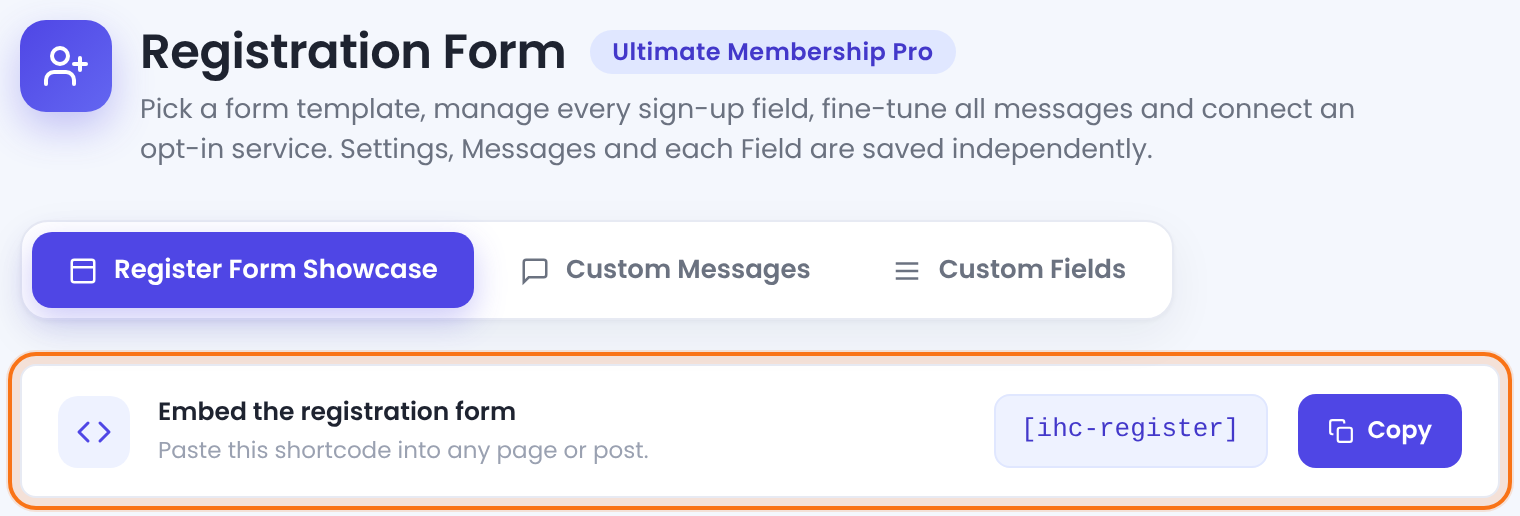
Registration Form screen with the Register Form Showcase, Custom Messages and Custom Fields tabs and the Embed the registration form strip with the ihc-register shortcode
The Registration Form screen. The strip shows the shortcode that prints the form.

The plugin created your Register page with the [ihc-register] shortcode in it. To put the form on another page, click Copy and paste the shortcode there. Each tab has its own Save Changes button, so save before you switch tabs.

Pick a template

In Register Form Display — Register Form Template, click a thumbnail. The Preview card next to the settings (below them on smaller screens) updates, so you can compare templates before you save.
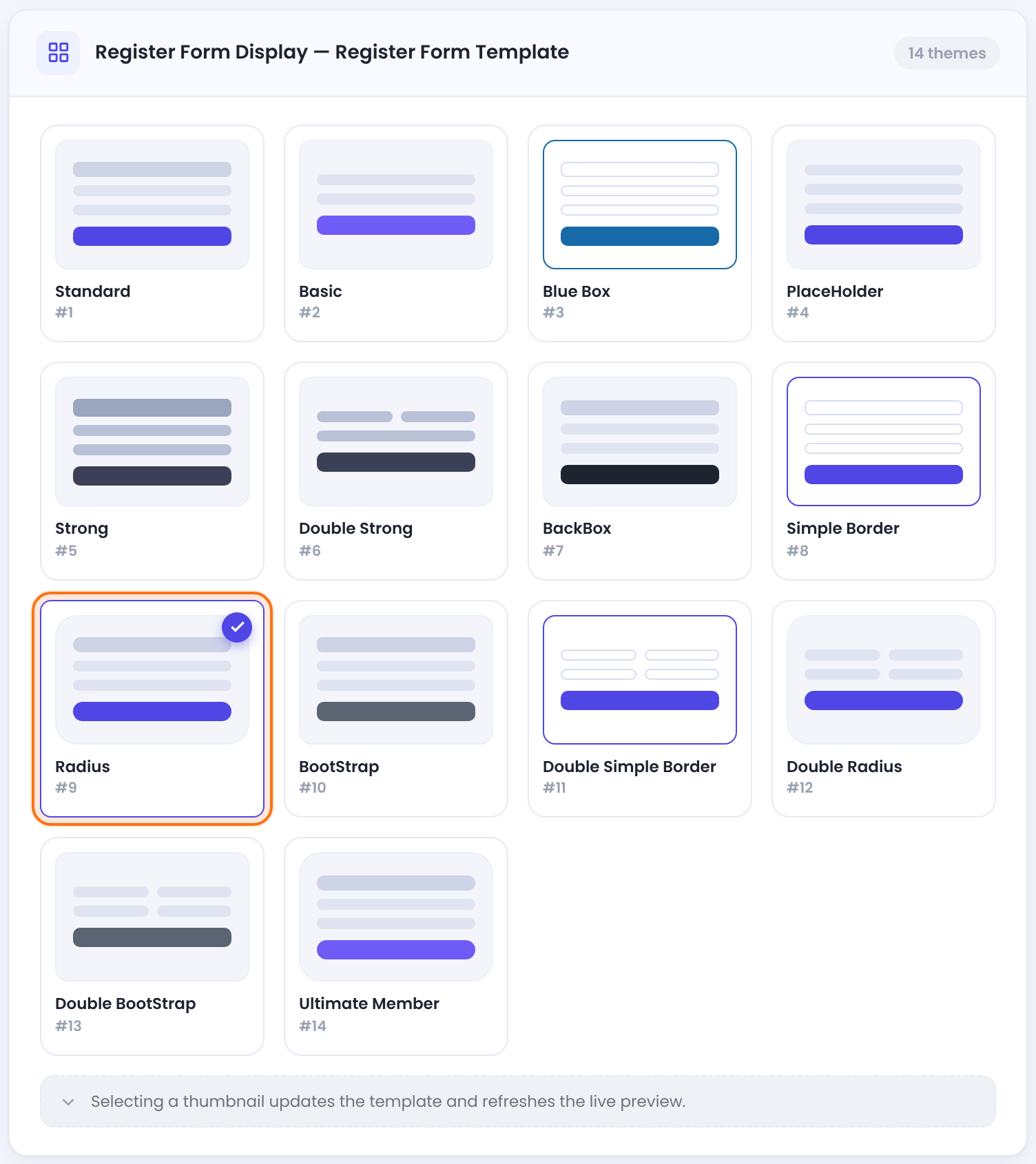
Register Form Template gallery with 14 thumbnails, Radius #9 selected
Fourteen templates. Radius (#9) is the default.

Templates change the layout and style of the fields and the button: rounded or square inputs, labels inside or above the fields, one or two columns. They don’t change which fields the form has.

Choose the Membership new members get

The first settings in Additional Settings decide which Membership a sign-up gets and which WordPress role the new account has. The numbers match the screenshot.
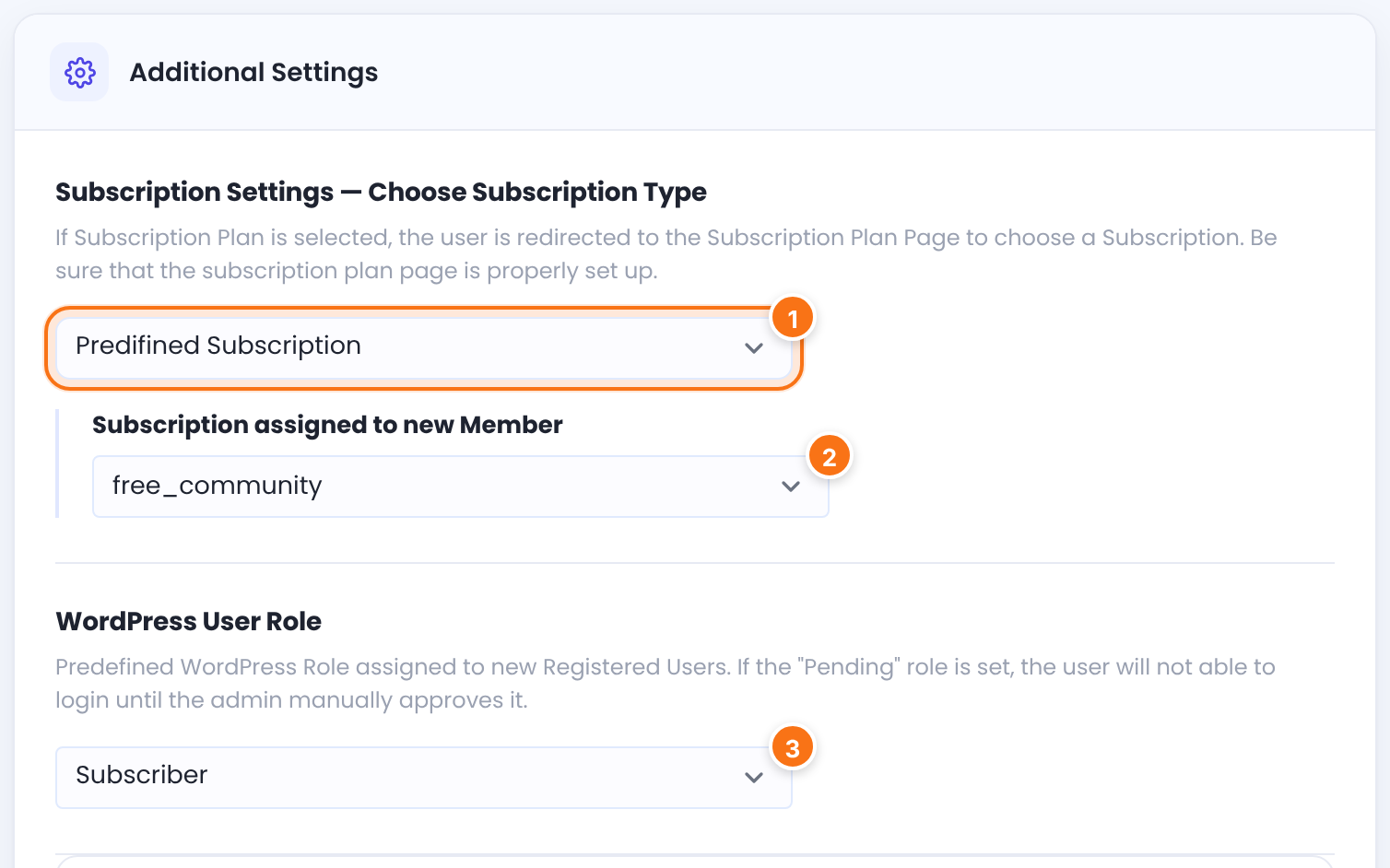
Additional Settings card with Choose Subscription Type set to Predifined Subscription, Subscription assigned to new Member set to free_community and WordPress User Role set to Subscriber
Every new member gets Free Community, unless they picked another plan first.
1Subscription Settings — Choose Subscription Type

How the form knows which Membership the visitor is signing up for.

  • Predifined Subscription (spelled this way in the plugin): the form opens directly. New members get the Membership set below, or the one in the link they came from.
  • Subscription Plan: visitors must pick a plan first. Anyone who opens the Register page without a plan is sent to your Subscription Plan page.

Default: Predifined Subscription

2Subscription assigned to new MemberPredifined Subscription

The Membership given to people who register without choosing a plan. Memberships are listed by their slug. With None, they get an account with no Membership.

Default: None

3WordPress User Role

The WordPress role of new accounts. Every role except Administrator is listed, including Pending, which holds new accounts for your approval (see the next step).

Default: Subscriber

After Payment Completed

Switches the member to the role in Choose New WordPress Role once their first Membership is activated, for example after the first payment.

Default: Off

Why the Register page sends visitors to the Subscription Plan page

When a visitor picks a plan on the Subscription Plan page, they arrive on the Register page with the plan in the link, for example yoursite.com/register/?lid=2 for the Membership with ID 2. The form then signs them up for that plan. The Register page sends visitors to the Subscription Plan page when:

Subscription Plan is selected

and the link has no plan, or a plan that doesn’t exist.

Predifined Subscription is selected

and the link has a plan that doesn’t exist or that this visitor isn’t allowed to buy.

Want people to register without choosing a plan? Set Choose Subscription Type to Predifined Subscription. This only happens when a page is set as Subscription Plan Page in Ultimate Membership Pro›Settings›Pages Setup.

When the Membership is paid, the payment part (payment method, price summary and coupon box) appears under the fields, and the member pays when they register:
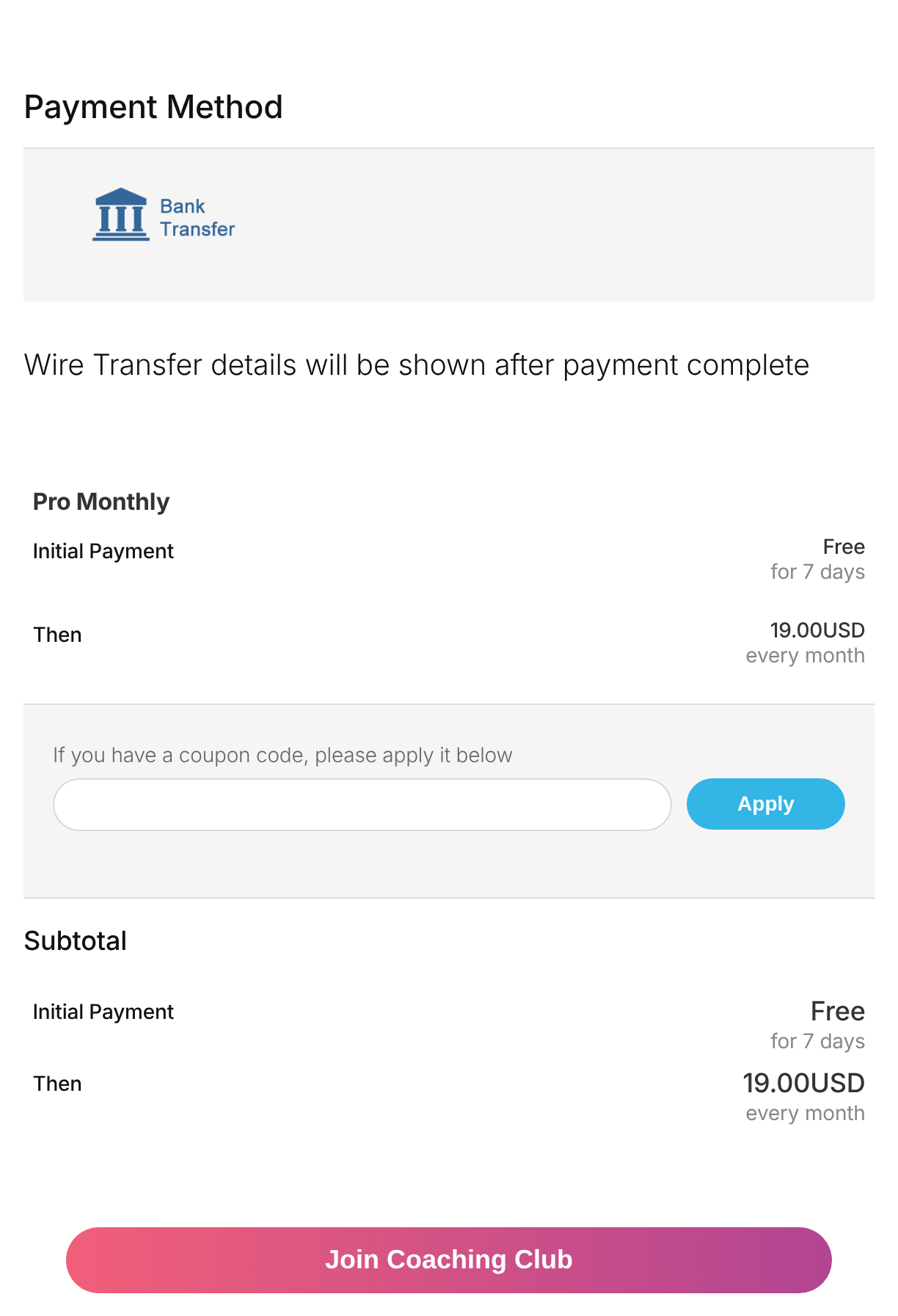
Register form for Pro Monthly showing Payment Method Bank Transfer, the plan summary Free for 7 days then 19.00USD every month, a coupon box and the Join Coaching Club button
The register form for Pro Monthly, a paid plan with a 7-day trial.

Approve new members yourself

Set WordPress User Role to Pending when you want to check every new account before it can be used. A Pending member can’t log in until you approve them. They see the login message “Your account has not been approved. Please retry later”.

  1. Go to Ultimate Membership Pro›Members.
  2. Open the row menu of the member and click Approve Member.

Approving gives the member the WordPress default role from Settings›General, New User Default Role, not the role you picked in this form. More about the member list in Manage your members.

A Membership’s own role replaces the register role

A Membership can set its own role in Additional Access Settings, Custom Member WordPress Role. When that Membership is activated (at once for a free plan, after payment for a paid one), the member gets that role. This also takes them out of Pending. The After Payment Completed switch works the same way. For approval to work, keep Custom Member WordPress Role on …Default Register option for the Memberships people register with, and leave After Payment Completed off.

Set the password rules and sign-up options

The rest of the card sets password rules, notifications and what happens after sign-up.
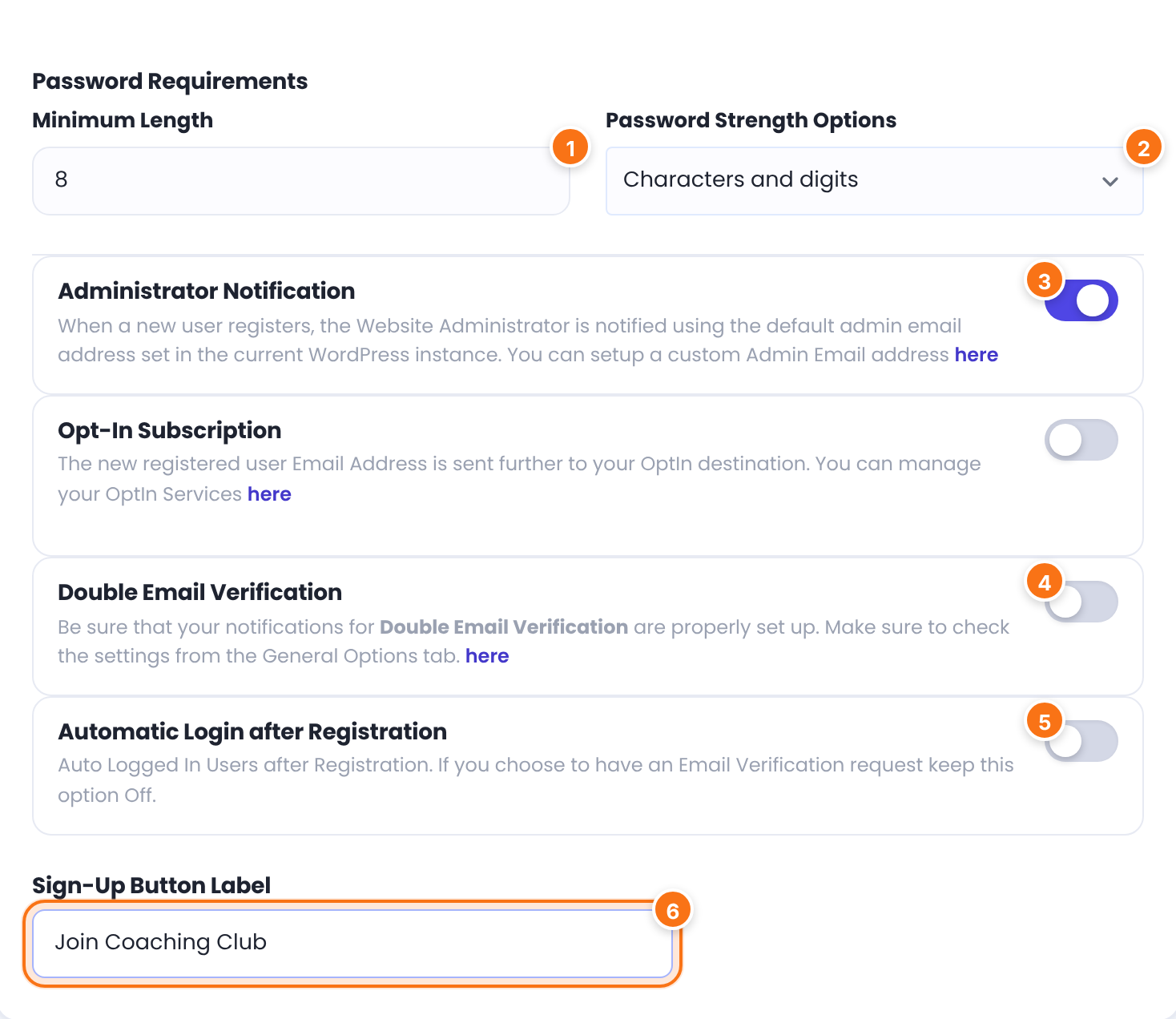
Password Requirements with Minimum Length 8 and Characters and digits, the Administrator Notification, Opt-In Subscription, Double Email Verification and Automatic Login switches, and Sign-Up Button Label Join Coaching Club
Password rules and sign-up options for the example.
1Minimum Length

The shortest password allowed. The lowest value you can enter is 4.

Default: 6

2Password Strength Options

Extra rules. A strength bar under the field shows members how they’re doing.

  • Standard: only the length is checked.
  • Characters and digits: needs letters and at least one number.
  • Characters, digits, minimum one uppercase letter: also needs a capital letter.

Default: Standard

3Administrator Notification

Admin emails about new sign-ups are set up in Ultimate Membership Pro›Email Notifications, and the admin address in Ultimate Membership Pro›Settings›Notifications Settings. See Set up email notifications.

Default: On

Opt-In Subscription

Sends the new member’s email address to your mailing list service, chosen in Choose Opt-In Service.

Default: Off

4Double Email Verification

New members must click a link in an email before they can log in. See Verify members’ email addresses.

Default: Off

5Automatic Login after Registration

Logs new members in as soon as they register. Keep it off when you use Double Email Verification, as the hint says.

Default: Off

6Sign-Up Button Label

The text on the submit button.

Default: Empty (the button says Register)

Where members go after registering

To send new members to a welcome page, pick it in Ultimate Membership Pro›Settings›Pages Setup, After Registration (default Do Not Redirect). Sign-ups for a free Membership, or for a paid one by Bank Transfer, go to the Thank You Page instead when one is set (the plugin creates it), and members who pay online return from the payment gateway. For per-Membership rules, see Redirect members after registration.

Set the terms label and custom CSS

Terms & Conditions (TOS) Label

The text next to the terms checkbox. It links to the page set as TOS Page in Pages Setup. The checkbox itself is the Accept field in Custom Fields.

Default: Accept our Terms&Conditions

Custom CSS

CSS added to pages with the registration form. The Preview updates when you click outside the editor.

Example: a brand-colored button

.ihc-form-create-edit input[type=submit] {
  background: #4f47eb;
}

Click Save Changes. Then open the Register page in a private window to check the result.
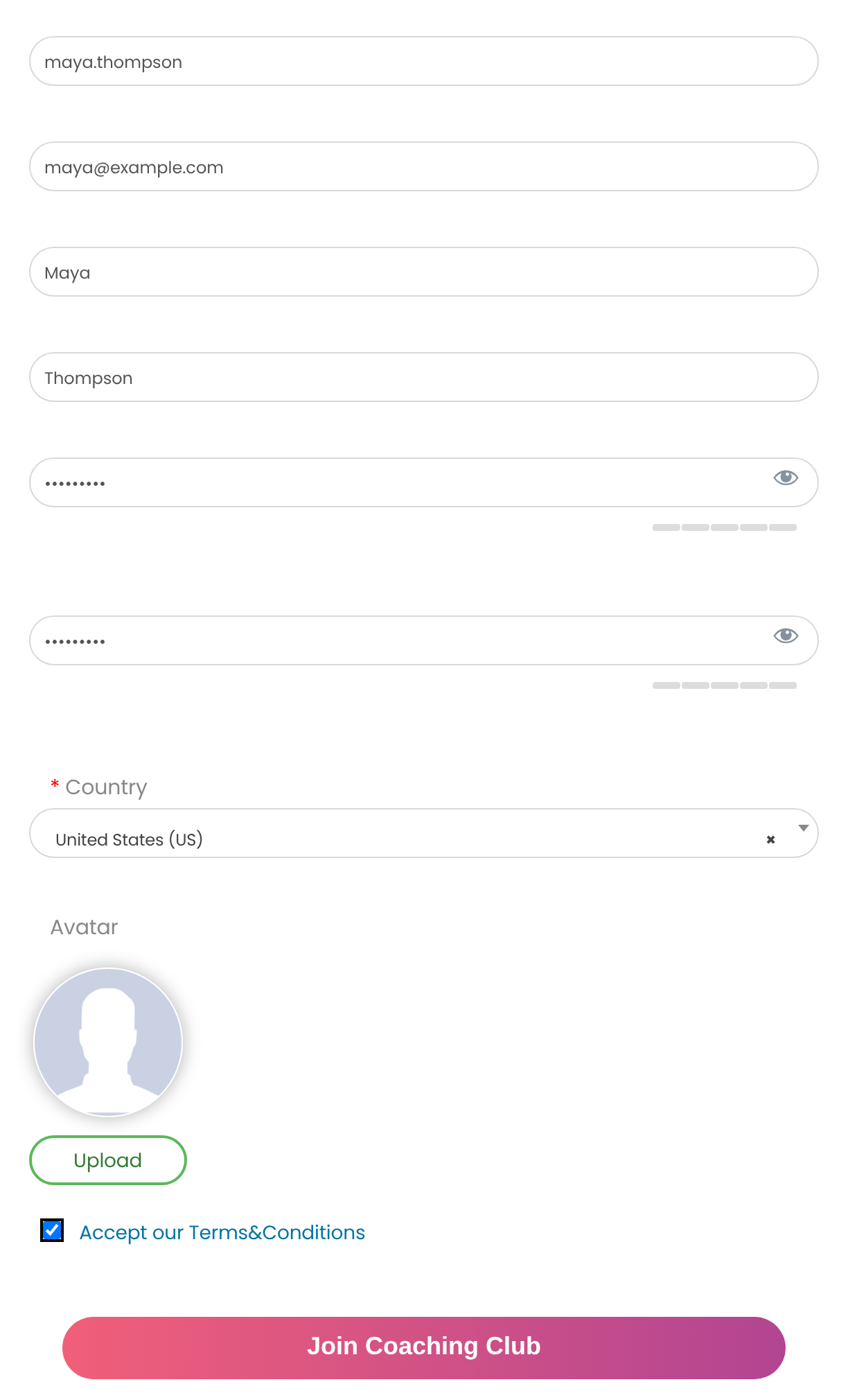
Front-end registration form filled in for Maya Thompson with Username, Email, First Name, Last Name, Password, Confirm Password, Country, Avatar, the terms checkbox and the Join Coaching Club button
What visitors see on the Register page (Radius template).

Change the fields and messages

Custom Fields

What
Which fields the form shows, their order, and which are required
Guide
Add custom fields to the registration form

Custom Messages

What
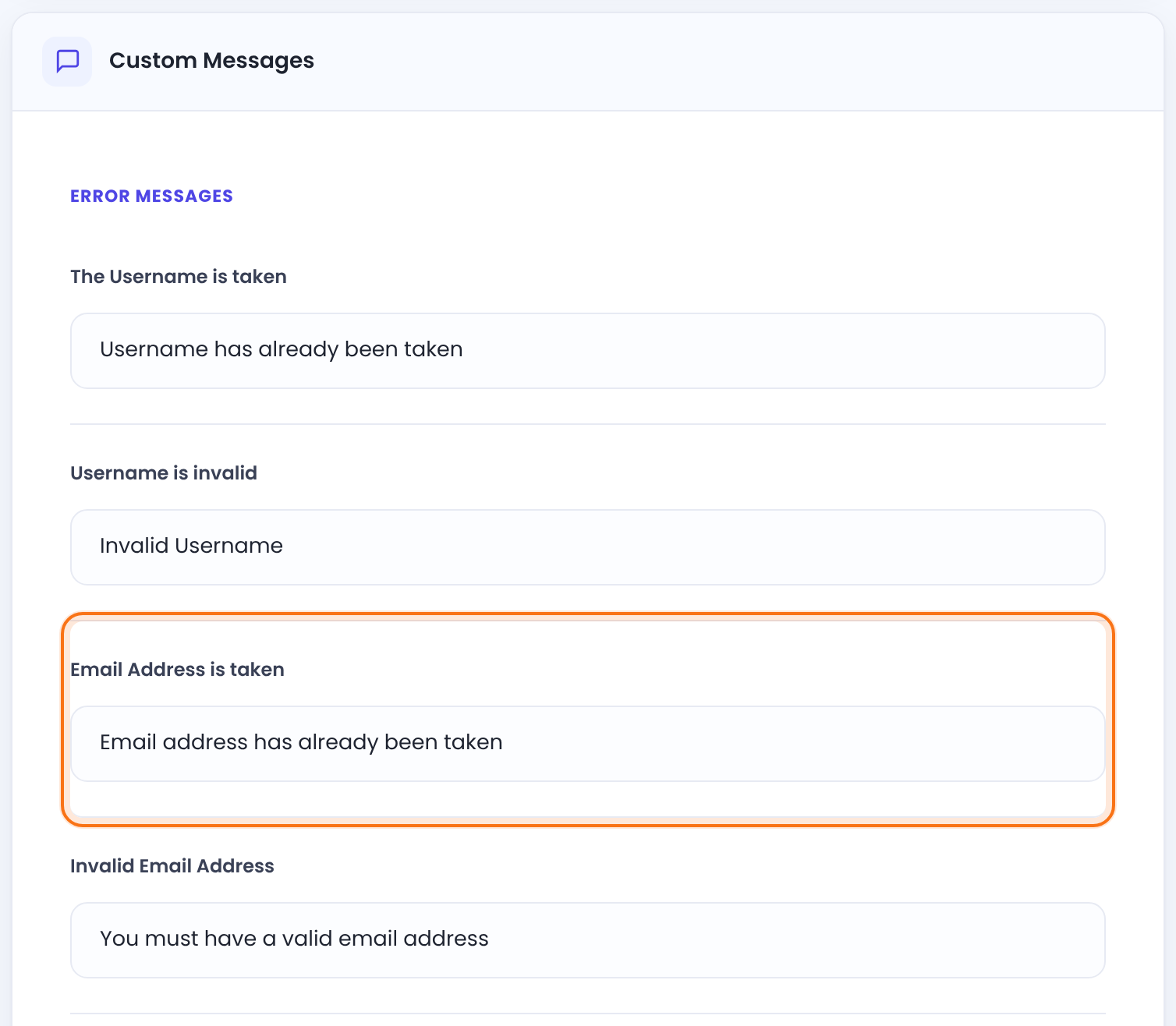
Error and success texts, such as Email Address is taken (“Email address has already been taken”)
Guide
Change plugin texts and messages
Custom Messages tab with the Error Messages group: The Username is taken, Username is invalid, Email Address is taken and Invalid Email Address
The Custom Messages tab. Each message has its own box.

Example: Coaching Club registration

Coaching ClubEveryone who registers gets Free Community. Visitors who pick Pro Monthly on the plan page sign up and pay for it.
Template
(#9) Radius
Choose Subscription Type
Predifined Subscription
Subscription assigned to new Member
Free Community
WordPress User Role
Subscriber
Minimum Length
8
Password Strength Options
Characters and digits
Automatic Login after Registration
Off
Sign-Up Button Label
Join Coaching Club
Pro Monthly sign-up link
yoursite.com/register/?lid=2

Troubleshooting

Why do I see “Administrator Info: Register Form is not showing up once you’re logged.” instead of the registration form?

Ultimate Membership Pro shows this notice because you’re logged in as an administrator. Open the Register page in a private window to see the form. Logged-in members don’t see the form at all.

Why does the Register page keep opening the Subscription Plan page?

The Register page sends visitors to the Subscription Plan page when Choose Subscription Type is set to Subscription Plan, or when the link has a plan that doesn’t exist or isn’t available to the visitor. Use Predifined Subscription, or link to the Register page with a valid ?lid=.

Why aren’t new members set to Pending?

New members don’t stay Pending when a Membership they signed up for has a Custom Member WordPress Role, or when After Payment Completed is on. Either one replaces Pending when the Membership is activated. Set the Membership role back to …Default Register option and switch After Payment Completed off.

Why does a member see “Your account has not been approved. Please retry later”?

Ultimate Membership Pro shows this message to members who have the Pending role. Approve them in Members, row menu, Approve Member.

Why does the registration form say “Password must include minimum {X} characters”?

The registration form shows this message when the password is shorter than Minimum Length. The member sees the number in place of {X}.

Why don’t new members get the Membership?

With Predifined Subscription, new members get no Membership when Subscription assigned to new Member is set to None. For paid plans, the Membership is activated after payment. See Login and registration problems.

What’s next

Add custom fields to the registration formAsk for more details at sign-up.Verify members’ email addressesConfirm emails before login.Stop spam registrationsKeep bots out of your form.Redirect members after registrationSend new members to a welcome page.

What are your feelings

  • Happy
  • Normal
  • Sad
Share This Article :
  • Facebook
  • X
  • LinkedIn
  • Pinterest
Usernames, emails and member IDsAdd custom fields to the registration form

#1 Membership WordPress Plugin

Monetize Your Content with Ultimate
Membership Pro

Unlimited Membership Levels Free, trial & paid plans
30+ Seamless Integrations WooCommerce, Elementor, Mailchimp & more
Automated Recurring Billing Charge members automatically, every cycle
Get Ultimate Membership Pro →
Ultimate Membership Pro

The WordPress membership plugin for recurring payments, content restriction and member profiles. Made by WPIndeed Development since 2015.

Try the live demoSee plans and pricing
See pricingLive demo
14-day money-back guaranteeUnlimited members on every plan
FeaturesPricingAdd-onsLive demoDocumentationCustomer supportCompare pluginsBlog

Product

  • Features
  • Pricing
  • Add-ons
  • Pro Add-ons
  • Live demo
  • Changelog

Features

  • Subscriptions & payments
  • Content restriction & drip
  • Member directory & profiles
  • Paywall
  • Group memberships
  • WooCommerce memberships

Solutions

  • Online courses
  • Video membership
  • Creators
  • Associations and clubs
  • Integrations
  • Payment gateways

Alternative to

  • MemberPress
  • Ultimate Member
  • Paid Memberships Pro
  • Restrict Content Pro
  • All plugins compared

Resources

  • Documentation
  • Video tutorials
  • Blog
  • Customer support
  • Legacy vs Pro
  • Developer Hooks
  • Ultimate Membership Pro nulled
  • FAQ

Company

  • Press kit
  • Affiliate program
  • Hosting partners
  • Contact us

More from us

  • Ultimate Affiliate Pro
  • Ultimate Learning Pro

© 2026 WPIndeed Net Solutions LLC. All rights reserved.

Terms and ConditionsRefund PolicyPrivacy Policy
We value your privacy
To provide the best experiences, we use technologies like cookies to store and/or access device information. Consenting to these technologies will allow us to process data such as browsing behavior or unique IDs on this site. Not consenting or withdrawing consent, may adversely affect certain features and functions.
Functional Always active
The technical storage or access is strictly necessary for the legitimate purpose of enabling the use of a specific service explicitly requested by the subscriber or user, or for the sole purpose of carrying out the transmission of a communication over an electronic communications network.
Preferences
The technical storage or access is necessary for the legitimate purpose of storing preferences that are not requested by the subscriber or user.
Statistics
The technical storage or access that is used exclusively for statistical purposes. The technical storage or access that is used exclusively for anonymous statistical purposes. Without a subpoena, voluntary compliance on the part of your Internet Service Provider, or additional records from a third party, information stored or retrieved for this purpose alone cannot usually be used to identify you.
Marketing
The technical storage or access is required to create user profiles to send advertising, or to track the user on a website or across several websites for similar marketing purposes.
  • Manage options
  • Manage services
  • Manage {vendor_count} vendors
  • Read more about these purposes
View preferences
  • {title}
  • {title}
  • {title}