
In Ultimate Membership Pro, the Extended Shortcodes add-on adds shortcodes you can place on any page or post to show content only to visitors, only to logged-in users, or only to members of one Membership, and to print links to your Login, Register, Lost Password, Account and Subscription pages. They let you adapt one page to different people without building separate pages or using the Locker.
This guide switches the add-on on and lists every shortcode with what it shows, plus a worked page. None of the shortcodes takes attributes.
Before you start
- The Extended Shortcodes add-on is installed and active. It’s a Pro add-on, included in the Full Package and Agency plans. See Install a Pro add-on.
- Your license is active. See Find and activate your license key.
- For the page-link shortcodes, the Login, Register, Lost Password, Account and Subscription Plan pages are set. See Set up the membership pages.
- For the Membership shortcodes, you have at least one Membership. See Create your first Membership.
Turn on the add-on
- Go to Ultimate Membership Pro›Modules. The card is in the Other group; you can also type its name in the Search modules… box.
- Click the Extended Shortcodes card.
- Switch on Activate/Hold Extended Shortcodes Integration and click Save Changes.
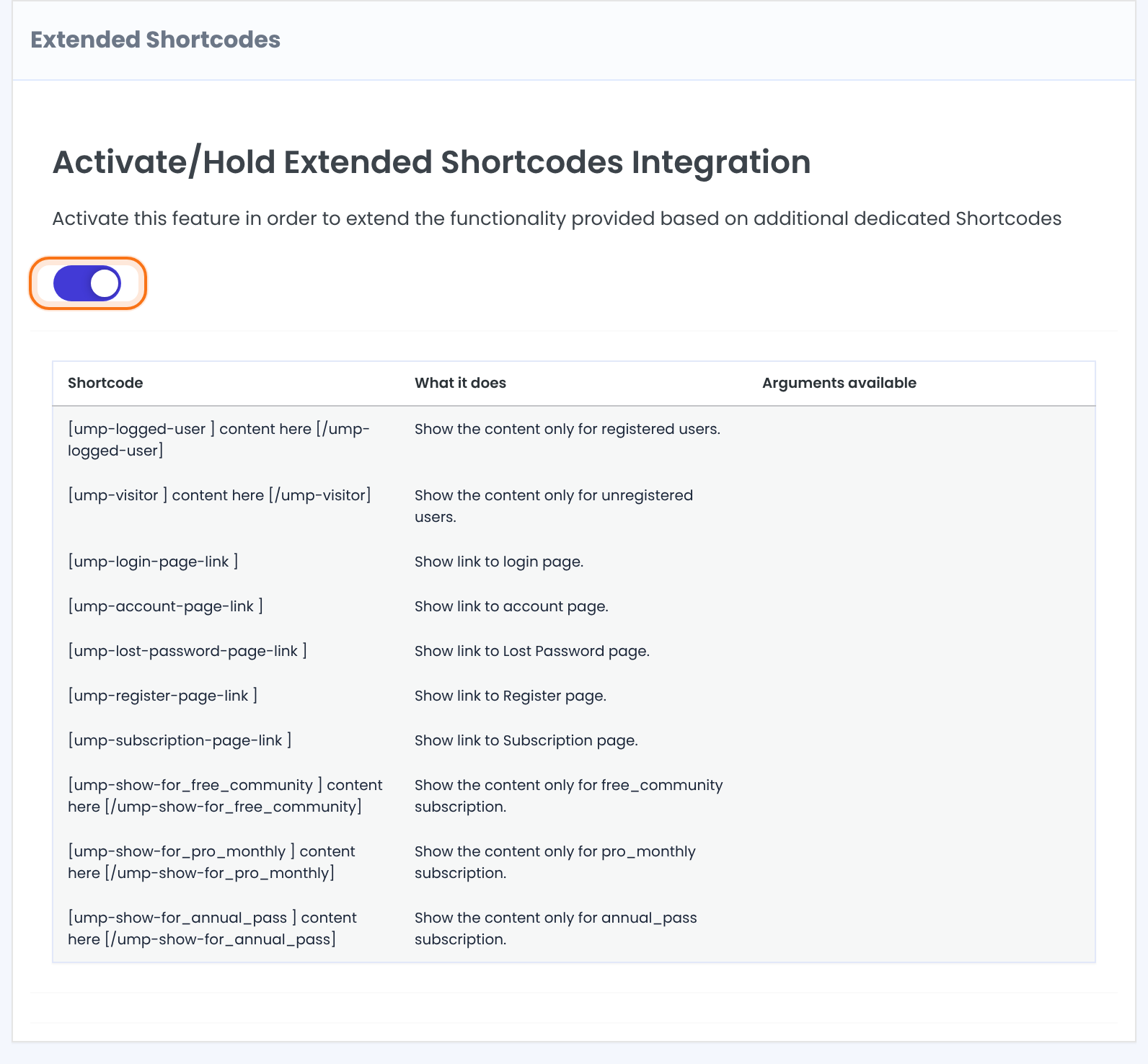
The same screen lists every shortcode in a table with three columns: Shortcode, What it does and Arguments available. The Membership shortcodes at the bottom are built from the Memberships you created, so your own list is the one to copy from. The shortcodes work only while the switch is on.
Show content to logged-in users or visitors
Put the content between an opening and a closing shortcode, in a Shortcode block, a classic editor or a page builder’s shortcode element.
Only for logged-in users
[ump-logged-user]Welcome back! This week's live session is on Friday.[/ump-logged-user]Shows the content to any user who is logged in, whatever their Membership. Visitors see nothing.
Only for visitors
[ump-visitor]Join the Coaching Club to unlock the weekly sessions.[/ump-visitor]Shows the content to people who are not logged in. Logged-in users see nothing.
Show content to one Membership
The add-on creates one shortcode per Membership. Its name is ump-show-for_ followed by the Membership’s internal name, which is shown in the table on the add-on screen, for example pro_monthly for Pro Monthly.
Only for members of one Membership
[ump-show-for_pro_monthly]Pro Monthly members: your workbook is ready.[/ump-show-for_pro_monthly]The content is shown while the member holds that Membership and it has not expired. Visitors and members of other Memberships see nothing. A shortcode is created for every Membership, so a new Membership gets its own shortcode as soon as you save it.
Show content to several Memberships
Use one shortcode per Membership and repeat the content, or use the Inside Locker for rules that cover several Memberships at once. See Hide part of a page (Inside Locker).
Add links to your membership pages
These shortcodes print a text link to one of your membership pages. They take no content between tags and no attributes. Each one shows only to the people who need it, so you don’t have to wrap it in another shortcode. If the page isn’t set in Ultimate Membership Pro, nothing is printed.
Login page link, for visitors
[ump-login-page-link]Prints a link with the text Login Page to your Login page. Logged-in users see nothing.
Register page link, for visitors
[ump-register-page-link]Prints Register Page, linked to your Register page. Logged-in users see nothing.
Lost password link, for visitors
[ump-lost-password-page-link]Prints Lost Password, linked to your Lost Password page. Logged-in users see nothing.
Account page link, for logged-in users
[ump-account-page-link]Prints Account Page, linked to the Member Portal. Visitors see nothing.
Subscription page link, for logged-in users
[ump-subscription-page-link]Prints Subscription Page, linked to your Subscription Plan page, where members can see the Memberships on offer. Visitors see nothing.
The pages themselves are set under Ultimate Membership Pro›Settings›Pages Setup. See Set up the membership pages.
See the result
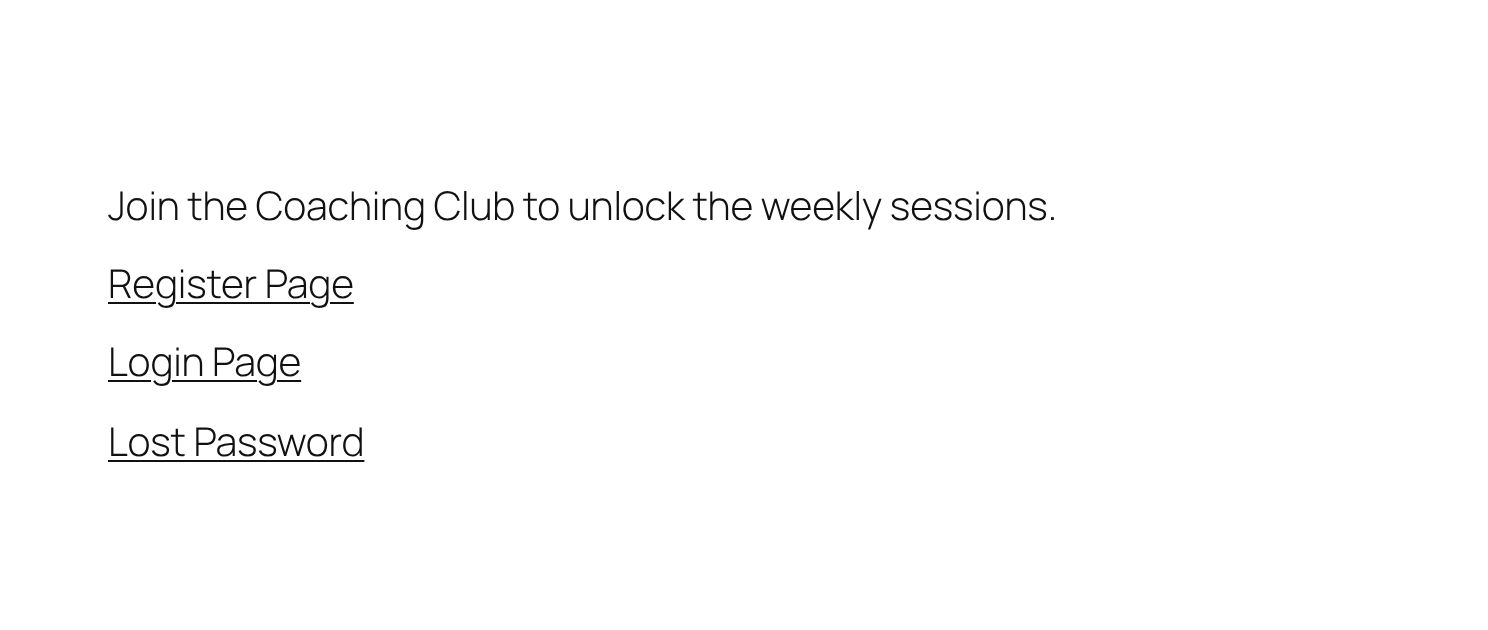
Here is a test page with every shortcode from this guide. A visitor sees the visitor text and the three visitor links:
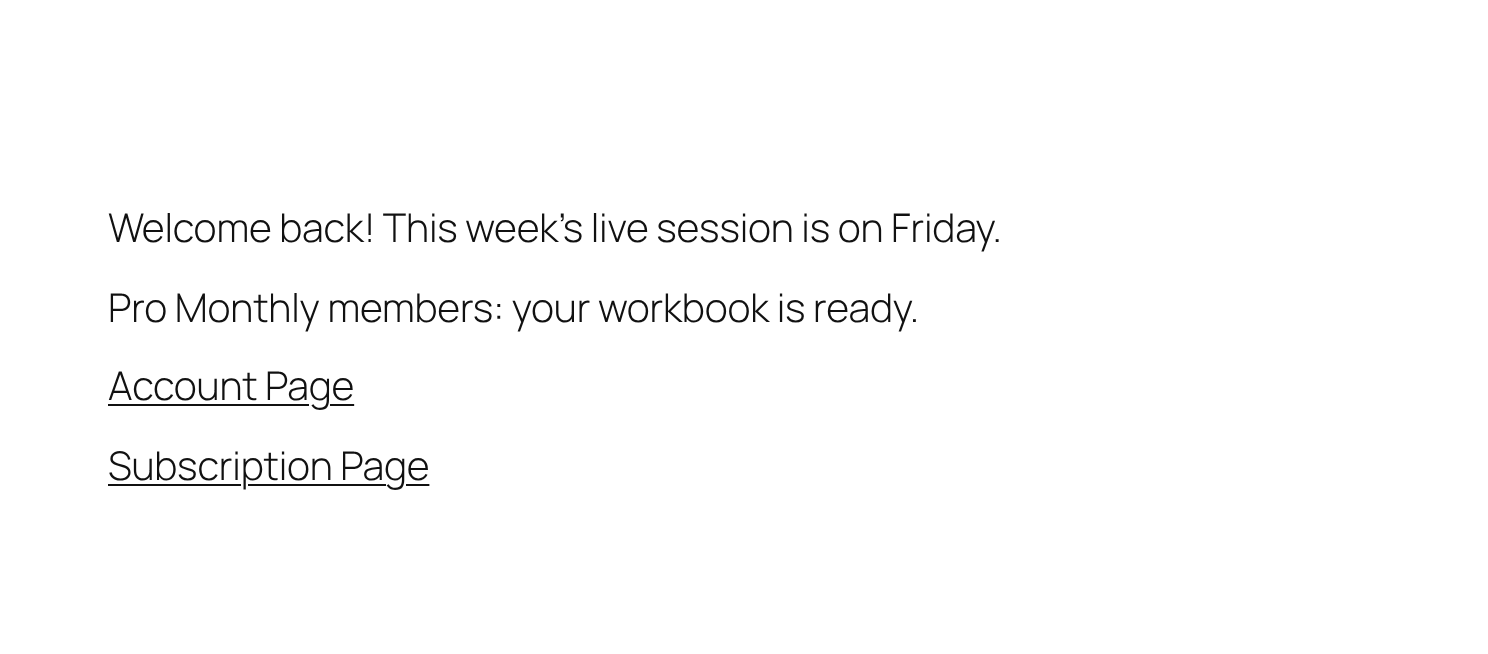
Ava, a logged-in member of Pro Monthly, sees the logged-in text, the Pro Monthly text and the two member links. The Annual Pass text and the visitor links are hidden:
Tips
- Test a page in a private browser window as a visitor, and logged in as a test member. Your own administrator account is a logged-in user who may not hold the Membership you are testing.
- These shortcodes decide what appears inside one page. To restrict whole pages, posts or categories, use Access Rules. See Restrict content with Access Rules.
Example: one welcome page for everyone
- Visitor
- Sees an invitation, Register Page and Login Page links
- Free Community member
- Sees a welcome text and the Subscription Page link, to upgrade
- Pro Monthly member
- Sees the workbook message and the Account Page link
- Shortcodes used
- ump-visitor, ump-logged-user, ump-show-for_pro_monthly, ump-register-page-link, ump-account-page-link, ump-subscription-page-link
Learn more about Extended Shortcodes
- Extended Shortcodes add-on page: what it does, at a glance.
- All Pro add-ons for Ultimate Membership Pro.
- Ultimate Membership Pro plans: Pro add-ons come with the Full Package and Agency plans.
- WordPress Shortcode block documentation.
Troubleshooting
Why do the shortcodes show as plain text on my page?
The add-on’s switch must be on and saved, and the shortcode must be spelled exactly as listed on the add-on screen. Use a Shortcode block rather than a Code or Preformatted block.
Where do I find the shortcode for my Membership in Ultimate Membership Pro?
Open Ultimate Membership Pro › Modules › Extended Shortcodes. The table lists one ump-show-for_ shortcode per Membership, with the Membership’s internal name after the underscore.
Why doesn’t a member see the Membership content?
The content shows while the member has that Membership and it is active. Check the member’s Membership status, and that you used the Membership’s own shortcode name from the add-on screen.
Why does a page link show nothing?
Each link shows to one audience only: Login Page, Register Page and Lost Password to visitors; Account Page and Subscription Page to logged-in users. The page must also be set under Settings › Pages Setup.
Can I change the text of the links, such as Login Page?
The links use fixed texts. To use your own wording, write a normal link to the page, wrapped in [ump-visitor] or [ump-logged-user] to choose who sees it.
Do these shortcodes accept attributes?
No. The Arguments available column on the add-on screen is empty because none of the shortcodes takes attributes.


