
In Ultimate Membership Pro, the Remove Dummy Data add-on permanently deletes the data a testing stage leaves behind, such as test payments, coupons, logs and notifications, so you can launch on a clean installation. It saves you from deleting hundreds of test records one by one.
This guide shows the screen, explains exactly what each option erases, and gives a safe routine for using it.
This deletes data for good
- The add-on is meant for a test site, or for a site that is about to launch. Don’t use it on a live site with real customers.
- There is no confirmation question and no undo. As soon as you click Remove Data, every ticked item is erased from the database.
- Payments erases more than payment records: it also removes every member’s Memberships, because those are stored with the orders. After it, no member holds a Membership.
- Make a full database backup first, and tick only what you really want to erase.
Before you start
- The Remove Dummy Data add-on is installed and active. It’s a Pro add-on, included in the Full Package and Agency plans. See Install a Pro add-on.
- Your license is active. See Find and activate your license key.
- A recent backup of your database.
Open the add-on
- Go to Ultimate Membership Pro›Modules. The card is in the Other group; you can also type its name in the Search modules… box.
- Click the Remove Dummy Data card.
This add-on has no on/off switch. Once it is active and your license is active, its card opens the screen.
Choose what to remove
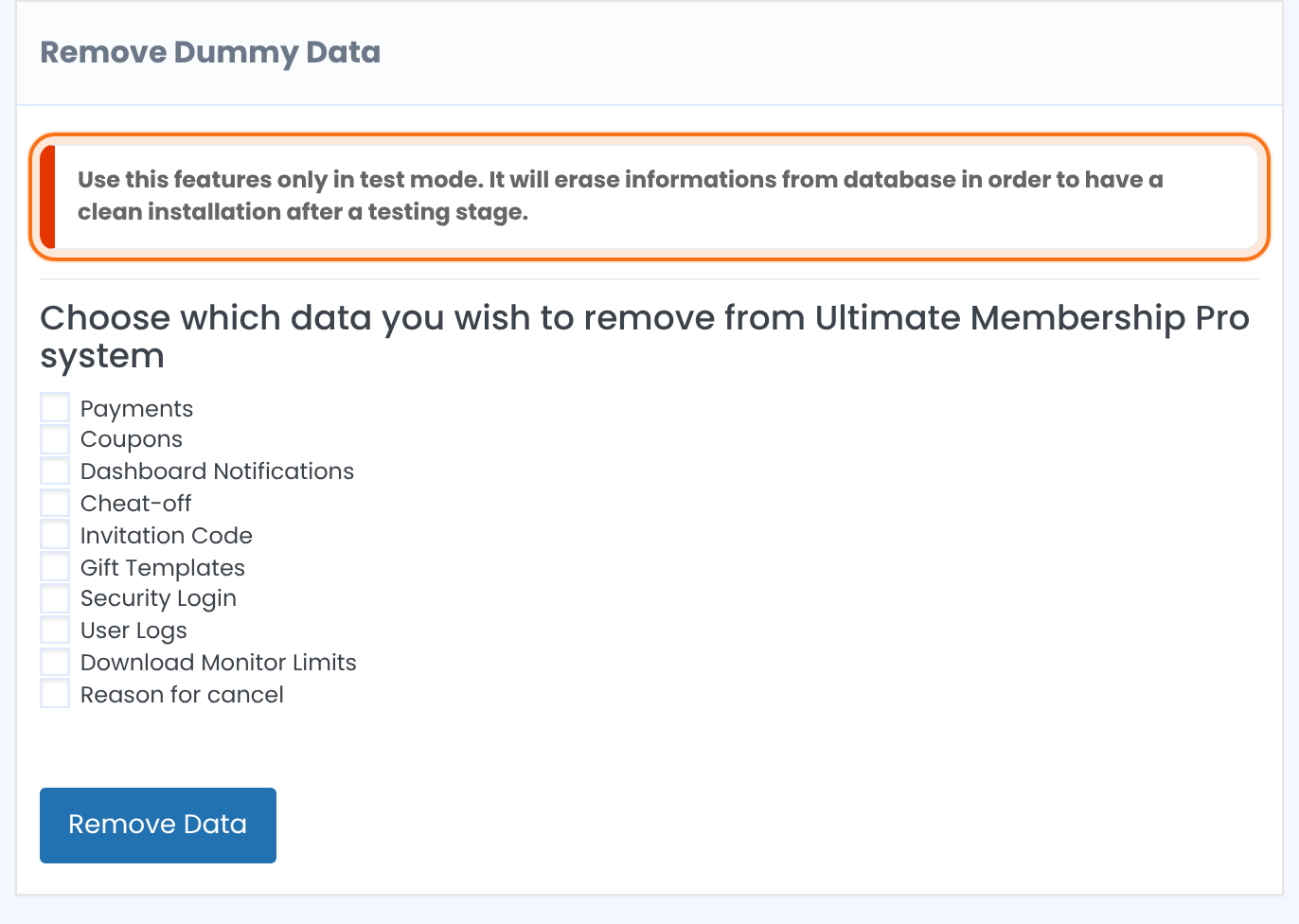
The screen warns you to use the feature only in test mode. Below the warning, tick the data you want to erase:
All orders and their details, the payment logs, and every member’s Memberships (which Membership each member holds, with start and expiry dates). Your Memberships themselves and your members’ accounts stay.
All coupons. See Create coupon codes.
The notifications shown in the admin area, such as new members and new orders.
The data kept to prevent account sharing. See Prevent account sharing.
All invitation codes. See Invite-only registration.
All gift templates. See Sell Memberships as gifts.
The login attempts recorded by the Security Login protection. See Block brute-force login attempts.
The log of member events.
The download counts kept for the Download Monitor integration. See Limit downloads with Download Monitor.
The reasons members gave when they cancelled or removed a Membership. See Ask members why they cancel.
Nothing is ticked at first. Click Remove Data only when the ticked boxes are the ones you mean. If nothing is ticked, nothing is removed.
A safe routine
- Export your orders first if you may need them: see Export Orders To CSV in What’s next.
- Do it on a staging copy of the site when you can, and check the result there.
- Then restart invoice numbering, so the first real order is number 1. See Restart invoice numbering (Reset Invoice ID).
Example: launch day at the Coaching Club
- Backup
- Full database backup
- Ticked
- Payments, Coupons, Dashboard Notifications, User Logs
- Not ticked
- Invitation Code, Gift Templates (not used yet)
- Then
- Reset Invoice ID so the first real order is IUMP000001, and add the real Memberships to members again
Learn more about Remove Dummy Data
- Remove Dummy Data add-on page: what it does, at a glance.
- All Pro add-ons for Ultimate Membership Pro.
- Ultimate Membership Pro plans: Pro add-ons come with the Full Package and Agency plans.
- Backing up your WordPress site.
Troubleshooting
Can I get the data back after using Remove Dummy Data?
Not from the plugin. The data is deleted from the database. Restore your database backup to get it back.
Why did my members lose their Memberships?
The Payments option also removes the records that say which Membership each member holds. Your Memberships and the members’ accounts stay, so assign the Memberships again, for example from the member’s profile.
Does it delete my members or my Memberships?
No. Members’ accounts and the Memberships you created are not part of the list.
Why doesn’t the Remove Dummy Data card open?
The card opens only while your license is active. See Find and activate your license key.


